

Compliance Reporting Without Losing the Spreadsheet or the Control
Keep the spreadsheet UI for domain experts, but move validation, execution, logging, and export into a governed Java application.
 CORE
·
CORE
·
 ·
·
Join the DZone community and get the full member experience.
Join For FreeCompliance-reporting teams keep spreadsheets in the loop for a practical reason: a workbook lets domain experts inspect assumptions, formulas, source rows, and intermediate values without reading a line of application code. That transparency is genuinely useful, and it's a big part of why replacing Excel outright so often fails to stick.
The trouble starts once that workbook becomes part of a repeatable, audited reporting process — a regulatory filing, an IFRS report, a periodic compliance submission. At that point, a shared Excel file isn't enough on its own. What's actually needed is version control, validation, an audit trail, a review step, and a reliable way to connect the spreadsheet's logic to the systems downstream.
The spreadsheet itself isn't the problem. It's a review surface domain experts genuinely need. The problem is treating it as a loose file sitting outside the application. The goal isn't to eliminate spreadsheets, but to preserve the spreadsheet experience while letting the application govern how it's used.
This article walks through an architecture that keeps the workbook where domain experts can see it, but moves execution — validation, calculation, output generation, logging — into a Java application. The scenario is inspired by a real-world IFRS reporting project, and the same architecture applies to regulatory reporting, statutory filings, actuarial review, and other spreadsheet-driven compliance workflows. The pattern itself doesn't require a specific product: it works with any spreadsheet engine that can load a workbook and expose read/write access to Java, and parts of it apply even if you only use a file library like Apache POI at the edges.
Three Ways Teams Usually Respond
Rewrite everything in Java. Engineering gets control, tests, and CI. But the calculation logic moves away from the people who understand it. Every threshold change, every new currency, every adjusted formula now goes through a sprint. Sometimes that's correct — if the rules are stable and nobody inspects formulas, do this. For living, business-owned logic, it breeds shadow spreadsheets.
Leave the desktop spreadsheet alone. Finance keeps full flexibility. The organization keeps none of the guarantees: no version control, no audit trail, no way to prove which file produced the submitted numbers.
Use a file library only at the edges. Java imports the workbook, exports the results. Better — but the correction loop still happens in desktop Excel: download, fix locally, re-upload, re-validate, repeat. Every round trip is an audit gap.
Now there is a fourth option: embed the workbook directly into the web application. Domain experts continue working in a familiar spreadsheet interface, while the application governs when users can edit data, when validation runs, which outputs become visible, and how every operation is logged. The rest of this article is about what that looks like in practice.
The Big Idea: One Workbook, Two Roles
In this pattern, the workbook plays two roles at the same time:
- For users, it is the interface. They inspect rows, correct values, maintain rule tables, and review generated outputs in a familiar grid.
- For the application, it is a runtime artifact. Java loads a known template, reads specific sheets and regions, runs validation, writes outputs, and records every run.
The design decision that makes this work: Java never wanders through the workbook looking for data. It reads and writes only through agreed sheets and regions — a contract.
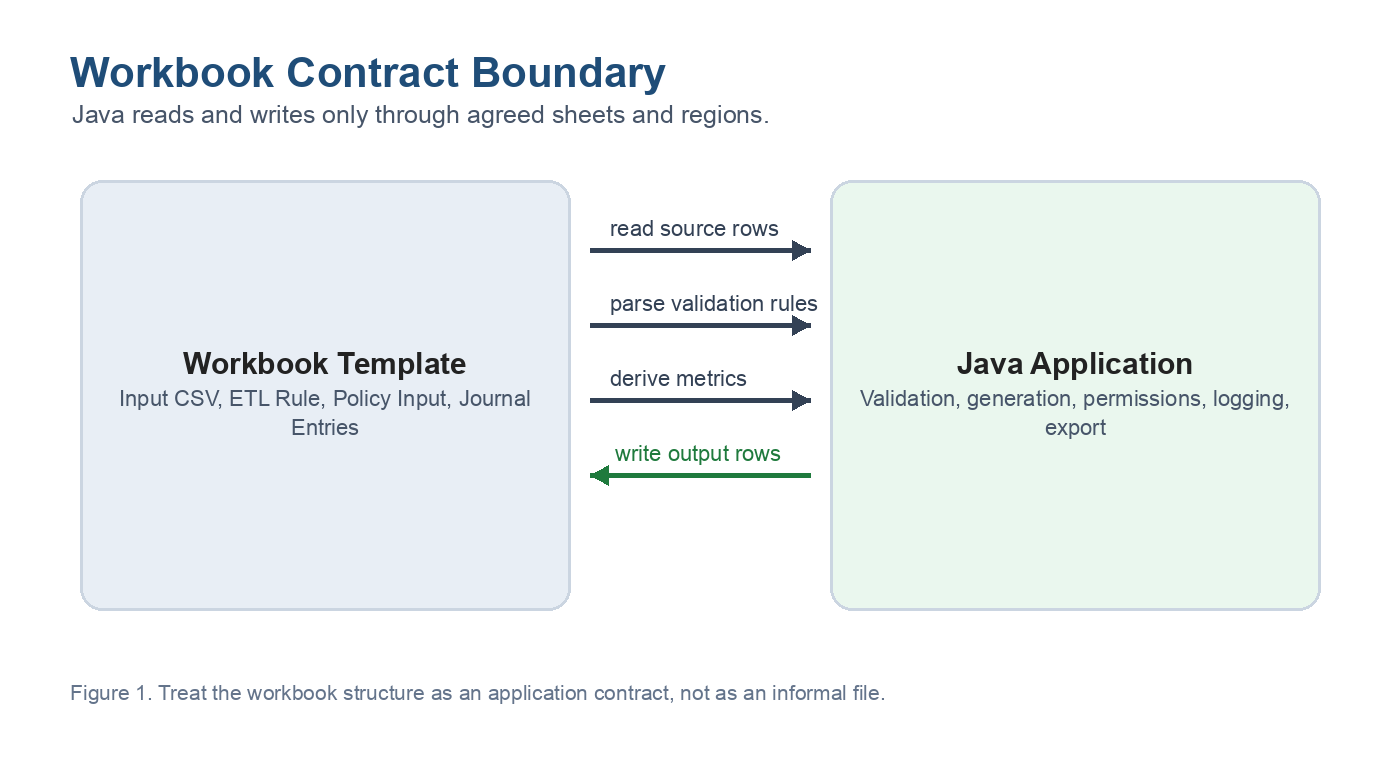
Finance owns what's inside the regions: values, formulas, rules. Engineering owns the boundary and everything behind it: execution, permissions, persistence, export. Let's see the two stages of a typical reporting workflow through this lens.
Stage 1: Let Users Fix Data Issues Without Leaving the App
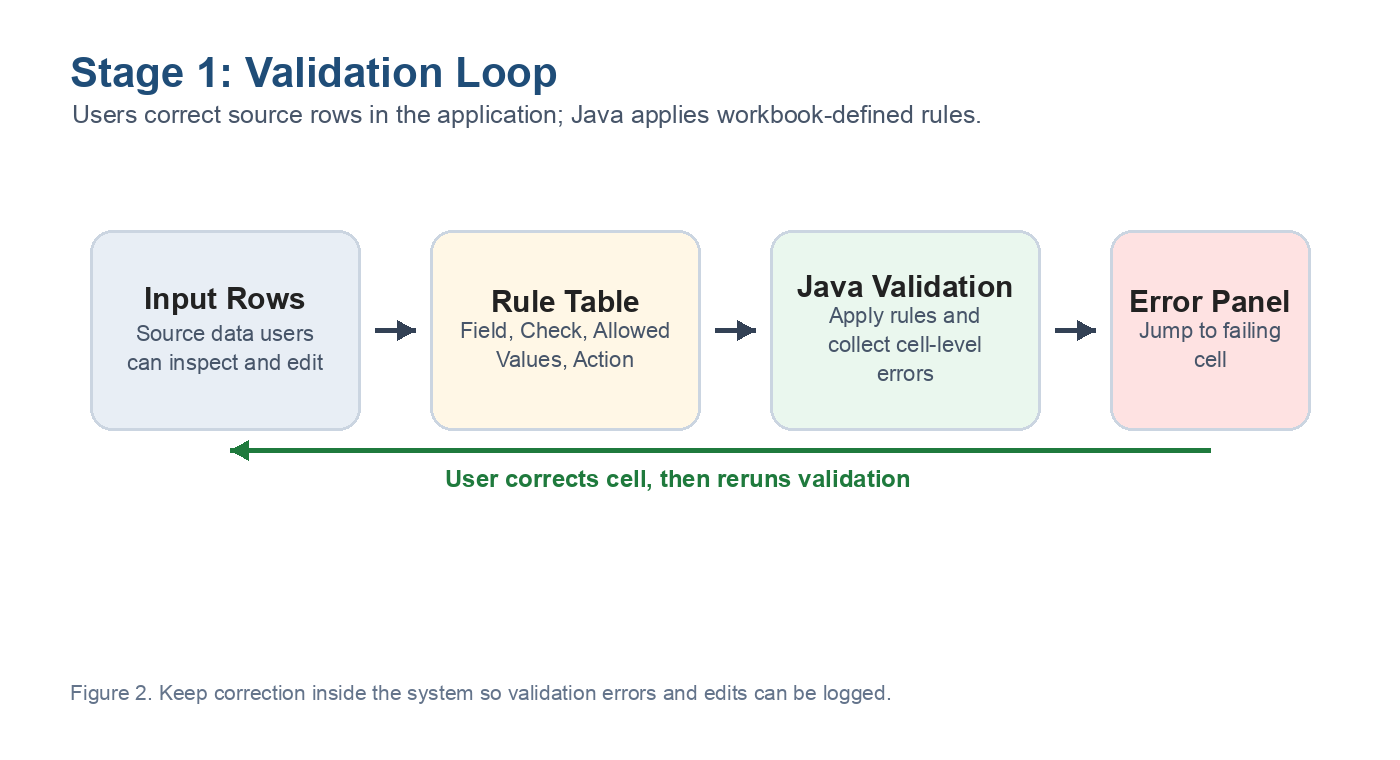
Reporting source data almost never arrives clean. A currency code says US instead of USD. An FX rate is missing. A service fee breaks a policy limit.
The template for this stage has two sheets. Input CSV holds the source rows users can inspect and correct. ETL Rule holds the validation rules — as an ordinary spreadsheet table with columns like Field, Check, and Allowed Values. A rule row might say: currency must be one of USD, EUR. Finance can read and change these rules without asking anyone.
When the user clicks Run Validation, the application takes over. To make this concrete: the examples in this article use Keikai Spreadsheet, a Java-based spreadsheet UI component, to embed the workbook in the browser and read and write it from Java — though the same three-step logic applies with any comparable engine. Conceptually, the Java service reads the data rows, reads the rule rows, and checks every row against every rule:
List<SourceRow> rows = sheetReader.readTable(workbook, "Input CSV");
List<Rule> rules = ruleParser.parse(sheetReader.readTable(workbook, "ETL Rule"));

for (SourceRow row : rows)
  for (Rule rule : rules)
    rule.check(row).ifPresent(report::add);
Notice what this is not: the rules are not hard-coded in Java. Java only knows how to read the rule table and apply generic checks. The actual business knowledge — which currencies are allowed, what a valid fee looks like — stays in the workbook where its owners can see it.
One detail carries most of the user experience: every validation error records which cell failed — sheet, row, and column. That lets the UI show a panel saying “policy P-1024, field currency, value US, expected USD or EUR” with a link that jumps the user straight to the offending cell. They fix it in the grid, click run again, and validation passes.
Compare that to the traditional loop — download, fix in Excel, upload, pray. Here, nothing leaves the system, and every edit can be logged with user, timestamp, old value, and new value.
Stage 2: Generate Outputs Under Application Control
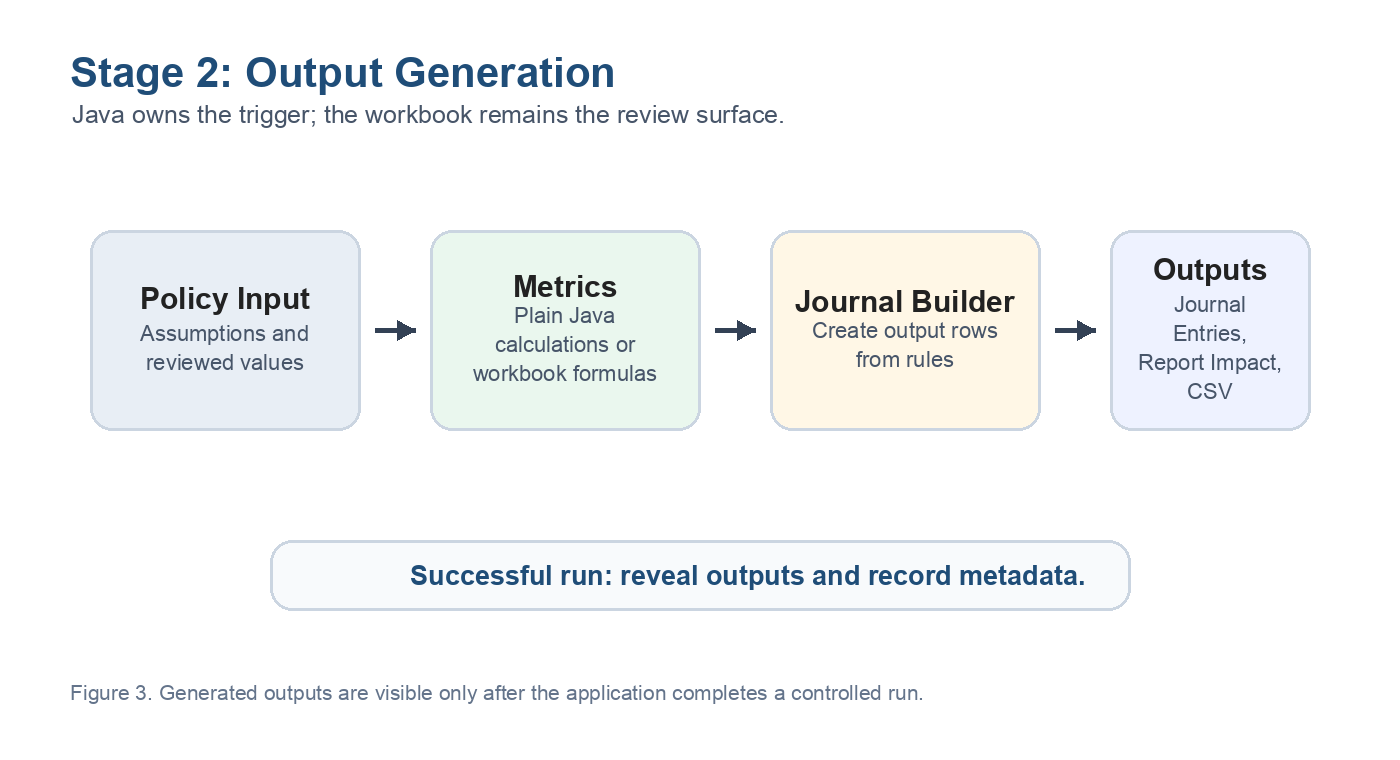
Once the data is clean, the second stage produces the actual reporting outputs: journal entries, impact tables, export-ready CSV sheets.
The input is a policy sheet with assumptions (premium totals, fees, FX rates) plus a rule table that maps accounting events to journal lines. Before the run, the application shows only the input sheet — output sheets stay hidden, because they don't exist meaningfully yet.
When the user triggers generation, the same Keikai-backed workbook is read and written from Java: it reads the inputs, computes the metrics, builds the journal rows, and writes them back into the workbook:
PolicyInput policy = policyReader.read(workbook, "Policy Input");
Metrics metrics = deriveMetrics(policy); // plain Java arithmetic
List<JournalRow> rows = journalBuilder.build(readJournalRules(workbook), metrics);
sheetWriter.replaceTable(workbook, "Journal Entries", rows);
revealSheets(workbook, "Journal Entries", "Report Impact", "Journal CSV");
The interesting part is the last line. Sheet visibility is an application decision: outputs appear only after a successful run, so a reviewer can never mistake stale output for fresh output. The reviewer then sees everything in one place — assumptions, rules, generated journals, report impact — in the same grid, and the export button produces a file the application has logged and versioned.
deriveMetrics itself is deliberately simple — a handful of multiplications and subtractions. In a real system it may be far more complex, or it may even delegate back to formulas in the workbook. The architecture doesn't change: inputs go into agreed regions, outputs come from agreed regions, and Java owns the trigger.
The Part Everyone Skips: The Workbook Is Now an API
The moment Java code depends on a sheet named ETL Rule with a header called Allowed Values, the workbook has stopped being a document. It has become an interface — and interfaces break when they're changed casually, without review.
The fix is to make the contract explicit and test it. Distinguish two kinds of change:
- Value changes – a new allowed currency, an adjusted threshold, a reviewed formula edit. These live inside the contract. Finance can make them without touching Java.
- Structural changes – renaming a sheet, deleting a header, moving an output table three columns right. These are API changes and should be reviewed like one.
Then write this test:
@Test
void templateSatisfiesReportingContract() {
  Workbook wb = engine.load("reporting-template.xlsx");
  assertSheetExists(wb, "Input CSV", "ETL Rule", "Journal Entries");
  assertHeaders(wb, "ETL Rule", "Field", "Check", "Allowed Values");
}
It looks almost too simple to matter, but most real-world workbook integration failures are exactly this mundane — a renamed sheet or a deleted header, discovered the night before a regulatory filing is due. Catching it in CI, before any template goes live, is what makes the difference.
Finally, log runs, not just files: template version, who ran it, validation status, output row counts, a hash of the inputs. When someone asks “why does this quarter's filing look wrong?”, you answer from the run log instead of from archaeology on a shared drive.
For compliance teams, these controls turn the workbook from an informal file into evidence the organization can explain. A reviewer can trace which template version produced a number, which source data was used, who ran the process, whether validation passed, and which output was exported. If a template structure changes, the contract test shows whether the workbook still satisfies the application’s required sheets and headers before it reaches production. In other words, the system does not just calculate results; it records the evidence needed to defend how those results were produced.
When to Consider a Simpler Approach
This approach pays off when the workbook is a genuine shared language between domain experts and developers — something both sides actually read, edit, and rely on. If the rules rarely or never need to change, and nobody inspects formulas, plain Java is simpler to test and operate. And if the workbook is really just a transfer format between systems, a straightforward import/export covers it.
Takeaways
The compliance-reporting spreadsheet doesn't have to be rewritten or worked around. Put it inside the application and split ownership along a clear line:
- The workbook owns what users must see and maintain: source rows, rule tables, assumptions, reviewable outputs.
- The application owns execution: validation, generation, sheet visibility, permissions, logging, export.
- The contract between them — named sheets, headers, regions — is documented, tested in CI, and changed only with review.
Do that, and the workbook stops being an unversioned file nobody can fully account for. It becomes a governed part of the application — the place where domain experts and the system finally agree on the numbers.
Opinions expressed by DZone contributors are their own.
Comments