

Confluent’s Kafka REST Proxy, The Silk Route for Data Movement to Operational Kafka Cluster
In this article, I am going to detailing out the steps to integrate the prebuilt versions of Confluent REST Proxy with running a multi-broker Apache Kafka cluster.
 CORE
·
CORE
·
Join the DZone community and get the full member experience.
Join For Free
Aside from holding the publish-subscribe messaging system functionality, Apache Kafka is gaining outstanding momentum as a distributed event streaming platform. It is being leveraged for high-performance data pipelines, streaming analytics, data integration, etc. Additionally, standing as a backbone for IoT data platform to handle massive amounts of heterogeneous data ingestion.
Despite surfacing tremendous usefulness related to data transportation, numerous Kafka connectors for import/export of data from various data systems, still, Kafka client library is an obstacle for any programming language other than Java to serve as producer/consumer of messages to Kafka topic.
Confluent’s Kafka REST Proxy and Its Importance
Apache Kafka offers its functionality through a well-defined set of APIs. With the help of the client library, we can interact or communicate to those Kafka’s APIs but the client library is limited to Java only. Even though Kafka provides a bunch of CLI tools, they are just thin wrappers over the Java client library. Due to this limitation, many programming languages lack officially supported, production-grade client libraries for Kafka.
The Confluent Platform that uses Apache Kafka as their central nervous system officially supports client libraries for C/C++, C#, Go, and Python. To overcome the above bottleneck, Confluent has developed a REST Proxy module to expose Apache Kafka’s APIs via HTTP. Since HTTP is a widely available and universally supported protocol, any programming language without banking on Kafka’s client library can interact with the Apache Kafka APIs. The Kafka REST proxy works as a RESTful web API. Any application developed irrespective of any programming language and having the capability to send and receive HTTP/HTTPS messages, can be configured to operate with Kafka cluster. The Confluent REST Proxy is a component or sub-module of the entire Confluent Platform.
To use the Confluent REST Proxy module independently with operational multi-node multi-broker Apache Kafka cluster, we can either download the source code from the GitHub repository and build or can download the prebuilt versions which is a part of the Confluent Platform.
As a side note, the Confluent REST Proxy project is licensed under the Confluent Community License. The REST integration for Apache Kafka is not part of the Open Source Apache Kafka ecosystem.
In this article, I am going to detailing out the steps to integrate the prebuilt versions of Confluent REST Proxy with running a multi-broker Apache Kafka cluster with subsequent, publish and consume simple messages from a terminal/CLI without using any built-in scripts. To enhance better readability, the article has been segmented into four parts.
Assumptions
Considering three nodes in the cluster and each one of them already installed and running with Apache Kafka of version 2.6.0. Similarly, the Zookeeper server (V 3.5.6) is a separate instance on top of OS Ubuntu 14.04 LTS. All the nodes in the entire cluster had configured with Java version '1.8.0_101". Besides, the Kafka cluster is configured with three brokers and two topics. Each topic has three partitions. There is no need of changing any existing configuration w.r.t topics and partitions for clubbing the REST Proxy module.
Confluent REST Proxy can be installed and run on a separate node outside of the Kafka cluster. Due to hardware limitations, I have not scaled the existing cluster horizontally with one more additional node for REST Proxy. Instead, selected a healthy node in the existing Kafka cluster that having 16GB RAM and 1 TB HD for REST Proxy to run.
Download and Install Confluent Platform
Even though the Confluent platform accommodates Apache Kafka, Zookeeper, KSqlDB, REST Proxy, Schema Registry, etc together as a suite, here only the REST Proxy will be integrating or hooking up with independently running Kafka cluster. In short, this procedure eliminates the data migration or shifting of stored messages that existed on topics from the operational Kafka cluster to the Confluent platform.
Downloaded prebuilt version confluent-community-5.5.0-2.12.tar from here under the Confluent Community License. This procedure is not recommended for commercial/ production use without a valid license from Confluent.
Configuration and Verify/Run Kafka REST
As mentioned above, copy and extract/untar the confluent-community-5.5.0-2.12.tar with root privilege under /usr/local/.

Navigated to /usr/local/confluent-5.5.0/etc/kafka-rest and modified the kafka-rest.properties file to update the values of the following keys:
# id
To define the unique id of the Confluent REST proxy server instance. Ideally, it is used in generating unique IDs for consumers that do not specify their ID.
#schema.registry.url
The URL of the Schema Registry can be installed and runs on a separate node outside the Apache Kafka cluster. The Schema Registry holds the versioned history of all schemas used by the serializer like Avro, JSON, Protobuf when producers submit messages with complex data types and subsequently consumers for decoding the consumed messages. You can go through this link to know more about the importance as well as the configuration of Schema Registry with Apache Kafka cluster.
In this integration, not provided the URL of Schema Registry because decided not to publish any messages with complex data types. Instead, will use basic data types like String, int, etc while publishing messages to the topic using terminal or REST client browser plug-in. But it is highly recommended to use Schema Registry URL in the production environment to allows the evolution of schemas:
#zookeeper.connect
The list of Zookeeper server with comma-separated value:
#bootstrap.servers
The list of Kafka brokers to connect that runs on multi-node cluster separated by comma (,). For a single-node Kafka cluster, it should be:
bootstrap.server=http://localhost:9091
Here are our kafka-rest.properties:
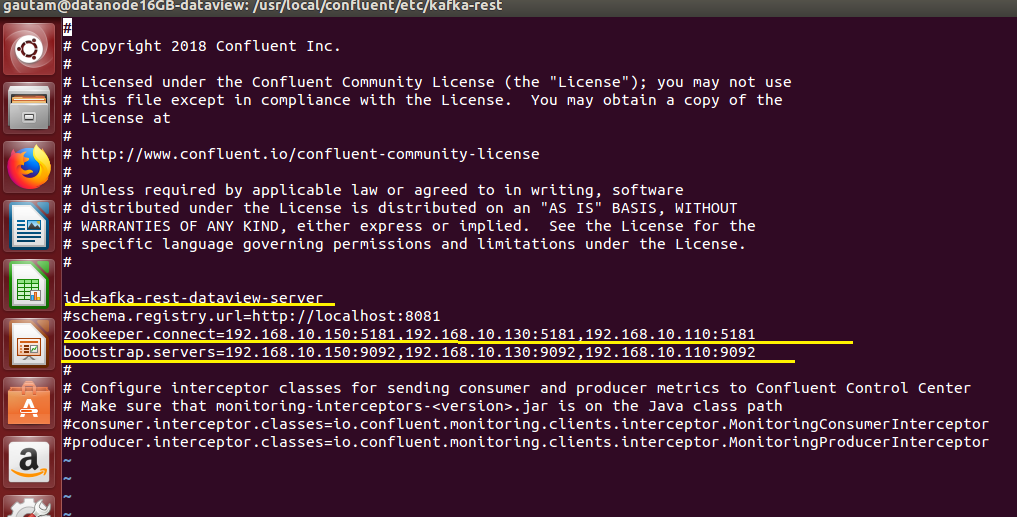
Since we are not using Confluent Control Center, so rest of the keys should be kept commented only.
To run the Kafka REST proxy, navigate to the bin directory under confluent-5.5.0 and execute the script "kafka-rest-start" with the location of the kafka-rest.properties as a parameter.
:/usr/local/confluent/bin$ ./kafka-rest-start ../etc/kafka-rest/kafka-rest.properties
Eventually, Kafka REST proxy will start with the following messages in the same console/terminal.
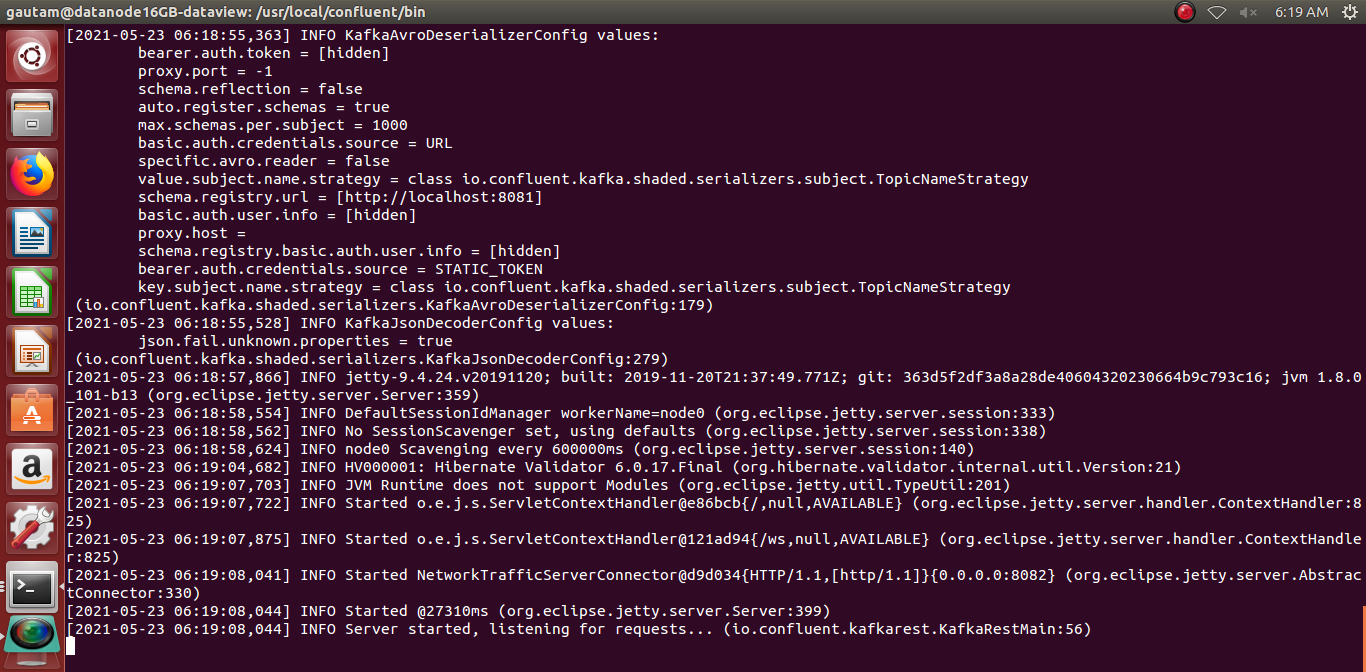
To make sure Kafka REST proxy is up and running, open a new terminal, type the following command and check the list of available topics that already created on the cluster.
~$ curl -X GET <<IP address of the node where REST proxy is running:8082>>/topics
Producing and Consuming Messages via Terminal/CLI
In this section, I have demonstrated how easily we can publish and consume messages from the topic without writing a single line of java and not by executing built-in scripts like kafka-console-producer.sh and kafka-console-consumer.sh.
Publishing a Simple Message In JSON Data Format to A Specific Topic
Typed the following command from the terminal as a request and subsequently, got the following response with no error.
curl -X POST http://<IP Address of node where Kafka REST proxy is running>:8082/topics/<<name of the topic>> –data ‘{“records”: [{“key”: “firstMSG”,”value”: “Sending Msg from through REST Proxy”}]}’ –header “Content-Type: application/vnd.kafka.json.v2+json”
Consume the Produced Message
1. To consume the above-published message, we need to first create a consumer instance in the consumer group. Named the consumer group and consumer instance as 'dataviewConsumer' and 'dataview_consumer'.
Request:
curl -X POST http://192.168.10.110:8082/consumers/ dataviewConsumer –data ‘{“name”: “dataview_consumer”, “format”: “json”, “auto.offset.reset”: “earliest”}’ –header “Content-Type: application/vnd.kafka.json.v2+json”

Response:
{“instance_id”:”dataview_consumer”, “base_uri”: http://192.168.10.110:8082/consumers/dataviewConsumer/instances/dataview_consumer”}2. Subscribe consumer instance to the topic "Auguest":
curl -X POST http://192.168.10.110:8082/consumers/dataviewConsumer/instances/dataview_consumer/subscription –data ‘{“topics”: [“Auguest”]}’ –header “Content-Type: application/vnd.kafka.json.v2+json”

3. And finally consumed the produced message. Consumer instances are removed if idle for 5 minutes so publish the message and consume subsequently from the topic to verify.
Request:
curl -X GET http://192.168.10.110:8082/consumers/dataviewConsumer/instances/dataview_consumer/records –header “Accept: application/vnd.kafka.json.v2+json”
Response:
[{“topic”:”Auguest”, “key”:”firstMSG” , “value”:”Sending Msg from through REST Proxy “, partition”:0,”offset”:1}]
The Crux
To avoid response as 404 Not Found while sending each request, we should be watchful of setting the content-type headers. The content-type headers should be the same when setting up and configuring consumer instances, producing Kafka's topic.
You can watch the following video for a better understanding of the screen recorded while executing this exercise.
Final Note
The Confluent Inc. has developed this excellent component as part of their complete event streaming platform which can be utilized for:
- To read most of the metadata about the cluster like brokers, topics, partitions, and configs using GET requests.
- Instead of developing or writing language-specific code especially java for exposing producer objects, any programming language that supports HTTP request-response can interact directly with the Apache Kafka cluster.
- Efficient to support load distribution among multiple instances running together.
- Can be used for low-level read operations and retrieve messages at specific offsets.
- Using REST API V3, some administrative operations can be performed on the cluster like create or delete topics, update or reset topic configurations, etc.
At last, Confluent’s Kafka REST proxy is of utmost value, when there is a limitation to utilize the Kafka client library straightforwardly.
Hope you have enjoyed this read. Please like and share if you feel this composition is valuable.
Reference:
- https://docs.confluent.io/platform/current/kafka-rest/index.html
Published at DZone with permission of Gautam Goswami. See the original article here.
Opinions expressed by DZone contributors are their own.
Comments