

Connecting Apache ActiveMQ With Apache Camel
This quick guide will help you connect Apache Camel and Apache ActiveMQ so you can both read and write messages between them.
Join the DZone community and get the full member experience.
Join For FreeActiveMQ (or all Message Oriented Middleware (MOM) in general) implementations are designed for the purpose of sending messages between two applications or two components inside one application. It is the most popular and powerful open source messaging and Integration Patterns server.
Installing Active MQ on Windows
After the download is complete, extract the files to a user-defined folder.
Run ActiveMQ
Open the Windows command prompt.
Use the following command to change the current directory to the ActiveMQ installation directory.
cd <active_mq_directory>/bin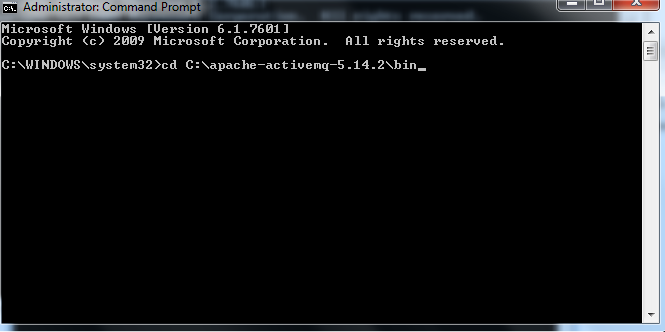
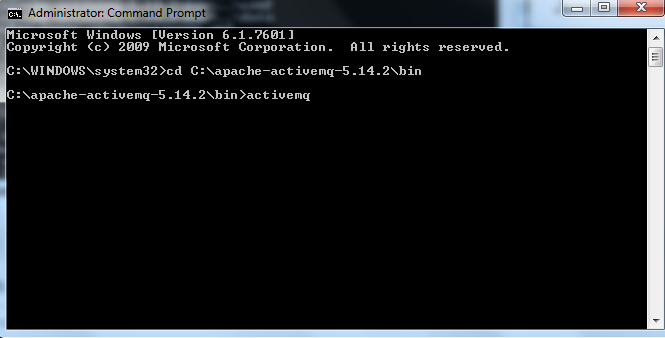
Run command activemq on command prompt.
Browse ActiveMQ and Creating Queues
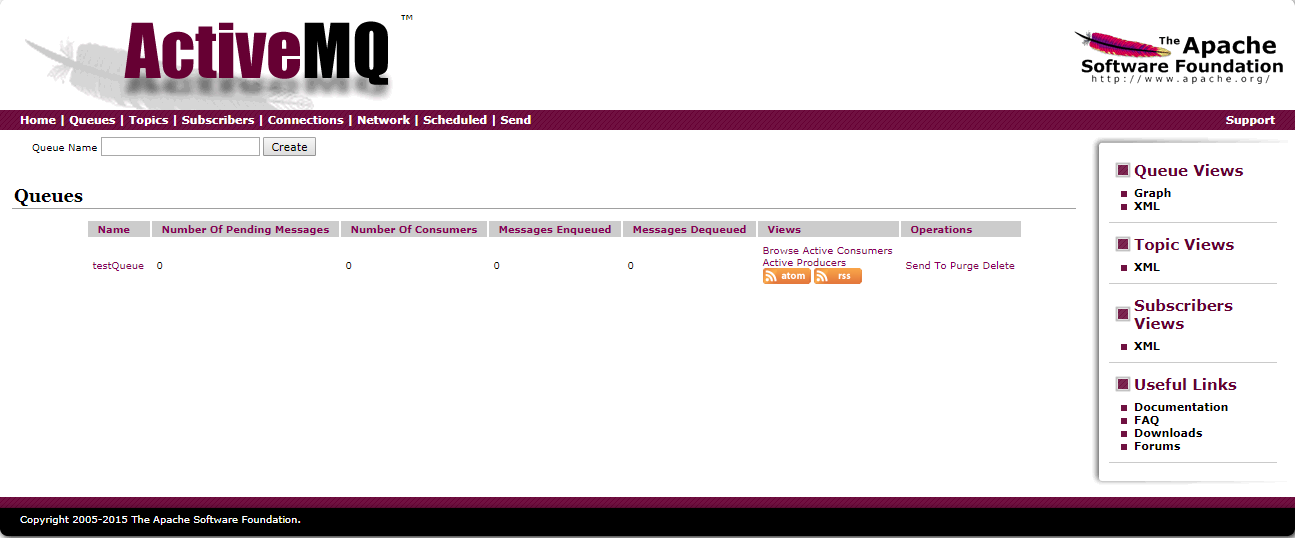
Use the URL http://127.0.0.1:8161/ to browse ActiveMQ. The initial username is admin and the password is admin.
Click on Queue, give a Queuename (e.g. testQueue), and click on Create.
Connecting ActiveMQ With Apache Camel
POM dependency:
<?xml version="1.0" encoding="UTF-8"?>
<project xmlns="http://maven.apache.org/POM/4.0.0"
         xmlns:xsi="http://www.w3.org/2001/XMLSchema-instance"
         xsi:schemaLocation="http://maven.apache.org/POM/4.0.0 http://maven.apache.org/xsd/maven-4.0.0.xsd">
    <modelVersion>4.0.0</modelVersion>

    <groupId>com.learncamel</groupId>
    <artifactId>learncamel-activemq2db</artifactId>
    <version>1.0-SNAPSHOT</version>

    <dependencies>

    <!-- https://mvnrepository.com/artifact/org.apache.camel/camel-core -->
    <dependency>
        <groupId>org.apache.camel</groupId>
        <artifactId>camel-core</artifactId>
        <version>2.19.2</version>
    </dependency>

        <dependency>
            <groupId>org.apache.camel</groupId>
            <artifactId>camel-sql</artifactId>
            <version>2.19.2</version>
        </dependency>
    <!-- camel-jms dependency -->
    <dependency>
        <groupId>org.apache.camel</groupId>
        <artifactId>camel-jms</artifactId>
        <version>2.19.2</version>
    </dependency>

    <!-- Apache Active MQ Jars -->

    <dependency>
        <groupId>org.apache.activemq</groupId>
        <artifactId>activemq-broker</artifactId>
        <version>5.14.5</version>
    </dependency>
    <dependency>
        <groupId>org.apache.activemq</groupId>
        <artifactId>activemq-client</artifactId>
        <version>5.14.5</version>
    </dependency>
    <dependency>
        <groupId>org.apache.activemq</groupId>
        <artifactId>activemq-pool</artifactId>
        <version>5.14.5</version>
    </dependency>
    <dependency>
        <groupId>org.apache.activemq</groupId>
        <artifactId>activemq-all</artifactId>
        <version>5.14.5</version>
    </dependency>

    <!-- Logging Jars -->
    <dependency>
        <groupId>org.slf4j</groupId>
        <artifactId>slf4j-api</artifactId>
        <version>1.7.12</version>
    </dependency>
    <dependency>
        <groupId>org.slf4j</groupId>
        <artifactId>slf4j-simple</artifactId>
        <version>1.7.12</version>
    </dependency>

        <dependency>
            <groupId>org.apache.camel</groupId>
            <artifactId>camel-test</artifactId>
            <version>2.19.2</version>
            <scope>test</scope>
        </dependency>
    </dependencies>
</project>
Building the Camel route to read messages from ActiveMQ:
package com.learncamel.route.jms;

import org.apache.camel.builder.RouteBuilder;
import static org.apache.activemq.camel.component.ActiveMQComponent.activeMQComponent;
public class JmsReadRoute extends RouteBuilder {
    public void configure() throws Exception {
        from("activemq:queue:testQueue")
                .to("log:?level=INFO&showBody=true")
                .to("direct:readQueue");
    }
}
Building the Camel route to write messages to ActiveMQ:
package com.learncamel.route.jms;

import org.apache.camel.builder.RouteBuilder;
import static org.apache.activemq.camel.component.ActiveMQComponent.activeMQComponent;
public class JmsWriteRoute extends RouteBuilder {
    public void configure() throws Exception {
        from("direct:writeQueue")
                .to("log:?level=INFO&showBody=true")
                .to("activemq:queue:testQueue");
    }
}
Now you know how to write and read messages to/from Apache ActiveMQ.
Opinions expressed by DZone contributors are their own.
Comments