

Azure Cosmos DB Playground: Learn and Experiment With Queries in Your Browser
Interactive, browser-based Azure Cosmos DB playground to learn, prototype, and test SQL queries instantly — no setup, installation, or cloud costs required.

 CORE
·
CORE
·
Join the DZone community and get the full member experience.
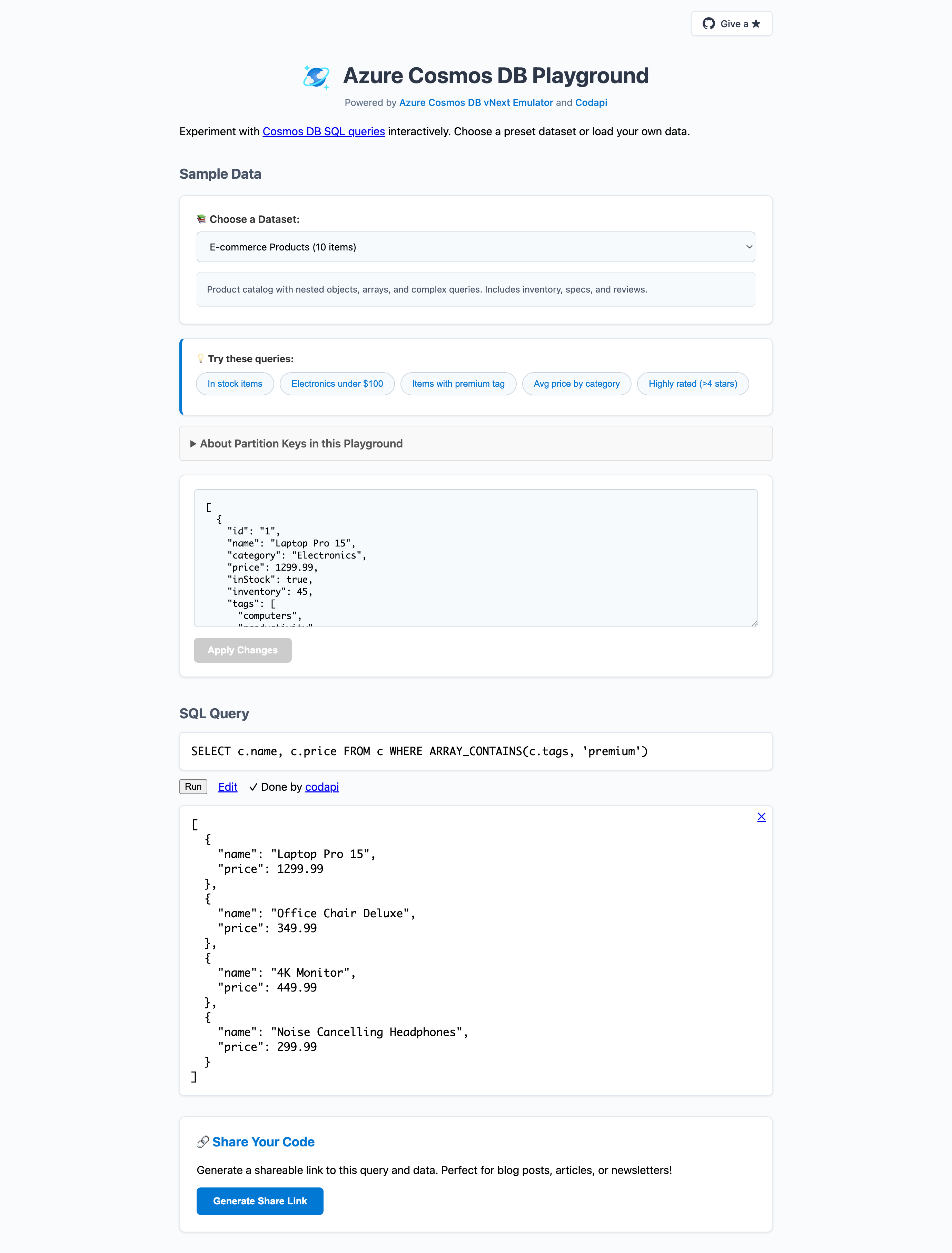
Join For FreeThe Azure Cosmos DB Playground is an interactive, browser-based playground for learning and experimenting with Azure Cosmos DB SQL queries without any setup, installation, or cloud costs. The playground runs on the Azure Cosmos DB vNext emulator and leverages the open-source Codapi project behind the scenes.
What Can You Do With the Playground?
The playground is designed for learning, prototyping, testing, and sharing Azure Cosmos DB queries. Here's what it offers:
- Explore with pre-loaded datasets: Start immediately with ready-to-run query examples across various scenarios (IoT telemetry, product catalogs, movie data, and more).
- Use your own data: Paste or upload custom JSON data to experiment with your specific use cases.
- Instant feedback: See query results immediately and iterate on both data and queries in real-time.
- Shareable links: Generate URLs that capture your current dataset and query for easy sharing with teammates or the community.
- Session persistence: Your last session is automatically restored after a refresh or when reopening the page.
- Embeddable examples: Embed interactive, runnable query examples directly into HTML files for documentation, blogs, or tutorials.
Use Cases
Learning Azure Cosmos DB Query Syntax
If you're new to Azure Cosmos DB or want to explore its SQL-like query language, the playground provides a zero-risk environment. Experiment with SELECT, WHERE, JOIN, aggregate functions, and nested object queries without worrying about costs or cleanup. The pre-loaded datasets give you realistic data to work with immediately.
Prototyping Queries Before Production
Before writing queries into your application code, you can prototype and validate them in the playground. Test different query patterns, check the structure of results, and refine your approach — all before touching your production codebase.
Sharing Examples and Collaboration
Need to show a colleague how to query nested arrays or demonstrate a specific query pattern? Generate a shareable link that captures both your data and query. The recipient can open it, see your exact setup, modify it, and continue experimenting.
Documentation and Tutorials
The embeddable widget lets you include interactive Cosmos DB examples directly in your documentation or blog posts. Readers can run and modify queries without leaving your page, making technical content more engaging and practical.
Try the Playground (or Deploy Your Own)
You can head over to https://aka.ms/cosmosdb-playground and start experimenting right away.
While the hosted playground is ready to use, you can also deploy your own instance on Azure. The playground uses a fully containerized architecture with Docker Compose. Follow the detailed deployment instructions available on GitHub to set up your own playground instance.
To configure HTTPS access for your deployed playground, refer to the instructions available on GitHub.
Quick demo (click to play):
Behind the Scenes: Architecture
Here is a simplified architecture of the Azure Cosmos DB Playground:
+-------------------+        +-------------------+        +-------------------+
|   User Browser    |  <---> |      nginx        |  <---> |     Codapi        |
| (playground.html) |        | (Reverse Proxy)   |        | (Sandbox Server)  |
+-------------------+        +-------------------+        +-------------------+
                                                           |
                                                           v
                                                +--------------------------+
                                                |  Ephemeral Query Container|
                                                |  (Python + Cosmos SDK)    |
                                                +--------------------------+
                                                           |
                                                           v
                                                +--------------------------+
                                                | Cosmos DB Emulator       |
                                                | (Docker Container)       |
                                                +--------------------------+
At its core, the playground uses the Azure Cosmos DB vNext Emulator as a custom Codapi sandbox. Let's break down what each component does.
Azure Cosmos DB vNext Emulator
The vNext emulator is a lightweight, Linux-compatible version of the Azure Cosmos DB emulator that runs as a Docker container. Unlike the Windows-only legacy emulator, vNext runs natively on Linux and macOS (via Docker), making it ideal for containerized deployments. It provides full SQL API compatibility, so the queries you write in the playground work the same way they would against a real Azure Cosmos DB instance.
Codapi Sandbox Server
Codapi is an open-source sandbox server designed for interactive documentation and learning environments. In the playground, Codapi manages the lifecycle of isolated Docker containers for each query execution. When you click "Run," Codapi spawns a fresh container, executes your code, and returns the results — then discards the container. This isolation ensures that concurrent users don't interfere with each other and that no state persists between executions.
The Codapi JavaScript widget powers the frontend integration, providing the code editor and invoking the Codapi API for server-side execution.
Query Execution Flow
When you run a query in the playground, here's what happens:
- nginx receives your request and routes it to the Codapi server.
- Codapi spawns an ephemeral Docker container containing Python and the Azure Cosmos DB SDK.
- The Python query engine inside this container connects to the long-running Cosmos DB emulator.
- It creates a temporary Cosmos DB container (with a unique name to avoid conflicts), seeds your JSON data, and executes your query.
- Results are returned to your browser.
- Both the temporary Cosmos DB container and the ephemeral Docker container are cleaned up.
This architecture means every query execution starts fresh. There's no shared state, no leftover data from previous runs, and no risk of one user's query affecting another's. The emulator itself runs continuously, but the data containers within it are created and destroyed per request.
Limitations
The playground is a sandbox for learning and experimentation, not production use. It's designed for small-to-medium datasets and may have performance constraints with very large data volumes. Some Cosmos DB features available in the full Azure service (like multi-region distribution, certain consistency levels, or vector search) are not available in the emulator.
For the most current list of limitations, refer to the GitHub repository.
Try It Out
Visit https://aka.ms/cosmosdb-playground to start experimenting with Azure Cosmos DB queries. Load a sample dataset, modify the query, see results instantly, and share your examples with others.
Have feedback or suggestions? Visit the GitHub repository and share your thoughts. Happy querying!
Published at DZone with permission of Abhishek Gupta. See the original article here.
Opinions expressed by DZone contributors are their own.
Comments