

Leveraging AI and Vector Search in Azure Cosmos DB for MongoDB vCore
This article explains the inbuilt vector search functionality in Cosmos DB for MongoDB vCore and also provides a quick exploration guide using Python code.
 CORE
·
CORE
·
Microsoft recently announced the introduction of vector search functionality in Azure Cosmos DB for MongoDB vCore. This feature enhances the capabilities of Cosmos DB by allowing developers to perform complex similarity searches on high-dimensional data, which is particularly useful in RAG-based applications, recommendation systems, image and document retrieval, and more. I am also participating in the Cosmos DB hackathon to explore more about how we can use this inside retrieval augmented generation.
In this article, we will explore the details of this new functionality, its use cases, and provide a sample implementation using Python.
What Is a Vector Store?
A vector store (or vector database) is designed to store and manage vector embeddings. These embeddings are mathematical representations of data in a high-dimensional space. Each dimension corresponds to a feature of the data, and tens of thousands of dimensions might be used to represent sophisticated data. For example, words, phrases, entire documents, images, audio, and other types of data can all be vectorized. In simpler terms, vector embeddings are a list of numbers that can represent inside a multi-dimensional space for any complex data.
Example
Pen: [0.6715,0.5562,0.3566,0.9787]Now we can represent a pen inside a multi-dimensional space and then use vector search algorithms to perform a similarity search to retrieve the closest matching elements.
How Does a Vector Index Work?
In a vector store, vector search algorithms are used to index and query embeddings. Vector indexing is a technique used in ML and data analysis to efficiently search and retrieve information from large datasets. Some well-known algorithms include:
- Flat Indexing
- Hierarchical Navigable Small World (HNSW)
- Inverted File (IVF) Indexes
- Locality Sensitive Hashing (LSH) Indexes
Vector search allows you to find similar items based on their data characteristics rather than exact matches on a property field. It’s useful for applications such as:
- Searching for similar text
- Finding related images
- Making recommendations
- Detecting anomalies
Integrated Vector Database in Azure Cosmos DB for MongoDB vCore
The Integrated Vector Database in Azure Cosmos DB for MongoDB vCore enables you to efficiently store, index, and query high-dimensional vector data directly within your Cosmos DB instance. Both transactional data and also vector embeddings are stored inside Cosmos DB together. This eliminates the need to transfer data to separate vector stores and incur additional costs. It works in 2 steps:
1. Vector Index Creation
To perform a vector similarity search over vector properties in your documents, you’ll first need to create a vector index. This index allows efficient querying based on vector characteristics.
2. Vector Search
Once your data is inserted into your Azure Cosmos DB for MongoDB vCore database and collection, and your vector index is defined, you can perform a vector similarity search against a targeted query vector.
What Is Vector Search?
Vector search, also known as similarity search, or nearest neighbor search, is a technique used to find objects that are similar to a given query object in a high-dimensional space. Unlike traditional search methods that rely on exact matches, vector search leverages the concept of distance between points in a vector space to find similar items. This is particularly useful for unstructured data like images, audio, and text embeddings.
Benefits of Vector Search in Cosmos DB
- Efficient similarity searches: Enables fast and efficient searches on high-dimensional vectors, making it ideal for recommendation engines, image search, and natural language processing tasks
- Scalability: Leverages the scalability of Cosmos DB to handle large datasets and high query volumes.
- Flexibility: Integrates seamlessly with existing MongoDB APIs, allowing developers to use familiar tools and libraries.
Use Cases
- Recommendation systems: Providing personalized recommendations based on user behavior and preferences
- Image and video retrieval: Searching for images or videos that are visually similar to a given input
- Natural Language Processing: Finding documents or text snippets that are semantically similar to a query text
- Anomaly Detection: Identifying unusual patterns in high-dimensional data
Setting Up Vector Search in Cosmos DB
Prerequisites
- An Azure account with an active subscription
- Azure Cosmos DB for MongoDB vCore configured for your workload
Detailed Step-By-Step Guide and Sample Code Written in Python
- Create a Cosmos DB account:
- Navigate to the Azure portal.
- Search for Azure Cosmos DB and select the MongoDB (vCore) option.
- Follow the prompts to create your Cosmos DB account.
- Configure your database:
- Create a database and a collection where you’ll store your vectors.
- Ensure that the collection is appropriately indexed to support vector operations. Specifically, you’ll need to create an index on the vector field.
- Insert vectors into the collection:
- Vectors can be stored as arrays of numbers in your MongoDB documents.
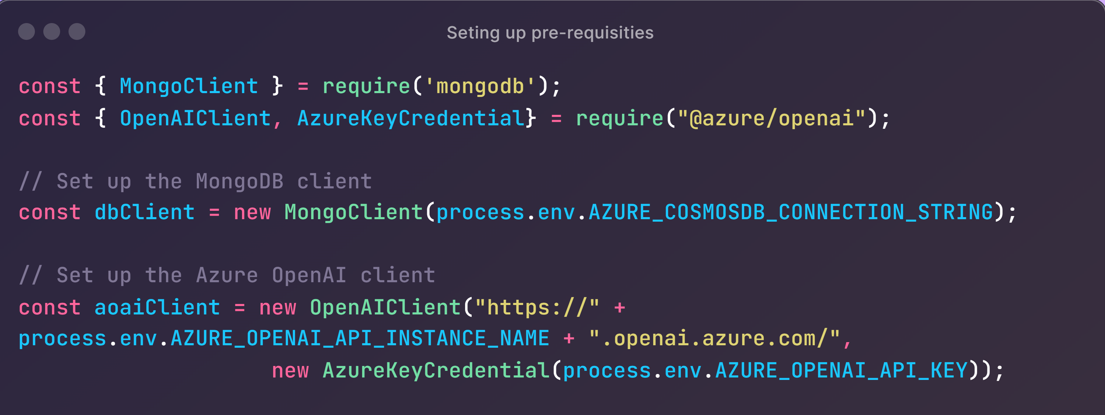
- Set up your project:
- Create a new Python project (e.g., using Visual Studio or Visual Studio Code).
- Import necessary MongoDB and Azure/OpenAI modules
- Connect to the database using Mongo client.
- Inserting data:
- The code below shows how to insert
orderdata from a local JSON file and insert embeddings intocontentVectorfield.
- The code below shows how to insert
-
Generate vector embeddings by using the open AI
getEmbeddings()method.
Here is the full code for your reference:
const { MongoClient } = require('mongodb');
const { OpenAIClient, AzureKeyCredential} = require("@azure/openai");

// Set up the MongoDB client
const dbClient = new MongoClient(process.env.AZURE_COSMOSDB_CONNECTION_STRING);

// Set up the Azure OpenAI client
const aoaiClient = new OpenAIClient("https://" + process.env.AZURE_OPENAI_API_INSTANCE_NAME + ".openai.azure.com/",
                    new AzureKeyCredential(process.env.AZURE_OPENAI_API_KEY));

async function main() {
    try {
        await dbClient.connect();
        console.log('Connected to MongoDB');
        const db = dbClient.db('order_db');

        // Load order data from a local json file
        console.log('Loading order data')
        const orderRawData = "<local json file>";
        const orderData = (await (await fetch(orderRawData)).json())
                                .map(order => cleanData(order));
        await insertDataAndGenerateEmbeddings(db, orderData);

    } catch (error) {
        console.error('An error occurred:', error);
    } finally {
        await dbClient.close();
    }
}

// Insert data into the database and generate embeddings
async function insertDataAndGenerateEmbeddings(db, data) {
    const orderCollection= db.collection('orders');
    await orderCollection.deleteMany({});
    var result = await orderCollection.bulkWrite(
        data.map(async (order) => ({
            insertOne: {
                document: {
                    ...order,
                    contentVector: await generateEmbeddings(JSON.stringify(order))
                }
            }
        }))
    );
    console.log(`${result.insertedCount} orders inserted`);
}

// Generate embeddings
async function generateEmbeddings(text) {
    const embeddings = await aoaiClient.getEmbeddings(embeddingsDeploymentName, text);
    await new Promise(resolve => setTimeout(resolve, 500)); // Rest period to avoid rate limiting on Azure OpenAI
    return embeddings.data[0].embedding;
}
Note: Remember to replace placeholders (Cosmos DB connection string, Azure OpenAI key, and endpoint) with actual values.
Managing Costs
To manage costs effectively when using vector search in Cosmos DB:
- Optimize indexes: Ensure that only necessary fields are indexed.
- Monitor usage: Use Azure Monitor to track and analyze usage patterns.
- Auto-scale: Configure auto-scaling to handle peak loads efficiently without over-provisioning resources.
- Data partitioning: Partition your data appropriately to ensure efficient querying and storage.
Conclusion
The introduction of vector search functionality in Azure Cosmos DB for MongoDB vCore opens up new possibilities for building advanced AI and machine learning applications. By leveraging this feature, developers can implement efficient similarity searches, enabling a wide range of applications from recommendation systems to anomaly detection. With the provided Python code examples, you can get started with integrating vector search into your Cosmos DB-based applications.
For more detailed documentation, visit the Azure Cosmos DB documentation.
Opinions expressed by DZone contributors are their own.