

Cost Efficiency in Azure Synapse Dedicated SQL Pools
This article explores various methods for automating the pausing and resuming of an Azure Synapse Dedicated SQL Pool, a cost-saving strategy when the pool is not in use.
Join the DZone community and get the full member experience.
Join For FreeAzure Synapse Dedicated SQL Pools, formerly known as SQL Data Warehouses, provide robust data warehousing and analytics capabilities. While these resources offer immense power and scalability, managing costs efficiently is vital. In this article, we'll explore cost-saving strategies, including pausing and resuming your dedicated SQL pool, and provide detailed PowerShell and Python scripts for automation.
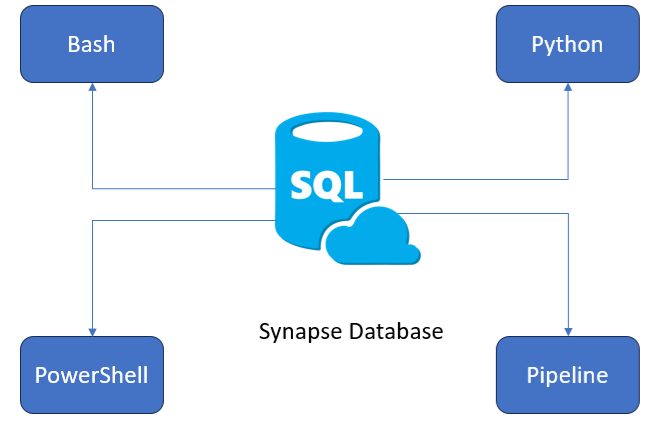
Different ways of implementing
Benefits of Pausing Your Dedicated SQL Pool
Pausing your Azure Synapse Dedicated SQL Pool during idle periods offers several benefits:
- Cost savings: By pausing, you only incur storage costs, significantly reducing compute costs.
- Resource allocation: You free up valuable compute resources for other workloads within your Azure environment.
- Environmental responsibility: Pausing aligns with environmentally responsible cloud computing practices, reducing energy consumption.
You can implement automatic pausing and resuming of an Azure Synapse Dedicated SQL Pool using various methods, including:
- CLI Commands: Using Azure Command-Line Interface (CLI) commands, you can script and automate the pausing and resuming of your dedicated SQL pool.
- Python Scripts: Python scripts can be used in combination with Azure SDKs to automate pool management tasks, including pausing and resuming.
- PowerShell Scripts: PowerShell scripts, leveraging the Azure PowerShell module, allow for the automation of pausing and resuming actions for your dedicated SQL pool.
- Azure Data Factory Pipelines: Azure Data Factory enables you to create data pipelines that can include activities for pausing and resuming SQL-dedicated Synapse pools, making it a part of your ETL or data orchestration workflows.
These options provide flexibility in choosing the automation method that best suits your organization's needs and existing workflows.
Implementing Automatic Pausing and Resuming
1. Using CLI Commands (Azure CLI)
To pause an Azure Synapse Dedicated SQL Pool using Azure CLI:
# Replace placeholders with your actual values

subscription_id="<YourSubscriptionId>"
resource_group="<YourResourceGroupName>"
workspace_name="<YourWorkspaceName>"
pool_name="<YourDedicatedPoolName>"

# Pause the dedicated SQL pool
az synapse sql pool pause --subscription $subscription_id --resource-group $resource_group --workspace-name $workspace_name --name $pool_name
To resume, replace az synapse SQL pool pause with az synapse SQL pool resume.
2. Using Python
Here's a Python script that uses the Azure SDK for Python to pause and resume an Azure Synapse Dedicated SQL Pool:
from azure.identity import DefaultAzureCredential

from azure.synapse.artifacts import SynapseManagementClient


# Replace placeholders with your actual values

subscription_id = "<YourSubscriptionId>"

resource_group = "<YourResourceGroupName>"

workspace_name = "<YourWorkspaceName>"

pool_name = "<YourDedicatedPoolName>"


# Authenticate using the DefaultAzureCredential

credential = DefaultAzureCredential()

synapse_client = SynapseManagementClient(credential, subscription_id)


# Pause the dedicated SQL pool

synapse_client.pools.pause(resource_group, workspace_name, pool_name)


# Resume the dedicated SQL pool

# synapse_client.pools.resume(resource_group, workspace_name, pool_name)
3. Using PowerShell
Here's a PowerShell script to pause and resume an Azure Synapse Dedicated SQL Pool:
# Install the Az.Synapse module if not already installed

Install-Module -Name Az.Synapse -Force -AllowClobber


# Replace placeholders with your actual values

$subscriptionId = "<YourSubscriptionId>"

$resourceGroupName = "<YourResourceGroupName>"

$workspaceName = "<YourWorkspaceName>"

$dedicatedPoolName = "<YourDedicatedPoolName>"


# Authenticate to Azure

Connect-AzAccount


# Pause the dedicated SQL pool

Pause-AzSynapseSqlPool -ResourceGroupName $resourceGroupName -WorkspaceName $workspaceName -Name $dedicatedPoolName -Confirm:$false


# Resume the dedicated SQL pool

# Resume-AzSynapseSqlPool -ResourceGroupName $resourceGroupName -WorkspaceName $workspaceName -Name $dedicatedPoolName -Confirm:$false
4. Using Azure Data Factory Pipelines
In Azure Data Factory, you can create a pipeline that includes two Azure Synapse activities to pause and resume the dedicated SQL pool. Here's a high-level description of the steps:
- Create an Azure Data Factory pipeline.
- Add an "Azure Synapse" activity for pausing the pool.
- Set the activity type to "Execute Data Flow" or "Execute SQL Script" based on your requirements.
- Configure the data flow or SQL script to pause the dedicated SQL pool.
- Add a similar "Azure Synapse" activity to resume the pool.
- Schedule the pipeline to run at specific times or trigger it based on your desired conditions.
These code snippets and methods provide multiple options to automate pausing and resuming your Azure Synapse Dedicated SQL Pool, allowing you to choose the approach that best fits your needs and existing workflows.
Conclusion
Pausing and resuming your Azure Synapse Dedicated SQL Pool during idle periods is a cost-effective strategy that can yield substantial savings. Automation using Azure Functions with Python or PowerShell runbooks in Azure Automation makes it easy to implement. By following these steps and scripts, you can effectively manage your Azure Synapse Dedicated SQL Pool costs while optimizing resource allocation.
Opinions expressed by DZone contributors are their own.
Comments