

CouchDB: Adding Document Using Java Couchdb4j
By
 ·
·
Interview
·
·
Interview
Likes
(0)
Likes
There are no likes...yet! 👀
Be the first to like this post!
It looks like you're not logged in.
Sign in to see who liked this post!
Comment
Save
7.4K Views
Join the DZone community and get the full member experience.
Join For Free
- Couchdb4j is a library for Couch Database for manipulating document in database.
- The jar file :-
- In this Demo ,"A new Student document is created with properties nad added to the student database".
- Project structure:-
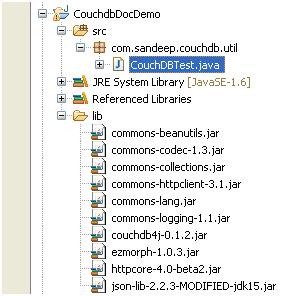
- The Java code CouchDBTest.java is ,
package com.sandeep.couchdb.util;

import java.util.HashMap;
import java.util.Map;
import com.fourspaces.couchdb.Database;
import com.fourspaces.couchdb.Document;
import com.fourspaces.couchdb.Session;

public class CouchDBTest {

 /*These are the keys of student document in couch db*/
 public static final String STUDENT_KEY_NAME ="name";

 public static final String STUDENT_KEY_MARKS ="marks";

 public static final String STUDENT_KEY_ROLL="roll";


 public static void main(String[] args){

  /*Creating a session with couch db running in 5984 port*/
  Session studentDbSession = new Session("localhost",5984);

  /*Selecting the 'student' database from list of couch database*/
  Database studentCouchDb = studentDbSession.getDatabase("student");

  /*Creating a new Document*/
  Document newdoc = new Document();

  /*Map for list of properties for the new document*/
  Map<String , String> properties = new HashMap<String,String>();

  properties.put(STUDENT_KEY_NAME, "saan");

  properties.put(STUDENT_KEY_MARKS, "67");

  properties.put(STUDENT_KEY_ROLL, "12");


  /*Adding all the properties to the new document*/
  newdoc.putAll(properties);

  /*Saving the new document in the 'student' database */
  studentCouchDb.saveDocument(newdoc);

 }
}
- We can open the Futon and verify that the document is added to "student" Database.The screenshot,

Document
Java (programming language)
Published at DZone with permission of Sandeep Patel. See the original article here.
Opinions expressed by DZone contributors are their own.
Comments