DZone
Thanks for visiting DZone today,
Edit Profile
  • Manage Email Subscriptions
  • How to Post to DZone
  • Article Submission Guidelines
Sign Out View Profile
  • Post an Article
  • Manage My Drafts
Over 2 million developers have joined DZone.
Log In / Join
Refcards Trend Reports
Events Video Library
Refcards
Trend Reports

Events

View Events Video Library

Related

  • Streaming vs In-Memory DataWeave: Designing for 1M+ Records Without Crashing
  • Optimizing MuleSoft Performance With HikariCP: A Complete Guide
  • Exploring Deployment Options in Mule 4
  • How to Set up OAuth JWT Flow and mTLS in the Salesforce Connector for a MuleSoft App

Trending

  • Comparing Top Gen AI Frameworks for Java in 2026
  • Setting Up Claude Code With Ollama: A Guide
  • Java in a Container: Efficient Development and Deployment With Docker
  • Improving Java Application Reliability with Dynatrace AI Engine
  1. DZone
  2. Software Design and Architecture
  3. Integration
  4. Create and Import Custom Functions in DataWeave

Create and Import Custom Functions in DataWeave

In this written and video tutorial, learn how to create custom functions in DataWeave and how to import the files and everything from the files.

By 
Abhishek Bathwal user avatar
Abhishek Bathwal
·
Nov. 08, 21 · Tutorial
Likes (1)
Comment
Save
Tweet
Share
19.5K Views

Join the DZone community and get the full member experience.

Join For Free

The article will showcase the creation of a file with custom functions and then show how to import them in DataWeave.

Creating a File With Custom Functions

A .dwl file for custom functions is created in src/main/resources under a folder called module.
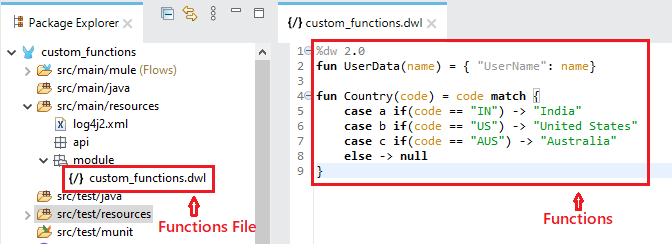
src/main/resources — where to find the file

Importing Custom Functions in Dataweave

1. Import File

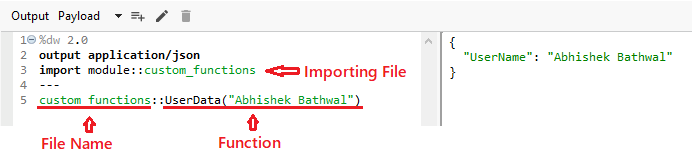
The custom functions file is under the module folder, so while importing, we need first to mention the folder name followed by the scope resolution operator (::) and then the file name.

Java
 
import <folder name>::<file name>


We are just importing the file, so we need to mention the file name followed by the scope resolution operator (::) then the function while calling the function. 

Java
 
<file name>::<function>


Calling only one function: 

Code screenshot showing importing file, file name, and function

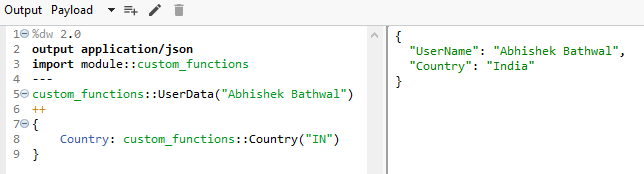
Calling both the functions:

Code screenshot for both functions

2. Import Everything From File

We use an asterisk (*) followed by from keyword, which means import everything from the file to import everything.

Java
 
Import * from <folder name>::<file name>


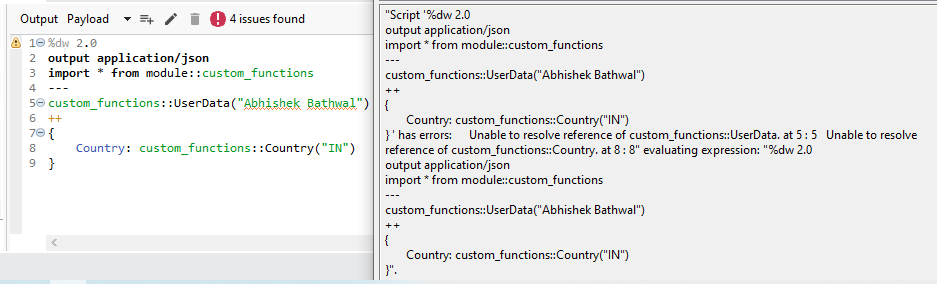
Since we are importing everything this time, we don’t need to mention the file name while calling the functions, or else it will throw an error. 

Without file name:
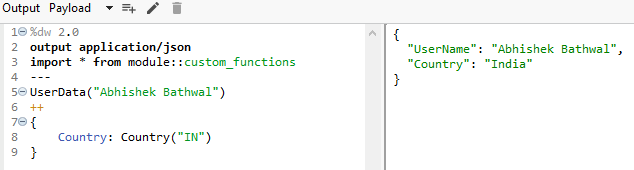
Code screenshot: without file name

With file name: 

Code screeshot: with file name resulting in error


Notes

  1. We can directly create the functions file under the src/main/resource folder, but it’s best practice to create a folder and store the file in that.
  2. Naming conventions are very important.
Preferred
Not Preferred
camelCase -> customFunctions
snake_case -> custom_functions
PascalCase -> CustomFunctions
Kebab-case -> custom-functions 


Custom software MULE

Opinions expressed by DZone contributors are their own.

Related

  • Streaming vs In-Memory DataWeave: Designing for 1M+ Records Without Crashing
  • Optimizing MuleSoft Performance With HikariCP: A Complete Guide
  • Exploring Deployment Options in Mule 4
  • How to Set up OAuth JWT Flow and mTLS in the Salesforce Connector for a MuleSoft App

Partner Resources

×

Comments

The likes didn't load as expected. Please refresh the page and try again.

  • RSS
  • X
  • Facebook

ABOUT US

  • About DZone
  • Support and feedback
  • Community research

ADVERTISE

  • Advertise with DZone

CONTRIBUTE ON DZONE

  • Article Submission Guidelines
  • Become a Contributor
  • Core Program
  • Visit the Writers' Zone

LEGAL

  • Terms of Service
  • Privacy Policy

CONTACT US

  • 3343 Perimeter Hill Drive
  • Suite 215
  • Nashville, TN 37211
  • [email protected]

Let's be friends:

  • RSS
  • X
  • Facebook