

Data Driven API Testing in Java with Rest-Assured and TestNG: Part 1
Learn how to perform data-driven API automation testing with Rest-Assured using object arrays and TestNG's @DataProvider annotation.
 CORE
·
CORE
·
Join the DZone community and get the full member experience.
Join For FreeData-driven testing, also known as parameterized testing, is a technique that uses a data table to drive test execution by defining inputs, expected outputs, and test environment settings. It separates test data from test logic. Rather than creating multiple test cases for different input values, a single test case is executed repeatedly using different data sets.
The TestNG framework provides the @DataProvider annotation, which supplies data sets to tests. There are multiple ways to perform data-driven API testing using TestNG’s @DataProvider. In this article, we will learn how to pass test data using an Object array.
Data-Driven Testing using @DataProvider and Object Array
This is one of the most commonly used approaches. The data provider method supplies the test data, and TestNG automatically executes the test method multiple times, each time with a different data set.
Set Up and Configuration
Set up the project by adding dependencies for Rest-Assured, TestNG, and Lombok to the Maven project:
<dependency>
    <groupId>io.rest-assured</groupId>
    <artifactId>rest-assured</artifactId>
    <version>6.0.0</version>
    <scope>test</scope>
</dependency>
<dependency>
    <groupId>org.testng</groupId>
    <artifactId>testng</artifactId>
    <version>7.11.0</version>
    <scope>test</scope>
</dependency>
<dependency>
    <groupId>org.projectlombok</groupId>
    <artifactId>lombok</artifactId>
    <version>1.18.42</version>
    <scope>compile</scope>
</dependency>
<dependency>
    <groupId>com.fasterxml.jackson.core</groupId>
    <artifactId>jackson-databind</artifactId>
    <version>2.21.0</version>
    <scope>compile</scope>
</dependency>
Application Under Test
We’ll use the POST /addOrder API of the Restful E-Commerce demo application available on GitHub, which provides free-to-use APIs.
The request body schema for the POST /addOrder API:
[
  {
    "user_id": "string",
    "product_id": "string",
    "product_name": "string",
    "product_amount": 0,
    "qty": 0,
    "tax_amt": 0,
    "total_amt": 0
  }
]
Creating a POJO Class
Create a POJO class for the Order object, which will be used in the DataProvider method.
@Getter
@Setter
@AllArgsConstructor
@ToString (exclude = "expectedStatus")
public class Order {
    @JsonProperty ("user_id")
    private String userId;
    @JsonProperty ("product_id")
    private String productId;
    @JsonProperty ("product_name")
    private String productName;
    @JsonProperty ("product_amount")
    private int    productAmount;
    private int    qty;
    @JsonProperty ("tax_amt")
    private int    taxAmt;
    @JsonProperty ("total_amt")
    private int    totalAmt;
    private int    expectedStatus;
}
Code Walkthrough:
@Getterand@Setterautomatically generate getter and setter methods at compile time.@AllArgsConstructorcreates a constructor with all fields as parameters, simplifying test data creation.@ToStringgenerates atoString()method excludingexpectedStatusfor cleaner logging.@JsonPropertymaps JSON field names to Java variables.- The additional
expectedStatusfield allows verification of the response status code, enabling flexible testing of valid and invalid cases.
Check out “How to Perform Response Verification in REST-Assured Java for API Testing” for an in-depth guide on response verification.
Creating a DataProvider Method
Define a DataProvider method that returns the test data in a 2D object array:
@DataProvider (name = "orderData")
    public Object[][] getOrderData () {
        return new Object[][] { { new Order ("1", "90", "Colgate Gel", 109, 1, 10, 119, 201) },
            { new Order ("1", "13", "Perfume", 299, 1, 30, 329, 201) },
            { new Order ("4", "79", "Fresh Milk", 12, 1, 1, 13, 201) },
            { new Order ("6", "81", "Yogurt", 16, 2, 3, 35, 201) },
            { new Order ("2", "63", "Bath Soap", 5, 5, 3, 28, 201) } };
    }
Code Walkthrough:
- The
@DataProviderannotation enables running the same test multiple times with different order data. - The 2D Object array acts as a container TestNG understands, with each entry representing one test run.
- Passing the Order object improves readability, ensures all required values are included, and makes test data easier to update without changing test logic.
Writing the API Automation Tests
Using Rest-Assured, write the API automation tests and pass the DataProvider to the @Test annotation:
@Test (dataProvider = "orderData")
    public void testCreateOrder (Order order) {
        List<Order> orders = new ArrayList<> ();
        orders.add (order);
        given ().contentType (ContentType.JSON)
            .when ()
            .log ()
            .all ()
            .body (orders)
            .post ("http://localhost:3004/addOrder")
            .then ()
            .log ()
            .all ()
            .statusCode (order.getExpectedStatus ())
            .and ()
            .assertThat ()
            .body ("message", equalTo ("Orders added successfully!"));
    }
}
Code Walkthrough:
testCreateOrder()runs multiple iterations using different order objects from theorderDataDataProvider.- The order is added to a list because the API expects a list of orders.
- Rest-Assured logs requests and responses, making debugging straightforward.
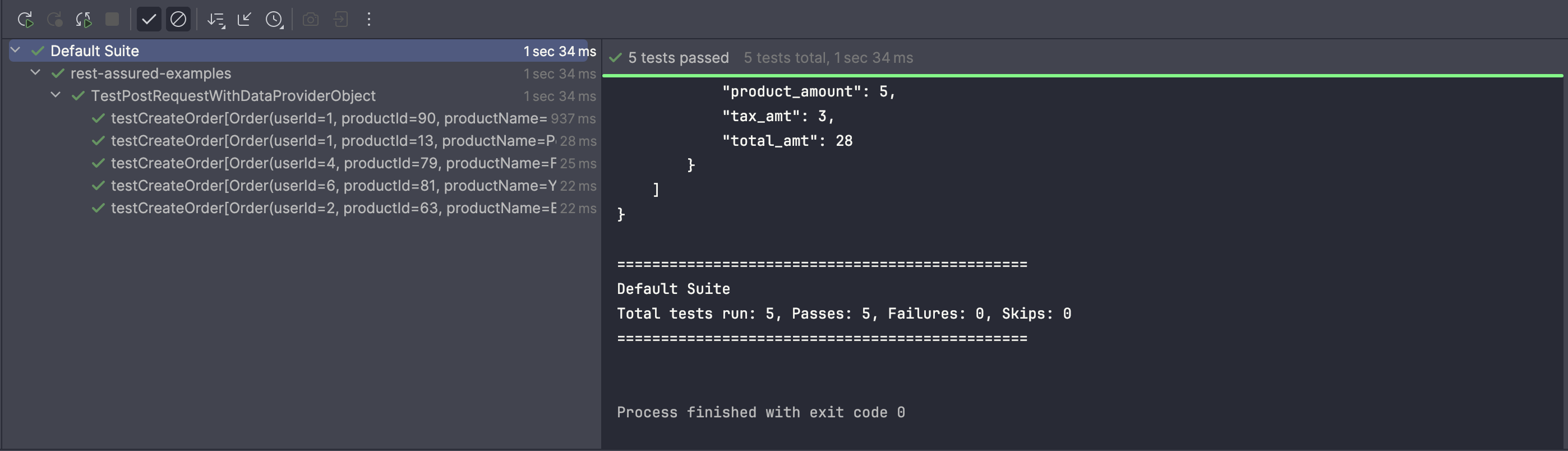
Test Execution
When the test runs, TestNG executes testCreateOrder() multiple times, each with a different data set from orderData, verifying that the API handles various inputs correctly.
Wrap Up
Data-driven testing separates the test data from the test logic, allowing the same test code to run with multiple inputs. By using a 2D Object array as a DataProvider, you can feed different data sets into the test method, making it easy to cover multiple scenarios with minimal effort.
Object arrays work best for small to medium datasets. They are simple, easy to read, and provide all data upfront. However, for large or complex datasets, supplying data can become cumbersome, and memory consumption may increase.
Happy Testing!
Published at DZone with permission of Faisal Khatri. See the original article here.
Opinions expressed by DZone contributors are their own.
Comments