

How to Perform Response Verification in REST-Assured Java for API Testing
Explore the various methods for extracting and verifying the API response body using the Rest-Assured framework in Java for API Testing.
 CORE
·
CORE
·
Join the DZone community and get the full member experience.
Join For FreeOne of the core factors in API test automation is verifying the response body for data integrity. It is a crucial step in the functional validation of the API to confirm that it is returning the correct data as desired.
This verification of the response body can be of a POST, GET, PUT, or PATCH API request. The same logic can be applied to any API response for verifying the data returned by the API.
There are multiple ways to verify the response body using REST-Assured. In this tutorial, I’ll walk you through these steps, which will help you write robust test automation scripts.
Response Body Verification Using REST-Assured
There are multiple ways to perform response body verification using REST-Assured, as mentioned below.
Using then().body() with Hamcrest Matchers
This is a common verification method that allows inline validation of the response body. Let’s take an example of an e-commerce GET /getOrder API, which returns order details based on the supplied Order ID. The API returns response data for Order ID 1.
{
    "message": "Order found!!",
    "orders": [
        {
            "id": 1,
            "user_id": "390",
            "product_id": "316",
            "product_name": "Ergonomic Iron Keyboard",
            "product_amount": 1951,
            "qty": 1,
            "tax_amt": 195,
            "total_amt": 2146
        }
    ]
}
Let’s verify the message text and the id retrieved in the response using REST-Assured. The following code hits the GET API and verifies the mentioned fields.
 @Test
    public void testResponseWithMatchers () {

        given ().when ()
            .queryParam ("id", 1)
            .log ()
            .all ()
            .get ("http://localhost:3004/getOrder")
            .then ()
            .log ()
            .all ()
            .statusCode (200)
            .and ()
            .assertThat ()
            .body ("message", equalTo ("Order found!!"))
            .body ("orders[0].id", equalTo (1));
    }
The statement body("message", equalTo("Order found!!")) verifies the message text, and similarly, body("orders[0].id", equalTo(1)) confirms that the Order ID equals 1 in the response body. REST-Assured allows multiple body() methods to be chained to perform assertions.
It is important to note that equalTo() is a static method imported into the code from the Hamcrest library (import static org.hamcrest.core.IsEqual.equalTo).
Extract the Response Body and Perform an Assertion Using TestNG
The response body can be extracted into a Response object, which can then be used to extract fields from arrays or objects in the response. These fields can be verified using TestNG assertions to validate the response data.
@Test
    public void testExtractResponseAndVerify () {
        Response response = given ().when ()
            .log ()
            .all ()
            .get ("http://localhost:3004/getAllOrders")
            .then ()
            .log ()
            .all ()
            .statusCode (200)
            .extract ()
            .response ();

        String orderMessage = response.jsonPath ()
            .getString ("message");
        assertEquals (orderMessage, "Orders fetched successfully!");
        String orderTwoUserId = response.jsonPath ()
            .getString ("orders[1].user_id");
        assertEquals (orderTwoUserId, "484");
The response body returned after calling the GET /getAllOrders API is stored in the response object. This object is then used to extract the message text from the response as a String using the jsonPath() method provided by the REST-Assured framework.
The following is the response body returned by the GET /getAllOrders API:
{
  "message": "Orders fetched successfully!",
  "orders": [
    {
      "id": 1,
      "user_id": "466",
      "product_id": "357",
      "product_name": "Small Marble Shoes",
      "product_amount": 1558,
      "qty": 9,
      "tax_amt": 1402,
      "total_amt": 15424
    },
    {
      "id": 2,
      "user_id": "484",
      "product_id": "219",
      "product_name": "Aerodynamic Bronze Chair",
      "product_amount": 1755,
      "qty": 7,
      "tax_amt": 1228,
      "total_amt": 13513
    },
    {
      "id": 3,
      "user_id": "386",
      "product_id": "342",
      "product_name": "Mediocre Aluminum Coat",
      "product_amount": 335,
      "qty": 1,
      "tax_amt": 33,
      "total_amt": 368
    },
    {
      "id": 4,
      "user_id": "481",
      "product_id": "220",
      "product_name": "Fantastic Concrete Table",
      "product_amount": 79,
      "qty": 1,
      "tax_amt": 7,
      "total_amt": 86
    }
  ]
}
Once the text, i.e., “Orders fetched successfully”, is extracted, it is verified using the assertEquals() method from TestNG. Similarly, to extract the user_id value of Order 2 (Order ID 2), the JSON path orders[1].user_id is used. Since arrays are zero-indexed, the second order corresponds to index 1. The extracted value is then compared using the assertEquals() method.
Another way to perform assertions on the response body is by using the JsonPath class provided by REST-Assured:
 @Test
    public void testExtractResponseAndVerify () {
        Response response = given ().when ()
            .log ()
            .all ()
            .get ("http://localhost:3004/getAllOrders")
            .then ()
            .log ()
            .all ()
            .statusCode (200)
            .extract ()
            .response ();

        JsonPath jsonPath = new JsonPath (response.asString ());
        assertEquals (jsonPath.getString ("orders[0].product_name"), "Small Marble Shoes");
    }
The response object is parsed into JSON using the JsonPath class, allowing values to be queried easily. The expression orders[0].product_name retrieves the product_name field from the first object in the orders array and returns it as a String. This value is then compared with the expected value using TestNG’s assertEquals() method.

Extract the Response Body as a String and Use the Google Gson Library to Fetch JSON Objects and Arrays
This is another handy approach for parsing dynamic JSON structures. To begin, add the Google Gson Maven dependency to the pom.xml file of your Maven project.
<dependency>
    <groupId>com.google.code.gson</groupId>
    <artifactId>gson</artifactId>
    <version>2.13.2</version>
</dependency>
Let’s take an example of the GET /getAllOrders API, which returns a list of available orders from the system.
{
  "message": "Orders fetched successfully!",
  "orders": [
    {
      "id": 1,
      "user_id": "466",
      "product_id": "357",
      "product_name": "Small Marble Shoes",
      "product_amount": 1558,
      "qty": 9,
      "tax_amt": 1402,
      "total_amt": 15424
    },
    {
      "id": 2,
      "user_id": "484",
      "product_id": "219",
      "product_name": "Aerodynamic Bronze Chair",
      "product_amount": 1755,
      "qty": 7,
      "tax_amt": 1228,
      "total_amt": 13513
    },
    {
      "id": 3,
      "user_id": "386",
      "product_id": "342",
      "product_name": "Mediocre Aluminum Coat",
      "product_amount": 335,
      "qty": 1,
      "tax_amt": 33,
      "total_amt": 368
    },
    {
      "id": 4,
      "user_id": "481",
      "product_id": "220",
      "product_name": "Fantastic Concrete Table",
      "product_amount": 79,
      "qty": 1,
      "tax_amt": 7,
      "total_amt": 86
    }
  ]
}
The following code extracts the response body as a String, then iterates over the JSON using the Google Gson library and fetch the required details:
@Test
    public void testExtractResponseWithGson () {
        String response = given ().when ()
            .log ()
            .all ()
            .get ("http://localhost:3004/getAllOrders")
            .then ()
            .log ()
            .all ()
            .statusCode (200)
            .extract ()
            .response ()
            .asString ();

        Gson gson = new Gson ();
        JsonObject responseObject = gson.fromJson (response, JsonObject.class);
        String orderText = responseObject.get ("message")
            .getAsString ();
        assertEquals (orderText, "Orders fetched successfully!");

        JsonArray orderArray = responseObject.getAsJsonArray ("orders");
        String orderThreeProductName = orderArray.get (2)
            .getAsJsonObject ()
            .get ("product_name")
            .getAsString ();
        assertEquals (orderThreeProductName, "Mediocre Aluminum Coat");
    }
The response body is extracted as a String using .extract().response().asString() and stored in the response variable.
The Gson class from the Gson library is instantiated to create a parser that converts JSON strings into Java objects. Since the response is a JSON object, it is first converted into a JsonObject using Gson.
The fromJson() method transforms the API response string into a JsonObject tree, allowing field access without using a POJO. The code then extracts the message value and verifies it against the expected success text using TestNG’s assertEquals() method.
Similarly, to extract the product_name value from the third order in the array, the JSON array is retrieved from the response object using:
JsonArray orderArray = responseObject.getAsJsonArray ("orders");Next, the product_name field is fetched using:
String orderThreeProductName = orderArray.get (2)
            .getAsJsonObject ()
            .get ("product_name")
            .getAsString ();
Finally, an assertion is performed using TestNG’s assertEquals() method.
assertEquals (orderThreeProductName, "Mediocre Aluminum Coat");Writing Multiple Verifications in the body() Method
REST-Assured allows performing assertions on multiple fields within a single body() method. Let’s take the same GET /getAllOrders API and perform multiple assertions by verifying the user_id, product_id, product_name, and product_amount in the body() method for the first order object.
This can be achieved by writing the code as shown below:
 @Test
    public void testMultipleResponseConditions () {
        given ().when ()
            .log ()
            .all ()
            .get ("http://localhost:3004/getAllOrders")
            .then ()
            .log ()
            .all ()
            .statusCode (200)
            .and ()
            .assertThat ()
            .body ("message", equalTo ("Orders fetched successfully!"), "orders[0].user_id", equalTo ("466"),
                "orders[0].product_id", equalTo ("357"), "orders[0].product_name", equalTo ("Small Marble Shoes"),
                "orders[0].product_amount", equalTo (1558));
    }
This approach has an advantage over using separate body() methods to verify individual fields. By validating multiple fields in a single body() method, all assertions are evaluated together. In the case of multiple mismatches, this approach verifies all specified fields and provides a consolidated and detailed assertion failure report in a single execution.
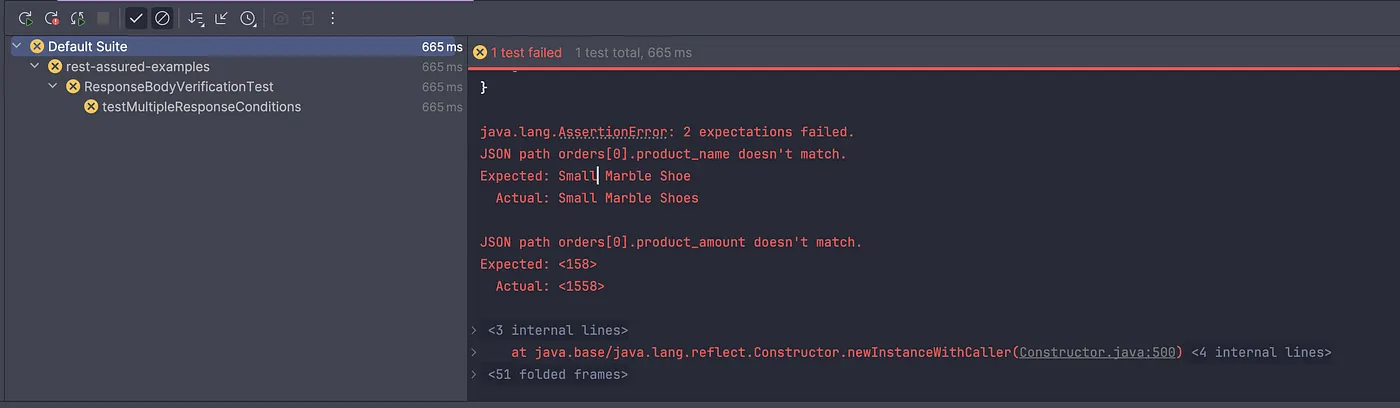
However, if individual fields are verified by chaining multiple body() methods and multiple assertion failures occur, the test execution stops at the first failure and does not verify subsequent fields. This limitation does not apply when multiple field verifications are included in a single body() method.
Deserializing the Response Body into a POJO Class
The response body can be deserialized into a POJO class to provide a cleaner and more structured approach to validating response data. Using this method eliminates the need for JSON Path expressions and enables more readable, type-safe validations through POJOs.
This can be implemented in two steps:
- Write a POJO class to deserialize the response body
- Write API tests to verify the response data using the POJOs
Creating a POJO for the Response Body
Below is the response body of the GET /getAllOrders API for which a POJO needs to be generated:
{
  "message": "Orders fetched successfully!",
  "orders": [
    {
      "id": 1,
      "user_id": "466",
      "product_id": "357",
      "product_name": "Small Marble Shoes",
      "product_amount": 1558,
      "qty": 9,
      "tax_amt": 1402,
      "total_amt": 15424
    },
    {
      "id": 2,
      "user_id": "484",
      "product_id": "219",
      "product_name": "Aerodynamic Bronze Chair",
      "product_amount": 1755,
      "qty": 7,
      "tax_amt": 1228,
      "total_amt": 13513
    },
    {
      "id": 3,
      "user_id": "386",
      "product_id": "342",
      "product_name": "Mediocre Aluminum Coat",
      "product_amount": 335,
      "qty": 1,
      "tax_amt": 33,
      "total_amt": 368
    },
    {
      "id": 4,
      "user_id": "481",
      "product_id": "220",
      "product_name": "Fantastic Concrete Table",
      "product_amount": 79,
      "qty": 1,
      "tax_amt": 7,
      "total_amt": 86
    }
  ]
}
The response body is a JSON object that contains a list of orders — in other words, a JSON object with a JSON array. To deserialize this structure, two POJO classes are required: one for the main response object and another for the individual order objects.
@Getter
@Setter
public class OrderResponse {
    private String      message;
    private List<Order> orders;

}
This POJO contains two fields: message and a list of orders. Next, we create the POJO for deserializing individual order objects. The Lombok library is used here to automatically generate getter and setter methods at runtime.
POJO for Deserializing the List of Orders
@Getter
@Setter
public class Order {
    private int    id;
    @JsonProperty ("user_id")
    private String userId;
    @JsonProperty ("product_id")
    private String productId;
    @JsonProperty ("product_name")
    private String productName;
    @JsonProperty ("product_amount")
    private int    productAmount;
    private int    qty;
    @JsonProperty ("tax_amt")
    private int    taxAmt;
    @JsonProperty ("total_amt")
    private int    totalAmt;
}
This POJO class includes all the fields present in the order object. Since the JSON fields use snake_case naming (for example, user_id, product_id), the @JsonProperty annotation from the Jackson Databind library is used to map them to standard Java camelCase field names.
Writing the API Test to Verify the Response Body Using POJOs
The following code verifies the response body using POJO deserialization:
@Test
    public void testDeserializeResponseWithPojo () {
        OrderResponse orderResponse = given ().when ()
            .log ()
            .all ()
            .get ("http://localhost:3004/getAllOrders")
            .then ()
            .log ()
            .all ()
            .statusCode (200)
            .extract ()
            .body ()
            .as (OrderResponse.class);

        assertEquals (orderResponse.getMessage (), "Orders fetched successfully!");
        assertEquals (orderResponse.getOrders ()
            .get (0)
            .getId (), 1);
        assertEquals (orderResponse.getOrders ()
            .get (1)
            .getTaxAmt (), 1228);
    }
This code deserializes the API response directly into the OrderResponse POJO using REST-Assured’s .as() method, eliminating the need for manual JSON parsing or JSON Path queries. It sends a GET request, logs request and response details, verifies a 200 status code, and extracts the response body into a structured Java object.
Assertions become simpler and more readable with this approach, as response fields can be accessed directly through the POJO and validated using standard Java method calls.
Compare the Response Body with the Expected JSON File
The response body can be compared with an expected JSON file; however, this approach is useful only when the API consistently returns static data in a fixed structure.
It works well for contract validation or full-body string comparison, but becomes less practical when fields such as order IDs, timestamps, quantities, or totals change across requests.
For dynamic responses, using deserialization, JSON tree models, or targeted field assertions is a more reliable approach.
To compare with an expected JSON file, we need to add the JsonAssert Maven dependency to the pom.xml:
<dependency>
    <groupId>org.skyscreamer</groupId>
    <artifactId>jsonassert</artifactId>
    <version>1.5.3</version>
    <scope>test</scope>
</dependency>
Save the expected JSON response in a file and place it in the src/test/resources folder. For example, we can use the GET /getAllOrders API response and store it in a file named AllOrders.json.
{
  "message": "Orders fetched successfully!",
  "orders": [
    {
      "id": 1,
      "user_id": "466",
      "product_id": "357",
      "product_name": "Small Marble Shoes",
      "product_amount": 1558,
      "qty": 9,
      "tax_amt": 1402,
      "total_amt": 15424
    },
    {
      "id": 2,
      "user_id": "484",
      "product_id": "219",
      "product_name": "Aerodynamic Bronze Chair",
      "product_amount": 1755,
      "qty": 7,
      "tax_amt": 1228,
      "total_amt": 13513
    },
    {
      "id": 3,
      "user_id": "386",
      "product_id": "342",
      "product_name": "Mediocre Aluminum Coat",
      "product_amount": 335,
      "qty": 1,
      "tax_amt": 33,
      "total_amt": 368
    },
    {
      "id": 4,
      "user_id": "481",
      "product_id": "220",
      "product_name": "Fantastic Concrete Table",
      "product_amount": 79,
      "qty": 1,
      "tax_amt": 7,
      "total_amt": 86
    }
  ]
}
The following code is used to verify the Response body using the expected response JSON file:
@Test
    public void testResponseFromJsonFile () {
        String actualResponse = given ().when ()
            .log ()
            .all ()
            .get ("http://localhost:3004/getAllOrders")
            .then ()
            .log ()
            .all ()
            .statusCode (200)
            .extract ()
            .response ()
            .asString ();

        String expectedJson = null;
        try {
            expectedJson = Files.readString (Paths.get (Objects.requireNonNull (this.getClass ()
                    .getClassLoader ()
                    .getResource ("AllOrders.json"))
                .getPath ()));
        } catch (IOException e) {
            throw new RuntimeException (e);
        }

        JSONAssert.assertEquals (expectedJson, actualResponse, true);

    }
The code is divided into three parts:
- The actual response is fetched and stored in the
actualResponsestring. - The expected JSON file is read from the
resourcesfolder and stored as a string inexpectedJson. - An assertion is performed using the JsonAssert library, which compares the expected and actual responses using strict mode (notice
truein theassertEquals()statement).
The true parameter enforces strict comparison, meaning the test will validate both the structure and the values exactly. In strict mode, the comparison fails if there are any differences, including missing keys, mismatched values, or extra fields present in the actual response but not in the expected JSON file.
Final Words
There are multiple approaches to deserializing and verifying the response body using the REST-Assured framework in Java. The choice of strategy should depend on the requirements of your project.
In my experience, I have used the JSON file comparison for JSON schema validation and also used it while working with mocks. However, when performing end-to-end and functional validation, the body() method with POJO classes is best suited as it helps to read the JSON file dynamically and avoids errors. Another effective approach is to extract the response body and verify the field values by using the Google Gson library, which offers a cleaner solution.
Happy Testing!
Published at DZone with permission of Faisal Khatri. See the original article here.
Opinions expressed by DZone contributors are their own.
Comments