

Salesforce Data Cloud: Setting Up and Using the Ingestion API
In this guide, learn to use Salesforce Data Cloud Ingestion API for real-time and bulk data ingestion to deliver accurate, personalized customer experiences.
Join the DZone community and get the full member experience.
Join For FreeSalesforce Data Cloud offers an integrated solution for ingesting and integrating information about customers to empower businesses to provide personalized experiences at scale. At the center of the platform lies the Ingestion API, which simplifies bringing information into Data Cloud. This piece goes into the technical aspects of the Ingestion API, such as its underlying patterns, implementation, and suggestions for ingesting into Salesforce Data Cloud.
Introduction to the Ingestion API
The Ingestion API is a RESTful endpoint for ingesting into Salesforce Data Cloud. It provides two primary interaction patterns:
- Streaming pattern – Designed for real-time incremental updates to the data. This pattern allows for the consumption of the data the instant that changes are made, so that the system is always up to date.
- Bulk pattern – Applied with CSV files for scheduled big-batch syncing. This pattern is appropriate for periodic batch updates when real-time information is not required.
Both streaming and bulk patterns can be supported by one stream simultaneously, allowing flexibility and scalability for different needs for ingesting the data.
Setting up the Ingestion API
Step 1: First, you need to set up a Data Stream in Data Cloud:
- Proceed to Data Cloud Setup | Ingestion API.
- Create a new connector called "IngestionAPIConnector."
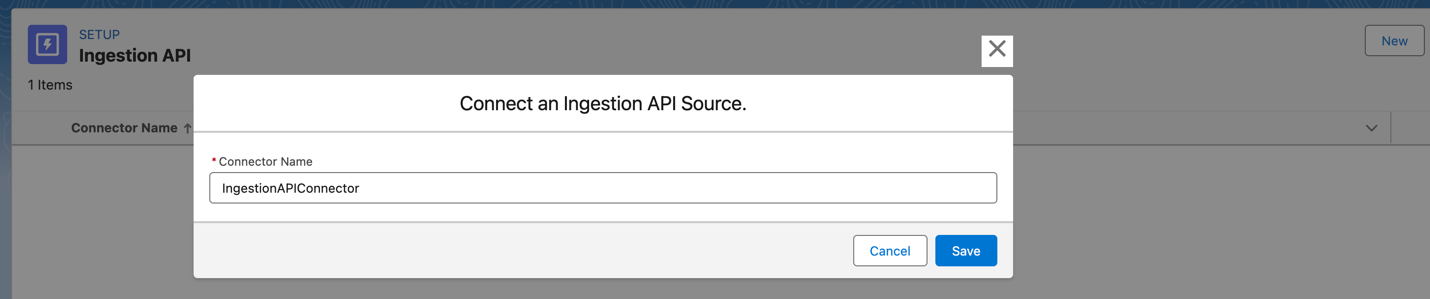
- Upload a schema file in accordance with OpenAPI specs (using the YAML format).
Here is an example schema for a SalesCustomer object:
openapi: 3.0.3
components:
  schemas:
    SalesCustomer:
      type: object
      properties:
        id:
          type: string
        firstName:
          type: string
        lastName:
          type: string
        age:
          type: number
        gender:
          type: string
        address:
          type: string
        city:
          type: string
        country:
          type: string
        createdDate:
          type: string
          format: date-time
        modifiedDate:
          type: string
          format: date-time
This schema defines the structure of the data to be ingested, including field types and formats.
Step 2: Configure and deploy the data stream:
- Navigate to Data Streams and create a new data stream.
- Choose "Ingested API" and go to the next step.
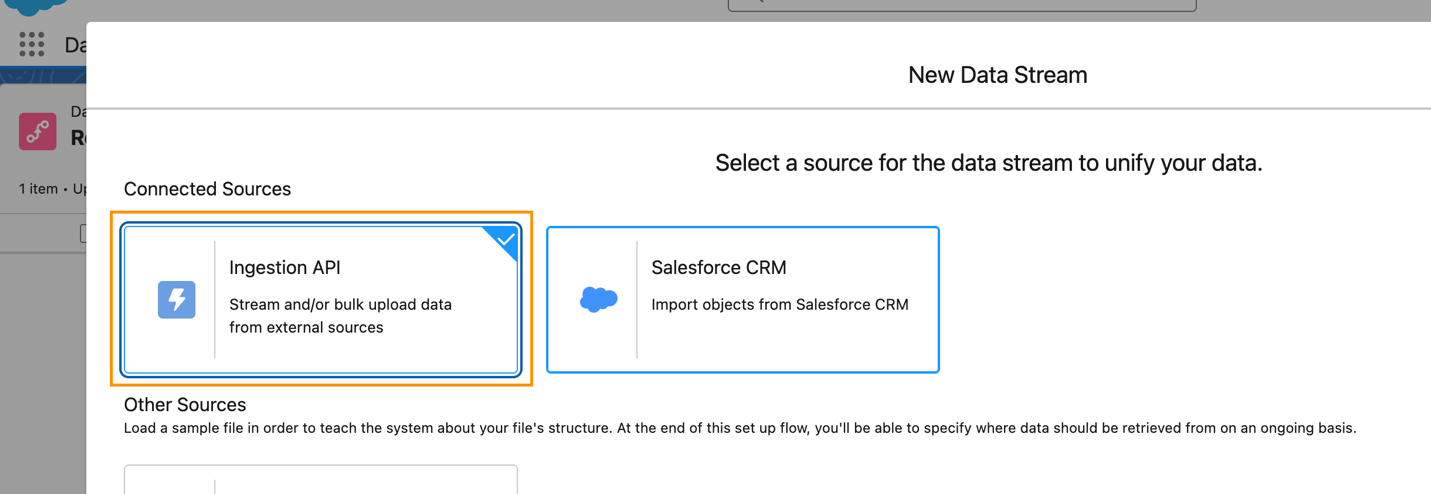
- The connector (
IngestionAPIConnector) created in the previous step will appear in the picklist. - Choose the object name (
SalesCustomer) and define its details (e.g., edit fields, reconfigure mappings).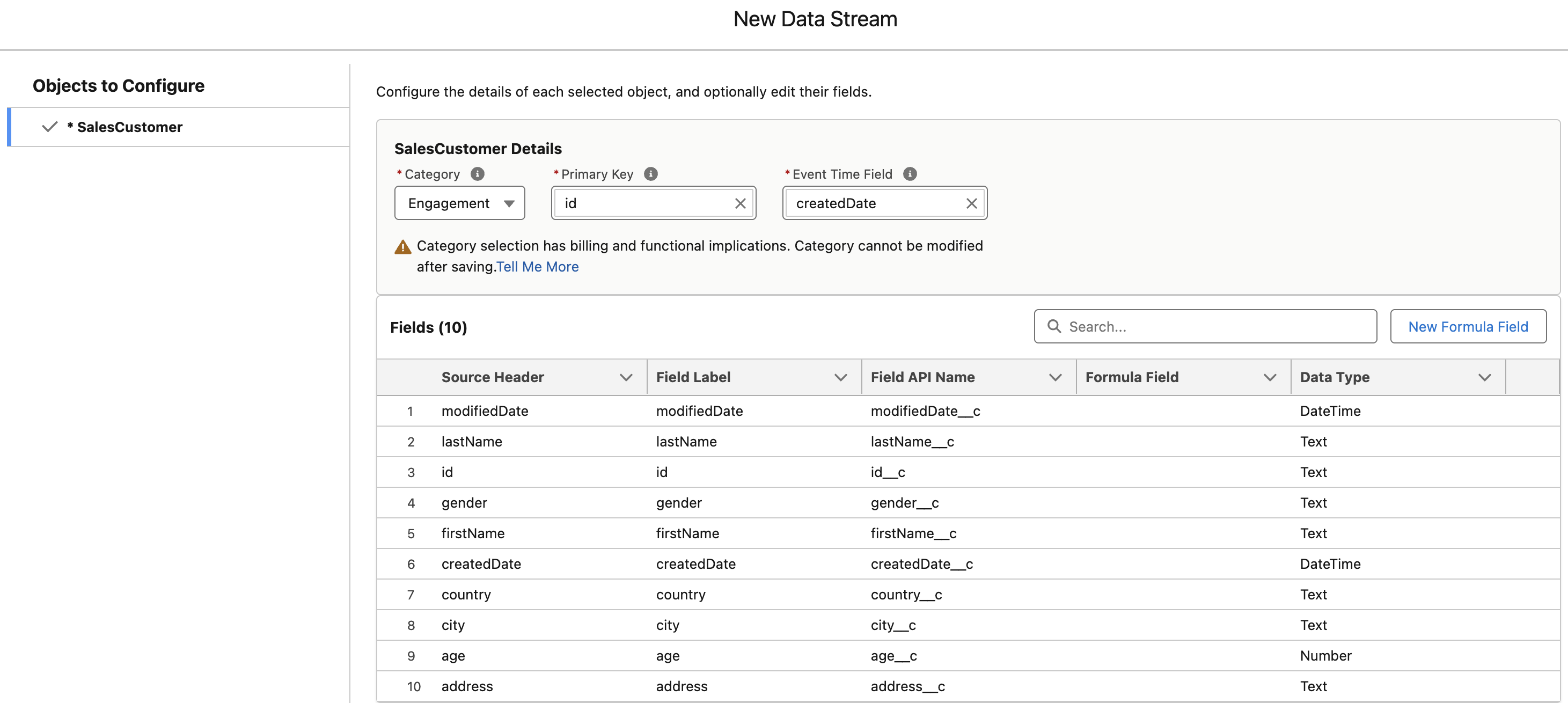

- Select Next and deploy the data stream.
Step 3: Map the data stream:
- Navigate to the Data Lake Objects tab.
- Click on IngestionAPIConnector-SalesCustomer.
- Choose Start under Data Mapping.
- Select the Pencil icon next to the Data Model entities.
- Choose the Custom Data Model tab and map it to IngestionAPIConnector-SalesCustomer.
- Click Done.
Note: In order to establish a secure connection to the Ingestion API, first make a Connected App and configure the OAuth settings.
Step 4: Implement the connected app for the Ingestion API.
- Navigate to Setup > App Manager.
- Select New Connected App.
- Enter the following information:
- Connected App Name – "DataCloudIngestionAPI"
- API Name – "DataCloudIngest"
- Contact Email – your email address
- Under OAuth settings, enable OAuth and set the following parameters:
- Enable OAuth settings.
- Enable for Device Flow.
- Require Secret for Web Server Flow.
- Require Secret for Refresh Token Flow.
- Callback URL – add a callback URL (e.g.,
https://login.salesforce.com/services/oauth2/callback) - Selected OAuth Scopes – add the following scopes:
cdp_ingest_api– access Data Cloud Ingestion API data and manage itapi– access and manage your informationrefresh_token, offline_access– request on your behalf at any moment
- Save and activate the Connected App.
Step 5: Ingest data using the API. Once the Connected App is established, you can start ingesting data with an HTTP POST request.
Request URL:
<dcinstanceurl>/api/v1/ingest/sources/<ConnectorName>/<ObjectName>where:
<dcinstanceurl>is the instance URL for Data Cloud<ConnectorName>isIngestionAPIConnector<ObjectName>isSalesCustomer
Example request:
{
	"id": "98765",
	"firstName": "John",
	"lastName": "Doe",
	"age": 30,
	"gender": "Male",
	"address": "123 Main Street",
	"city": "San Francisco",
	"country": "USA",
	"createdDate": "2025-03-01T12:00:00Z",
	"modifiedDate": "2025-03-10T14:30:00Z"
}
cURL example:
bash
curl -X POST https://<dcinstanceurl>/api/v1/ingest/sources/IngestionAPIConnector/SalesCustomer \
-H "Content-Type: application/json" \
-H "Authorization: Bearer <access_token>" \
-d '{
  "id": "98765",
  "firstName": "John",
  "lastName": "Doe",
  "age": 30,
  "gender": "Male",
  "address": "123 Main Street",
  "city": "San Francisco",
  "country": "USA",
  "createdDate": "2025-03-01T12:00:00Z",
  "modifiedDate": "2025-03-10T14:30:00Z"
}'
Step 6: Verify data in DMO. Open the Data Explorer tab > select Data Model Object from the pick list for Objects > enter SalesCustomer into the Object name. You can now view the data ingested in the previous step.

Ingestion API Best Practices
The following are best practices for using the Ingestion API:
- Schema consistency – Ensure that the schema at ingestion is identical to the provided OpenAPI schema. Incompatible types or fields can cause ingestion to fail.
- Batch size management – When you use the bulk pattern, manage the batch size to prevent performance bottlenecks and timeouts.
- Error handling – Implement thorough error handling to catch and document issues with the ingestion of the data. Rich error messages are provided by the Ingestion API that can be used to diagnose issues.
- Incremental vs. full loads – For large datasets, utilize the streaming pattern for incremental updates in place of relying solely on full batch loads.
- Data filtering – Filter the information before ingesting it to avoid unnecessary use of credits on poor-quality or irrelevant information.
Ingestion API Benefits
Primary benefits of using the Ingestion API:
- Real-time data synchronization – The streaming pattern makes the customer information always up to date, improving the decision-making process and the customer experience.
- Scalability – Ingestion API can handle a large volume of data coming from real-time and batch sources.
- Flexibility – Support for switching between streaming and bulk patterns enables flexibility based on business needs.
- Data accuracy – Schema-based validation ensures ingested data meets quality and consistency standards.
Conclusion
Salesforce Data Cloud Ingestion API is the ideal solution for the management of customer data at scale. With the capacity to process both streaming and bulk patterns, it allows businesses to adapt to varying ingestion needs while preserving the quality and integrity of the information. Adhering to the best practices and leveraging the flexibility offered by the API, businesses can achieve valuable customer insights and offer personalized customer experiences.
Opinions expressed by DZone contributors are their own.
Comments