

DZone
Thanks for visiting DZone today,
Edit Profile
  • Manage Email Subscriptions
  • How to Post to DZone
  • Article Submission Guidelines
Sign Out View Profile
  • Post an Article
  • Manage My Drafts
Newsletter
Log In / Join
Refcards Trend Reports
Events Video Library
Refcards
Trend Reports

Events

View Events Video Library

Related

  • Building Hybrid Multi-Cloud Event Mesh With Apache Camel and Kubernetes
  • Replay, Scheduling, and Throttling: Engineering a Self-Service Kafka Streaming Tool at Scale
  • Searching Kafka Without an Index: Lessons From Building Message Search for Kafdrop
  • Idempotency Under Concurrency: Why Your Application Check Isn't the Last Line of Defense

Trending

  • Part 4: Multi-Agent Orchestration — Pairing Goose With Quarkus Flow State Machines
  • New York City Taxi Trips: Putting Neo4j and DuckDB to Work
  • When a Coding Agent Fixes the Test Instead of the Bug
  • Member Spotlight: Shai Almong

Draft This article hasn't been published, so readers can't see it.

In moderation This article is waiting for review, so readers can't see it yet.

Deleted This article has been deleted, so readers can't see it.

  1. DZone
  2. Coding
  3. Tools
  4. Deploying Kafka on OpenShift

Deploying Kafka on OpenShift

Bringing Kafka to the cloud.

By 
Niklas Heidloff
·
May. 02, 21 · Tutorial
Post on X (opens in a new tab) Share on LinkedIn (opens in a new tab)
6.3K Views

Join the DZone community Save articles, join the discussion, and download Refcards and Trend Reports with a free account.

Join for free Already a member? Log in

This article describes an easy way for developers to deploy Kafka on Red Hat OpenShift.

Managed Services

There are multiple ways to use Kafka in the cloud. One way is to use IBM’s managed Event Streams service or Red Hat’s managed service OpenShift Streams for Apache Kafka. The big advantage of managed services is that you don’t have to worry about managing, operating, and maintaining the messaging systems. As soon as you deploy services in your own clusters, you are usually responsible for managing them. Even if you use operators which help with day 2 tasks, you will have to perform some extra work compared to managed services.

Operators

Another approach to use Kafka is to install it in your own clusters. Especially for the early stages in projects when developers want simply to try out things, this is a pragmatic approach to get started. For Kafka multiple operators are available which you find on the OperatorHub page in the OpenShift Console, for example:

  1. Strimzi
  2. Red Hat Integration – AMQ Streams

Strimzi is the open-source upstream project for Red Hat’s AMQ Streams operator. It’s also the same code base used in Red Hat’s new managed Kafka service.

As always you can install the operators through the OpenShift user interface or programmatically.

Programmatic Setup

For my application modernization example, I’ve used the programmatic approach to set up the Strimzi operator.

Shell


x


1
$ oc new-project kafka
2
$ curl -L https://github.com/strimzi/strimzi-kafka-operator/releases/download/0.15.0/strimzi-cluster-operator-0.15.0.yaml \
3
     | sed 's/namespace: .*/namespace: kafka/' \
4
     | oc apply -f - -n kafka 
5
$ oc apply -f kafka-cluster.yaml -n kafka 
6
$ oc expose svc/my-cluster-kafka-external-bootstrap --port=9094
7
$ echo Run this command \(potentially multiple times\): \"oc wait kafka/my-cluster --for=condition=Ready --timeout=300s -n kafka\"


In the file kafka-cluster.yaml, the cluster is defined.

YAML


xxxxxxxxxx
1
28


1
apiVersion: kafka.strimzi.io/v1beta1
2
kind: Kafka
3
metadata:
4
  name: my-cluster
5
spec:
6
  kafka:
7
    version: 2.3.0
8
    replicas: 3
9
    listeners:
10
      plain: {}
11
      tls: {}
12
      external:
13
        type: nodeport
14
        tls: false
15
    config:
16
      offsets.topic.replication.factor: 3
17
      transaction.state.log.replication.factor: 3
18
      transaction.state.log.min.isr: 2
19
      log.message.format.version: '2.3'
20
    storage:
21
      type: ephemeral
22
  zookeeper:
23
    replicas: 3
24
    storage:
25
      type: ephemeral
26
  entityOperator:
27
    topicOperator: {}
28
    userOperator: {}


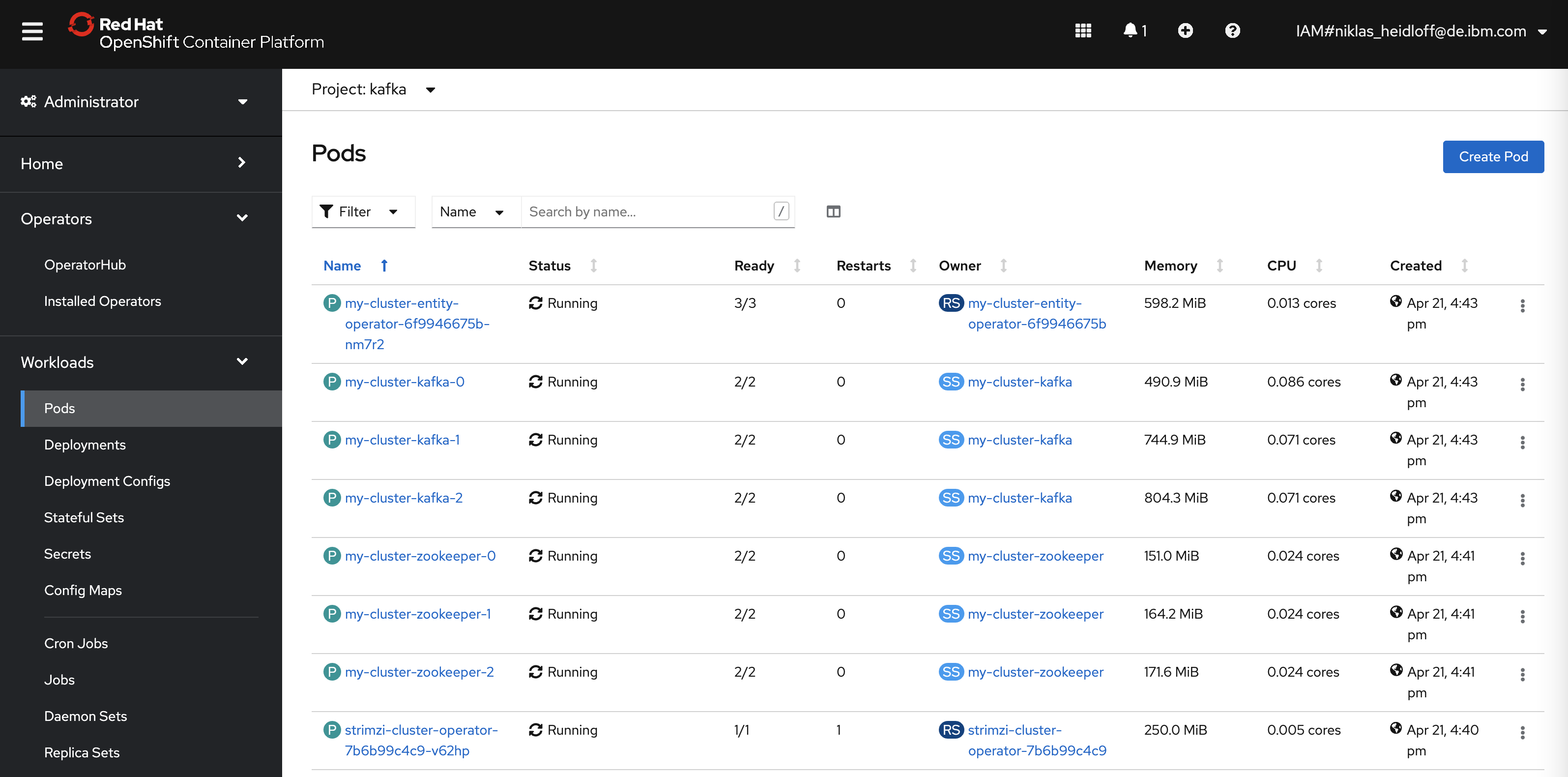
After this Kafka will be available under ‘my-cluster-kafka-external-bootstrap.kafka:9094’ for other containers running in the same cluster.
Next Steps

To learn more about OpenShift deployments and application modernization, check out the Application Modernization – From Java EE in 2010 to Cloud-Native in 2021 on GitHub.

kafka OpenShift

Published at DZone with permission of Niklas Heidloff. See the original article here.

Opinions expressed by DZone contributors are their own.

Related

  • Building Hybrid Multi-Cloud Event Mesh With Apache Camel and Kubernetes
  • Replay, Scheduling, and Throttling: Engineering a Self-Service Kafka Streaming Tool at Scale
  • Searching Kafka Without an Index: Lessons From Building Message Search for Kafdrop
  • Idempotency Under Concurrency: Why Your Application Check Isn't the Last Line of Defense

Partner Resources

×

Comments

Loading comments

The comments didn't load

Please try again in a moment.

Likes

Loading

The next likes didn't load. Please try again.

The likes didn't load

Please try again in a moment.

See who liked this

Log in or join DZone for free to see who liked this article.

Log in Join for free
  • RSS
  • X
  • Facebook

ABOUT US

  • About DZone
  • Support and feedback
  • Community research

ADVERTISE

  • Advertise with DZone

CONTRIBUTE ON DZONE

  • Article Submission Guidelines
  • Become a Contributor
  • Core Program
  • Visit the Writers' Zone

LEGAL

  • Terms of Service
  • Privacy Policy

CONTACT US

  • 3343 Perimeter Hill Drive
  • Suite 215
  • Nashville, TN 37211
  • [email protected]

Let's be friends:

  • RSS
  • X
  • Facebook