

Designing Docling Studio: Key Architecture Decisions
Architecture decisions behind Docling Studio: a visual inspection layer for Docling. From dual-engine design to Docker packaging.
 CORE
·
CORE
·
Join the DZone community and get the full member experience.
Join For FreeDocling Studio is a visual layer on top of Docling, the document extraction engine. The idea is simple: give users a way to see extraction results for debugging, quality analysis, and understanding how the pipeline actually works.
Document extraction is a critical building block for AI projects, especially in RAG contexts. But when something goes wrong in the extraction, you need to see it, not just read JSON. You could script a quick viewer with pdf.js, but you'd be re-implementing coordinate transforms, element filtering, and result navigation from scratch, and you'd lose the native connection to DoclingDocument structures that makes inspection actually useful.
That's why I built Docling Studio: a tool that works directly with Docling's output format and supports both local debugging and production-ready setups out of the box.
Section 1: Two Modes, One Interface
The first architectural decision was about how Docling Studio connects to Docling itself. There are two very different use cases: a developer inspecting a single PDF on their laptop, and a team running extraction at scale through an API. Building two separate tools for this made no sense. So Docling Studio supports both modes behind a single interface.
The first architectural decision was about how Docling Studio connects to Docling itself.
Local mode embeds Docling directly in the backend. You install Docling Studio, drop a PDF, and the extraction runs in-process. No external service to configure, no network dependency. This is the fastest way to debug and explore what Docling produces for a specific document.
Serve mode not yet implemented, but architecturally ready, will connect to a running Docling Serve instance. Instead of running the extraction locally, Docling Studio will send the document to Docling Serve over HTTP and retrieve the results. This is the production path: your team runs Docling Serve on a dedicated server or cluster, and Docling Studio becomes a visual frontend for it.
The key design constraint was that both modes had to be invisible to the rest of the application. The frontend doesn't know (and doesn't care) which engine is running behind the scenes. The extraction results come back in the same format either way. This is achieved through a simple engine adapter abstraction: a common interface that takes a document and pipeline configuration in, and returns a DoclingDocument out. Today, the local implementation is in place. The remote connector for Docling Serve will plug into the same interface; the rest of the codebase won't need to change.
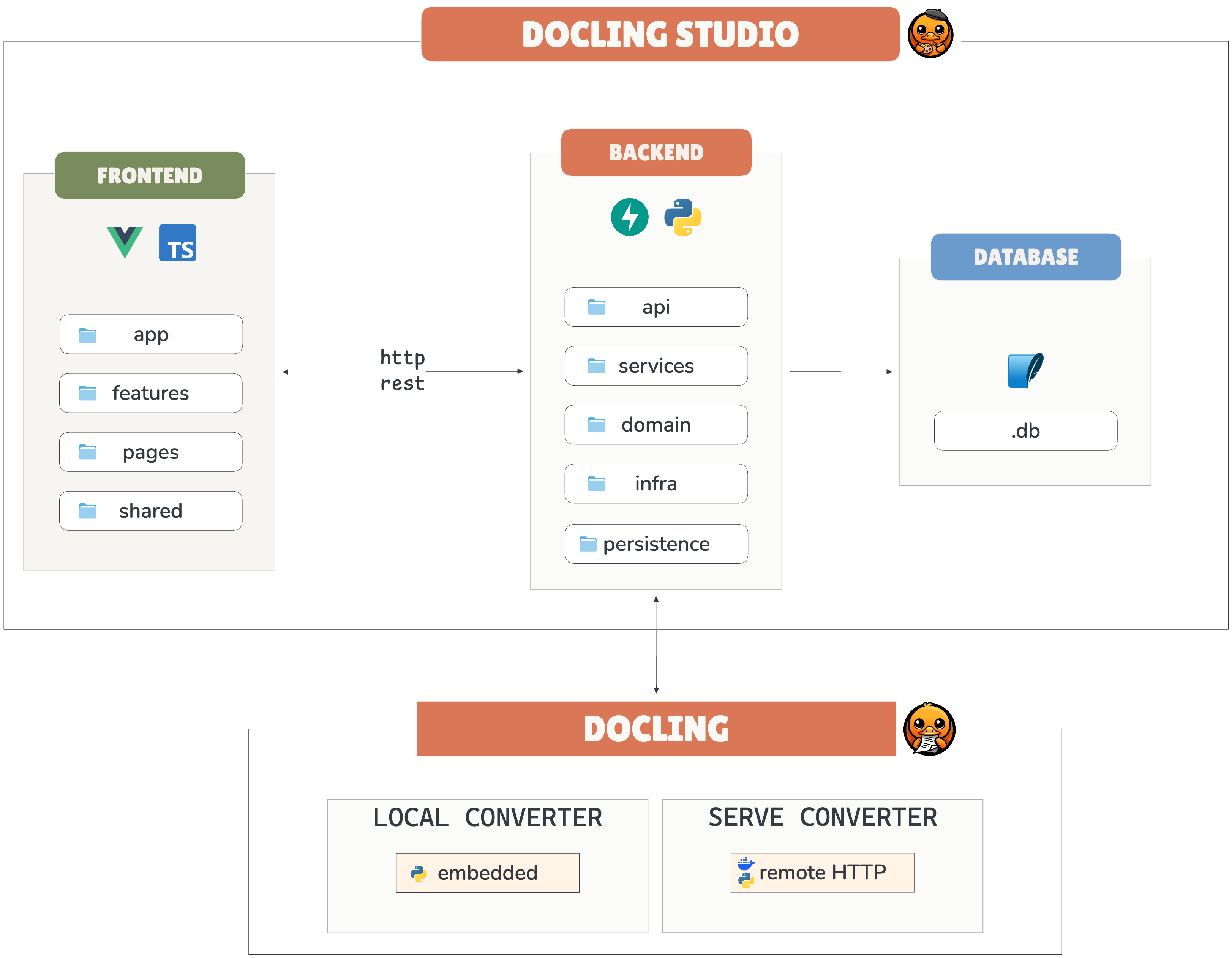
This pattern keeps the codebase clean and makes it easy to add new engines later — for instance, connecting to a custom extraction pipeline or a different version of Docling.
Section 2: Frontend: Rendering Bounding Boxes at Scale
The core value of Docling Studio lives in the frontend: overlaying colored bounding boxes on top of the original PDF pages and letting users click through each detected element. Sounds straightforward. It wasn't.
The Coordinate Problem
Docling outputs bounding box coordinates in PDF points, a unit system that has nothing to do with screen pixels. A PDF point is 1/72 of an inch, and the coordinate origin sits at the bottom-left of the page. Browsers render top-left origin, in pixels, at whatever zoom level the user picks. Every single box needs to be transformed: flip the Y axis, scale to the current zoom factor, and offset to the page position on screen. Get one step wrong, and your boxes float next to the content instead of on top of it.
Why Vue 3 Composition API
The rendering layer needs to be reactive at a fine-grained level. When a user changes zoom, every box recalculates. When they click a box, the side panel updates with the element details. When they filter by element type, show only tables, hide text blocks, dozens of boxes appear or disappear instantly. Vue 3's Composition API handles this naturally: each concern (zoom state, selection state, filter state) lives in its own composable, and the reactivity system takes care of re-rendering only what changed. No manual DOM manipulation, no performance hacks.
The Performance Question
A dense academic paper can produce 50+ detected elements on a single page. Rendering 50 semi-transparent overlays with hover states and click handlers could easily lag. The solution was surprisingly simple: the boxes are plain CSS-positioned divs layered on top of a rendered page image, not canvas elements. The browser's layout engine handles the compositing natively. No virtual DOM tricks needed, no canvas API complexity. CSS transforms for positioning, CSS transitions for hover effects. It just works.
The frontend is organized by feature: analysis, document, history, and settings, each as a self-contained module with its own components, composables, and stores. Shared utilities like the coordinate transform logic live in a common layer.
frontend/src/
├── app/                      # App shell, router, global styles
├── pages/                    # Route-level pages
│   ├── HomePage.vue
│   ├── StudioPage.vue        # PDF viewer + config + results
│   ├── DocumentsPage.vue
│   ├── HistoryPage.vue
│   └── SettingsPage.vue
│
├── features/                 # Feature modules
│   ├── analysis/             # Analysis store, API, bbox scaling, UI
│   │   ├── store.ts
│   │   ├── api.ts
│   │   ├── bboxScaling.ts    # Pure math: page coords → pixel coords
│   │   └── ui/
│   │       ├── BboxOverlay.vue
│   │       ├── AnalysisPanel.vue
│   │       ├── StructureViewer.vue
│   │       └── ...
│   ├── document/             # Document store, API, upload
│   ├── history/              # History store, navigation
│   └── settings/             # Theme, locale, API URL
│
└── shared/                   # Cross-feature utilities
    ├── types.ts              # All shared TypeScript interfaces
    ├── i18n.ts               # FR/EN translations
    ├── format.ts             # Date/size formatters
    └── api/http.ts           # HTTP client (fetch wrapper)
Section 3: Backend: FastAPI as a Thin Orchestration Layer
The backend has one job: sit between the frontend and Docling, and make the extraction pipeline easy to drive through a REST API. It shouldn't do more than that.
Why FastAPI Over Django or Flask
Docling is a Python library. Whatever framework wraps it needs to be Python-native. Django was overkill. Docling Studio doesn't need an admin panel, an ORM migration framework, or a template engine. Flask was an option, but FastAPI wins on two things: native async support and automatic OpenAPI documentation. The async part matters because document extraction can take minutes on large files. You don't want the server to block while Docling processes a 40-page report. FastAPI handles this cleanly with background tasks.
The Orchestration Pattern
The backend follows a layered structure that keeps concerns separated. The API layer defines the routes and handles HTTP; it knows nothing about Docling. The service layer contains the business logic: start an analysis, check its status, and retrieve results. The domain layer holds the data models. And the infrastructure layer is where the engine adapters live, the local and Serve mode implementations described earlier.
This separation isn't over-engineering for the sake of it. When Docling Serve support lands, it will only touch the infrastructure layer. None of the API routes, services, or domain models needs to change.
No WebSocket, On Purpose
An extraction job on a large document can take time, and the natural instinct is to push real-time progress updates via WebSocket. I chose polling instead. The frontend checks the job status every few seconds. It's less elegant but drastically simpler, no connection management, no reconnection logic, no state sync issues. For an inspection tool where you run a few documents at a time, the UX difference is negligible. Simplicity won.
document-parser/
├── main.py                   # FastAPI app, CORS, lifespan
│
├── domain/                   # Pure domain — no HTTP, no DB
│   ├── models.py             # Document, AnalysisJob dataclasses
│   ├── parsing.py            # Docling conversion & page extraction
│   └── bbox.py               # Bounding box coordinate normalization
│
├── api/                      # HTTP layer (FastAPI routers)
│   ├── schemas.py            # Pydantic DTOs (camelCase serialization)
│   ├── documents.py          # /api/documents endpoints
│   └── analyses.py           # /api/analyses endpoints
│
├── persistence/              # Data layer (SQLite via aiosqlite)
│   ├── database.py           # Connection management, schema init
│   ├── document_repo.py      # Document CRUD
│   └── analysis_repo.py      # AnalysisJob CRUD
│
├── services/                 # Use case orchestration
│   ├── document_service.py   # Upload, delete, preview
│   └── analysis_service.py   # Async Docling processing
│
└── tests/                    # pytest
Section 4: Data Layer: Why SQLite Over PostgreSQL
This is the question every developer asks when they see the stack. The answer is simple: Docling Studio is a tool, not a platform.
The Zero-Dependency Argument
Docling Studio ships as a single Docker image. You pull it, you run it, you start inspecting documents. Adding PostgreSQL to the equation means a second container, a docker-compose file, connection strings, volume mounts for data persistence, and a migration step. For an inspection tool that a developer wants to try in five minutes, that's a dealbreaker. SQLite lives inside the container as a single file. Nothing to configure, nothing to connect.
The Use Case Doesn't Need More
Docling Studio stores analysis metadata, job history, and pipeline configurations. Not millions of rows, a few hundred at most, even for heavy users. There are no concurrent writes from multiple users, no complex joins across large datasets, and no need for replication. SQLite handles this effortlessly.
The Abstraction Is There
The persistence layer uses aiosqlite for direct async access to SQLite, no ORM overhead for what amounts to simple CRUD operations on a few tables. All database access is abstracted behind a repository pattern: the rest of the codebase calls document_repo.save() or analysis_repo.get_by_id(), never raw SQL. If a use case ever requires PostgreSQL (say, a shared team instance with multiple concurrent users), the migration path is clear: swap the repository implementations, keep the interfaces. The choice is deliberate, not a limitation.
Section 5: Packaging: One Docker Image to Rule Them All
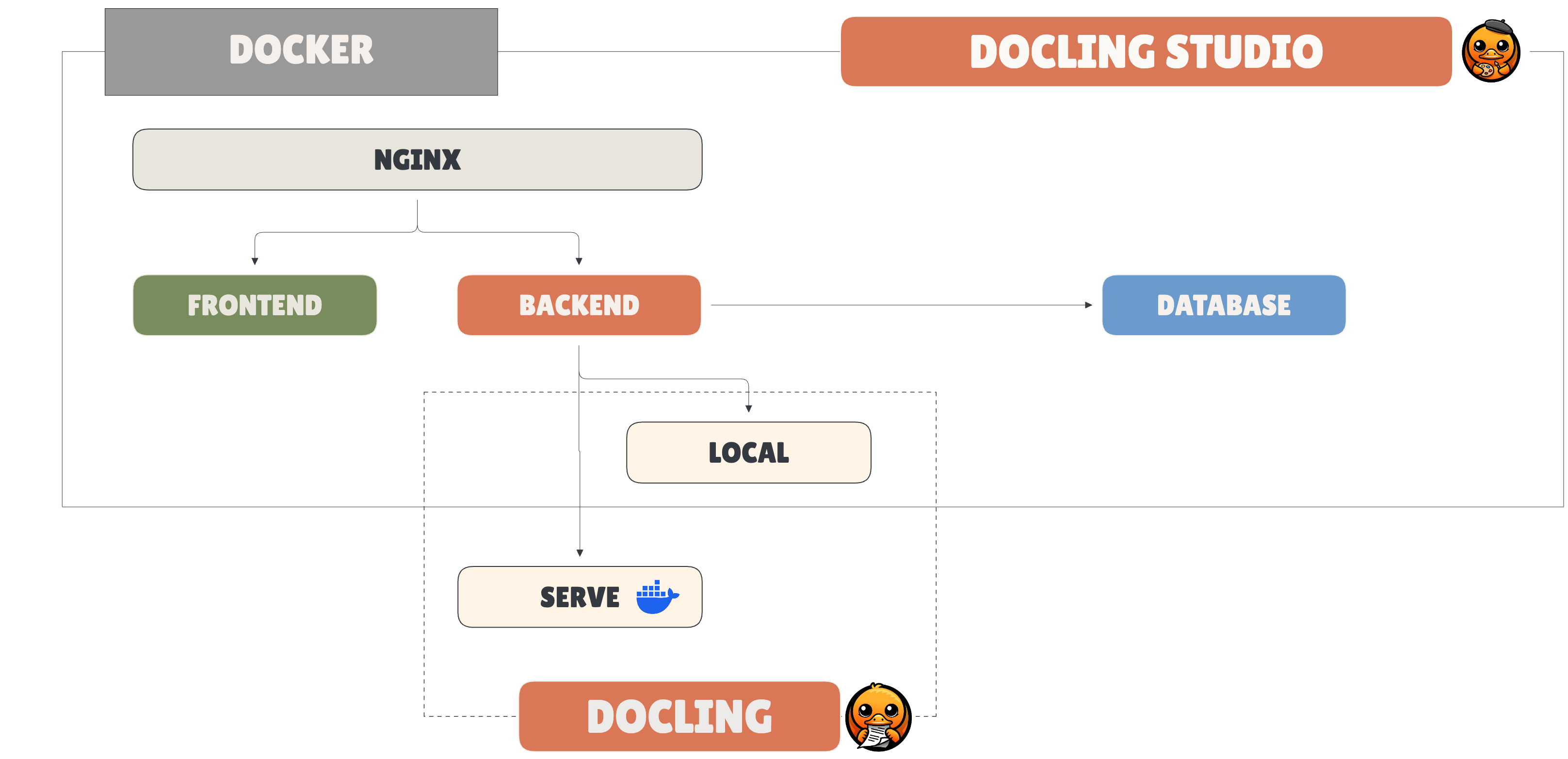
Docling Studio bundles everything: frontend, backend, and Nginx, into a single Docker image. One pull, one run, done.
Why a Single Image
The target user is a developer who wants to try Docling Studio now, not spend twenty minutes wiring containers together. A multi-container setup with separate frontend, backend, and reverse proxy images is the textbook answer. It's also the wrong answer for an open-source tool that lives or dies on first impressions. If the README says docker run and it works, people try it. If it says docker-compose up with a config file to edit first, half of them leave.
How It Works
A multi-stage Dockerfile builds the Vue 3 frontend into static assets, installs the Python backend with its dependencies, and configures Nginx to serve the frontend and proxy API calls to FastAPI. The final image contains everything needed to run.
Multi-Arch for Real-World Adoption
The image builds for both AMD64 and ARM64. This isn't optional; a growing share of developers run Apple Silicon machines, and ignoring ARM means locking out a significant part of your potential users. CI/CD builds and pushes both architectures automatically.
The Trade-Off
A single image doesn't scale horizontally. You can't independently scale the frontend and backend, and you can't run multiple backend instances behind a load balancer. That's fine. Docling Studio is an inspection tool, not a SaaS platform. If someone needs to scale extraction, they run Docling Serve separately and point Docling Studio at it; that's exactly what mode is for.
Section 6: What's Next
Docling Studio today is a debugging tool. You feed it a document, you see what Docling extracted, you spot what went wrong. That's V0, and it's useful, but it's only the first step of a longer arc.
The trajectory follows three stages that each build on the previous one: see what the extraction produces, audit what your pipeline does with it, then improve the models that power it.
See - V0: Extraction Inspection
This is the current state. Docling Studio renders bounding boxes over original pages, lets you click through detected elements, and gives you a visual ground truth of what the pipeline actually captured. The immediate next step is full Docling Serve integration, so teams running extraction in production can inspect results without re-processing documents locally.
Audit - V1: RAG Chunking Visualization
Docling is increasingly used as the ingestion layer for RAG pipelines. But between extraction and retrieval, there's a critical step nobody can see: chunking. Where do the splits happen? Does a table end up in one chunk or scattered across three? Is the section heading grouped with its content or orphaned in the previous chunk? Today, answering these questions means staring at JSON. V1 makes it visual, overlaying chunk boundaries on the original document, showing exactly what context is preserved or lost. This turns Docling Studio from an extraction debugger into a vector store audit tool. The developer who debugs extraction in V0 is exactly the one who needs to audit chunks in V1.
Improve - V2: Dataset Annotation and Evaluation
This is the strategic step. When you can see extraction errors and chunking failures, the natural next question is: can I fix the model? V2 adds a native annotation layer, users correct extraction results directly on top of the document, building training datasets without leaving the tool. The key differentiator against established annotation tools like Label Studio or Prodigy is that Docling Studio operates natively on DoclingDocument structures, not on generic formats. You annotate what Docling actually produces, not a re-imported approximation.
The connection point that closes the loop is docling-eval, the evaluation framework from the Docling project. By feeding corrected annotations back into docling-eval, Docling Studio becomes the missing piece of a complete cycle: extract → visualize → annotate → evaluate → retrain. This positions it not as a standalone tool, but as the visual and human-in-the-loop layer of the Docling ecosystem.
Each stage widens the user base. V0 attracts developers debugging single documents. V1 brings in teams building RAG pipelines. V2 pulls in ML engineers training extraction models. The architecture is designed to support this progression without rewrites; the engine abstraction, the layered backend, and the modular frontend all serve this longer-term trajectory.
Contributions and feedback are welcome!
github.com/scub-france/Docling-Studio
Opinions expressed by DZone contributors are their own.
Comments