

Designing Tool-Calling AI Agents That Survive Production: A LangGraph Approach
AI agents work in demos and break into production. This LangGraph tutorial builds tool-calling agents that are fail-safe: validated, bounded, and observable.
Most agent demos work beautifully on stage and fall apart the first week in production. The reason is almost always the same: the demo treats tool-calling as a happy path, and production is nothing but edge cases. A tool times out. A model hallucinates an argument.
The agent loops on itself and burns through your token budget. After shipping a few of these systems, I have learned that the durable design question is not "can the agent call a tool" but "what happens when the tool call goes wrong."
This tutorial walks through a tool-calling agent in LangGraph built the way I would build it for production, with the safeguards baked in from the first commit rather than bolted on after the first incident.
What We Are Building
To keep the focus on production patterns rather than business logic, we will build a small but realistic agent: a currency assistant. A user asks a plain-language question like "What is the USD to INR rate?" and the agent answers using live foreign-exchange data rather than guessing. The model itself has no idea what today's rate is, so it must recognize that it needs data, call a get_exchange_rate tool to fetch it, and then return the actual result.
That is the entire reason tool-calling exists: it turns a model that can only talk into an agent that can act and ground its answers in real data. FX rates are a good teaching example because the failure modes are obvious and unforgiving. A wrong currency code, an unsupported pair, or a flaky data source are exactly the kinds of things that must not crash a production agent.
The Mental Model
A tool-calling agent is a loop. The model looks at the conversation and decides whether to answer directly or to call a tool. If it calls a tool, your code runs that tool, feeds the result back, and the model decides again. That loop is exactly what LangGraph is good at expressing: nodes do work, edges decide where control flows next.
Step 1: A Tool That Cannot Crash Your Agent
Our agent's one capability is looking up an exchange rate, so the tool that does it has to be bulletproof. The single most important production habit is that a tool never raises into the agent loop. It validates its input and returns a readable error string that the model can reason about. A raised exception kills the run; a returned error lets the agent recover. Here, the tool checks that both currency codes are valid and that the requested pair exists, returning a clear message when either check fails.
Notice the failure modes are first-class outputs, not afterthoughts. Bad arguments and missing data both produce a controlled message.
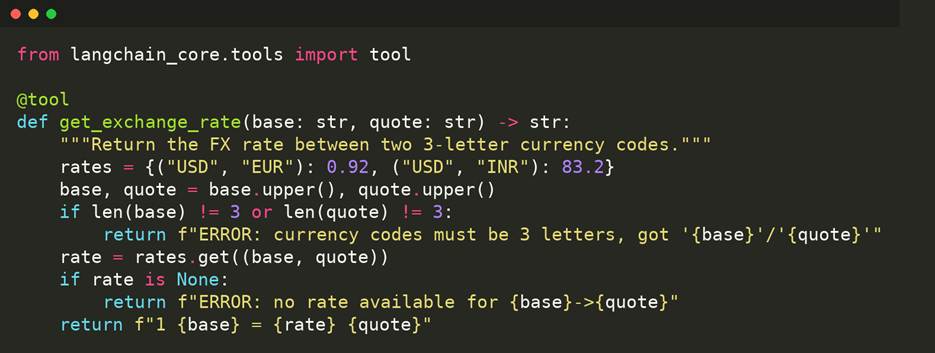
Step 2: The Nodes
The agent node asks the model what to do. The tool node executes any requested tools, and critically, it wraps every call so a failure becomes a message instead of a stack trace. It also rejects calls to tools that do not exist, which is how you contain a hallucinated tool name.
Step 3: Wiring the Loop, With a Brake
The conditional edge sends control to the tools node only when the model actually requests a tool; otherwise, the run ends. This is the whole agent loop in four lines.
The brake that separates a demo from a production system is one line at invocation time:
The recursion_limit bounds how many times the loop can cycle. Without it, a confused model can call tools indefinitely. With it, a runaway agent fails fast and loudly instead of quietly draining your budget. Treat it as a required parameter, not an optional one.
Step 4: Observability, You Will Thank Yourself For
When an agent misbehaves in production, you need to see its decisions, not guess at them. A few log lines at each node turn an opaque black box into a traceable sequence. Running the agent against "What is the USD to INR rate?" produces this:
Every step is visible: the agent decides to call a tool, the tool returns a validated result, control flows back, and the model produces its final answer. When something breaks at 2 a.m., this trace is the difference between a five-minute fix and a five-hour investigation.
What Makes It Survive
The example is small, but the principles scale. Tools return errors instead of raising. Unknown tool names are rejected rather than executed. The loop is bounded, so it cannot run away. Every decision is logged, so failures are traceable instead of mysterious when you are debugging at scale. Swap the prototype model for ChatAnthropic or ChatOpenAI, add your real tools, and the same skeleton carries you from prototype to production without rewriting the core.
The hard part of agent engineering was never getting the model to call a tool. It is designed for the moment the call goes wrong, and LangGraph gives you exactly the right place to put each safeguard.
Opinions expressed by DZone contributors are their own.