

Detecting and Solving Segmentation Faults in Linux Containers
In this article, we will explain what segmentation fault is, what causes them, and how to detect or troubleshoot them.
Join the DZone community and get the full member experience.
Join For FreeUnderstanding and solving errors are essential skills for any Linux administrator. The most common errors you will get are: “no such file or directory found” or “unable to access or permission denied”. If you are a Linux administrator, it is mandatory to know how to detect and solve segmentation faults. In this article, we will explain what segmentation fault is, what causes them, and how to detect or troubleshoot them. So let’s get started.
What Is a Segmentation Fault?
A segmentation fault is nothing but the error that occurs due to failed attempts to access Linux OS’s memory regions. These types of faults are detected by the kernel. Once detected, the process is immediately terminated, and a “segmentation violation signal” or “segmentation fault” is issued.
We can find most segmentation faults in lower-level languages like C (the most commonly used/ fundamental language in both LINUX and UNIX). It allows a great deal on memory allocation and usage. Hence, developers can have full control over the memory allocation.
What Causes a Segmentation Fault?
In the Linux or kernel operating system, the following are the conditions that cause a segmentation fault:
- Segmentation Violation Mapping Error (SEGV_MAPERR): This is the error that occurs when you want to access memory outside the application that requires an address space.
- Segmentation Violation Access Error (SEGV_ACCERR): This is the error that occurs when you want to access memory where the application does not have permission or write source codes on read-only memory space.
Sometimes we assume that these two conditions cause major problems, but that’s not always true. There might be chances of getting errors through referencing NULL values, freed pointers available for the reference memory areas, non-initialized parameters, and StackOverflow.
Examples That Generate Segmentation Faults in Linux
Here, we are going to explain a few code snippets that generate the segmentation default in Linux:
void main (void) {
   char *buffer;  /* Non initialized buffer */
   buffer[0] = 0; /* Trying to assign 0 to its first position will cause a segmentation fault */
}
We can now run and compile them on Linux kernel as follows:
$ ulimit -S -c unlimited$ gcc -o seg_fault -ggdb seg_fault.c$ ./seg_faultOutput:
Segmentation fault (core dumped)In the above example, ulimit dumps the process memory on errors, and the compiling done with the help of GCC or -ggtb options, adds debug information on the resulting binary.
In addition, we can also enable get debug information and core dumping where the error occurred as shown in the below example:
$ gdb ./seg_fault /var/crash/core.seg_faultOutput:
... <snip> ...
Reading symbols from ./seg_fault...
[New LWP 6291]
Core was generated by `./seg_fault'.
Program terminated with signal SIGSEGV, Segmentation fault.
#0  0x000055ea4064c135 in main () at seg_fault.c:4
4 buffer[0] = 0;Note: However, if you don't have to debug information, you can still identify the errors with the help of the name of the function, and values where we are getting errors.
How to Detect a Segmentation Fault
Till now, we have seen a few examples where we get errors. In this section, we will explain how to diagnose/detect the segmentation fault.
Using a debugger, you might detect segmentation faults. There are various kinds of debuggers available, but the most often used debuggers are GDB or -ggtb. GDB is a well-known GNU debugger that helps us view the backtrace of the core file, which is dumped by the program.
Whenever a segmentation fault occurs in the program, it usually dumps the memory content at the time of the core file crash process. Start your debugger, GDB, with the “gdb core” command. Then, use the “backtrace” command to check for the program crash.
If you are unable to detect the segmentation fault using the above solution, try to run your program under “debugger” control. Then, go through the source code, one code line or one code function at a time. To perform this task, all you need to do is compile your program codes without optimization, and use the “-g” flag to find out the errors.
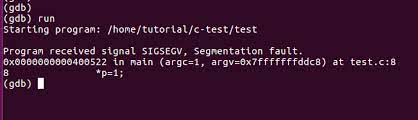
Let us explain the simple steps required to identify segFault inside GDB:
Make sure you have enabled the debugger mode (-g flag should also be a part of the GCC line). It looks like this:
gcc -g -o segfault segfault.cThen load the file into the gdb format:
gdb ./segfault
For the sample code, use this navigation to identify the codes that cause SegFault:
gef> runThen, run your program: Starting program: /home/pi/segfault
program received signal SIGSEGV, Segmentation fault.The following image illustrates the above steps:
How to Prevent Segmentation Faults in Linux?
When you write a program using pointers, memory allocators, or references, make sure that all the memory accessories are within the boundary and compile with proper access restrictions.
The below are the important things which you should take care of them to avoid segmentation faults:
- Using gdb debugger to track the source of the problem while using dynamic memory location.
- Make sure that you have installed or configured the correct hardware or software components.
- Maintaining type consistency throughout the program code and the function parameters that call convention values will reduce the Segfault.
- Always make sure that all operating system dependencies are installed inside the jail.
- Stop using conditional statements in recursive functions.
- Turn on the core dumping support services (especially Apache) to prevent the segmentation fault in the Linux program.
These tips are very important as they improve code robustness and security services.
Final Take
If you are a Linux developer, you might have gone through the segmentation fault scenarios many times. In this post, we have tried to brief you about SegFault, given real-time examples, explained the causes for the SegFault, and discussed how to detect and prevent segmentation faults.
We hope this blog may help a few Linux communities, Linux administrators, and Linux experts worldwide who want to master the core concepts of the Linux kernel system.
Opinions expressed by DZone contributors are their own.
Comments