

Develop With OCI Real-Time Speech Transcription and Oracle Database NL2SQL/Select AI To Speak With Your Data
Use a combination of real-time speech-to-text, natural language to SQL, and Gen AI, to talk with your data just as you would to a person and in real-time.
Join the DZone community and get the full member experience.
Join For FreeSpeak in your natural language, ask questions about your data, and have the answers returned to you in your natural language as well: that's the objective, and what I'll show in this quick blog and, as always, provide full src repos for as well. I'll leave the use cases up to you from there.
You can learn more about these Oracle Database features here for the free cloud version and here for the free container/image version. Also, you can check out the Develop with Oracle AI and Database Services: Gen, Vision, Speech, Language, and OML workshop, which explains how to create this application and numerous other examples as well as the GitHub repos that contain all the src code.
Now, let's get into it. First, I'll show the setup for the Select AI database side (which, in turn, calls Gen AI service), then the OCI Real-time Speech AI Transcription service, and finally the front-end Python app that brings it all together.
Oracle Database NL2SQL/Select AI (With Gen AI)
While Oracle Database version 23ai contains a number of AI features such as vector search, RAG, Spatial AI, etc., NL2SQL/Select AI was introduced in version 19.
We have a stateless Python application, so we'll be making calls to:
DBMS_CLOUD_AI.GENERATE(
            prompt       => :prompt,
            profile_name => :profile_name,
            action       => :action)
Let's look at each of these three arguments.
- The
promptis the natural language string, starting with "select ai." - The
profile_nameis the name of the AI Profile created in the database for OCI Generative AI (or whatever AI service is being used) with the credential info and optionally anobject_listwith meta info about the data. Oracle Autonomous Database supports models from OCI Generative AI, Azure OpenAI, OpenAI, and Cohere. In our sample app, we use the Llama 3 model provided by OCI Generative AI. Here is an example code tocreate_profile:
dbms_cloud_admin.enable_resource_principal(username  => 'MOVIESTREAM');

dbms_cloud_ai.create_profile(
        profile_name => 'genai',
        attributes =>
            '{"provider": "oci",
            "credential_name": "OCI$RESOURCE_PRINCIPAL",
            "comments":"true",
            "object_list": [
                {"owner": "MOVIESTREAM", "name": "GENRE"},
                {"owner": "MOVIESTREAM", "name": "CUSTOMER"},
                {"owner": "MOVIESTREAM", "name": "PIZZA_SHOP"},
                {"owner": "MOVIESTREAM", "name": "STREAMS"},
                {"owner": "MOVIESTREAM", "name": "MOVIES"},
                {"owner": "MOVIESTREAM", "name": "ACTORS"}
             ]
            }'
);- Finally, the
actionis one of four options for the interaction/prompt and type/format of the answers that are returned to you from Oracle Database's Select AI feature. In our sample app, we usenarrate; however, we could use others.narratereturns the reply as a narration in natural language.chatas a chat exchange in natural languageshowsqlreturns the raw SQL for the answer/query.runsqlgets the SQL and then runs it and returns the raw query results.
OCI Real-Time Speech Transcription
OCI Real-time Speech Transcription is expected to be released within the month and includes Whisper model multilingual support with diarization capabilities.
Using this service simply requires that certain policies are created to provide access for a given user/compartment/group/tenancy. These can be specified at various levels and would generally be more restricted than the following but this gives a list of the resources needed.
allow any-user to manage ai-service-speech-family in tenancy
allow any-user to manage object-family in tenancy
allow any-user to read tag-namespaces in tenancy
allow any-user to use ons-family in tenancy
allow any-user to manage cloudevents-rules in tenancy
allow any-user to use virtual-network-family in tenancy
allow any-user to manage function-family in tenancy
The options for accessing the service from an external client are essentially the same as accessing any OCI/cloud service. In this case, we use an OCI config file and generate a security_token using the following.
oci session authenticate ; oci iam region list --config-file /Users/YOURHOMEDIR/.oci/config --profile MYSPEECHAIPROFILE --auth security_token
From there it's just a matter of using the preferred SDK client libraries to call the speech service. In our case, we are using Python.
The Python App
Here is the output of our application where we can see:
- A printout of the words (natural language) spoken into the microphone and transcribed by the real-time transcription service.
- The trigger of a Select AI command, with "narrate" action, in response to the user saying "select ai."
- The results of the call to the Oracle database Select AI function returned in natural language.
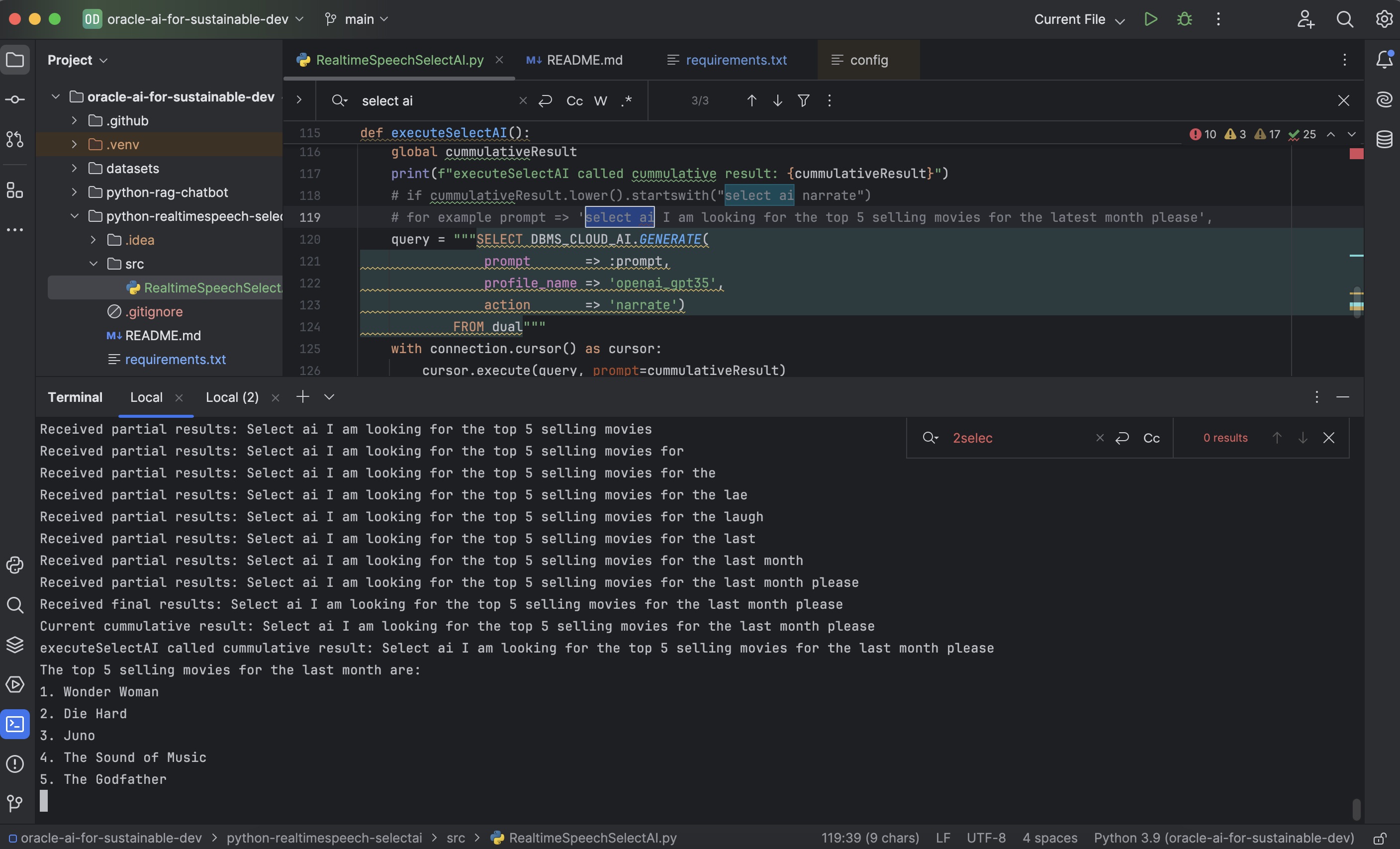
Let's take the application step by step.
First, we see the Python imports:
asyncioevent processing loopgetpassto get the database and wallet/ewallet.pem passwords from the application promptpyaudiofor processing microphone events/soundoracledbthin driver for accessing the Oracle database and making Select AI callsoci sdk coreand speech libraries for real-time speech transcription calls
import asyncio
import getpass

import pyaudio
import oracledb
import oci
from oci.config import from_file
from oci.auth.signers.security_token_signer import SecurityTokenSigner
from oci.ai_speech_realtime import (
    RealtimeClient,
    RealtimeClientListener,
    RealtimeParameters,
)
Then we see the main loop where sound from the microphone is fed to the OCI teal-time speech transcription API client and to the cloud services via WebSocket. The client is created by specifying the OCI config mentioned earlier along with the URL of the speech service and the compartment ID.
def message_callback(message):
    print(f"Received message: {message}")
realtime_speech_parameters: RealtimeParameters = RealtimeParameters()
realtime_speech_parameters.language_code = "en-US"
realtime_speech_parameters.model_domain = (
    realtime_speech_parameters.MODEL_DOMAIN_GENERIC
)
realtime_speech_parameters.partial_silence_threshold_in_ms = 0
realtime_speech_parameters.final_silence_threshold_in_ms = 2000
realtime_speech_parameters.should_ignore_invalid_customizations = False
realtime_speech_parameters.stabilize_partial_results = (
    realtime_speech_parameters.STABILIZE_PARTIAL_RESULTS_NONE
)
realtime_speech_url = "wss://realtime.aiservice.us-phoenix-1.oci.oraclecloud.com"
client = RealtimeClient(
    config=config,
    realtime_speech_parameters=realtime_speech_parameters,
    listener=SpeechListener(),
    service_endpoint=realtime_speech_url,
    signer=authenticator(),
    compartment_id="ocid1.compartment.oc1..MYcompartmentID",
)
loop = asyncio.get_event_loop()
loop.create_task(send_audio(client))
loop.create_task(check_idle())
loop.run_until_complete(client.connect())
if stream.is_active():
    stream.close()
If the transcribed speech contains "select ai", the application waits for 2 seconds, and if there is no further speech, takes the command from "select ai" on, and sends it over to the database server using the Oracle Python driver. The following is the code for the connection creation and execution of this using DBMS_CLOUD_AI.GENERATE (prompt, profile_name, action) described earlier.
pw = getpass.getpass("Enter database user password:")
# Use this when making a connection with a wallet
connection = oracledb.connect(
    user="moviestream",
    password=pw,
    dsn="selectaidb_high",
    config_dir="/Users/pparkins/Downloads/Wallet_SelectAIDB",
    wallet_location="/Users/pparkins/Downloads/Wallet_SelectAIDB"
)

def executeSelectAI():
    global cummulativeResult
    print(f"executeSelectAI called cummulative result: {cummulativeResult}")
    # for example prompt => 'select ai I am looking for the top 5 selling movies for the latest month please',
    query = """SELECT DBMS_CLOUD_AI.GENERATE(
                prompt       => :prompt,
                profile_name => 'openai_gpt35',
                action       => 'narrate')
            FROM dual"""
    with connection.cursor() as cursor:
        cursor.execute(query, prompt=cummulativeResult)
        result = cursor.fetchone()
        if result and isinstance(result[0], oracledb.LOB):
            text_result = result[0].read()
            print(text_result)
        else:
            print(result)
    # Reset cumulativeResult after execution
    cummulativeResult = ""
Video
A walkthrough of this content can also be viewed here:
Concluding Notes
The next logical step of course is to add text-to-speech (TTS) functionality for the reply and OCI has a new service for that as well. I'll post an updated example including this in the near future.
Thank you for reading and please do not hesitate to contact me with any questions or feedback you may have. I'd love to hear from you.
Opinions expressed by DZone contributors are their own.
Comments