

DMN 1.3 Temporal FEEL Expressions
Temporal-based decisions are critical for every business, providing easy-to-interpret functions to define the time-based checks that will better enable business users.
Join the DZone community and get the full member experience.
Join For FreeDecision Model and Notation (DMN) is a standard established by the Object Management Group (OMG) for describing and modeling operational decisions. DMN decision models can be shared between DMN-compliant platforms and across organizations so that business analysts and business rules developers are unified in designing and implementing DMN decision services.
Alongside Boxed Expressions (Data Tables, Context, Functions, Lists, etc.), the DMN specification defines the Friendly Enough Expression Language (FEEL) to define the logic of a decision in a DMN model.
DMN 1.3 spec was released in December 2019. Among other features, a notable addition was the support for temporal reasoning using FEEL expressions. Time-based decisioning is a critical piece of decision logic for many businesses. The temporal operators introduced in the DMN specification are also heavily inspired by HL7 CQL, which is extensively used in the healthcare domain.
In this article, let’s explore the built-in temporal functions and the range-based FEEL expression that can be used for point in time as well time range decisions.
Red Hat Process Automation currently supports the execution of DMN 1.3 and we will be using it for our examples below. Although there aren't modeling capabilities for DMN 1.3 yet, the temporal FEEL functions are already supported on the latest version of the platform, since the underlying engine supports the execution of the DMN 1.3 spec.
Built-In Temporal Functions
The DMN 1.3 spec provides common support utilities when dealing with date or date and time values.
Function |
Description |
day of year( date ) |
Returns the Gregorian number of the day within the year |
day of week( date ) |
Returns the day of the week according to the Gregorian calendar enumeration: “Monday”, “Tuesday”, “Wednesday”, “Thursday”, “Friday”, “Saturday”, “Sunday” |
month of year( date ) |
Returns the month of the year according to the Gregorian calendar enumeration: “January”, “February”, “March”, “April”, “May”, “June”, “July”, “August”, “September”, “October”, “November”, “December” |
week of year( date ) |
Returns the Gregorian number of the week within the year, accordingly to ISO 8601 |
As you can see, these utility methods can come in handy for decision logic checks that involve interpretation of when the event happened.
Assume that an online store runs a special discount sale that provides a special discount on products every Saturday in the months of May, June, and July. Let’s create a simple FEEL expression which will check if the purchase is eligible for the discount.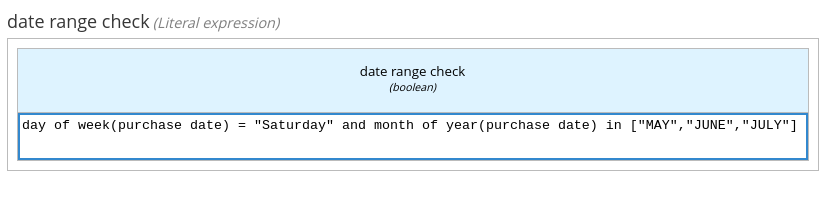
The decision thus expressed is not only concise but also easy for business users to understand and interpret.
Point in Time/Range-Based Temporal Functions
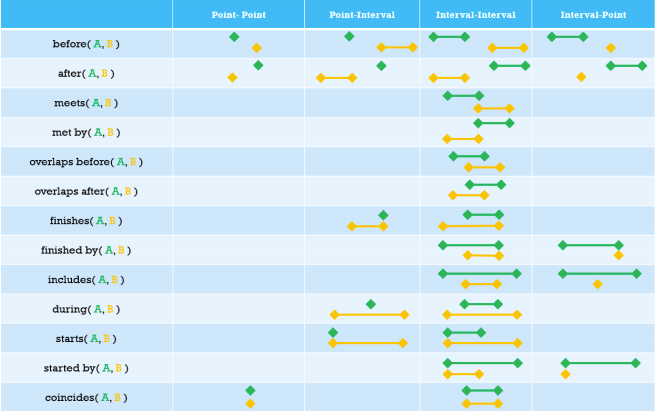
Next, let’s look at the new temporal based FEEL functions. The table below shows the various ways these functions can be used. Let’s look at some of these functions and their usages with examples.
Interval-Point / Point-Interval
A range in FEEL is a value that defines a lower and an upper bound. The following FEEL functions provide a powerful combination of using range and point values together.
Function |
before(point, range) / before(range, point) |
after(point, range) / after(range, point) |
finishes(point, range) |
finished by(range, point) |
starts(point, range) |
includes(range, point) |
during(point, range) |
started by(range, point) |
Let’s say we want to see if the claim date submitted by the customer falls within the coverage period (start date - end date).
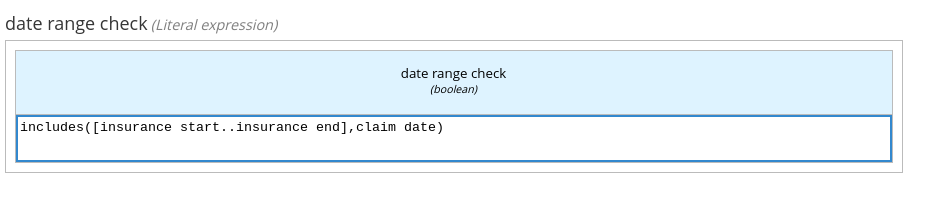 Notice that we are now using a combination of ranges and point literals to perform this decision.
Interval-Interval
FEEL now also provides for several functions across time intervals.
Function |
before(range1,range2) |
after(range1, range2) |
meets(range1, range2) |
met by(range1, range2) |
overlaps(range1, range2) |
overlaps before(range1, range2) |
overlaps after(range1, range2) |
finishes(range1, range2) |
finished by(range1, range2) |
includes(range1, range2) |
during(range1, range2) |
starts(range1, range2) |
started by(range1, range2) |
coincides(range1, range2) |
Let’s now look at an example. Let’s say we have a requirement to identify if there is an overlap between periods of coverages (start time - end time) between two insurance enrollments.
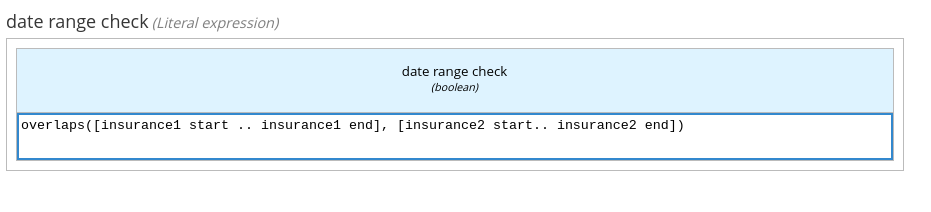 With a simple expression, we are now able to express the decision for the overlap logic. Contrasting this to the earlier release, this would have to be done in multiple steps using arithmetic operators on the start and end date.
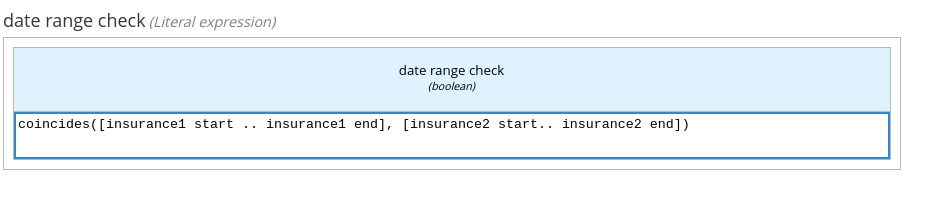
Let's consider another example where there is a customer who has a primary and a secondary insurance. We want to do a check to make sure both of them have the same coverage period. The following FEEL expression implements this logic.
 A range in FEEL expressions can be either closed or opened. This allows us to specify if the start/end values need to be considered for the purpose of decision making.
Let’s say, we would like to check if insurance2 starts exactly the same date after insurance1 ends.

Notice that the range definition for insurance1 has a ‘)’ (open interval). This means that the end date here isn't considered within the range of values.
Point-Point
FEEL now has the following point-point convenience methods.
Function |
before(A,B) |
after(A,B) |
coincides(A,B) |
Consider a simple example where we want to check if the claim date is before the data of expiry on an insurance.
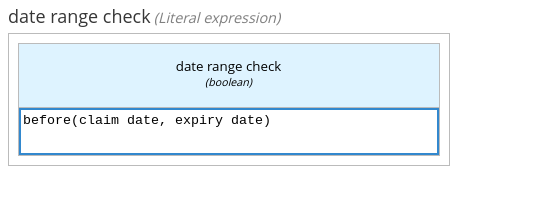 As we can see, the interpretation becomes obvious with the way the FEEL functions are expressed.
It is also important to note that some of the FEEL functions we discussed in the interval-interval section can also be applied to point values. For instance, we discussed the coincides function for comparing two range values. Let’s now try to do the same with two points in time.
We would like to check if the login date happens to be the birthday of the customer. This can then be used to send out greetings to the user.
 Notice how the same FEEL expression can be used for decisions on point values, as well.
Summary
As we described earlier, temporal-based decisions are critical for every business, providing easy-to-interpret functions to define the time-based checks that will better enable business users.
Opinions expressed by DZone contributors are their own.
Comments