

DocAI: PDFs/Scanned Docs to Structured Data
In this article, discover a way to chat with AI and ask questions in the context of your scanned documents.
 ·
·
Join the DZone community and get the full member experience.
Join For FreeProblem Statement
The "why" of this AI solution is very important and prevalent across multiple fields.
Imagine you have multiple scanned PDF documents:
- Where customers make some manual selections, add signature/dates/customer information
- You have multiple pages of written documentation that have been scanned and want a solution that obtains text from these documents
OR
- You are simply looking for an AI-backed avenue that provides an interactive mechanism to query documents that do not have a structured format
Dealing with such scanned/mixed/unstructured documents can be tricky, and extracting crucial information from them could be manual, hence error-prone and cumbersome.
The solution below leverages the power of OCR (Optical character recognition) and LLM (Large Language Models) in order to obtain text from such documents and query them to obtain structured trusted information.
High-Level Architecture
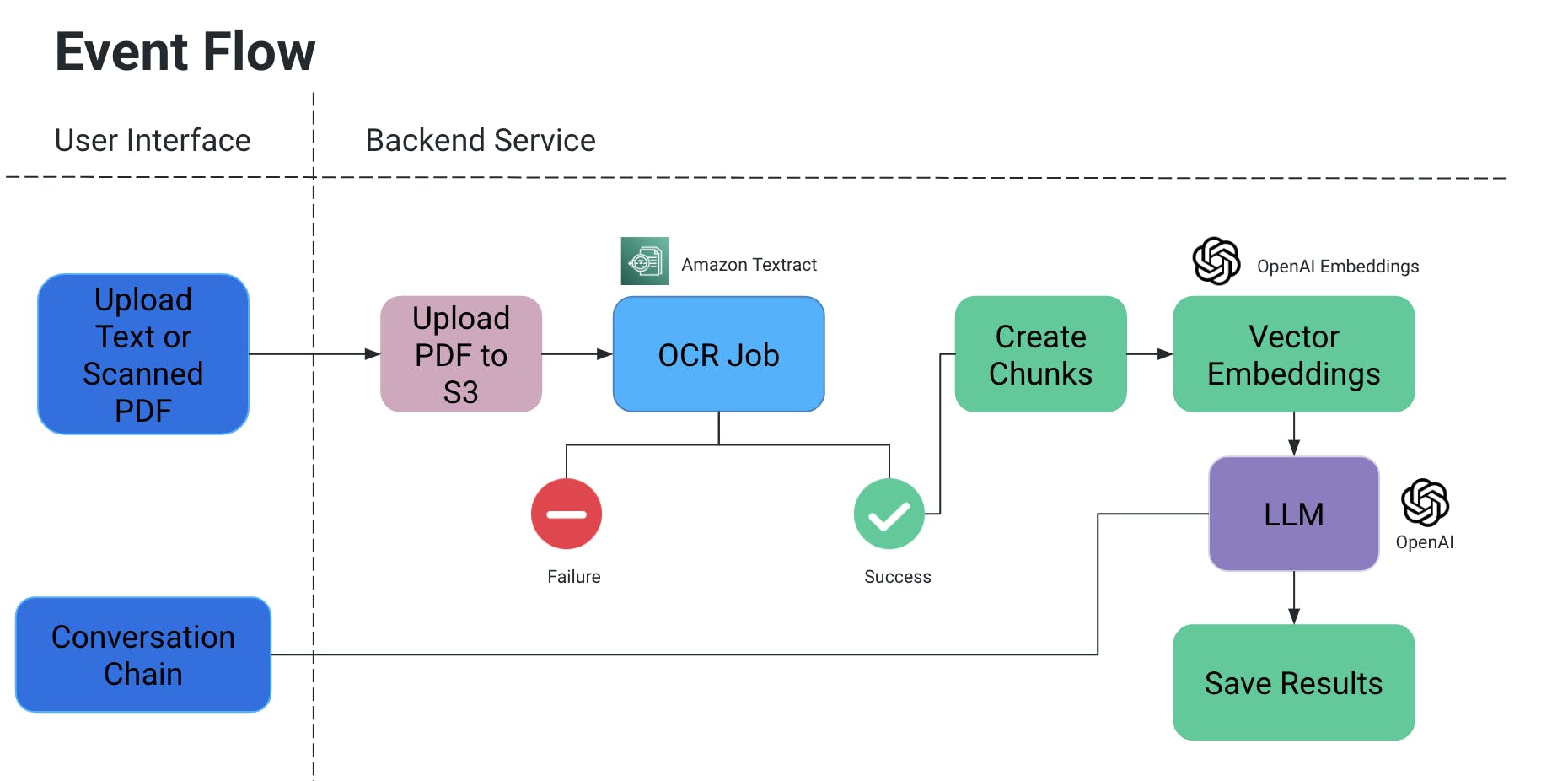
User Interface
- The user interface allows for uploading PDF/scanned documents (it can be further expanded to other document types as well).
- Streamlit is being leveraged for the user interface:
- It is an open-source Python Framework and is extremely easy to use.
- As changes are performed, they reflect in the running apps, making this a fast testing mechanism.
- Community support for Streamlit is fairly strong and growing.
- Conversation chain:
- This is essentially required to incorporate chatbots that can answer follow-up questions and provide chat history.
- We leverage LangChain for interfacing with the AI model we use; for the purpose of this project, we have tested with OpenAI and Mistral AI.
Backend Service
Flow of Events
- The user uploads a PDF/scanned document, which then gets uploaded to an S3 bucket.
- An OCR service then retrieves this file from the S3 bucket and processes it to extract text from this document.
- Chunks of text are created from the above output, and associated vector embeddings are created for them.
- Now this is very important because you do not want context to be lost when chunks are split: they could be split mid-sentence, without some punctuations the meaning could be lost, etc.
- So to counter it, we create overlapping chunks.
- The large language model that we use takes these embeddings as input and we have two functionalities:
- Generate specific output:
- If we have a specific kind of information that needs to be pulled out from documents, we can provide query in-code to the AI model, obtain data, and store it in a structured format.
- Avoid AI hallucinations by explicitly adding in-code queries with conditions to not make up certain values and only use the context of the document.
- We can store it as a file in S3/locally OR write to a database.
- Chat
- Here we provide the avenue for the end user to initiate a chat with AI to obtain specific information in the context of the document.
- Generate specific output:
OCR Job
- We are using Amazon Textract for optical recognition on these documents.
- It works great with documents that also have tables/forms, etc.
- If working on a POC, leverage the free tier for this service.
Vector Embeddings
- A very easy way to understand vector embeddings is to translate words or sentences into numbers which capture the meaning and relationships of this context
- Imagine you have the word "ring" which is an ornament: in terms of the word itself, one of its close matches is "sing". But in terms of the meaning of the word, we would want it to match something like "jewelry", "finger", "gemstones", or perhaps something like "hoop", "circle", etc.
- Thus when we create vector embedding of "ring", we basically are filling it up with tons of information about its meaning and relationships.
- This information, along with the vector embeddings of other words/statements in a document, ensures that the correct meaning of the word "ring" in context is picked.
- We used OpenAIEmbeddings for creating Vector Embeddings.
LLM
- There are multiple large language models that can be used for our scenario.
- In the scope of this project, testing with OpenAI and Mistral AI has been done.
- Read more here on API Keys for OpenAI.
- For MistralAI, HuggingFace was leveraged.
Use Cases and Tests
We performed the following tests:
- Signatures and handwritten dates/texts were read using OCR.
- Hand-selected options in the document
- Digital selections made on top of the document
- Unstructured data parsed to obtain tabular content (add to text file/DB, etc.)
Future Scope
We can further expand the use cases for the above project to incorporate images, integrate with documentation stores like Confluence/Drive, etc. to pull information regarding a specific topic from multiple sources, add a stronger avenue to do comparative analysis between two documents, etc.
Published at DZone with permission of Kriti B. See the original article here.
Opinions expressed by DZone contributors are their own.
Comments