

Optimizing Docker Container Logging: Strategies for Scalability and Performance
Let's explore the significance of various logging types and their impact on selecting optimal solutions for scalable containerized applications.
In modern microservices, logging is vital for observability, performance, and incident response. Traditional logging fails at scale, causing latency and storage issues. This article details efficient logging strategies for Docker containers, including log driver selection and centralized aggregation, to mitigate bottlenecks and build a robust, scalable logging infrastructure for any deployment at scale.
Understanding Log Drivers and Types
Log drivers capture container console output (stdout/stderr) and route it to local files or remote services. If a log driver fails to deliver logs (e.g., remote destination unreachable), the Docker daemon thread can block, potentially causing thread exhaustion.
Log drivers are specifically for continuous console-based logging, not event or file-based logs. For instance, when deploying a Spring application to AWS ECS (EC2) with the awslogs driver, only initial console logs are handled by the driver before the application starts writing to file or event logs.
- File-based logging: This common method stores logs in files, with an external process (like OpenTelemetry or Splunk Forwarder) handling transfer and retries, ensuring log preservation during outages and scaling.
- Event-based logging: Application teams or their dependencies set this up, often using asynchronous event streaming libraries with built-in resilience.
- Console-based logging: Docker's internal log copiers asynchronously monitor stdout/stderr for each container, using synchronous, blocking log drivers to send logs to various destinations like Splunk or CloudWatch.
Here is an example illustrating ECS deployment on EC2 with two application containers generating logs and forwarding to external logging systems:
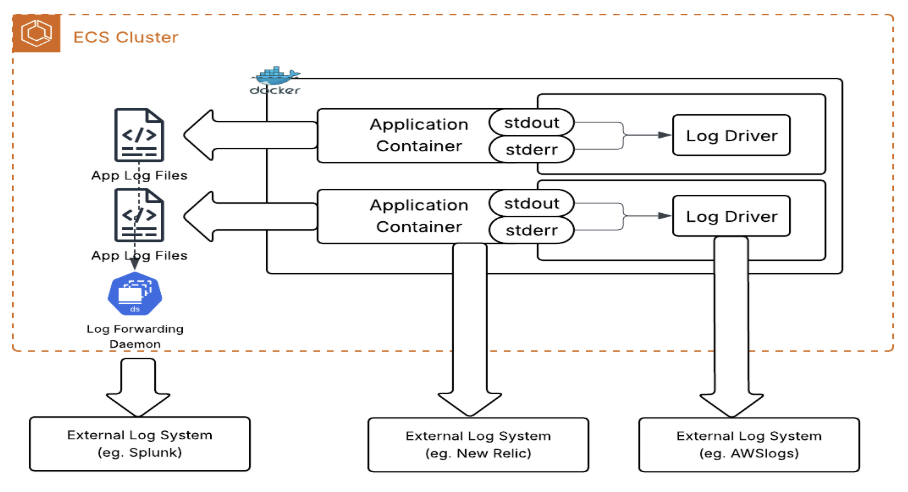
A challenge with default log driver settings is that if the external log destination is unavailable, it can cause resource contention on stdout/stderr, eventually affecting the routines managing logging.
AWSLogs Driver Modes
In Amazon Elastic Container Service (Amazon ECS), the awslogs logging driver captures logs from a container’s stdout and stderr, and then uploads them to Amazon CloudWatch Logs via the `PutLogEvents` API. The log driver supports a mode setting, which can be configured as follows:
-
blocking(default): Application container code writing to stdout/stderr blocks if logs can't be sent to CloudWatch immediately, potentially blocking the app, failing health checks, and terminating tasks. The startup fails if the log group/stream creation fails.
- non-blocking: Logs are buffered in-memory when CloudWatch is unavailable; calls to stdout/stderr don't block. When the buffer is full, logs are lost. For ECS on EC2, container startup doesn't fail if log group/stream creation fails. For ECS on Fargate, the startup always fails regardless of the mode if the log group/stream creation fails.
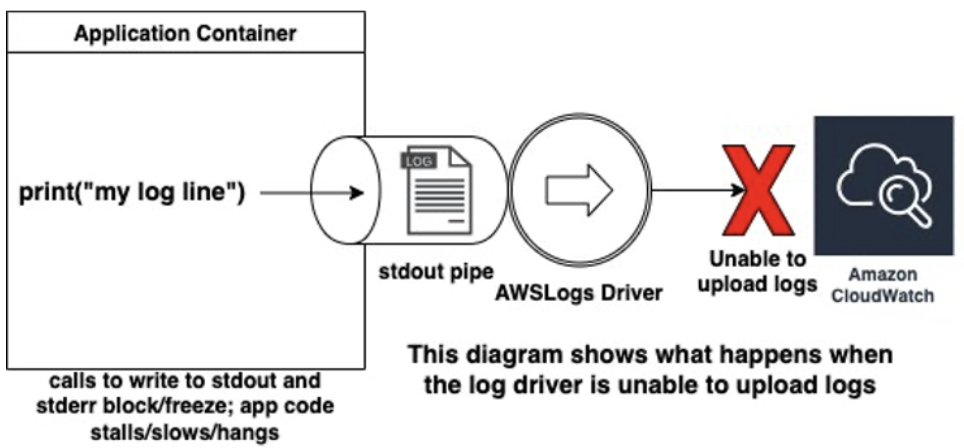
Blocking introduces latency — when logging, the log driver takes precedence over the container's operation and delays all other tasks until the log driver has delivered the message. This can cause application instability and cause the ECS service scheduler to recycle the task, as it thinks it is unhealthy. This presents in various ways — teams may notice an intermittent CPU utilization spike, because the CPU is waiting for the I/O operation (log delivery) to complete.
The Docker documentation itself states: "Applications are likely to fail in unexpected ways when STDERR or STDOUT streams block."
When non-blocking is set, the logging driver uses an in-memory buffer to queue logs before sending them to their final destination. If this buffer fills up, the container runtime will discard additional logs until the buffer has room again. This affects your application’s memory as well, so be cognizant of setting a buffer that is too high, which consumes too much of the container’s memory.
Balancing Application Availability and Log Delivery: Key Trade-Offs
There is a trade-off between prioritizing application availability and ensuring reliable log delivery. It is recommended to configure logging as non-blocking to prevent unexpected downtime, with the understanding that this may result in some log loss. Non-blocking mode requires setting an appropriate buffer size — typically 5–10MB for most applications.
Buffer size affects the memory available to the main application. Setting the buffer too large can reduce memory for workloads, while a buffer that is too small increases the risk of log loss if the buffer fills up.
Note: A small buffer will result in log loss when full, as messages will be dropped.
For example, if using a native logging driver (Splunk), a temporary outage in a log delivery service prevented logs from being sent. Applications using the default blocking log configuration became unstable and experienced task restarts until the service was restored.
Here is the reference from the AWS blog describing the scenario where a container sends logs to Amazon CloudWatch. If the connection to CloudWatch is lost, the container will continue trying to send logs until it becomes blocked (backpressure), causing it to freeze and the application it hosts to stop responding. Once the connection is restored, the container resumes normal operation.

Is it advisable to use non-blocking mode instead of the default?
Given the potential impact on application availability with the default blocking mode, application teams might opt for non-blocking mode as an alternative.
The recommended Amazon ECS Task Definition settings are shown below:
"logConfiguration": {
    "logDriver": "awslogs",
    "options": {
        "mode": "non-blocking",
        "max-buffer-size": "25m"
    }
}
Conclusion
In summary, optimizing Docker container logging is crucial for maintaining application stability and performance in Microservices environments. While log drivers are essential for capturing console output, their default blocking behavior can lead to significant issues like resource contention, application freezes, and task instability, especially when external log destinations are unavailable. To mitigate these risks, it is highly recommended to configure log drivers in a non-blocking mode, even though this may entail a small risk of log loss. Careful consideration of max-buffer-size is also vital, balancing memory consumption with the need to prevent log drops during high-throughput periods.
Ultimately, understanding the trade-offs between application availability and absolute log delivery is key. By adopting non-blocking logging strategies and optimizing buffer sizes, application teams can build a more resilient and scalable logging infrastructure that supports continuous observability without compromising application uptime.
Opinions expressed by DZone contributors are their own.