

Kubernetes CSI Drivers
What does a storage standard specification look like? Why do we need it, and which problem does it solve? How does it work in practice, and what impact can it have?
Join the DZone community and get the full member experience.
Join For FreeIn the Kubernetes ecosystem, storage has many facets. The most obvious ones are StorageClass, PersistentVolume, and PersistentVolumeClaim. We have all used them to get storage mounted to pods, but that is just the surface of how storage really gets plugged into Kubernetes pods. Beneath the PVs and PVCs lies a complex standard consisting of multiple components, and every component is crucial for it to work.
In this article, I am going to dive deep into how this standard works, what each component does, and build a working architecture. But first, let’s define the standard. The official definition of CSI is: a standard interface that enables container orchestration systems (like Kubernetes) to expose arbitrary storage systems to containers in a consistent way — or, as stated more formally, the Container Storage Interface (CSI) is a specification that enables storage vendors to develop plugins that expose storage systems to containerized workloads in a standardized, portable way.
Great, but what does that even mean?
The Problem
So, say we have gone back in time to pre-December 2017. We are using Kubernetes and need to create volumes, attach and detach disks to nodes, and mount and unmount filesystems. These tasks were handled by modules, aka plugins, within the Kubernetes code base, aka in-tree. Different vendors like AWS and GCP would develop their plugin and ship it with Kubernetes.
Kubernetes bundled dozens of proprietary storage integrations into itself, forcing it to understand how every storage system worked. This led to the system being very cumbersome and prone to error, a maintenance nightmare. It was not good for anybody, because vendors were blocked by Kubernetes releases from introducing new features and fixing bugs, and independent development was not possible.
In December 2017, really smart people from Google, Red Hat, VMware, and others came up with a solution. The solution was to decouple storage from container orchestration, and thus CSI was born.
How CSI Works
At a high level, CSI has the following components. Here, I am only going to list the components for which I will show some code snippets. I believe that helps internalize the concept better.
CSI Driver (Vendor Provided)
CSI drivers consist of a controller and a plugin provided by storage vendors. They contain code that interacts with the storage backend and abstracts APIs (gRPC) for kubelet and sidecars.
Controller Service
This is a controller that runs as a Deployment (Kubernetes resource) and supports the following functions (not listing all):
- CreateVolume
- DeleteVolume
- ControllerPublishVolume (Attach)
Node Service
This is a plugin that runs as a DaemonSet on nodes (one per node) and supports the following functions:
- NodePublishVolume (Mount into Pod)
- NodeUnpublishVolume (Unmount)
- Reporting node capabilities and topology (important for kubelet to know)
Kubernetes CSI Sidecars (Special Interest Group (SIG) Provided)
These are sidecars that act as a bridge between the Kubernetes API server and the controller drivers. We have a couple of these:
- External-Provisioner – Watches for PVCs via the Kubernetes API watch stream, and depending on the outcome, calls the Create/DeleteVolume API of the controller driver over gRPC.
- External-Attacher– Watches for VolumeAttachment (Kubernetes resource) and calls.
- ControllerPublishVolume – When a pod starts
- ControllerUnpublishVolume – When a pod is removed from the node
A timeline of the events, attempting to showcase how components interact:
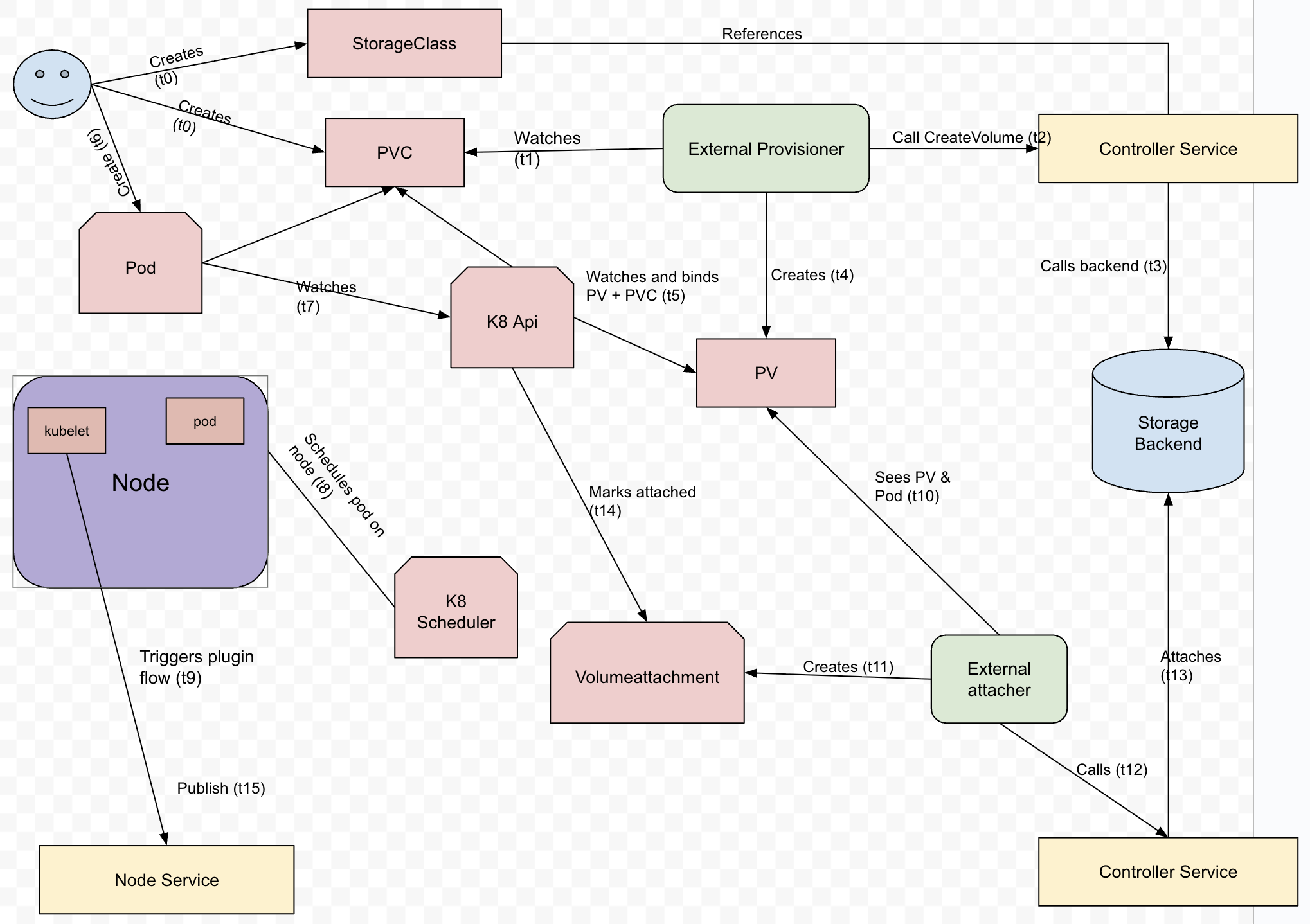
Let’s tighten up this story from a user’s perspective and build a mental map of event flow.
When a user creates a PVC (PersistentVolumeClaim), K8s notices the PVC and sends a watch event to all clients that are watching for PVCs. The External-Provisioner sidecar is a watcher of PVC and gets the event. It finds the CSI controller information from the StorageClass (part of the PVC), determines that it is responsible for this StorageClass, and calls the controller's CreateVolume Method. Controller driver returns volume metadata. External-Provisioner then creates a PersistentVolume (K8 resource) object. Binding of PVC and PV is handled by K8s.
When a user creates a POD, the K8 scheduler decides which node the pod should run on; it is aware if the volume requires attachment. The scheduler calls an API server to schedule the pod. When the POD is scheduled, the PV controller creates a VolumeAttachment object with information like attacher, nodeName, and PV name.
External-attacher watches for VolumeAttachment and calls Controller Driver’s ControllerPublishVolume. Controller driver returns a valid response after attaching; external-attacher updates VolumeAttachment to attached=true.
At this point, the Kubelet running on the nodes notices the pod has been scheduled and the volume attached. Kubelet loads the CSI driver’s node plugin by means of node-driver-registrar. Kubelet calls the plugin over a registered Unix domain socket. CSI Node Plugin calls NodeStageVolume and NodePublishVolume, which are basically mounting the storage on the node.
Notice that the storage volume is attached to the node, so this publish event is one per node. Here, I want to give a quick reference of K8 storage access modes. K8 defines three access modes and their significance.
| AccessMode | Meaning | Multiple pods on same node |
|---|---|---|
| ReadWriteOnce (RWO) | Mounted as read-write by a single node | ✅ All pods on the same node can share it |
| ReadOnlyMany (ROX) | Mounted read-only by many nodes | ✅ All pods can see it read-only |
| ReadWriteMany (RWX) | Mounted read-write by many nodes | ✅ All pods on the same node or different nodes can see it |
Let the Coding Begin!
Set up the Go Project.
mkdir csi && cd csiThe full code is present at https://github.com/justramesh2000/csi-demo, here I am going to talk about important functions and corresponding K8 resources Yaml.
The CSI standard is divided into three types of services.
1. Identity Service
This service exposes information about the CSI driver; it lets CO (Container orchestrator), like K8s, confirm if the driver is present and healthy. This service is implemented by both the controller and the node plugin. The functions in this service are:
GetPluginInfo – This returns the driver name and version.
func (d *driver) GetPluginInfo(ctx context.Context, req *csi.GetPluginInfoRequest) (*csi.GetPluginInfoResponse, error) {
	// kubelet uses this info to identify the CSI driver
	log.Println("GetPluginInfo called")
	return &csi.GetPluginInfoResponse{
		Name:          "demo.csi.k8s.io", // unique driver name
		VendorVersion: "v0.1",
	}, nil
}
Probe – This returns health information.
func (d *driver) Probe(ctx context.Context, req *csi.ProbeRequest) (*csi.ProbeResponse, error) {
	log.Println("Probe called")
	return &csi.ProbeResponse{}, nil
}
GetPluginCapabilities – This provides information about what features are supported by the driver (create, delete, attach, mount). The return type of this function provides information on what groups (example, controller) of functions the driver supports (aka capabilities). For more information, visit this page.
func (d *driver) GetPluginCapabilities(ctx context.Context, req *csi.GetPluginCapabilitiesRequest) (*csi.GetPluginCapabilitiesResponse, error) {
	log.Println("GetPluginCapabilities called")
	return &csi.GetPluginCapabilitiesResponse{
		Capabilities: []*csi.PluginCapability{
			{
				Type: &csi.PluginCapability_Service_{
					Service: &csi.PluginCapability_Service{
						Type: csi.PluginCapability_Service_CONTROLLER_SERVICE,
					},
				},
			},
			{
				Type: &csi.PluginCapability_Service_{
					Service: &csi.PluginCapability_Service{
						Type: csi.PluginCapability_Service_UNKNOWN,
					},
				},
			},
		},
	}, nil
}
2. Controller Service
This is the control plane of CSI, which handles operations across the cluster. The functions it supports are:
Create/Delete Volume – These provisions or de-provisions are stored by making backend API calls to AWS. This is the abstraction I spoke about earlier, because of this, K8s doesn't have to worry about how the storage is provisioned.
func (d *driver) CreateVolume(ctx context.Context, req *csi.CreateVolumeRequest) (*csi.CreateVolumeResponse, error) {
	log.Printf("CreateVolume called: %v", req.Name)
	return &csi.CreateVolumeResponse{
		Volume: &csi.Volume{
			VolumeId:      req.Name,
			CapacityBytes: req.CapacityRange.GetRequiredBytes(),
		},
	}, nil
}

func (d *driver) DeleteVolume(ctx context.Context, req *csi.DeleteVolumeRequest) (*csi.DeleteVolumeResponse, error) {
	log.Printf("DeleteVolume called: %v", req.VolumeId)
	return &csi.DeleteVolumeResponse{}, nil
}
Publish/Unpublish Volume – This helps with attaching and detaching volume to the node. Another abstraction that K8 doesn’t have to worry about.
func (d *driver) ControllerPublishVolume(ctx context.Context, req *csi.ControllerPublishVolumeRequest) (*csi.ControllerPublishVolumeResponse, error) {
	log.Printf("ControllerPublishVolume called: VolumeID=%s, NodeID=%s", req.VolumeId, req.NodeId)
	// In demo: return minimal valid response
	return &csi.ControllerPublishVolumeResponse{}, nil
}

func (d *driver) ControllerUnpublishVolume(ctx context.Context, req *csi.ControllerUnpublishVolumeRequest) (*csi.ControllerUnpublishVolumeResponse, error) {
	log.Printf("ControllerUnpublishVolume called: VolumeID=%s, NodeID=%s", req.VolumeId, req.NodeId)
	return &csi.ControllerUnpublishVolumeResponse{}, nil
}
ControllerGetCapabilities – Advertises features (create/delete) that are supported by the controller. So, identity service capability function said “I have controller service” and ControllerGetCapabilites says “these are the functions I can perform.”
func (d *driver) ControllerGetCapabilities(ctx context.Context, req *csi.ControllerGetCapabilitiesRequest) (*csi.ControllerGetCapabilitiesResponse, error) {
	return &csi.ControllerGetCapabilitiesResponse{
		Capabilities: []*csi.ControllerServiceCapability{
			{
				Type: &csi.ControllerServiceCapability_Rpc{
					Rpc: &csi.ControllerServiceCapability_RPC{
						Type: csi.ControllerServiceCapability_RPC_CREATE_DELETE_VOLUME, // important for provisioner
					},
				},
			},
		},
	}, nil
}
3. Node Services
These are node-specific services; Kubelet on each node calls these functions to perform.
NodeStageVolume – Prepare Volume on the node (e.g., format it).
func (d *driver) NodeStageVolume(ctx context.Context, req *csi.NodeStageVolumeRequest) (*csi.NodeStageVolumeResponse, error) {
	log.Println("Stage volume called")
	log.Printf("NodeStageVolume called: %v -> %v", req.VolumeId, req.StagingTargetPath)
	os.MkdirAll(req.StagingTargetPath, 0755)
	return &csi.NodeStageVolumeResponse{}, nil
}
NodePublishVolume – Mount the volume into the pod’s filesystem when the pod is scheduled. You'd notice that here I am just creating a directory on the container filesystem of the container running this code, in our case, it will be the node plugin container. This is ephemeral storage for demo purposes. If your pod deletes, the data will not persist.
func (d *driver) NodePublishVolume(ctx context.Context, req *csi.NodePublishVolumeRequest) (*csi.NodePublishVolumeResponse, error) {
	log.Println("Publish volume called")
	log.Printf("NodePublishVolume called: %v -> %v", req.VolumeId, req.TargetPath)
	hostPath := fmt.Sprintf("/tmp/csi-demo-volumes/%s", req.VolumeId)
	os.MkdirAll(hostPath, 0755)
	log.Printf("Volume mounted at %s", hostPath)
	return &csi.NodePublishVolumeResponse{}, nil
}
NodeGetInfo – Gives the node's identity, which is used by the controller for the attach operation.
func (d *driver) NodeGetInfo(ctx context.Context, req *csi.NodeGetInfoRequest) (*csi.NodeGetInfoResponse, error) {
	return &csi.NodeGetInfoResponse{
		NodeId: "demo-node",
	}, nil
}
NodeGetCapabilites – Node-level features supported by the node service.
func (d *driver) NodeGetCapabilities(ctx context.Context, req *csi.NodeGetCapabilitiesRequest) (*csi.NodeGetCapabilitiesResponse, error) {
	log.Println("NodeGetCapabilities called")
	return &csi.NodeGetCapabilitiesResponse{
		Capabilities: []*csi.NodeServiceCapability{
			{
				Type: &csi.NodeServiceCapability_Rpc{
					Rpc: &csi.NodeServiceCapability_RPC{
						Type: csi.NodeServiceCapability_RPC_STAGE_UNSTAGE_VOLUME,
					},
				},
			},
		},
	}, nil
}
Time to See Things in Action
First, let's build a Docker image for this so that we can load it into our KIND. A Docker file is present in the repo, and the following command can be used to build and tag an image from the code directory
docker build -t csi-demo:latest .At this point, there will be an image in your local Docker.
Create a KIND cluster using:
kind create cluster --name csi-demoLoad the image we just built to the KIND cluster, provide the image tag and cluster.
kind load docker-image csi-demo:latest --name csi-demoWe will first let K8 know about our driver via a CSIDriver object, apply the following YAML to Kubernetes using kubectl apply -f <filename>.yaml:
apiVersion: storage.k8s.io/v1
kind: CSIDriver
metadata:
  name: demo.csi.k8s.io
spec:
  attachRequired: true
  podInfoOnMount: true # helpful during debugging
  fsGroupPolicy: ReadWriteOnceWithFSType
  volumeLifecycleModes:
    - Persistent
Let's also set up some service account and permissions, apply the following YAML to K8s:
apiVersion: rbac.authorization.k8s.io/v1
kind: ClusterRole
metadata:
  name: csi-demo-provisioner-role
rules:
  - apiGroups: [""]
    resources: ["persistentvolumeclaims", "persistentvolumes"]
    verbs: ["get", "list", "watch", "create", "update", "delete", "patch"]
  - apiGroups: ["storage.k8s.io"]
    resources: ["storageclasses", "volumeattachments"]
    verbs: ["get", "list", "watch", "create", "update", "delete", "patch"]
  - apiGroups: ["storage.k8s.io"]
    resources: ["volumeattachments/status"]
    verbs: ["get", "list", "watch", "patch", "update"]
  - apiGroups: ["coordination.k8s.io"]
    resources: ["leases"]
    verbs: ["get", "list", "watch", "create", "update", "delete", "patch"]

---
apiVersion: rbac.authorization.k8s.io/v1
kind: ClusterRoleBinding
metadata:
  name: csi-demo-provisioner-binding
roleRef:
  apiGroup: rbac.authorization.k8s.io
  kind: ClusterRole
  name: csi-demo-provisioner-role
subjects:
  - kind: ServiceAccount
    name: csi-demo-controller-sa
    namespace: kube-system
We are ready to deploy the controller and node plugin, apply the following YAMLs to K8 (order doesn't matter):
Controller driver – Notice that the controller driver runs as a Deployment.
apiVersion: v1
kind: ServiceAccount
metadata:
  name: csi-demo-controller-sa
  namespace: kube-system
---
apiVersion: apps/v1
kind: Deployment  # runs as a Deployment
metadata:
  name: csi-demo-controller
  namespace: kube-system
spec:
  replicas: 1
  selector:
    matchLabels:
      app: csi-demo-controller
  template:
    metadata:
      labels:
        app: csi-demo-controller
    spec:
      serviceAccountName: csi-demo-controller-sa
      containers:
        - name: csi-demo
          image: csi-demo:latest
          imagePullPolicy: Never
          env:
            - name: CSI_ENDPOINT
              value: "unix:///csi/csi.sock"
          volumeMounts:
            - name: socket-dir
              mountPath: /csi

        - name: external-provisioner
          image: registry.k8s.io/sig-storage/csi-provisioner:v5.1.0
          args:
            - "--csi-address=/csi/csi.sock"
            - "--v=5"
          env:
            - name: PROVISIONER_NAME
              value: demo.csi.k8s.io
            - name: CSI_ADDRESS
              value: /csi/csi.sock
          volumeMounts:
            - name: socket-dir
              mountPath: /csi

        - name: external-attacher
          image: registry.k8s.io/sig-storage/csi-attacher:v4.8.0
          args:
            - "--csi-address=/csi/csi.sock"
            - "--v=5"
          env:
            - name: ATTACHER_NAME
              value: demo.csi.k8s.io
            - name: CSI_ADDRESS
              value: /csi/csi.sock
          volumeMounts:
            - name: socket-dir
              mountPath: /csi
      volumes:
        - name: socket-dir
          emptyDir: {}
Node plugin. Notice that the node plugin runs as a DaemonSet on all nodes.
apiVersion: v1
kind: ServiceAccount
metadata:
  name: csi-demo-node-sa
  namespace: kube-system
---
apiVersion: apps/v1
kind: DaemonSet  # runs as a DaemonSet
metadata:
  name: csi-demo-node
  namespace: kube-system
spec:
  selector:
    matchLabels:
      app: csi-demo-node
  template:
    metadata:
      labels:
        app: csi-demo-node
    spec:
      serviceAccountName: csi-demo-node-sa
      containers:
        - name: csi-demo-node
          image: csi-demo:latest
          imagePullPolicy: Never
          securityContext:
            privileged: true
          env:
            - name: CSI_ENDPOINT
              value: "unix:///csi/csi.sock"
          volumeMounts:
            - name: plugin-dir
              mountPath: /csi
            - name: pods-mount-dir
              mountPath: /var/lib/kubelet/pods
              mountPropagation: Bidirectional

        - name: node-driver-registrar
          image: registry.k8s.io/sig-storage/csi-node-driver-registrar:v2.12.0
          args:
            - "--csi-address=/csi/csi.sock"
            - "--kubelet-registration-path=/var/lib/kubelet/plugins/demo.csi.k8s.io/csi.sock"
            - "--v=5"
          volumeMounts:
            - name: plugin-dir
              mountPath: /csi
            - name: registration-dir
              mountPath: /registration
      volumes:
        - name: plugin-dir
          hostPath:
            path: /var/lib/kubelet/plugins/demo.csi.k8s.io/
            type: DirectoryOrCreate
        - name: registration-dir
          hostPath:
            path: /var/lib/kubelet/plugins_registry/
            type: Directory
        - name: pods-mount-dir
          hostPath:
            path: /var/lib/kubelet/pods
            type: Directory
Verify if all the pods are running fine in kube-system namespace where we created the controller driver and plugin.
kubectl get pod -n kube-systemAt this point, we are done with our CSI driver and are ready to create storage.
Let's create a StorageClass to let K8 know about our driver. Apply the following YAML:
apiVersion: storage.k8s.io/v1
kind: StorageClass
metadata:
  name: csi-demo-sc
provisioner: demo.csi.k8s.io
volumeBindingMode: Immediate
And, now we can create the PVC and see it BIND.
Apply the following YAML:
apiVersion: v1
kind: PersistentVolumeClaim
metadata:
  name: demo-pvc
spec:
  storageClassName: csi-demo-sc
  accessModes:
    - ReadWriteOnce
  resources:
    requests:
      storage: 1Gi
Confirm if PVC is bound.
kubectl get pvcYou can also check if the volume (PV) is present.
kubectl get pvLet's create the pod by applying the following YAML:
apiVersion: v1
kind: Pod
metadata:
  name: demo-pod
spec:
  containers:
    - name: app
      image: busybox
      command: ["sleep", "3600"]
      volumeMounts:
        - mountPath: "/mnt/demo"
          name: demo-vol
  volumes:
    - name: demo-vol
      persistentVolumeClaim:
        claimName: demo-pvc
Note: The pod is referencing PVC (demo-pvc) and it has a mountPath /mnt/demo.
If everything went well, the pod will move to running status:
kubectl get pod You could exec into the pod and confirm that the mount path exists.
Exec into the pod.
kubectl exec -it demo-pod -- /bin/shCheck the mounted path.
ls -l /mnt/demo/You can also check the volume attachment object with the attacher information.
k get volumeattachmentOn my machine, I see the following:

That's all, we have a CSI driver running and provisioning a volume to us.
Conclusion
We have demystified how kubernetes storage really works under the hood, if you have made this far, you have effectively peeled back all the layers of Kubenertes storage, there are more nuances to it but this is a great foundation. What starts as a simple PVC or a mounted directory inside a pod is actually the outcome of a well-designed sequence of interactions between Kubernetes control-plane components, CSI sidecars, and the driver’s own controller and node services.
Opinions expressed by DZone contributors are their own.
Comments