

Docker Secrets Management: From Development to Production
Why environment variables leak, how Docker Swarm secrets work, when to use HashiCorp Vault, and building a layered approach to secrets in production containers.
 CORE
·
CORE
·
Most Docker tutorials show secrets passed as environment variables. It's convenient, works everywhere, and feels simple. It's also fundamentally insecure.
Environment variables are visible to any process running inside the container. They appear in docker inspect output accessible to anyone with Docker socket access. Debugging tools log them. Child processes inherit them. And in many logging frameworks, they get written to log files where they persist indefinitely.
Consider this common pattern:
docker run -e DATABASE_PASSWORD=SuperSecret123 myappThat password is now:
- Visible in
docker inspect myapp - Readable by any process in the container via
/proc/1/environ - Inherited by every subprocess spawned by the application
- Potentially logged by the application's error handling
- Available to anyone with read access to the Docker socket
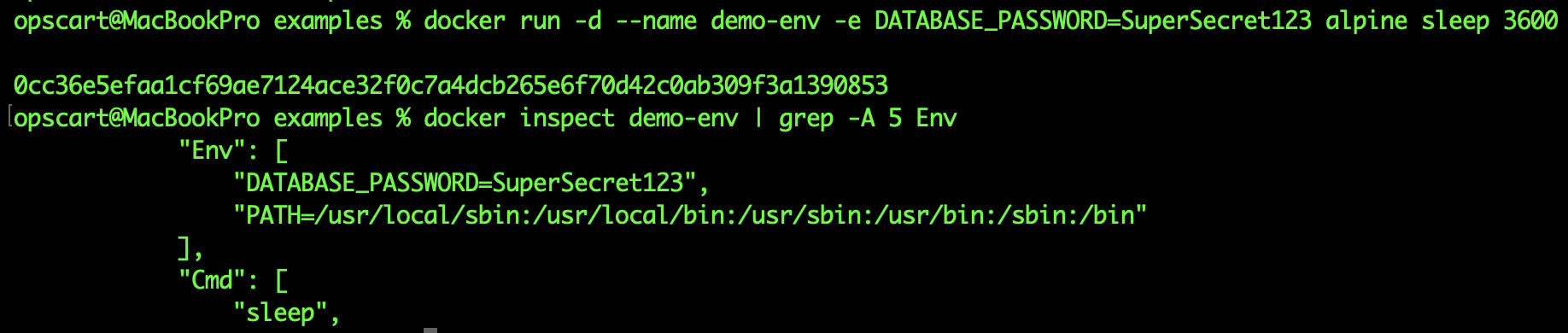
docker inspect showing environment variables with secrets visible
This is not theoretical. In production pharmaceutical environments managing patient data under HIPAA, environment variable leakage through log aggregation systems has triggered compliance violations.
Docker Swarm Secrets: The Native Solution
Docker Swarm includes built-in secret management that addresses the environment variable problem through encryption and in-memory delivery.
How Swarm Secrets Work
When you create a secret in Swarm, the secret value is encrypted and stored in Swarm's distributed state (backed by Raft consensus). The secret is only decrypted on nodes running services that explicitly declare they need it. On those nodes, secrets are mounted as files in an in-memory tmpfs filesystem at /run/secrets/.
This means:
- Encrypted at rest: Secrets are encrypted in Swarm's internal database
- Encrypted in transit: Secrets are transmitted over TLS between Swarm nodes
- Never written to disk: Secrets exist only in memory via tmpfs
- Scoped access: Only containers declaring the secret can read it
- No inspect visibility:
docker inspectshows secret names, not values
Important security note: While Swarm secrets are encrypted at rest, the encryption keys are managed by the Swarm itself and reside in manager node memory. This means an attacker with privileged access to a manager node could theoretically access them. However, this is still a massive improvement over environment variables, which are exposed at the filesystem and process level on every worker node.
Example usage:
# Create a secret
echo "SuperSecret123" | docker secret create db_password -

# Deploy a service using the secret
docker service create \
  --name api \
  --secret db_password \
  myapp:latest

# Inside the container
cat /run/secrets/db_password
# SuperSecret123

# From the host
docker inspect api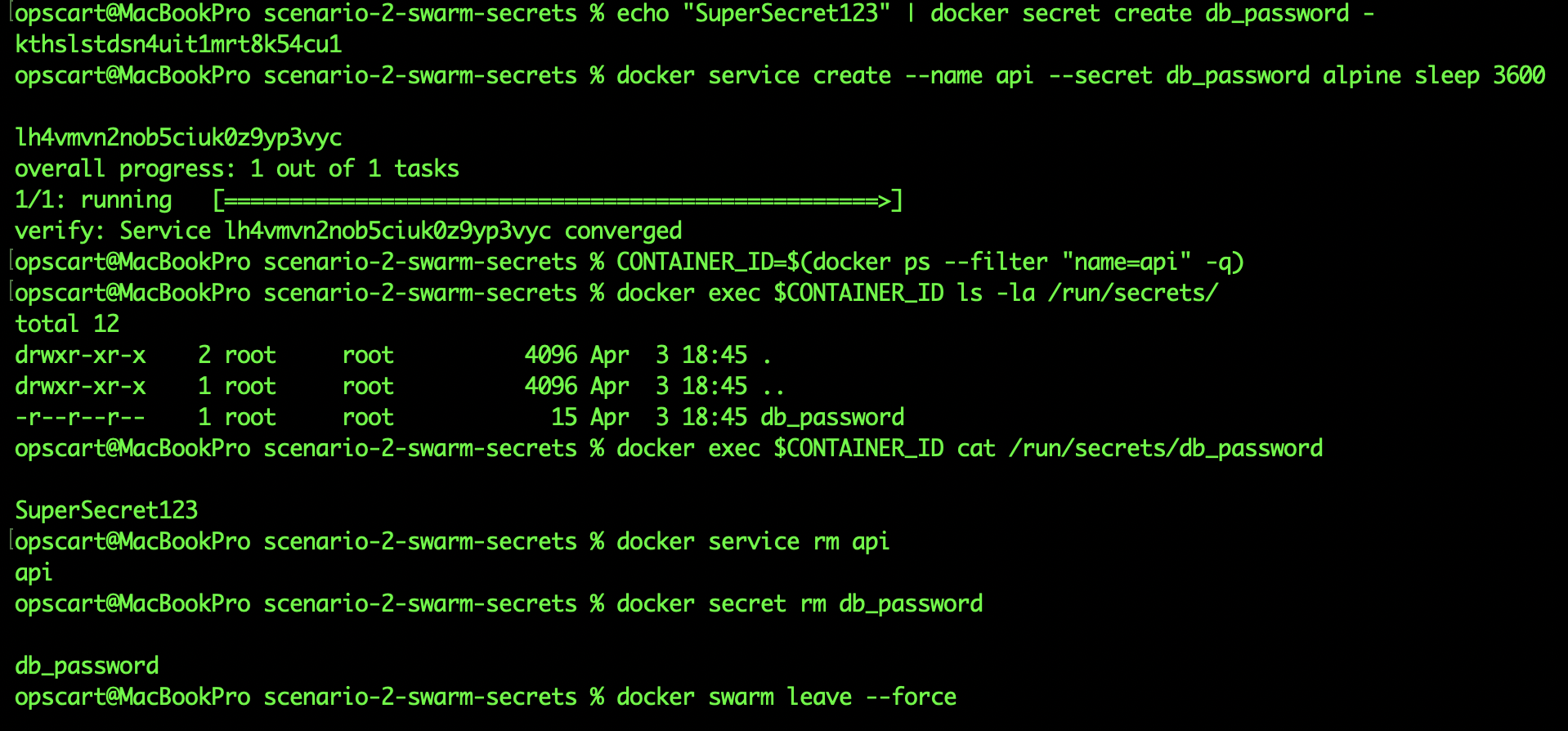
Terminal screenshot showing secret mounted at /run/secrets/ with permissions 400
File permissions: The secret file is mounted with 400 permissions (read-only, owner-only) and owned by root. This means only the container's root user — or a process that has dropped privileges after reading — can access it. If your application runs as a non-root user (best practice), you'll need to read the secret during initialization while still running as root, then drop privileges.
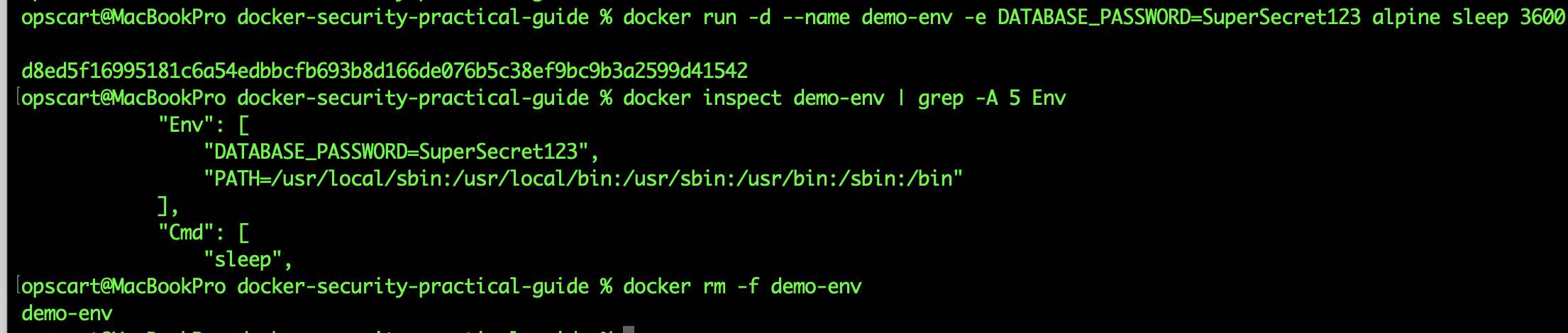
Screenshot of docker inspect output showing SecretName but no SecretValue
Production reality: In pharmaceutical cluster environments, Swarm secrets enable compliance with data protection requirements by ensuring database credentials are never written to disk and are only accessible to explicitly authorized services.
When Swarm Secrets Are Enough
Swarm secrets work well for:
- Single-platform Docker deployments (not mixing VMs and containers)
- Static secrets that change infrequently (manual rotation is acceptable)
- Environments where Vault's operational complexity isn't justified
- Simple microservice architectures where each service needs 2-5 secrets
Swarm secrets are Docker-native, require no external dependencies, and work on single-node "Swarms" (you can run docker swarm init on a single host to get secret management without clustering).
HashiCorp Vault: When You Need More
Vault is an external secret manager that adds capabilities Swarm secrets don't have: dynamic secret generation, automatic rotation, fine-grained access policies, and audit logging.
Dynamic Secrets: The Key Differentiator
The most powerful Vault feature is dynamic secrets. Instead of storing a static database password, Vault generates temporary credentials on-demand that expire automatically.
Traditional approach - Static password stored in Vault:
vault kv put secret/db password=SuperSecret123Dynamic approach - Vault generates temporary credentials:
vault read database/creds/app-role
# Returns:
# username: v-token-app-role-8h3k2j
# password: A1Bb2Cc3Dd4Ee5Ff (auto-generated)
# lease_duration: 3600 (expires in 1 hour)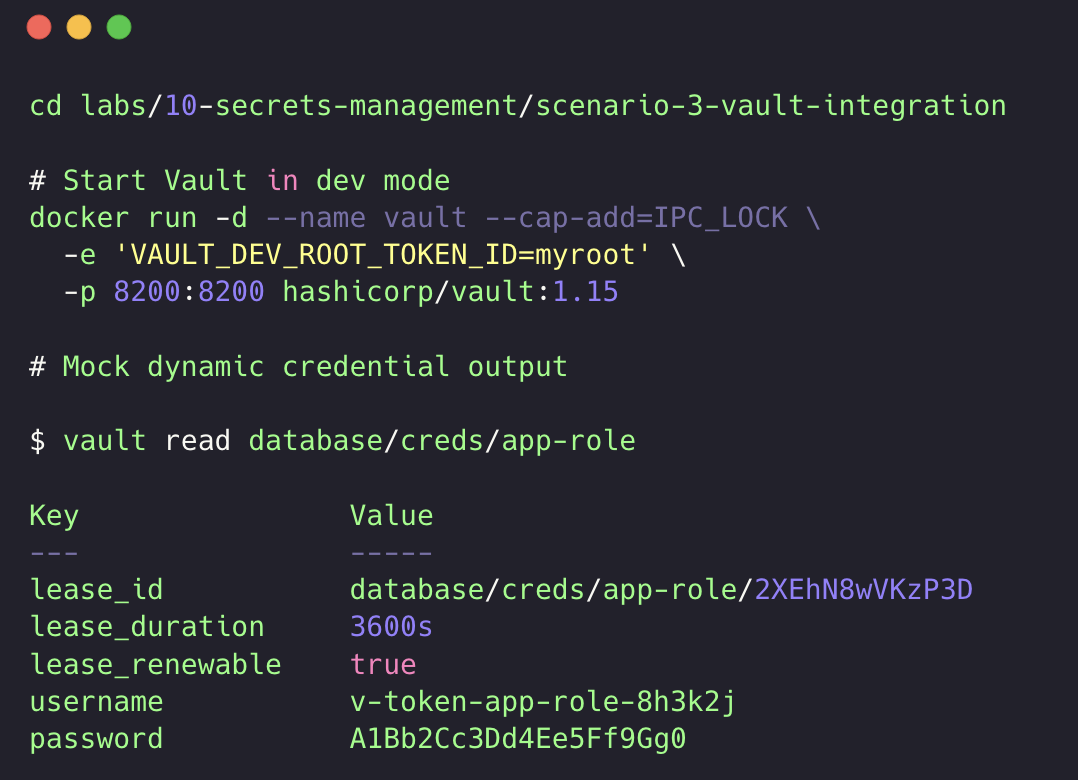
When the application requests database credentials from Vault, Vault connects to the database and creates a temporary user with the exact permissions the application needs. That user exists for a limited time (configurable, typically 1-24 hours), then Vault automatically revokes it.
This solves two problems:
- Credential sprawl: No static password shared across environments
- Blast radius: Compromised credentials expire automatically
Audit Logging for Compliance
Vault logs every secret access. This is required for SOC 2 Type II and PCI DSS compliance, where auditors need proof of who accessed which secrets when.
Example Vault audit log entry:
{
  "time": "2026-03-30T19:45:12Z",
  "type": "response",
  "auth": {
    "token_type": "service",
    "entity_id": "api-service"
  },
  "request": {
    "path": "database/creds/app-role"
  },
  "response": {
    "secret": true
  }
}
Vault audit log showing timestamp, entity_id, request path, and response metadata
Every access is logged with timestamps, the requesting identity, and the secret path. This log is write-only (even Vault admins can't modify it) and can be exported to SIEM systems.
When Vault Is Justified
Use Vault when:
- You need dynamic database credentials (most important use case)
- Compliance requires audit trails (SOC 2, PCI DSS, HIPAA)
- You're managing secrets across multiple platforms (Docker + VMs + Kubernetes)
- Automated secret rotation is required
- You have dedicated operations staff to maintain Vault infrastructure
Vault's operational complexity is real. It requires:
- High-availability deployment (3+ nodes)
- Secure initialization and unsealing procedures
- TLS certificate management
- Backup and disaster recovery planning
- Access policy maintenance
For a 5-person startup, this overhead usually isn't justified. For Fortune 500 pharmaceutical operations managing hundreds of microservices accessing regulated data stores, it's mandatory infrastructure.
BuildKit Secret Mounts: Build-Time Security
Build-time secrets are different. You need credentials during docker build to access private npm registries, clone private git repos, or download proprietary dependencies. These secrets should never persist in the final image.
BuildKit secret mounts solve this. BuildKit has been the default builder since Docker Engine 23.0, so if you're on a modern Docker version, you already have this capability — no special flags or setup required.
Dockerfile:
FROM node:18.20.5-alpine3.20

WORKDIR /a
COPY package.json*
RUN --mount=type=secret,id=npmrc,target=/root/.npmrc \
  npm install --only=production && \
  npm cache clean --force

COPY app.js ./

RUN addgroup -g 1001 -S nodejs && \
    adduser -S nodejs -u 1001 && \
    chown -R nodejs:nodejs /app

USER node
CMD ["node", "app.js"]
Build the image with the secret:
docker build --secret id=npmrc,src=$HOME/.npmrc -t myapp .The .npmrc file is available inside the container during npm install, but it's not written to any image layer. It's not in the final image. It's not in docker history. It existed only for the duration of that one RUN instruction.
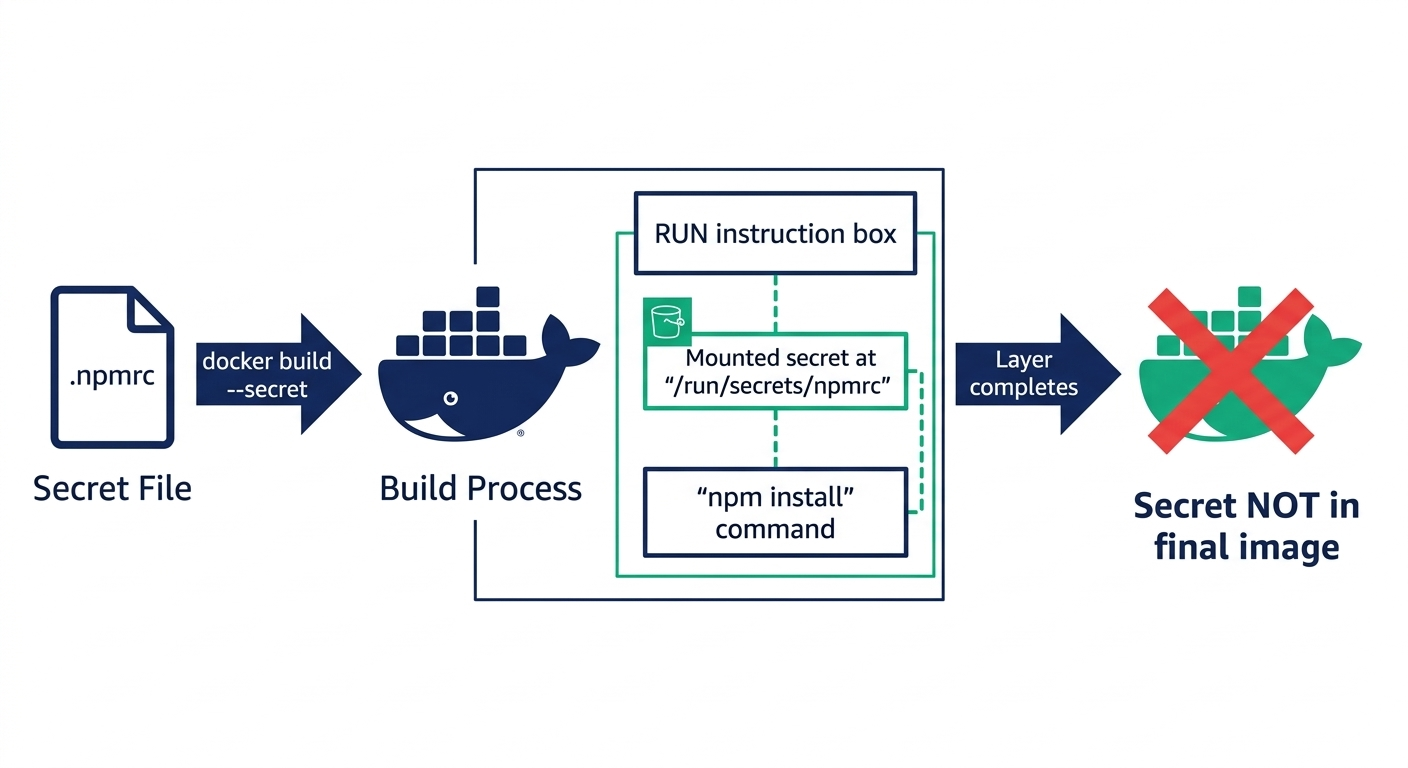
Diagram showing BuildKit secret mount lifecycle - secret available during RUN, then immediately discarded
Why BuildKit Secrets Matter: Before BuildKit secrets, developers used ARG or multi-stage builds with complex cleanup scripts. Both leaked secrets into intermediate layers visible in
docker history. BuildKit secrets are ephemeral by design — they can't leak because they never persist.
Common Build-Time Secret Patterns
Private npm/pip registries:
RUN --mount=type=secret,id=npmrc,target=/root/.npmrc \
  npm install
SSH keys for private git repos:
RUN --mount=type=secret,id=ssh_key,target=/tmp/key \
  cp /tmp/key /root/.ssh/id_rsa && \
  chmod 600 /root/.ssh/id_rsa && \
  git clone [email protected]:company/private-repo.git && \
  rm /root/.ssh/id_rsa
API tokens for downloading artifacts:
RUN --mount=type=secret,id=api_token \
  TOKEN=$(cat /run/secrets/api_token) && \
  curl -H "Authorization: Bearer $TOKEN" \
  https://api.company.com/artifact.tar.gz -o /tmp/artifact.tar.gz
Secret Scanning: Prevention Layer
Despite proper secret management, developers still accidentally commit secrets. GitLeaks and similar tools scan repositories for patterns matching credentials.
# Scan current repository
docker run -v $(pwd):/path zricethezav/gitleaks:latest \
  detect --source /path --verbose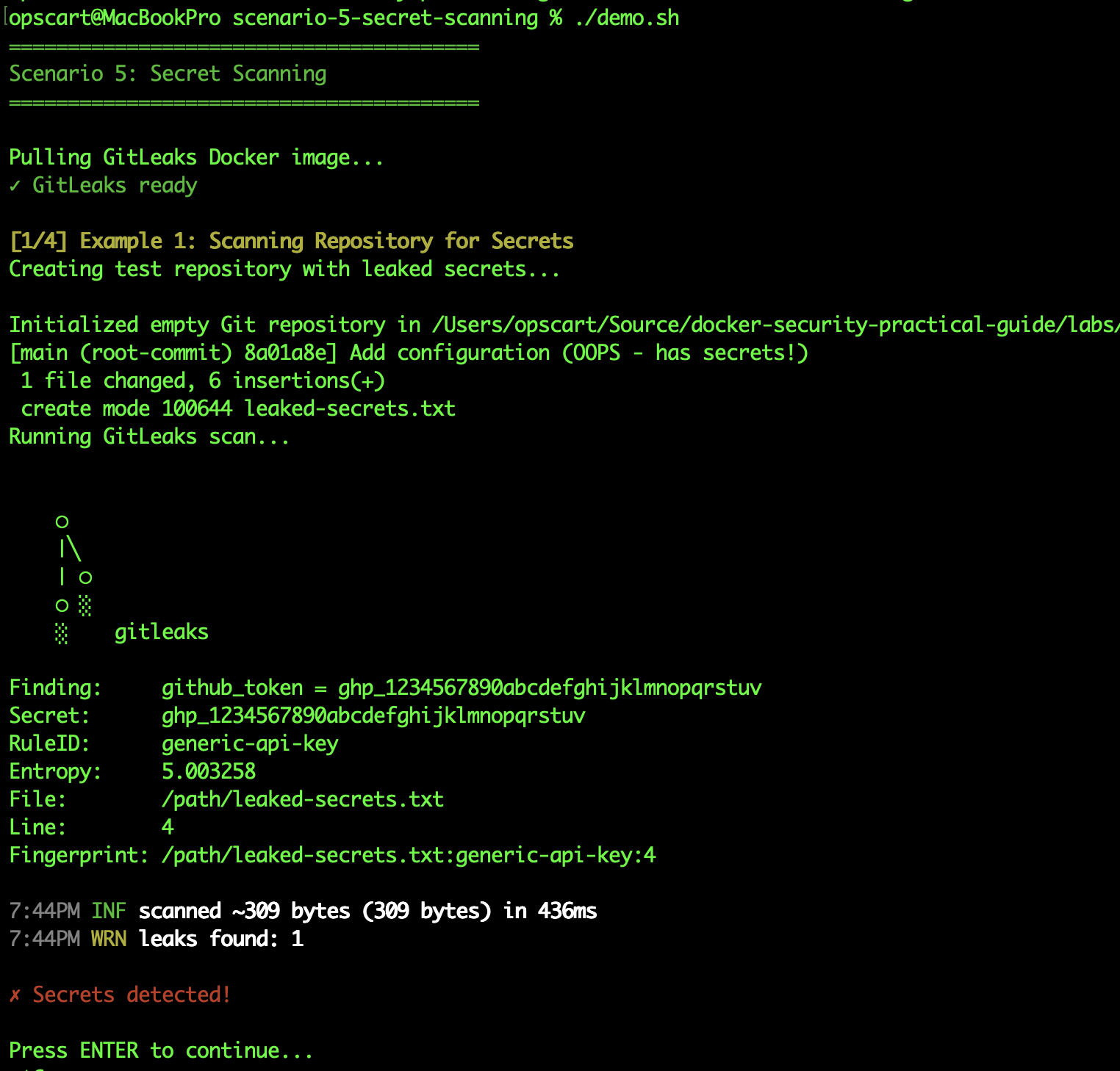
GitLeaks detects:
- AWS keys (
AKIA...) - GitHub tokens (
ghp_...) - Stripe keys (
sk_live_...) - Private keys (
-----BEGIN PRIVATE KEY-----) - Database connection strings
- High-entropy strings (potential secrets)
Prevention via Pre-Commit Hooks
The most effective scanning happens before commit:
.pre-commit-config.yaml:
repos:
  - repo: https://github.com/gitleaks/gitleaks
    rev: v8.18.0
    hooks:
      - id: gitleaks
Install the hook:
pre-commit install

# Now every git commit runs GitLeaks first
git commit -m "Add config"
# GitLeaks scan...
# ERROR: Secret detected in config.yml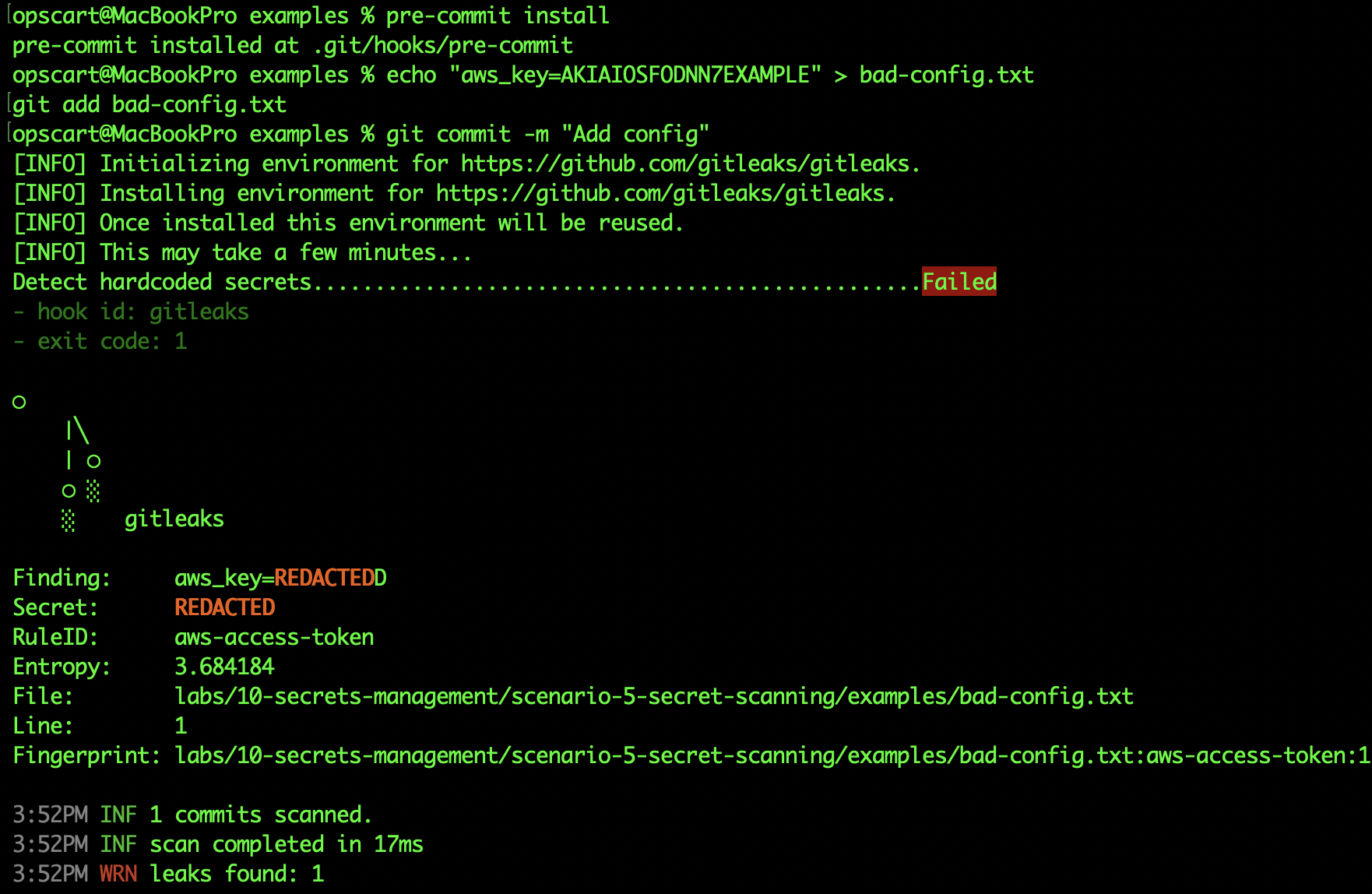
Pre-commit hooks prevent secrets from entering git history. CI/CD scanning catches what pre-commit missed. Together, they create defense in depth.
Critical: Secrets in Git Are Permanent
Even after deleting a file containing secrets, those secrets remain in git history indefinitely. The only remediation is to rotate the secret (assume it's compromised) and optionally rewrite history with
git filter-branchor BFG Repo-Cleaner.
Layered Approach for Production
Production environments don't choose one solution. They layer multiple approaches:
| Secret type | solution | why |
|---|---|---|
|
Build-time (npm, SSH)
|
BuildKit Mounts
|
Ephemeral, can't leak into image
|
|
Simple service secrets
|
Docker Swarm Secrets
|
Native, encrypted, no external deps
|
|
Database credentials
|
Vault Dynamic Secrets
|
Auto-expiring, audit trail
|
| Compliance-regulated |
Vault + Audit Logs
|
SOC 2, PCI DSS requirements
|
| Detection |
GitLeaks + Pre-commit
|
Prevent accidents
|
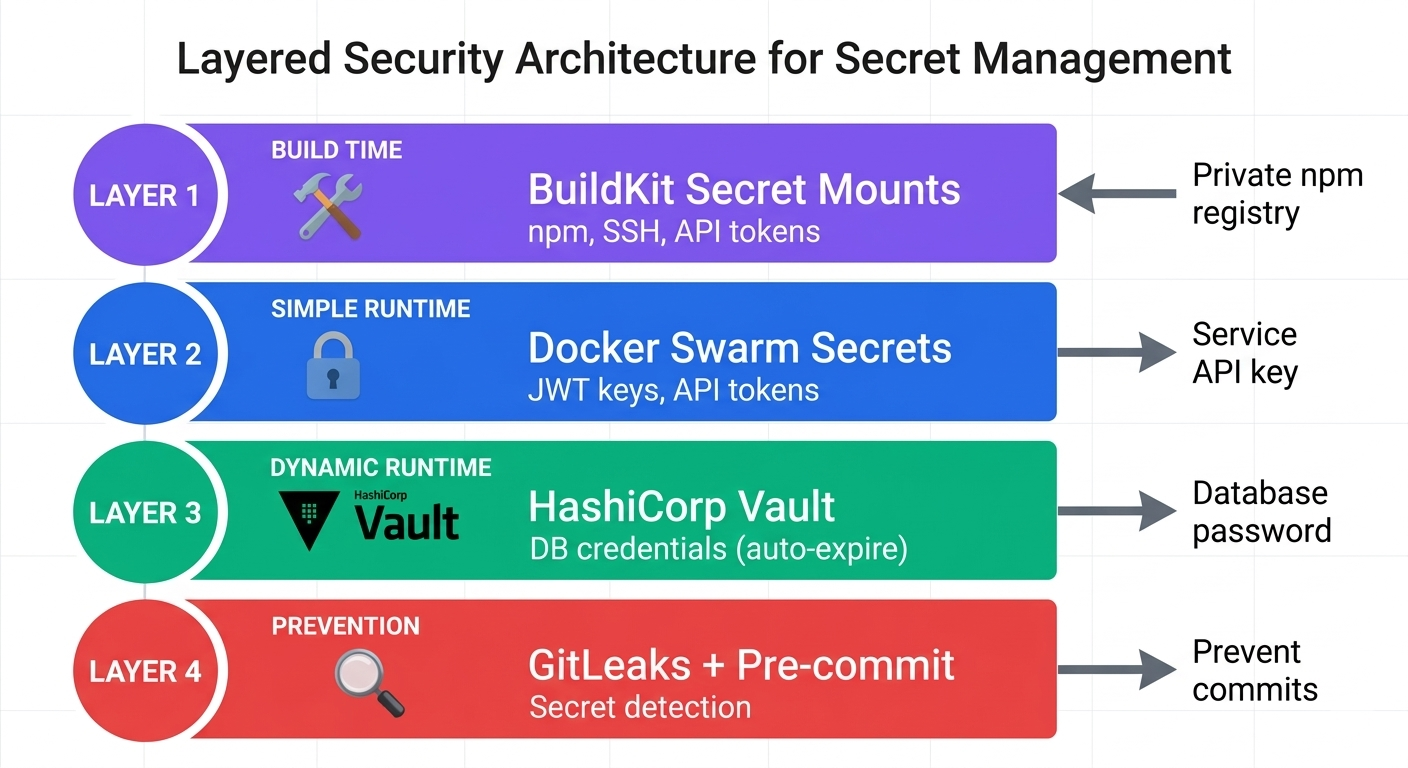
Example Architecture for a Pharmaceutical Application:
- CI/CD pipeline: BuildKit mounts for private npm registry access
- API service: Swarm secret for JWT signing key (static, rotated quarterly)
- Database access: Vault dynamic credentials (expire every 4 hours, audit logged)
- Pre-commit hooks: GitLeaks scanning on every developer commit
- CI/CD gates: Automated GitLeaks scan on every pull request
Key Takeaways
Environment variables are not secrets. They're visible to any process, appear in docker inspect, and get logged. Use them for configuration, not credentials.
Swarm secrets are underutilized. Most teams don't realize Docker has native secret management that works on single nodes. No Vault complexity required for simple use cases.
Vault's value is dynamic secrets. Static secret storage is a nice feature. Dynamic database credentials that auto-expire are transformative for security posture.
BuildKit secrets prevent build leakage. Before BuildKit, build-time secrets inevitably leaked into image layers. BuildKit mounts are ephemeral by design.
Secrets in git are forever. File deletion doesn't remove secrets from history. Rotate immediately if detected. Pre-commit hooks prevent the problem.
Layer your approach. Production systems use BuildKit for builds, Swarm for simple secrets, Vault for dynamic credentials, and GitLeaks for prevention. Each solves a different problem.
Hands-On Practice
Want to practice these concepts? Lab 10 in the Docker Security Practical Guide covers all five scenarios:
- Anti-patterns (environment variables, docker history leaks)
- Swarm secrets (encrypted, tmpfs-mounted)
- Vault integration (dynamic credentials, audit logging)
- BuildKit secret mounts (ephemeral build-time secrets)
- Secret scanning with GitLeaks (pre-commit hooks, CI/CD)
All labs are executable on Docker Desktop (macOS/Windows/Linux).
Note: Lab 10 covers Vault in development mode to demonstrate core concepts. For production Vault deployment with high availability, TLS, dynamic database credentials, and audit logging integration, see the upcoming Lab 11 (Tier 2 Deep-Dive) in the same repository.
GitHub: https://github.com/opscart/docker-security-practical-guide/tree/master/labs/10-secrets-management
Complete guide: https://opscart.com/docker-security-guide/docker-secrets-management/
Published at DZone with permission of Shamsher Khan. See the original article here.
Opinions expressed by DZone contributors are their own.