

When One Docker Swarm Replica Became Unreachable Over an Overlay Network: A Production Case With Traefik
One Docker Swarm replica became unreachable to Traefik over the overlay network, while the service remained available through its healthy replica.
Context
The incident occurred in the production backend infrastructure of a mobile application. External HTTP traffic was handled by Traefik, deployed on Docker Swarm manager nodes. Traefik ran in swarmMode, used providers.docker, was configured to use the mgp_default network, and had lbswarm disabled so that routing used the required overlay network rather than the Swarm VIP.
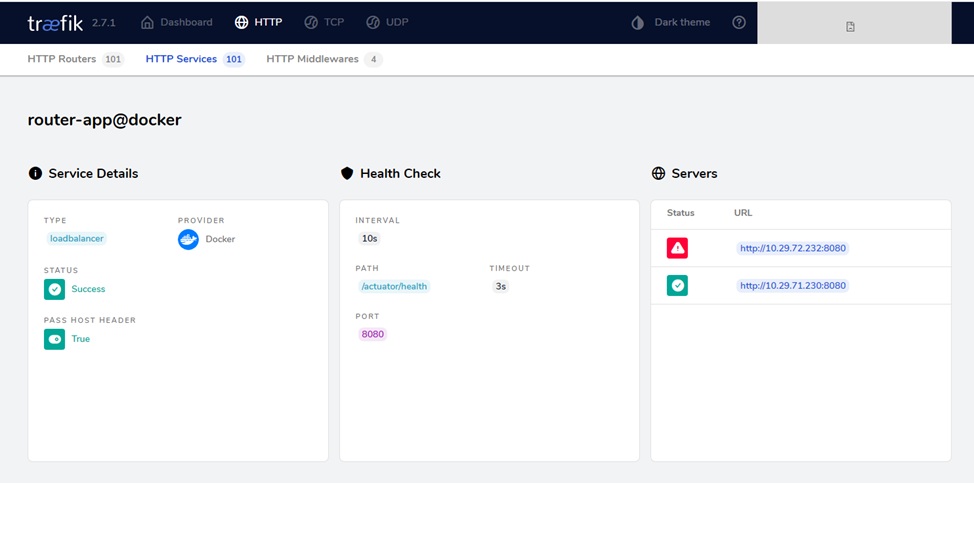
One of the critical services was mgp_router-app. It was an entry-point service with two replicas deployed to preserve availability if one of them failed.
The service used placement constraints, max replicas per node = 1, and a Traefik health check configured for /actuator/health on port 8080. This meant we relied on external health checking and strictly controlled replica placement across nodes.
Swarm-level load balancing was intentionally disabled. We needed routing control at the Traefik layer, along with the ability to quickly remove unhealthy backends based on their health check status. For this production setup, that provided more flexibility than the built-in Swarm load-balancing logic.
What Happened
The issue was neither a widespread outage nor a failure of the entire service. One replica became unreachable to Traefik over the overlay network: a Traefik instance on one of the manager nodes could not establish a connection to that replica’s backend endpoint. The second replica continued to work normally, so the service as a whole remained available.
For regular traffic, the incident did not affect service availability: Traefik continued routing requests to the healthy replica and removed the unavailable backend from routing. During targeted manual testing of the unhealthy replica’s backend endpoint through Traefik, requests ended in a timeout or HTTP 503.
The container appeared healthy, but only locally. The service responded inside the container, and /actuator/health returned UP. However, other containers and Traefik instances on remote nodes could not establish a connection to that replica through its IP address in mgp_default.
Initial Checks
The container had the same DNS name in both networks. This ruled out name mismatch as an independent cause of the unavailability: the issue occurred specifically at the network-connectivity level to the replica IP in mgp_default.
First, we identified the problematic container and inspected its state:
docker ps --filter "name=mgp_router-app" --q
docker inspect 6bd15b62f891
Next, we checked the networks connected to the container:
docker inspect 6bd15b62f891 --format '{{json .NetworkSettings.Networks}}' | jq
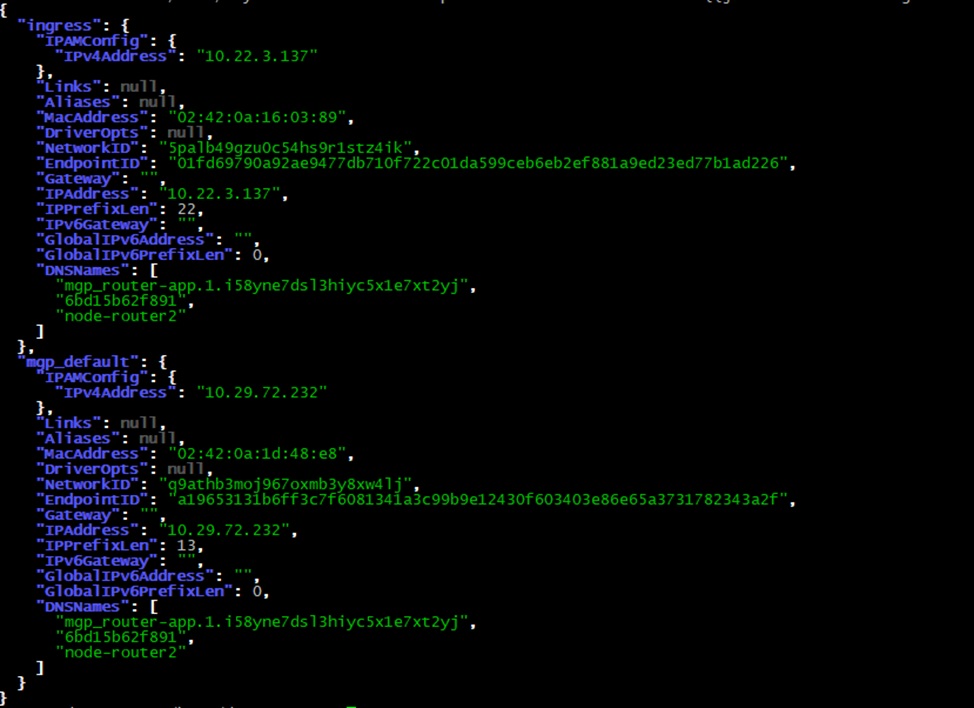
The container was attached to two networks:
ingresswith IP10.22.3.137/22;mgp_defaultwith IP10.29.72.232/13.
We then entered the container and checked whether the application was listening on the expected port:
docker exec -it 6bd15b62f891 bash
ss -tuln
The health endpoint also responded correctly:
curl "http://10.29.72.232:8080/actuator/health"The expected response was:
{"status":"UP"}
At this point, it was clear that the issue was not the application itself, its startup, or its bind address inside the container. The service was alive, but that alone said nothing about its reachability from outside the container.
Checking Connectivity Between Nodes
The next step was critical: We checked whether another node in the cluster could reach the container using its overlay IP.
docker exec -it 373354916bfc bash
ping 10.22.3.137
This was the IP from the ingress network, and the test confirmed ICMP reachability of the address in that network. That indicated the issue did not look like a complete loss of inter-node connectivity.
The situation was different for the mgp_default IP: pinging it from other nodes failed, even though this overlay network was supposed to provide inter-container communication in Docker Swarm.
This distinction was important. ICMP reachability of the address in ingress remained available, while connectivity to the replica through mgp_default was broken. Therefore, the problem was not the container itself or a complete network failure; it was a specific break in the network path used to reach that replica.
What Docker Logs Showed
The dockerd logs on the affected node provided another useful signal. They contained repeated messages related to Swarm network synchronization:
Jun 02 11:08:42 node-router2 dockerd: time="2025-06-02T11:08:42.462965233Z" level=warning msg="bulk sync to node 091d01df89ae failed: failed to send a TCP message during bulk sync: dial tcp 10.170.0.145:7946: i/o timeout"
Jun 02 11:17:02 node-router2 dockerd: time="2025-06-02T11:17:02.581936915Z" level=error msg="Bulk sync to node 091d01df89ae timed out"
The logs also contained NetworkDB stats entries:
Jun 02 11:07:08 node-router2 dockerd: time="2025-06-02T11:07:08.012509772Z" level=info msg="NetworkDB stats node-router2(2642aeb5172b) - netID:q9athb3moj967oxmb3y8xw4lj leaving:false netPeers:58 entries:13563 Queue qLen:2 netMsg/s:7"These messages do not prove a specific bug or root cause, but they indicate problems with exchanging network state between nodes. Combined with the endpoint being unreachable through mgp_default, they strengthened the working hypothesis of an overlay-networking issue.
This was an important diagnostic signal: the Docker daemon was running, and the container was started, but the cluster’s network state was not ideal and was likely becoming inconsistent during node-to-node state exchange.
Investigating the Hypotheses
Hypothesis 1: The container itself was the problem.
This hypothesis was not confirmed. A curl request inside the container to http://10.29.72.232:8080/actuator/health returned {"status":"UP"}, and ss -tuln showed that the service was listening on the required port.
Hypothesis 2: The problem was port publishing or binding.
This hypothesis was not confirmed. Even though port 10005 was reachable externally, that did not explain why Traefik could not reach port 8080 over the overlay network. The container worked locally, while the issue occurred on the network path between nodes.
Hypothesis 3: Traefik itself was the problem.
Probably not. Traefik was not the source of the failure; it was the first component that detected that the backend was unavailable from its node.
Hypothesis 4: The Docker Swarm overlay network was the problem.
This became the primary working hypothesis. The replica was reachable from inside its container but was not properly reachable from other nodes through its overlay IP.
curl http://10.29.72.232:8080
nc -vz 10.29.72.232 8080
The curl request worked locally, while nc -vz 10.29.72.232 8080 failed from other nodes. This indicated that traffic was not being routed correctly through the overlay network.
An MTU/VXLAN issue was also considered. This is a plausible class of problems for Docker overlay networks, especially when there is an MTU mismatch or a Path MTU Discovery issue. In this case, however, it remained only a hypothesis rather than a confirmed root cause.
Recovery
We restored the problematic replica by forcing Docker Swarm to recreate the task through a rolling update:
docker service update --force \
  --update-parallelism 1 \
  --update-order start-first \
  --update-delay 30s \
  --detach=true \
  mgp_router-app
--force triggered an update even though neither the image nor the service configuration had changed. Swarm recreated the task for the affected replica and reattached it to mgp_default; after that, Traefik could reach it again over the overlay network.
The rollout parameters were selected to avoid affecting service availability:
--update-parallelism 1– update one replica at a time;--update-order start-first– start the new task before stopping the old one;--update-delay 30s– give the new task time to start and pass its checks.
Restarting Docker on the node and placing the node into drain mode were considered fallback measures, but they were not required to resolve this incident.
Why It Happened
The exact upstream root cause cannot be stated without additional evidence. However, the most well-supported explanation is that a local network-state inconsistency occurred in the Docker Swarm overlay network. As a result, one replica remained operational inside its container, but became unreachable through its overlay IP.
The most plausible explanations include:
- the overlay network on the node was not fully ready when the container started;
- an issue in Docker
libnetwork; - an outdated VXLAN routing table;
- an iptables issue or a race condition while updating network rules;
- a node restart without restarting the Docker daemon;
- an issue with a Swarm endpoint that was not properly advertised or connected.
These situations are particularly unpleasant because Docker continues to consider the container running and its internal health check green, while the network path to the replica is already partially broken.
Key Takeaways
The main conclusion is simple: a healthy container does not necessarily mean a reachable replica.
This is critical in production because:
- a local
curlinside the container does not prove external reachability; - an internal health check does not guarantee that Traefik can reach the backend;
- Swarm may remain formally healthy even when one replica has dropped out of normal network connectivity.
Therefore, in such clusters, it is necessary to check not only container state but also inter-node reachability over the overlay network.
What to Monitor
To prevent similar incidents, it is useful to monitor not only service health but also the cluster’s network plane.
The minimum set of checks includes:
- reachability of container overlay IPs from other nodes;
- health checks through Traefik;
bulk syncandNetworkDBerrors in Docker logs;- recurring issues on the same node;
- consistency between a container’s local health and its external reachability.
It is also useful to have a script that specifically checks connectivity between nodes through the overlay network, not just through ingress or localhost.
Conclusion
This case demonstrated several important points.
First, a container can be healthy locally while remaining unreachable externally.
This is especially important for services that handle user traffic.
Second, Traefik is a good early indicator of network problems.
It can reveal that a backend on one node has stopped responding.
Third, Docker Swarm overlay networking can degrade locally.
In that case, the cluster may appear operational, while one replica has already dropped out of normal routing.
Fourth, such incidents must be diagnosed along the network path, not only through application state.
First, check the container from the inside, then verify reachability from other nodes, then inspect Docker logs, and only after that draw conclusions about the root cause.
Opinions expressed by DZone contributors are their own.