

Dynamic C# Introduction
Dynamic C# offers dynamic capabilities, which are useful in certain situations. In this post, I will give you a very basic introduction to dynamic C#.
 CORE
·
CORE
·
Join the DZone community and get the full member experience.
Join For FreeIntroduction
C# is generally considered as a statically typed language. However, Dynamic C# offers dynamic capabilities, which are useful in certain situations. In this post, I will give you a very basic introduction to dynamic C#.
Why Dynamic C#
There are many reasons why you would like to use dynamic C# capabilities. A few of these are mentioned below:
- It compliments “normal” statically typed C#
- We can use it when we don’t know object/data structure at compile time
- It can also improve source-code readability. It may also reduce the amount of code
- Useful when working with weakly typed data: JSON, XML, Plain Text etc
- Interop with dynamic languages or writing COM interop code is easy in dynamic C#
It's like saying to the compiler, “Trust me, you will be fine during run time”
Example Usage
- Replace reflection code with dynamic code
- Simple COM interop
- Dynamic JSON processing
- Data Access Code
Static & Dynamic Binding
Let's see an example:
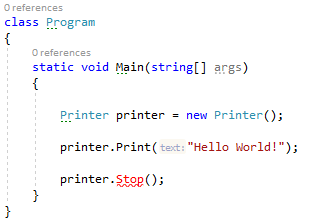
We can see that IDE is giving feedback for the Stop method not being available and the code will not compile due to this. This is the static binding behavior of C#.
Static Binding
- Binding occurs at compile-time
- The compiler knows that
Stop()doesn’t exist in Printer - You receive a compile error, so it cannot build & execute the program
Dynamic Binding
Now, let's see the dynamic binding difference:
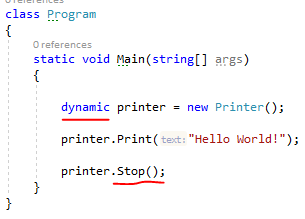
- Binding occurs at run-time
- The compiler doesn’t know if the
Stop()method exists or not - Program compiles and can be executed (runtime error may result)
- Even with dynamic C#. type safety is still enforced, only this time it’s at run-time
Limitations of Callable Methods
We can’t use extension-methods with dynamic types. Extension methods are compile-time concepts. However, we can still utilize extension methods by calling them normal static methods.
Introducing ExpandoObject
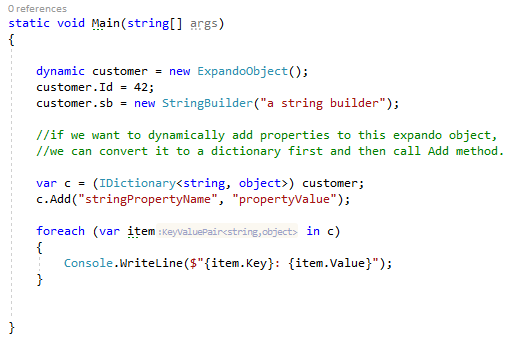
It is a pre-supplied dynamic type. It is a general-purpose class. We can think of ExpandoObject as being similar to a dictionary that has string-based keys and object values.
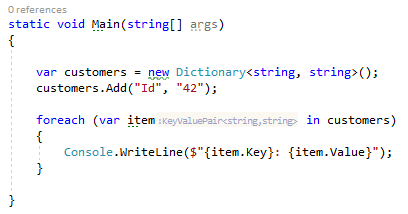
To understand ExpandoObject, lets first see a typical statically typed code:
Now, see the use of ExpandoObject in the following code:
Dynamically Adding ExpandoObject Behavior
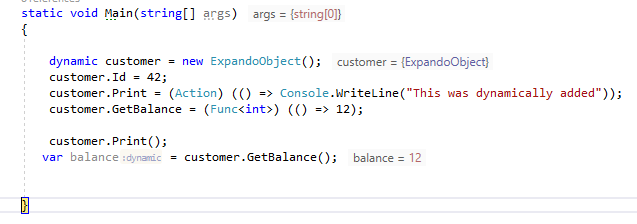
In addition to dynamic properties, we can also add behavior. Any object can be added as a value even behavior:
Summary
This was a short introduction of dynamic C# and we barely scratched the surface. We learned that it complements static C# and comes in handy in certain situations. Correctly applied, dynamic C# has the ability to improve productivity, readability & simplicity of code. We also learned about ExpandoObject and saw that we can dynamically add properties and behavior using ExpandoObject. If you have some comments or questions, feel free to ask. You can see the code on this github repo.
Until next time! Happy coding!
Published at DZone with permission of Jawad Hasan Shani. See the original article here.
Opinions expressed by DZone contributors are their own.
Comments