

Dynamic Entity Graphs in Spring Data JPA
In this article, we will talk about JPA entity graphs and a library that enables the generation and application of entity graphs dynamically.
Join the DZone community and get the full member experience.
Join For FreeJPA and its implementation, Hibernate, is the most popular way to access relational data in Java applications. From the very beginning, data access optimization has been one of the main goals of Hibernate developers. One such optimization is eliminating unnecessary database queries, which significantly impact performance. For example, when dealing with related entities, such as master-detail relationships, we need to decide whether we need to fetch details. The simplest solution would be to mark associated entity fields with the EAGER fetch type. However, this is highly ineffective since we don’t always need associated entities. While LAZY fetching helps to avoid extra queries, it is essential to remember to fetch additional detail entities strictly within the transaction. Also, this may cause the N+1 query problem.
The Entity Graph specification was introduced in JPA 2.1, offering developers fine-grained control over how entities and their related data are fetched from the database. With entity graphs, developers can define explicit fetch plans, reducing the N+1 query problem and eliminating the need for manual JOIN clauses. This feature empowers developers to optimize data retrieval efficiently.
Spring Data JPA and Entity Graphs
Spring Data JPA library provides out-of-the-box support for Entity Graphs starting from Spring Boot 2.1.0. In Spring Boot, we can define entity graphs using @NamedEntityGraph and @EntityGraph annotations. Let’s look at the following entities:
@Entity
public class Owner extends Person {

    @Column(name = "address")
    private String address;

    @OneToMany(fetch = FetchType.LAZY)
    @JoinColumn(name = "owner_id")
    @OrderBy("name")
    private List<Pet> pets = new ArrayList<>();
}

@Entity
public class Pet extends NamedEntity {

    @Column(name = "birth_date")
    private LocalDate birthDate;

    @ManyToOne
    @JoinColumn(name = "type_id")
    private PetType type;

    @OneToMany(cascade = CascadeType.ALL, fetch = FetchType.LAZY)
    @JoinColumn(name = "pet_id")
    private Set<Visit> visits = new LinkedHashSet<>();
}
Assume that we need to show owners in the different UI views. First – list of owners and their pets found by the owner’s last name:
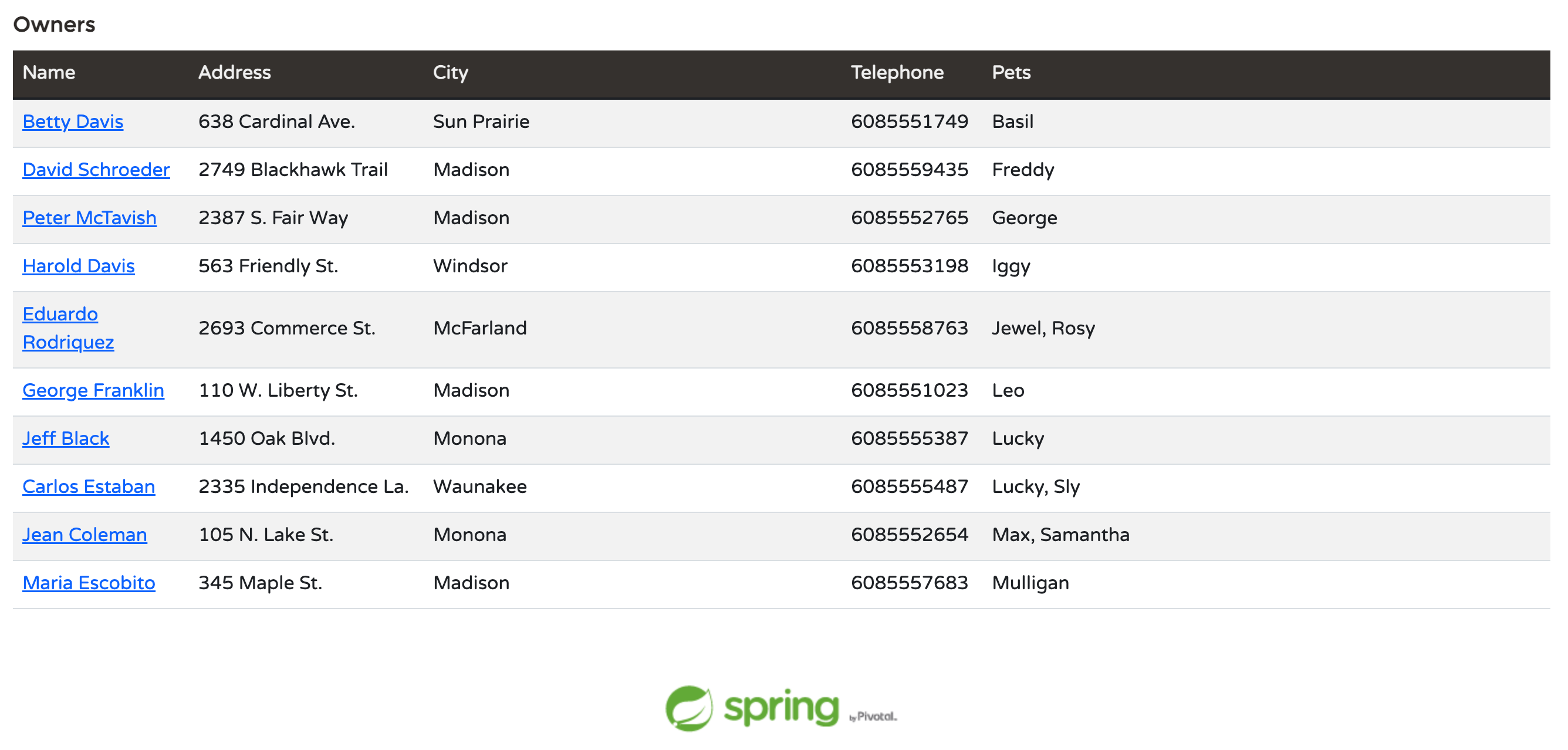
For this UI, we need to fetch owners and their pets. An entity graph in the corresponding Spring Data JPA repository will look like this:
@EntityGraph(attributePaths = { "pets" })
Page<Owner> findByLastNameStartingWithIgnoreCase(@Nullable String lastName, Pageable pageable);
We can either write this code manually or use the JPA Buddy plugin to create entity graphs using a visual editor. For the graph above, we need to select owners and their pets in the visual entity graph editor:

The second view includes not only the primary owner’s info but more details, including pets and pet’s visits to the clinic:
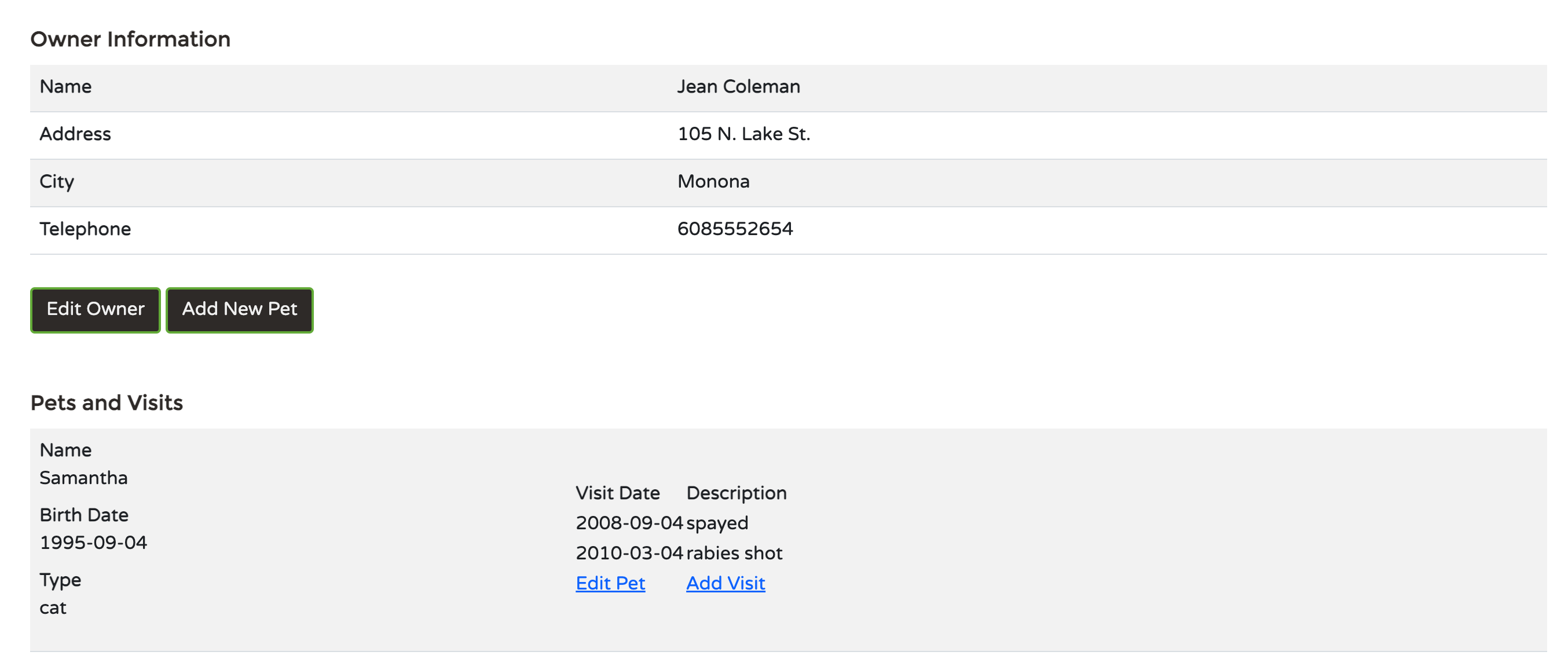
For the second screen that shows details of the owner and their pet, we create the following graph:
@EntityGraph(attributePaths = { "pets.type", "pets.visits" })
Optional<Owner> findById(Integer id);
As per Spring Boot implementation, we can specify only one @EntityGraph annotation per one Spring Data JPA repository method. In addition, we can do it only at design time while writing the code.
Let’s assume we need to fetch an owner by their ID and show their details on two screens: full and brief details (pets only). For the first case, we’ve already described the method above. But what about the second case? We don’t want to fetch additional data for the sake of performance. In Spring Data JPA, we’ll have to introduce a new method and specify a new entity graph. Fortunately, this framework allows adding any arbitrary string between the repository method's find and By parts. So, in the repository, there will be two methods:
@EntityGraph(attributePaths = { "pets.type", "pets.visits" })
Optional<Owner> findById(Integer id);

@EntityGraph(attributePaths = { "pets "})
Optional<Owner> findOwnerWithPetsById(Integer id);
More cases for fetching data mean more entity graphs, hence more methods. Gradually the code might become cluttered with various combinations of various graphs, so less maintainable. Dynamically specifying a graph in run-time may be a solution, but Spring Boot does not allow this. To fetch data dynamically, we have the following options:
- Criteria API, which is famous for its verbosity. To create the query that will select pets and visits, we need to write something like this:
CriteriaBuilder criteriaBuilder = entityManager.getCriteriaBuilder();
CriteriaQuery<Owner> criteriaQuery = criteriaBuilder.createQuery(Owner.class);
Root<Owner> ownerRoot = criteriaQuery.from(Owner.class);
Predicate ownerIdPredicate = criteriaBuilder.equal(ownerRoot.get("id"), ownerId);

Fetch<Owner, Pet> petsFetch = ownerRoot.fetch("pets", JoinType.LEFT);
petsFetch.fetch("type", JoinType.LEFT);
petsFetch.fetch("visits", JoinType.LEFT);

criteriaQuery.select(ownerRoot)
           .where(ownerIdPredicate);

Owner owners = entityManager.createQuery(criteriaQuery).getSingleResult();- The
EntityManagermeans that we’ll need to step down one abstraction level. Also, creating and adding an entity graph to the entity manager’s query context is a verbose and error-prone operation.
EntityGraph<Owner> graph = this.entityManager.createEntityGraph(Owner.class);
graph.addAttributeNodes("pets");
Subgraph<Pet> petSubgraph = graph.addSubgraph("pets");
petSubgraph.addAttributeNodes("type", "visits");
Map<String, Object> hints = new HashMap<>();
hints.put("javax.persistence.loadgraph", graph);
Owner owner = this.entityManager.find(Owner.class, ownerId, hints);
Adding Dynamic Entity Graphs To Spring Data JPA
Fortunately, Spring Boot (and Spring Data) frameworks were implemented with extensibility in mind. We can extend standard Spring Data JPA repository interfaces and accept entity graph definitions as a parameter. The Spring Data JPA EntityGraph library developed by a company named “Cosium” implements this approach. All we need to do is add one more dependency to the application and enable the proper repository factory to use repositories that allow dynamic entity graph usage.
<dependency>
  <groupId>com.cosium.spring.data</groupId>
  <artifactId>spring-data-jpa-entity-graph</artifactId>
  <version>3.0.1</version>
</dependency>@SpringBootApplication
@EnableJpaRepositories(repositoryFactoryBeanClass = EntityGraphJpaRepositoryFactoryBean.class)
public class PetClinicApplication {/*application code here*/}This library can create Spring Data JPA repositories that accept an entity graph as an additional parameter for any derived query method.
We can apply entity graphs to derived methods in repositories in two ways. First, we can reuse a statically defined named graph. Assume that we have named graphs for an entity:
@Entity
@NamedEntityGraphs({
    @NamedEntityGraph(name = "owner-with-pets",
       attributeNodes = {
       @NamedAttributeNode("pets")
    }),
    @NamedEntityGraph(name = "owner-with-pets-visits", attributeNodes = {
       @NamedAttributeNode(value = "pets", subgraph = "type-and-visits")
    }, subgraphs = {
       @NamedSubgraph(name = "type-and-visits", attributeNodes = {
          @NamedAttributeNode(value = "type"),
          @NamedAttributeNode(value = "visits")
       })
    })
})
public class Owner extends Person {/* entity definition */ }
In the repository, we define a method to search owners by ID with an additional parameter — entity graph:
Optional<Owner> findById(Integer id, EntityGraph entityGraph);Now we can pass a named entity graph to this method. It means we do not need to add more methods to the repository for different entity graphs. In the code, we’ll be able to invoke the repository method like this:
Owner owner = ownerRepository.findById(ownerId,
NamedEntityGraph.fetching("owner-with-pets-visits"))
.orElseThrow();
The second way to use graphs — build them at run-time in a type-safe manner and pass them to this method. The library uses code generation based on JPA entities’ metadata to do this. We need to add two more dependencies to the project: Hibernate metadata generator and entity graph builder generator:
<dependency>
  <groupId>org.hibernate</groupId>
  <artifactId>hibernate-jpamodelgen</artifactId>
  <version>6.1.7.Final</version>
  <scope>provided</scope>
</dependency>
<dependency>
  <groupId>com.cosium.spring.data</groupId>
  <artifactId>spring-data-jpa-entity-graph-generator</artifactId>
  <version>3.0.1</version>
  <scope>provided</scope>
</dependency>
After the project build phase is finished, dedicated builder classes will be in the generated-sources folder. The code generator creates one builder for every entity. Our project will have OwnerEntityGraph, PetEntityGraph, etc. We can use these builders help us to create a graph, like in the example below: we build a graph to fetch pets with their types and visits. Note the builder usage: to traverse the graph structure, we use the .___ field as a reference to the root graph builder. After each traversal, we use the .___() method to get the entity graph itself.
OwnerEntityGraph entityGraph = OwnerEntityGraph
    .____() //Getting base graph
    .pets().type() //Traversing to pets and then to their type
    .____ //Return to the root
    .pets().visits() //Traversing by another branch: pets and then visits
    .____
    .____();
Owner owner = this.ownerRepository.findById(ownerId, entityGraph)
    .orElseThrow();
As we can see, we can create entity graphs at runtime and use existing named entity graphs. This library provides an excellent addition to the standard Spring Data JPA capabilities allowing us to avoid defining static entity graphs for all possible cases that may lead to a method's combinatorial explosion.
Conclusion
Understanding and leveraging the power of entity graphs in JPA helps developers to optimize data retrieval, and avoid extra database queries, thus improving application performance. Entity graphs simplify complex data fetching scenarios, so it’s a great tool in a developer's arsenal for achieving efficient data access. Although Spring Data JPA allows only static entity graph definitions, we can always extend this library thanks to Spring’s flexible architecture. The Spring Data JPA EntityGraph library adds significant value by enabling the reuse of different entity graphs in the same query method in repositories as well as creating entity graphs at run-time. It greatly simplifies the data fetch process for many cases.
Published at DZone with permission of Andrey Belyaev. See the original article here.
Opinions expressed by DZone contributors are their own.
Comments