

Prompt Caching for LLMs, Part 1: Exact-Match Caching in Production
Learn how exact-match prompt caching with Redis and Memcached reduces LLM costs and latency, and how request coalescing prevents cache stampedes.
 CORE
·
Why Prompt Caching Matters for LLM Applications?
Modern LLM apps often get the same, or almost the same, prompt more than once. This happens with form submissions, common FAQ questions, agent tool calls, or a user asking the same thing in different words. Without caching, each of these repeat requests pays full token cost, full latency, and adds unwanted pressure on your rate limits.
There are four caching methods used in production today. This article, Part 1 of a 3-part series, covers the first and most basic one: exact-match caching. Part 2 covers semantic caching, for requests that mean the same thing but are worded differently. Part 3 covers what happens at the model-serving layer itself: self-hosted KV cache reuse and provider prefix caching, plus the production details every team ends up needing: watching your metrics, working out your costs, and a full checklist.
- Gateway or application exact-match caching. A hash lookup on a byte-identical or normalized request. Zero cost on a hit. Covered here.
- Semantic caching. Embedding plus a vector similarity search. Zero model cost on a hit for reworded queries. Covered in Part 2.
- Inference-engine KV cache reuse, for teams running their own models (vLLM, SGLang). Covered in Part 3.
- Provider prompt or prefix caching (Anthropic, OpenAI, Bedrock). Covered in Part 3.
These layers stack. Check exact match first, then check semantic, then let the request reach the model, where either your own inference engine or the API provider reuses whatever part of the prompt stayed the same.
The Full Picture
Exact match sits right at the front of the stack. It is the cheapest check to run, so it should catch as many requests as it can before anything more costly runs.
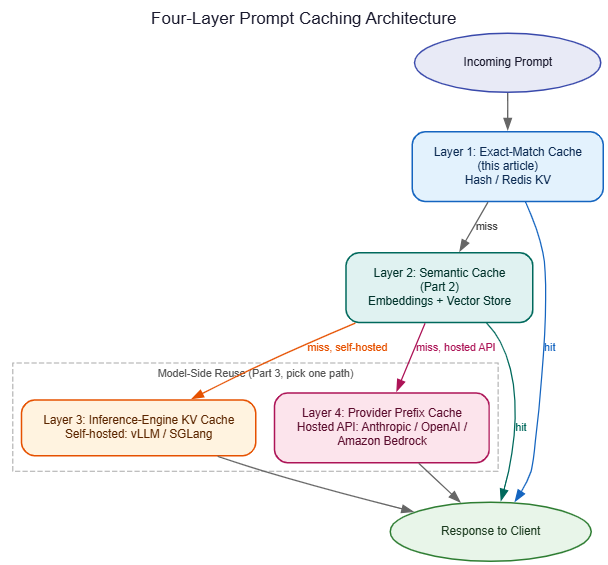
Layers 1 and 2 sit in front of the model and can skip the model call entirely. Layers 3 and 4, covered in Part 3, sit inside the model call itself and never skip it. They just make it much cheaper when a part of the prompt repeats.
1. Exact Query Caching (Baseline)
Treat the prompt, or a cleaned-up version of it, as a key in a fast key-value store: Redis, Memcached, or an in-process LRU cache.
Key Design
- Hash the full context that matters: system prompt, user message(s), tool definitions, and any settings (like temperature) that change the output.
- Clean up whitespace, and sort tool lists if their order does not change how the model behaves.
- Store the full response, or structured output, plus details like timestamp, model version, and TTL.
- For agents, the key needs more than just the user message. Include the full tool schema (name, description, parameters), any tool-call results you fold back into the context if they are always the same, and leave out anything you don't want changing the key, such as a request ID or trace ID that changes every call but doesn't affect the output. Two common ways a cache silently breaks here: tool definitions listed in a different order between calls, and JSON keys written in a different order by different parts of the same codebase. Sort both before hashing. Don't count on the order matching by chance.
Where Should the Cache Live?
The store you pick changes how it can fail, more than most teams expect at first:
- In-process LRU (a local dict, or a library like
cachetools) is the fastest choice, under a millisecond, with no network call. It only sees traffic hitting that one process, so on a deployment with many instances, each instance builds its own cache on its own, and the hit rate stays low until every instance has warmed up. This is fine for small deployments, or for caching things that are cheap to redo per instance anyway. - A shared store (Redis, Memcached) gives every instance the same view, so a hit on instance A also counts as a hit for a request landing on instance B. This is the right default once you go beyond a single instance, at the cost of a network round trip, usually a few milliseconds on the same network.
- A two-level setup (a small in-process LRU in front of shared Redis) gives you the best of both: the busiest keys never leave the process, and everything else falls through to the shared store. Worth the extra work once a small number of keys account for most of your traffic, which is common on FAQ-style workloads.
Handling Stale Data
- A fixed TTL, for example, 60 seconds, for time-sensitive data such as travel prices or stock levels.
- LRU eviction once the cache fills up.
- Clear the cache on purpose when something changes: a price update, an outage, a policy change.
Python example (Redis):
import hashlib
import json
import redis
from typing import Optional

r = redis.Redis(host="localhost", port=6379, db=0)

def make_key(prompt: str, model: str, temperature: float = 0.0) -> str:
    payload = json.dumps({"prompt": prompt, "model": model, "temp": temperature}, sort_keys=True)
    return "llm:exact:" + hashlib.sha256(payload.encode()).hexdigest()

def get_exact(prompt: str, model: str, temperature: float = 0.0) -> Optional[str]:
    key = make_key(prompt, model, temperature)
    try:
        return r.get(key)
    except redis.RedisError as exc:
        # Cache being down should never break the request.
        # Log it and fall through to the model.
        logger.warning("exact cache read failed: %s", exc)
        return None

def set_exact(prompt: str, response: str, model: str, temperature: float = 0.0, ttl: int = 300):
    key = make_key(prompt, model, temperature)
    try:
        r.setex(key, ttl, response)
    except redis.RedisError as exc:
        logger.warning("exact cache write failed: %s", exc)
Treat the cache as a nice-to-have, not something the app depends on. If the cache goes down, fall back to full model calls; don't fail the request.
Should You Cache Errors?
Most production systems say no, or only in some cases, and it is easy to skip thinking about this until something goes wrong. A few good defaults:
- Never cache a
429(rate-limited) or5xxerror from the model provider as if it were a real answer. Retry with backoff instead of remembering the failure. - If your own guardrail or content filter rejects a response, that is a judgment call. Some teams cache the rejection briefly (a few seconds to a minute) just to stop a broken or hostile client from triggering the same expensive rejection path again and again. Others never cache rejections at all, so they don't end up serving a stale "rejected" result after the input has been fixed.
- If you do cache rejections, use a clearly different TTL and a different key prefix (
llm:reject:instead ofllm:exact:) so you can clear them, or leave them out of your hit-rate numbers, separately from real answers.
Warming the Cache
A cache that just went live is empty, and the first few minutes after any deploy that clears the cache see a drop in hit rate. If your logs keep old prompts and responses, a simple warm-up job that loads the most common prompts from the last few days into the new cache, before it takes real traffic, avoids that drop. This matters most for FAQ-style traffic where a small number of questions make up most of the volume.
Request Coalescing: Solving the Thundering Herd
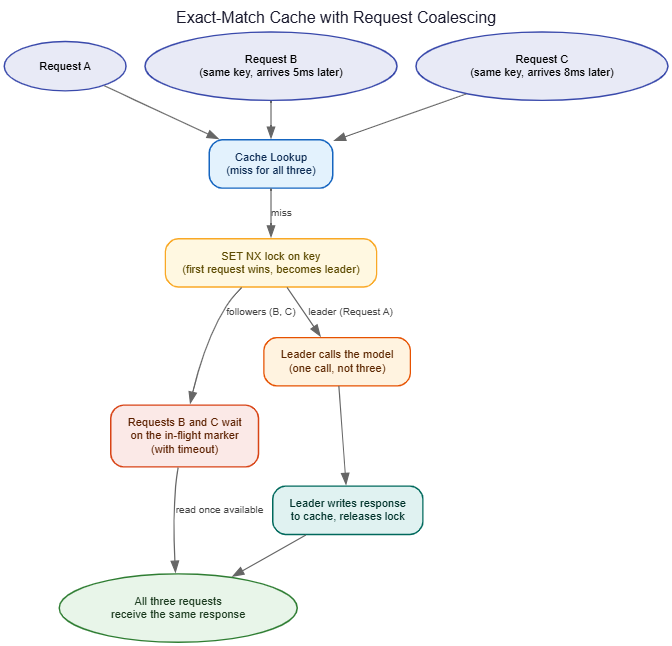
Exact-match caching has one failure mode that only shows up under real load: if fifty identical requests arrive at almost the same time, before the first one has filled the cache, all fifty can miss, and all fifty can call the model on their own. This is called a cache stampede, and it is not rare at real traffic levels. A viral post, a batch job starting up, or a retry storm from another system can all set it off.
How to Fix It
- Request coalescing, also called single-flight. The first request for a key takes a short lock (or sets an in-flight marker), and the other requests wait on that same result instead of calling the model on their own. Redis's
SET NXpattern, or a library likesingleflightin Go, handles this cleanly. - Cache the "in progress" state too, not just finished responses, so other requests can see "someone is already working on this" instead of racing to do it themselves.
- Put a fair timeout on the wait, with a fallback to a normal model call if the in-flight request does not finish in time, so one stuck request does not hold up every other request waiting on it.
Without this fix, exact-match caching can actually make traffic spikes worse, not better. Every process learns about a busy key at almost the same moment and hits the model all at once, right when the model can least handle it.
When It Shines
Templated queries, form-driven flows, test suites, batch jobs — anywhere the same string keeps coming back. Hit rates can be very high in narrow domains and close to zero in open, free-form chat, which is exactly the gap semantic caching, covered in Part 2, is built to close.
What's Next
Exact-match caching only helps when the input matches exactly, which is common for templated and form-driven traffic but rare in open conversation. Part 2 covers semantic caching: matching reworded questions with embeddings, doing it safely with a verification step, and the invalidation, multi-turn, and security issues that come with trusting a similarity score instead of an exact match.
Further Reading
- Redis documentation,
SETcommand options (includingNXfor locking patterns) - Redis documentation, key eviction policies (LRU, LFU, TTL-based)
Opinions expressed by DZone contributors are their own.