

Build a Dynamic Web Form Using Camunda BPMN and DMN
Camunda BPMN and DMN can be combined to build dynamic web forms that adapt fields and flows in real time, which reduces hardcoding and improves flexibility.
Join the DZone community and get the full member experience.
Join For FreeBusiness Process Model and Notation (BPMN) is the universal standard for visually modeling and automating business processes. It is used to design and automate workflows, defining the sequence of tasks, approvals, and user interactions. Whereas Decision Model and Notation (DMN) models the complex decision logic that can be embedded within those processes to automate business rules in a structured, reusable way.
Camunda's process orchestration platform provides a collaborative environment for Business and IT developers via an intuitive visual Modeler that adheres to BPMN and DMN standards. Modeling with Camunda reduces the time it takes to develop and maintain real-world business processes through automation. Beyond automation, combining BPMN and DMN allows us to create dynamic web forms where the fields, validations, and even flow of the form adapt real-time business rules, instead of being hardcoded. This makes applications more flexible, easier to maintain, and business-driven.
What Is a Dynamic Web Form
A dynamic web form is an interactive form whose fields, validations, and flow are driven by business rules or user input. Instead of hardcoding logic into the UI, the form leverages decision models to display only what’s relevant, making it smarter, leaner, and easier to maintain.
Think of an application that has multiple webpages collecting user input data. The traditional way of implementing these webpages is hard-coded field types, validations, and repeating the same set of tasks in multiple pages. A dynamic webform concept is built once and used multiple times. The fields and validations are configured centrally, and a single webpage renders the fields based on what the page is intended for.
A Simple Use Case
I will create a simple web form with a few dynamic questions. The form will start with the initiation of a BPMN process instance, and that will track different answers and flows. The DMN will have the questions configured, which will appear dynamically in the web form. Camunda Modeler will be used to create the BPMN diagram and DMN tables.
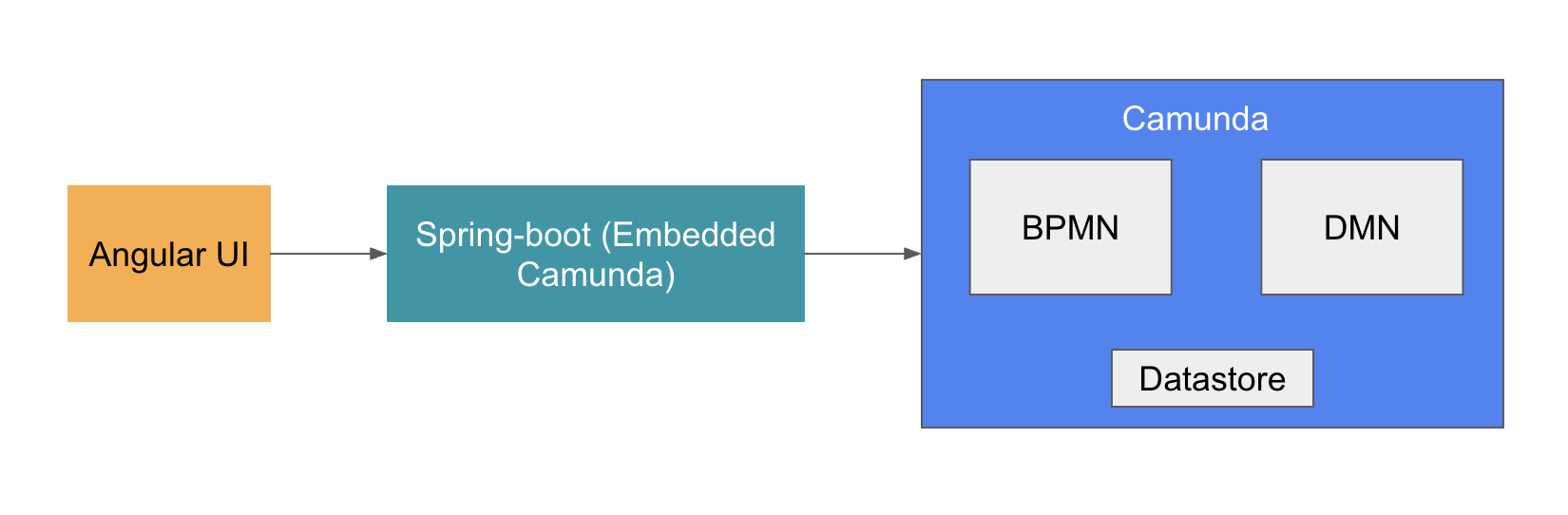
The web application is built with Angular on the frontend and Spring Boot on the backend, integrating the Camunda process engine.
High-Level Architecture
BPMN Design
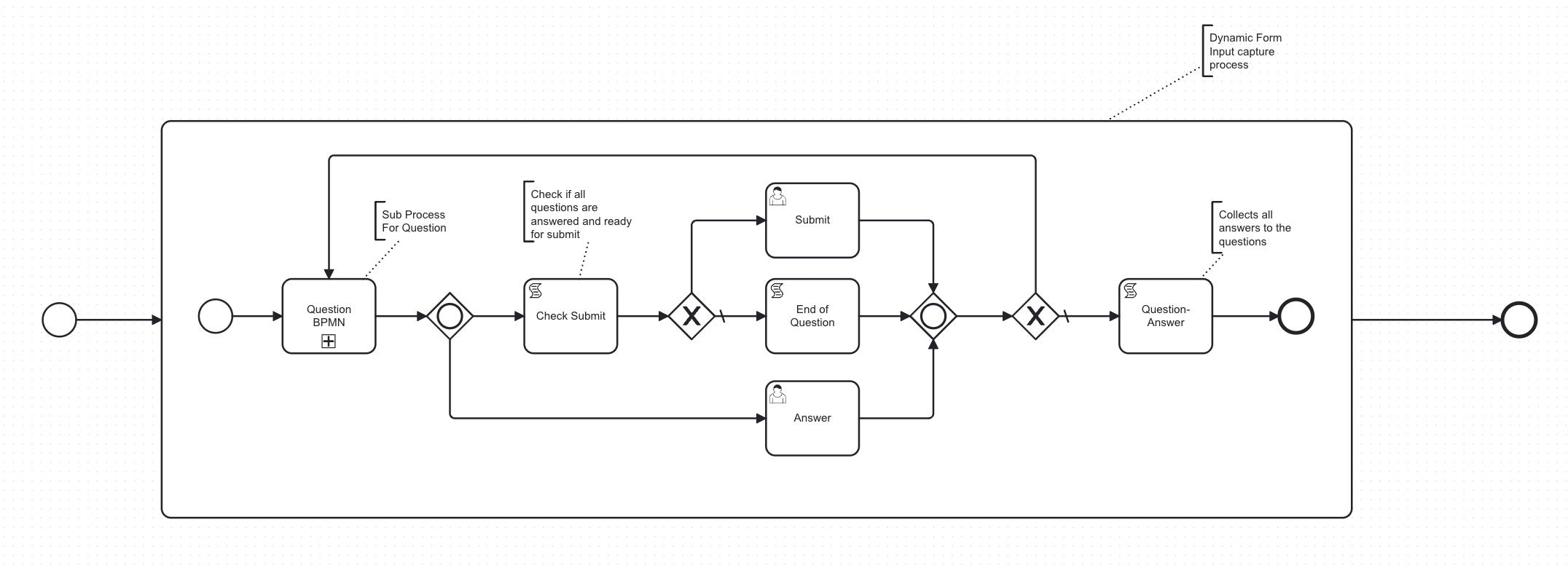
The main BPMN Process, which captures the user's answers/input for different questions, has:
- A sub-process for questions
- A few script tasks for checking and setting execution variables if the user reached the last question, answer, and question-answer collection
- A couple of user tasks to answer the question and submit the form
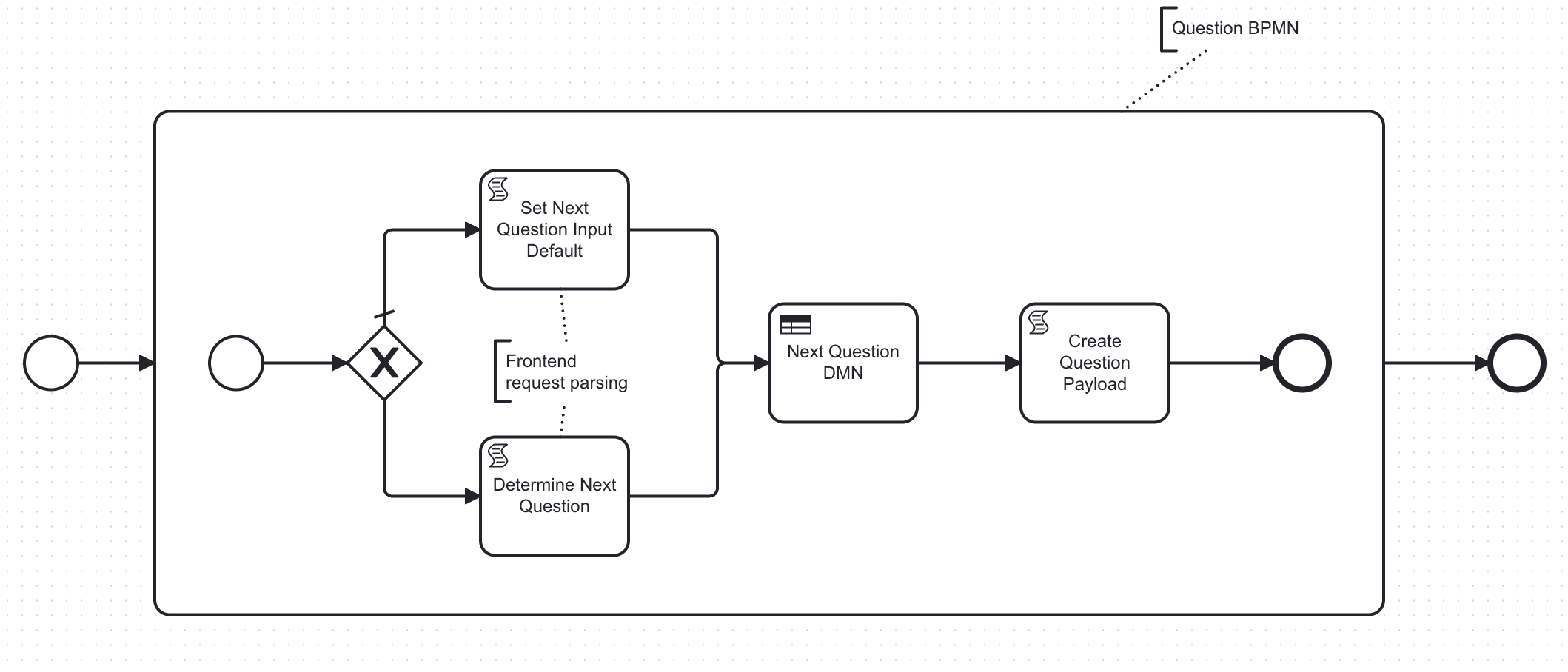
The sub-process, question BPMN has:
- A few script tasks to parse the input from the form and then prepare the next question payload to render in the form
- DMN table to determine the next question based on the answer/input of the previous question
DMN Design
The Next Question DMN has multiple tables to hold different input elements and their answer choices.
- Next question table – This table holds the question_id and answer as input and returns another question_id once the condition satisfies
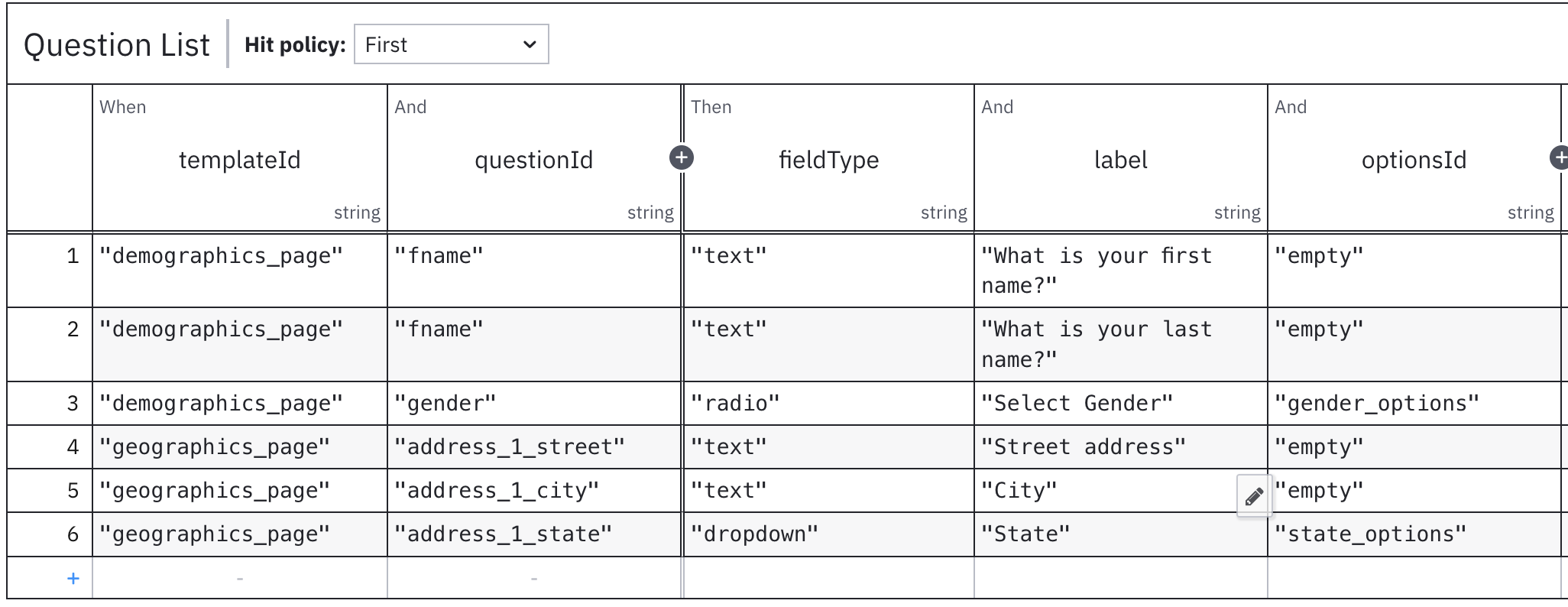
- Question list table – This table holds the question metadata - question_id, input type (text, radio, checkbox, etc.), question title, answer_choice_id
- Answer choice table – this table holds the different answer options for radio, dropdown, checkbox, etc.
- Literal expression – This combines all three tables and prepares a collection of questions with answer choices.
- Inputs – The entry point for this DMN, questionIdInput, and answerInput, to determine the next question.
This DMN is the foundation behind the dynamic nature of the form. The questions, input field types, answer choices, title, description, help text, etc. — everything is configured as a rule. The front-end UI only renders the questions dynamically, rather than hard-coding the input fields in the form itself.

The next step after the BPMN and DMN design is to deploy these models in the Camunda engine and implement the frontend and backend. The frontend UI will render the dynamic form by calling Camunda native APIs for process orchestration.
Backend
Spring Boot with an embedded Camunda engine is used as the backend of this dynamic form application. The backend is very lightweight to deploy the main BPMN process, question BPMN process, and question DMN.
├── src/main/
│	├── java/com/dynamicform/workflow/
│	│   └── Application.java
│	└── resources/
│		├── application.yaml
│		├── main-process.bpmn
│		├── question.bpmn
│		└── next-question.dmn
└── pom.xml
Frontend
The dynamic form renderer UI is built in Angular. Instead of hardcoding logic into Angular components, the form behavior (fields, validations, and visibility) is driven by Camunda BPMN workflows and DMN decision tables. Question metadata and details are fetched against the DMN, and JSON data is parsed in a form component to render the questions with input type, answer choices, etc. The integration between the UI and backend process engine is done through Camunda engine-rest APIs:
- /engine-rest/process-definition/key/main-process/start : To start the process instance
- /engine-rest/process-instance/${processId}/variables : To get the variables of a process instance
- /engine-rest/task : To create a task
- /engine-rest/task/${taskId}/complete : To mark a task complete
I have created a simple form with a couple of questions about whether the user has breakfast, and this is how it renders based on the answers to the previous question.
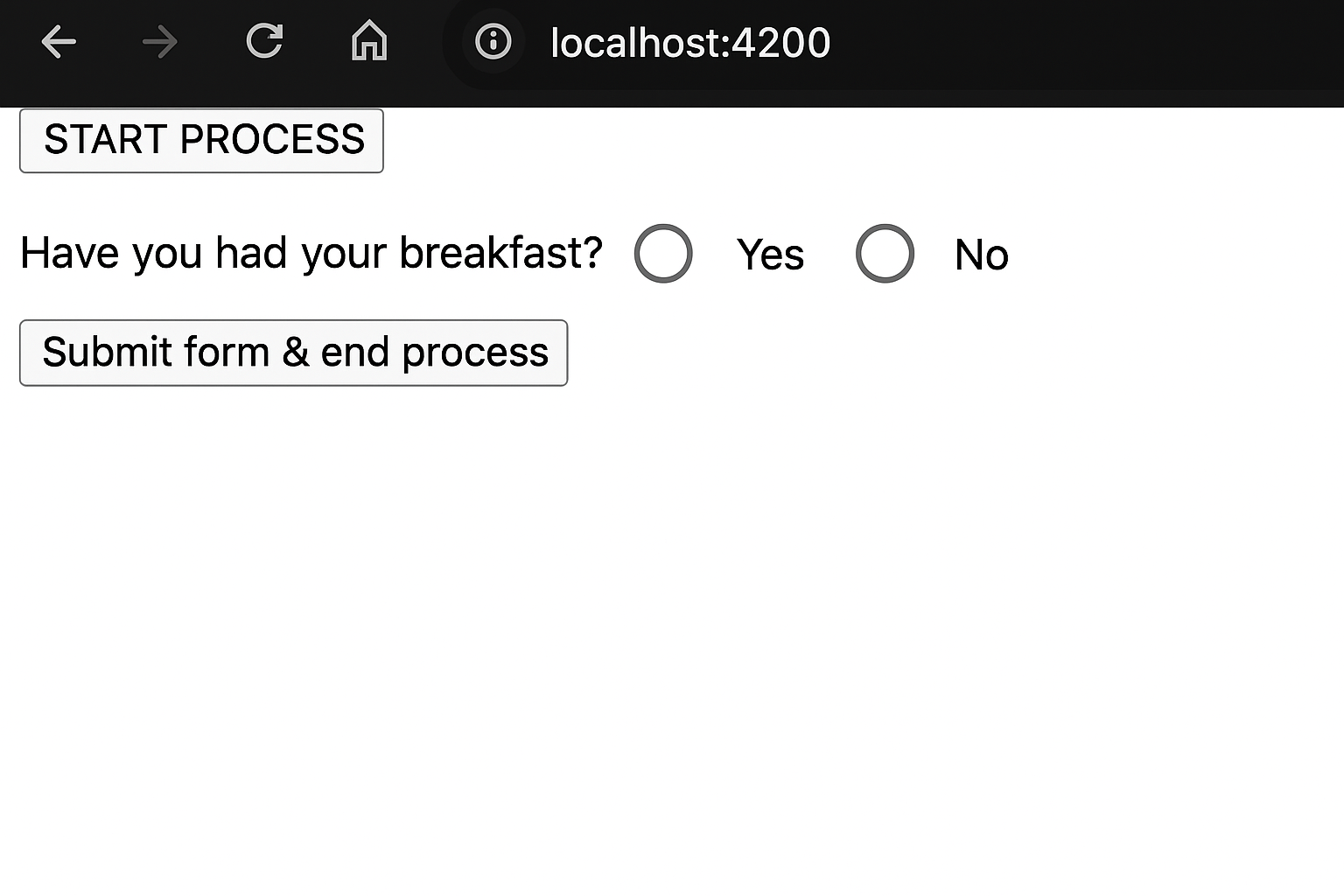
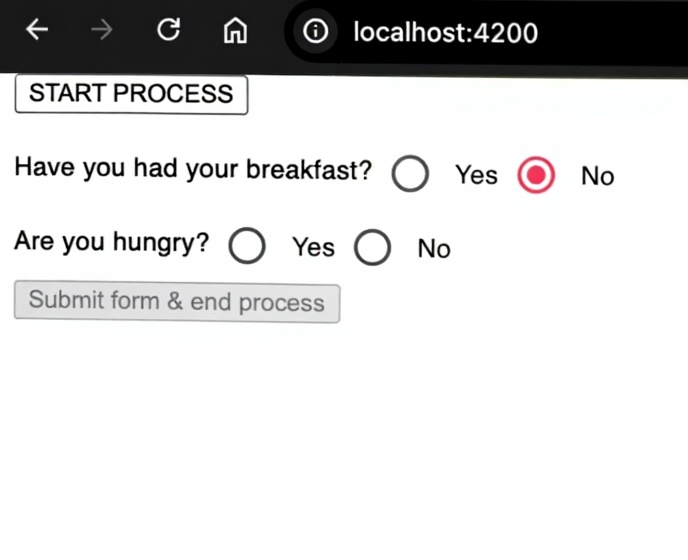
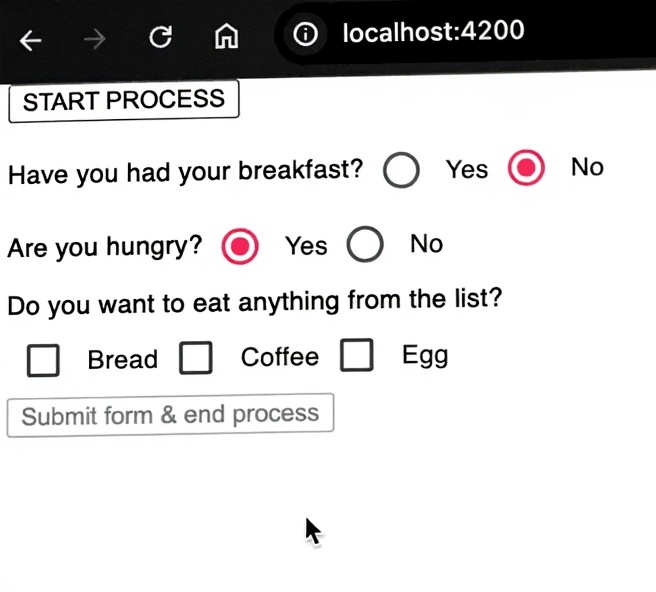
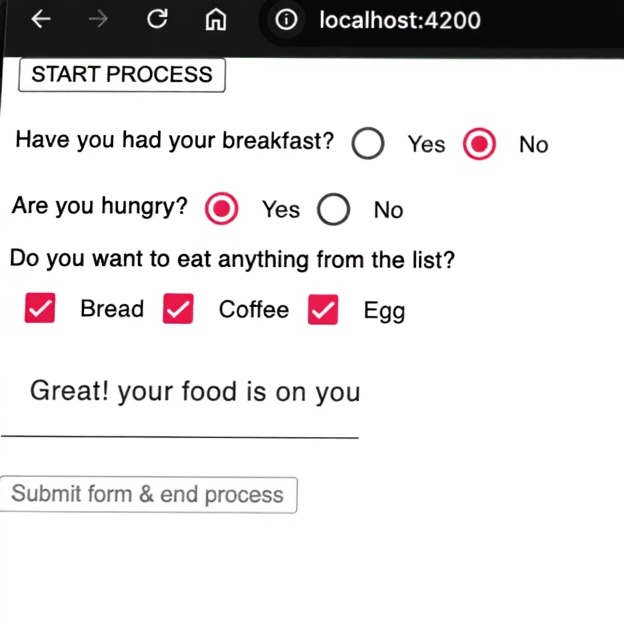
The form/UI page displays the questions in a dynamic manner and is based on the response to the previous question. This single UI page can render any form based on a simple configuration instead of creating multiple UI pages for different forms.
Configure: Build Once and Use Multiple Times
Form elements or questions can be grouped as a template/page for a specific UI page. An additional column in the question list DMN, as the template/page identifier, can hold all form elements/questions for every page.
What I Have Learned
This approach of configuring the form elements outside of the code undoubtedly provides flexibility in developing the UI. But most importantly, it empowers the business team to configure the process flow, form elements, rules, etc., without or with minimal help from the developer in design time, which accelerates the delivery at the end of the day.
Opinions expressed by DZone contributors are their own.
Comments