

EC2 Network Performance Demystified: m3 and m4
Choosing the right AWS EC2 instance for your network can be a challenge, so here are some benchmarks for m3 and m4 instances to help your decision making.
Join the DZone community and get the full member experience.
Join For FreeAWS offers EC2 instances in different sizes, defined by the instance type. How do you decide which instance type to use? Do you need an m4.large or m4.xlarge instance? At a minimum, the following factors should affect your decision:
- How much memory does the operating system and application need?
- Does your application benefit from multiple CPU cores?
- What is the expected network throughput going in and out your instance?
It’s easy to get the information about the memory and CPU capacity of an instance type at Amazon EC2 Instance Types. For example, an m4.large instance comes with two vCPUs and 8 GiB memory. But which network performance can you expect with an m4.large instance? AWS promises a Moderate network performance without any hint how to translate this vague information into GBit/s.
I’ve been dissatisfied with the lack of information about the actual network performance of EC2 instances for a while. Therefore, I remembered the saying my father told me: “Messen heißt wissen!” which translates to “Measuring means knowledge!”.
Over the last few weeks, I’ve measured the networking performance of EC2 instances in the real world, and I’m happy to share the results with you.
Summary of the benchmarking infrastructure:
- Benchmarking tool: iperf3
- Instance type of iperf3 server: m4.16xlarge
- Regions: eu-west-1 and us-west-2
- Period: every 3 hours from November 22th, 2017 to November 28, 2017
Expect a detailed blog post explaining my benchmark infrastructure in the future.
m3 Instance Family
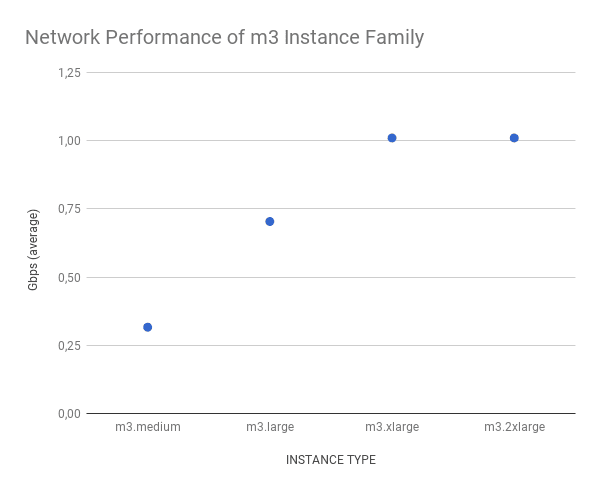
The benchmark results within the m3 instance family are very consistent with a minimal variance between different measurements. Expect a network throughput from 0.3 Gbps to 1.0 Gbps with m3 instances.
| INSTANCE TYPE | TARGET | MIN | MAX | AVG | STDDEV |
|---|---|---|---|---|---|
| m3.medium | Moderate | 0.32 | 0.32 | 0.32 | 0.00 |
| m3.large | Moderate | 0.70 | 1.22 | 0.70 | 0.04 |
| m3.xlarge | High | 1.01 | 1.01 | 1.01 | 0.00 |
| m3.2xlarge | High | 1.01 | 1.01 | 1.01 | 0.00 |
The following chart shows the average networking performance of the different m3 instance types.
m4 Instance Family
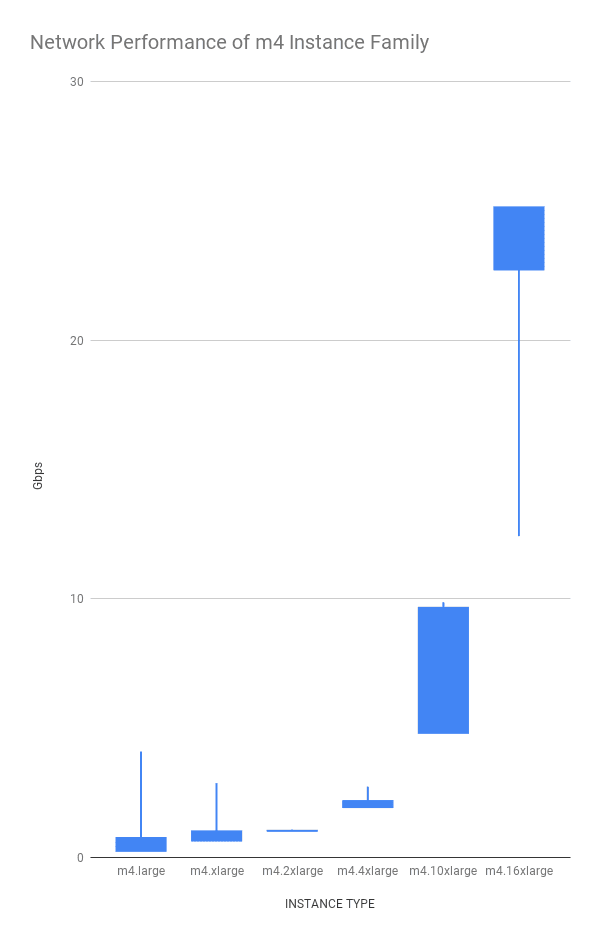
The variance is much higher between measurements of the same instance type within the m4 family. AWS specifies the network throughput for the m4.10xlarge and m4.16xlarge instance types in detail: 10 Gbps and 25 Gbps.
| INSTANCE TYPE | TARGET | MIN | MAX | AVG | STDDEV |
|---|---|---|---|---|---|
| m4.large | Moderate | 0.47 | 4.08 | 0.49 | 0.25 |
| m4.xlarge | High | 0.79 | 2.85 | 0.81 | 0.18 |
| m4.2xlarge | High | 1.01 | 1.06 | 1.01 | 0.00 |
| m4.4xlarge | High | 2.03 | 2.73 | 2.05 | 0.12 |
| m4.10xlarge | 10 Gbps | 5.00 | 9.86 | 7.22 | 2.42 |
| m4.16xlarge | 25 Gbps | 12.42 | 24.63 | 23.93 | 1.20 |
The following chart illustrates the networking performance of the m4 instance family. The vertical line shows min/max throughput in seconds. The box indicates the average +/- standard deviation.
Summary
When choosing an instance type, the network performance should be one of the main criteria. Especially, for network-intensive workloads. As AWS is only providing very vague information about the networking performance of each instance types our benchmark helps you to avoid bottlenecks caused by the networking capacity of your instances.
Networking benchmarks of other instance families will follow!
Published at DZone with permission of Andreas Wittig. See the original article here.
Opinions expressed by DZone contributors are their own.
Comments