

Eclipse MAT — Incoming, Outgoing References
Check out the differences between incoming and outgoing references in Eclipse MAT.
 CORE
·
CORE
·
Join the DZone community and get the full member experience.
Join For FreeEclipse Memory Analyzer (MAT) is a powerful tool for heap dump analysis. It has several great features to debug memory problems effectively. ‘Incoming references’ and ‘outgoing references’ are one such feature. In this article, let’s discuss incoming references, outgoing references, and the difference between them.
In Eclipse MAT, when you right click on any object, you will see drop down menu. If you select ‘List Objects’ menu item, you will notice two options:
- with outgoing references
- with incoming references
As it’s easier to understand new concepts through examples. Let’s learn more about incoming references and outgoing references through an example. Say your application’s source code looks like this:
public class A {
     private C c1 = C.getInstance();
}
public class B {
     private C c2 = C.getInstance();
}
public class C {
     private static C myC = new C();
     public static C getInstance() {
             return myC;
     }
     private D d1 = new D();
     private E e1 = new E();
}
public class D {
}
public class E {
}
public class SimpleExample {
     public static void main (String argsp[]) throws Exception {
            A a = new A();
            B b = new B();
     }
}
Now, if we are going draw the objects diagrammatically for the above example application, it’s going to look like this:
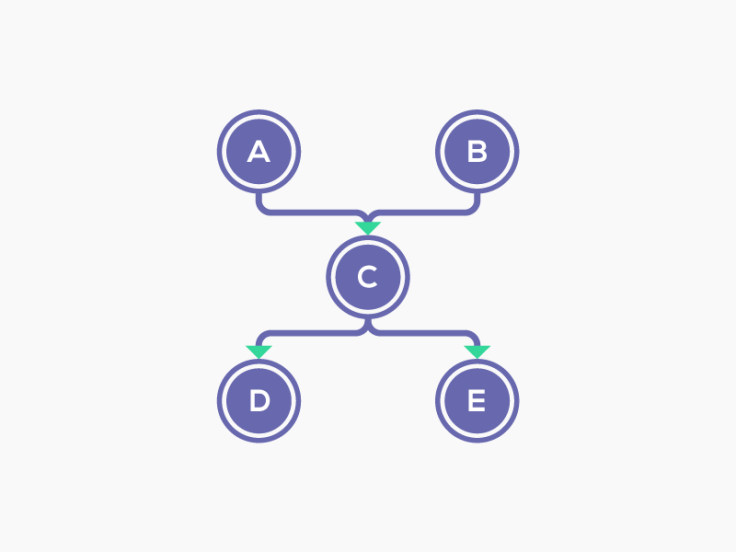
Fig: Sample application’s objects references
- Object A and Object B are holding a reference to Object C
- Object C is holding a reference to Object D and Object E
Now, in this sample project, let’s study the incoming references and outgoing references of object C.
Incoming References of Object C
All the objects that hold references to object C are called incoming references. In this example, Object C’s incoming references are object A, object B, and class C.
To confirm this theory, we captured heap dump from the above sample application and upload it to Eclipse MAT. Below are the incoming references reported by Eclipse MAT for Object C.

Fig: Incoming references of Object C
When you right-click on Object C in the ‘Dominator Tree’ and select ‘List Objects > with incoming references’ option, you will notice that Eclipse MAT generates the above report. You can notice Object A, Object B, and class C reported as incoming references. Eclipse MAT also displays the variables used to reference Object C. You can see object A referencing object C using the variable ‘c1.’ Similarly, other variables used to reference object C are also reported.
Outgoing References for Object C
All the objects that Object C references are called outgoing references. In this example, Object C’s outgoing references are object D, object E and class C.
Below are the outgoing references reported by Eclipse MAT for Object C.

Fig: Outgoing references of Object C
When you right-click on Object C in the ‘Dominator Tree’ and select ‘List Objects > with outgoing references’ option, you will notice Eclipse MAT generates the above report. You can notice Object D, Object E, and class C reported as incoming references. Eclipse MAT also displays the variables by Object C to reference other objects. You can see object C referencing object D using the variable ‘d1.’ Similarly, other variables used in object C are also reported.
We hope this article might have clarified the difference between incoming references and outgoing references. To more learn about the difference between heaps, check out this article on the difference between shallow heap and retained heap for further reading.
Opinions expressed by DZone contributors are their own.
Comments