

Effective Engineering Feedback: Software Testing
Software testing is a feedback system that drives better decisions. Learn how effective feedback, CLEAR principles, and testing levels improve quality and teamwork.
 CORE
·
CORE
·
Testing is learning through questioning and acting upon questions and answers. The importance of our questions and their answers determines testing value. There is a truth hidden behind this perspective: Feedback is at the core of testing. Testing is valuable to the extent that it generates feedback. It is valuable to the extent that it improves understanding and supports better decision-making. This feedback operates on two interconnected levels: individual and collective.
At an individual level, feedback emerges from inspection and interaction with the system. Every test we design and execute produces feedback — about behavior, risks, inconsistencies, and unexpected outcomes. This is where learning begins. We interpret the feedback, form hypotheses, challenge assumptions, and gradually develop a clearer understanding of the system. We learn through this loop of observation and reflection.
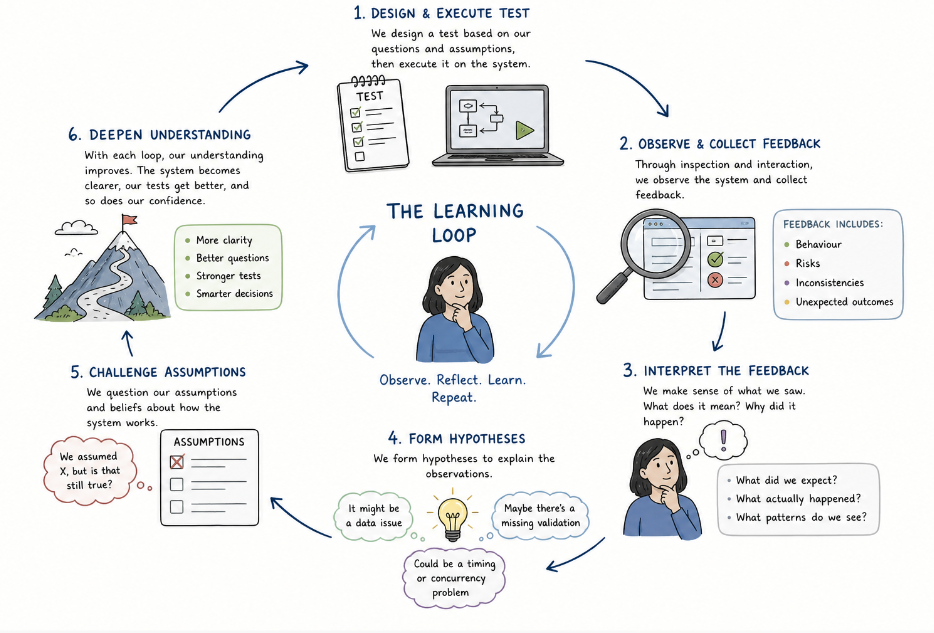
Gone are the days when software testing was a single person's responsibility. The impact of our feedback depends on how effectively it is communicated and shared with others. Team-level feedback transforms individual insights into actionable decisions. When testers communicate their findings to developers, product managers, and other stakeholders, they are not just reporting results. They are shaping the team’s perception of risk, quality, and priorities. The clarity, timing, and framing of this communication determine whether the feedback leads to meaningful action or is overlooked or misunderstood. Effective testing is not just about discovering information. It's also about the right insights reaching the right people in a way that drives informed decisions.
In this article, I will explain how placing feedback at the core of software testing can guide towards better engineering practices. I start with feedback in bug reporting and then arrive at the CLEAR framework for feedback effectiveness. Testing levels are then framed as distinct feedback channels, and some testing types are targeted feedback instruments. The final paragraph explains how feedback can help shed some light on why testing is much more than manual and automated testing.
Bug Reporting
The value of a bug report depends on how effective the feedback it provides. How important is this bug? How severe is it? (bug priority and severity are not the same thing!). How clear is the problem to the person who will attempt to solve it? What are the reproduction steps? Is there only one way to reproduce it, or are there multiple ways? Is the bug always reproducible, or is it intermittent? A bug report should include all the data necessary. We are explaining an investigation journey. Our investigation could save time for others or guide them towards the correct line of thinking. After all, why do we write a bug report?
- Eliminating the "It Works on My Machine" loop. The most expensive part of a developer’s day is often the "chase." If a bug report lacks clear reproduction steps, the developer could spend hours trying to trigger the failure. A great report provides a predictable path to failure. By defining the specific sequence of events, environment variables, and input data, the developer avoids guessing which variables led to the problem.
- Providing the evidence (Logs, Traces, and Context). Logs and traces, screenshots and screen recordings are the "black box flight recorders" of the application. They point the developer to the exact line of code or the specific API call that failed. For example, knowing that a bug only happens on iOS 17 using a specific Safari version on a low-memory device saves time. It prevents the developer from looking for a server-side logic error when the problem is actually client-side memory management.
- Shortening the "Mental Model" gap. A developer usually has a mental model of how the code should work. A bug report challenges that model. When we explain multiple ways to reproduce a bug or show that it’s intermittent, we are providing pattern recognition. For example, if a bug happens only when two specific promotional rules overlap, the developer realizes the issue isn't in the "Price Calculator" class, but in the "Rule Intersector" logic.
What Makes Testing Feedback Effective?
Effective feedback requires hard skills and soft skills. The CLEAR (Concise, Logical, Empathetic, Actionable, Relevant) framework summarizes the characteristics of effective feedback as follows.
- Concise. This is about providing the maximum amount of "signal" with the minimum amount of "noise." It’s about ensuring a developer doesn't have to read a novel to find the plot. Vague feedback ("something seems wrong in the payment module") is noise. Precise feedback ("the discount code field fails validation for codes containing hyphens") is signal.
- Bad example: "The application seems to have some weird behavior where if I go to the checkout page and I try to click the button really fast, sometimes it doesn't work, and it hangs."
- CLEAR example: "Checkout: Race condition causes UI hang during rapid click of 'Purchase' button."
- The difference: "We've moved from a narrative description to a specific technical summary in half the words.
- Logical. Logical feedback follows a sequence that matches how we operate software. If our reproduction steps jump from Step 1 to Step 10, the developer will get lost in the gap.
- The framework in action
- Pre-conditions: What state was the system in?
- Steps to reproduce: The chronological path.
- Expected result: The requirement.
- Actual result: The deviation.
- Logical tip: If a bug is intermittent, describe the logic of the failure. "The bug appears only when the cache is empty (First Load)," rather than just saying "It happens sometimes."
- The framework in action
- Empathetic. Empathy in testing is about realizing that you are giving feedback about a "failure" to the person who built the feature, or designed it, or created the user stories.
- Non-empathetic: "The pricing logic is completely broken. How did this pass code review?"
- CLEAR example: "I found an interesting edge case in the pricing engine where legacy discounts conflict with the new VAT rules. It looks like a complex interaction — I've attached the logs to help narrow down where the calculation drifts."
- The difference: You are framing the bug as a "complex interaction" (externalizing the problem) rather than a "developer error" (internalizing the problem).
-
Actionable. Actionable feedback means that the person receiving it has everything they need to start working immediately. If they have to ping you for more info, it's probably because your feedback wasn't actionable.
-
Relevant. A tester often speaks to multiple people. Relevance means knowing what data matters to whom.
- To a developer: Give them the stack trace, the environment version, and the specific variable state.
- To a product owner: Give them the business risk.
- Example: "This bug means 10% of users in the UK cannot complete a purchase today. Estimated revenue impact is £X."
- To a stakeholder: Give them the trust impact.
- Example: "This UI glitch makes the platform look unsecure during the login process, which could increase churn."
Testing Levels as Distinct Feedback Channels
Different testing levels can be viewed in terms of feedback loops. For example, the classic testing pyramid describes levels of testing — unit, integration, system, and acceptance. In essence, the pyramid consists of nested feedback loops, each operating at a different altitude and pace.
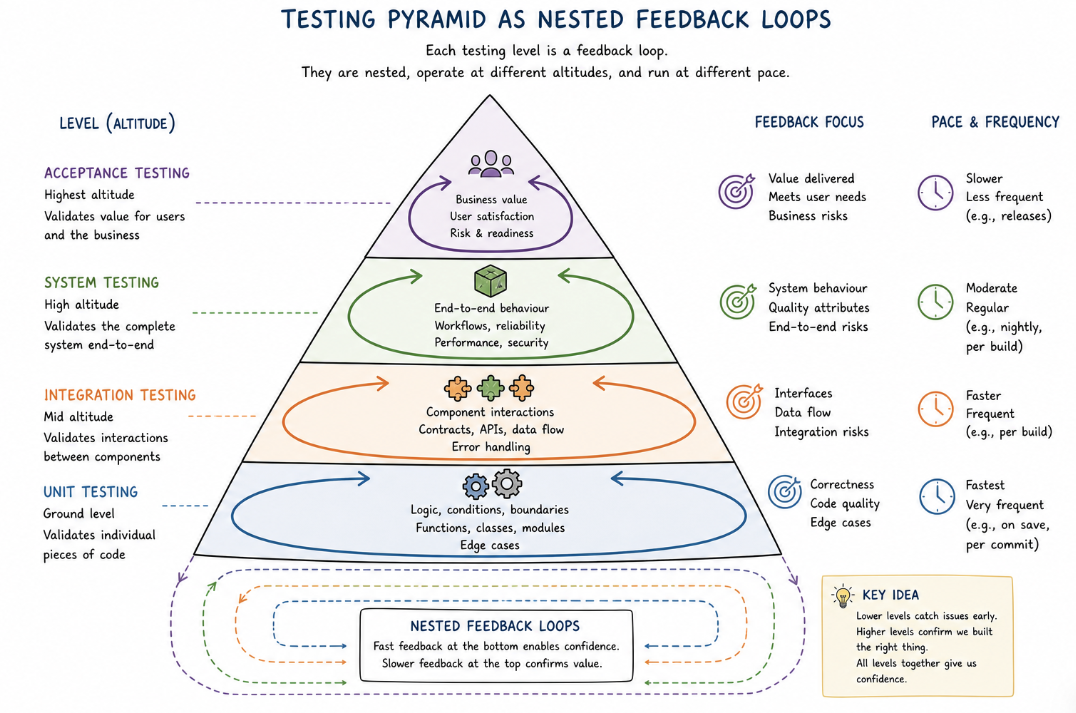
Figure 2: The testing pyramid as nested feedback loops.
Unit Tests: Feedback for Developers, Within Seconds
Unit tests sit closest to the code. They verify that individual functions, methods, or classes behave as expected in isolation. A well-written unit test suite runs in seconds.
Consider a financial calculation module that computes loan repayment schedules. A developer adds a new function to handle edge cases in variable-rate loans. Within moments of writing the code, unit tests confirm whether the logic is correct — or flag exactly which case is broken. The feedback is private, immediate, and technical: this is the developer's conversation with their own code.
The stakeholder here is the developer. The decision supported is: "Is my implementation correct? Can I move on?"
Integration Tests: Feedback for Development Teams, Within Minutes
Integration tests verify that components work together, and examples here could include:
- A service correctly calls an API.
- Data persists accurately in the database.
- A message queue consumer processes events in the right order.
Integration tests are slower than unit tests but still intended to run frequently, typically on every pull request or branch merge.
Imagine an e-commerce platform where a promotional pricing service must communicate with the inventory service before applying discounts. An integration test here catches the case where the pricing service applies a discount to an out-of-stock item — not because either service is individually broken, but because the contract between them is violated.
The stakeholder is the development team. The decision supported is: "Do our services talk with each other as expected? Are our inter-component contracts solid?"
System Tests: Feedback for QA and Product Teams, Within Hours
System tests verify end-to-end behavior across the entire application in an environment that resembles production. They exercise real user journeys — registering an account, completing a purchase, submitting a support ticket — using realistic data and configurations.
A system test for a travel booking platform might simulate a user searching for flights, selecting seats, entering payment details, and receiving a confirmation email. When a regression causes the confirmation email to omit the booking reference number, the system test catches it before it reaches a real customer. The failure report goes not just to engineering but to product management, who understand the downstream impact on customer support call volumes.
The stakeholders are QA, product managers, engineering leads, and the development team. The decision supported is: "Is the application ready to be released? Is the user experience releasable under realistic conditions?"
Acceptance Tests: Feedback for Business Stakeholders, Continuously
Acceptance tests bridge the gap between business requirements and technical implementation. They verify that the software fulfills the intent expressed in user stories, not just the technical specification.
A healthcare SaaS platform builds a feature to allow patients to request prescription renewals through a portal. The acceptance criteria, written collaboratively by the product owner and QA, specify that a renewal request must fail gracefully if the prescribing physician is no longer affiliated with the practice. An acceptance test codifies this scenario, and when it runs green, it gives the product owner a specific, unambiguous signal: "The software behaves as agreed."
The stakeholders are the business, product owners, and compliance teams. The decision supported is: "Does this feature meet the agreed requirements? Can we ship it?"
Testing Types as Targeted Feedback Instruments
Different types of testing generate feedback on entirely different dimensions of software quality. Choosing which types to invest in depends entirely on which questions we want to answer.
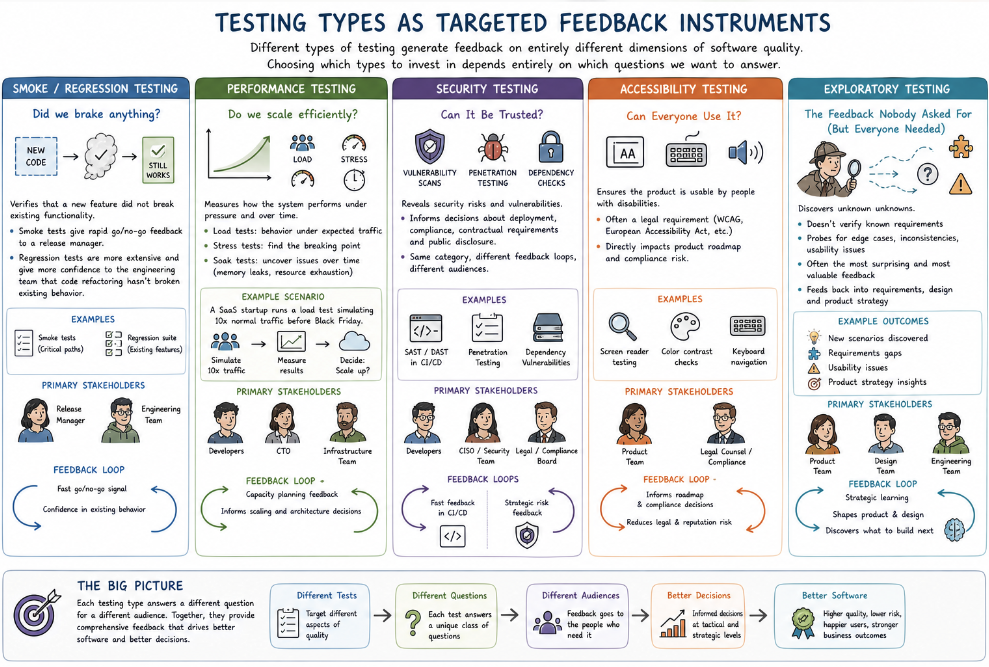
Figure 3: Testing types as targeted feedback instruments.
Smoke/Regression Testing: Did We Break Anything?
This is the most familiar category — verifying that a new feature did not break existing functionality. But even here, the feedback target matters. Smoke tests give rapid go/no-go feedback to a release manager. Regression tests are more extensive and give more confidence to an engineering team that code refactoring hasn't broken existing behavior.
Performance Testing: Do We Scale Efficiently?
Performance tests answer a different class of question entirely — and for a different audience. Load tests measure how the system behaves under expected traffic. Stress tests reveal the breaking point. Soak tests uncover slow memory leaks or resource exhaustion that only appear after sustained operation.
A SaaS startup preparing for a Black Friday marketing campaign runs a load test simulating ten times normal traffic. The results are communicated to developers, the CTO, and the infrastructure team, who must decide whether to scale up cloud resources before the campaign launches. Performance test results are, fundamentally, capacity planning feedback.
Security Testing: Can It Be Trusted?
Security testing generates feedback for a stakeholder who rarely appears in sprint reviews but who is ever-present in risk conversations: the CISO, compliance officer, or legal team. Penetration testing results, OWASP scan outputs, and dependency vulnerability reports fit here. They inform decisions about whether a product can be deployed in regulated industries, whether it can meet contractual security requirements, and whether it needs a public disclosure if a vulnerability is found.
A SAST (Static Application Security Testing) scan run as part of CI/CD delivers feedback to developers when a new library dependency has a known CVE. A quarterly penetration test by an external security firm delivers feedback to the board about the organization's overall security posture. Same category, very different feedback loops, very different audiences.
Accessibility Testing: Can Everyone Use It?
Accessibility testing is a form of feedback that's all too often treated as optional. The primary stakeholder here isn't technical: it's the product team and legal counsel. In many jurisdictions, accessibility isn't a nice-to-have — it's a legal requirement under WCAG guidelines and regulations like the European Accessibility Act. Accessibility test results directly inform product roadmap decisions and compliance risk assessments.
Exploratory Testing: The Feedback Nobody Asked For (But Everyone Needed)
Exploratory testing occupies a unique position in the feedback ecosystem. Unlike scripted tests, it doesn't verify known requirements — it discovers unknown unknowns. A skilled exploratory tester, given a new feature and a testing charter, will probe for edge cases, inconsistencies, and usability issues that no test script anticipated.
The feedback from exploratory testing is often the most surprising and the most valuable. It tells the product team not just that something is broken, but that there are scenarios they never considered. This information feeds back into requirements, design decisions, and sometimes into the product strategy itself.
Feedback in The Era of Manual vs Automated
Software testing is more than test execution. We do not provide feedback only by manually clicking buttons or running automated scripts. Manual and automated testing speak only about the mechanics of testing and bypass the intellectual testing process. Analysis, skepticism, and synthesis for a given business domain usually provide the highest value. Feedback is the synthesis of domain expertise and technical skepticism. It is the ability to look at a "green" pipeline and still identify the architectural fragility or the user experience friction that no script was designed to catch.
Invaluable feedback flows through testing activities beyond manual/automated testing. It is the questions we ask during requirements refinement and the risks we surface in a three-amigos session. It is the review comments we leave on a pull request, the observations we document during exploratory testing, and the metrics we present in a quality report. A tester who spots an ambiguity in a user story and raises it before a line of code is written has delivered invaluable feedback. A QA lead who notices that defect density is climbing in a particular service week over week has delivered great feedback. The medium changes — a conversation, a ticket, a bug, a dashboard, a test result — but the purpose is the same: to give the right person the right feedback at the right moment so they can make a better decision. By far, the best decisions are made when testing feedback is given early in the SDLC, before developers start coding. This kind of feedback is neither manual testing nor automated testing.
Wrapping Up
The industry's attachment to speed is understandable, but speed without evidence is just gambling, and evidence requires feedback.
Software testing is an ongoing, multi-layered system of feedback. It keeps every stakeholder in a software product informed, aligned, and able to make good decisions. It is this very feedback that can help us visualize the invisible and understand what we don't know.
The best testing strategies don't ask "how do we test everything?" They ask "what do we need to know, who needs to know it, and when?" When teams internalize that question, they stop treating testing as overhead and start treating it as infrastructure — the feedback system of a healthy software delivery process.
The future of software doesn't belong to the fastest coder; it belongs to the teams with the best feedback loops. That is the art of engineering feedback.
Opinions expressed by DZone contributors are their own.