DZone
Thanks for visiting DZone today,
Edit Profile
  • Manage Email Subscriptions
  • How to Post to DZone
  • Article Submission Guidelines
Sign Out View Profile
  • Post an Article
  • Manage My Drafts
Over 2 million developers have joined DZone.
Log In / Join
Refcards Trend Reports
Events Video Library
Refcards
Trend Reports

Events

View Events Video Library

Related

  • Retrieval Augmented Generation With Spring AI 2.0, Claude, and PGvector
  • A Spring Boot App With Half the Startup Time
  • Key Takeaways From Integrating a RAG Application With LangSmith
  • Improving Java Application Reliability with Dynatrace AI Engine

Trending

  • Add Observability to Your React Native Application in 5 Minutes
  • The Architecture and MVC Pattern of an ASP.NET E-Commerce Platform
  • From DevOps to AIOps: How Agentic AI Tamed Our Multi-Substrate Chaos
  • AI and Agentic: Promise, Peril, and Predictability

Enable CORS Into Mule 4 at Application Level

In this article, take a look at how to enable CORS into Mule 4 at the application level.

By 
Nitin  Gupta  user avatar
Nitin Gupta
·
Jan. 22, 20 · Tutorial
Likes (3)
Comment
Save
Tweet
Share
29.6K Views

Join the DZone community and get the full member experience.

Join For Free

Mule standing in paddock

Cross-origin resource sharing (CORS) is a mechanism that allows restricted resources on a web page to be requested from another domain outside the domain from which the first resource was served.

There are some situations when we need to enable CORS at the Mule application side so that UI applications like React JS and Angular JS can integrate exposed APIs. Below is the procedure of how we can enable CORS into a Mule 4 application-level at the HTTP listener level.

There are two ways we can allow CORS at Mule 4 application level.

1. Add Origin


You might also like:  Do You Really Know CORS?

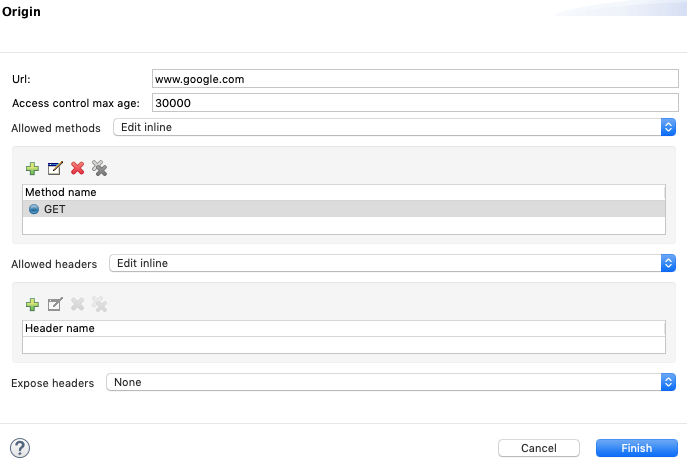
"Add Origin" will be used to add a specific URL. Below parameters, we can add "Add Origin."

  • Origin URL
  • Access Control Max Age
  • Allowed Methods
  • Allowed HTTP Request Headers


2. Add Public Resource

Under "Add Public resource," we are allowing all public URLs.
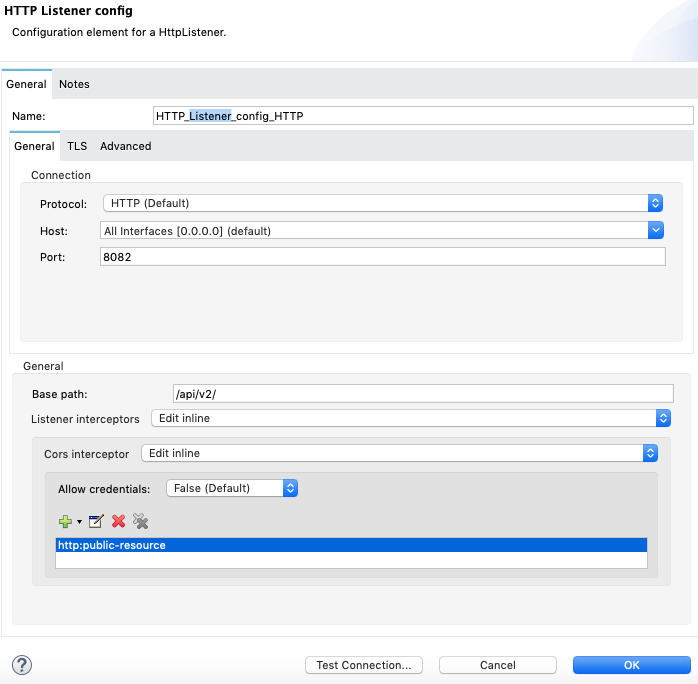


The XML for "Add public resource" is shown below.

XML
x
10
 
1
<http:listener-config name="HTTP_Listener_config_HTTP" doc:name="HTTP Listener config" doc:id="6dd98b8b-1473-4140-a458-2de66eb25343" basePath="/api/v2/">
2
  <http:listener-connection host="0.0.0.0" port="8082" ></http:listener>
3
        <http:listener-interceptors >
4
            <http:cors-interceptor >
5
                <http:origins >
6
                    <http:public-resource ></http:public>
7
                </http:origins>
8
            </http:cors-interceptor>
9
        </http:listener-interceptors>
10
    </http:listener-config>


Thanks, and happy coding.

Further Reading

Basics of CORS (Cross-Origin Resource Sharing)

CORS (Cross-Origin Request Sharing) in Mule

application

Opinions expressed by DZone contributors are their own.

Related

  • Retrieval Augmented Generation With Spring AI 2.0, Claude, and PGvector
  • A Spring Boot App With Half the Startup Time
  • Key Takeaways From Integrating a RAG Application With LangSmith
  • Improving Java Application Reliability with Dynatrace AI Engine

Partner Resources

×

Comments

The likes didn't load as expected. Please refresh the page and try again.

  • RSS
  • X
  • Facebook

ABOUT US

  • About DZone
  • Support and feedback
  • Community research

ADVERTISE

  • Advertise with DZone

CONTRIBUTE ON DZONE

  • Article Submission Guidelines
  • Become a Contributor
  • Core Program
  • Visit the Writers' Zone

LEGAL

  • Terms of Service
  • Privacy Policy

CONTACT US

  • 3343 Perimeter Hill Drive
  • Suite 215
  • Nashville, TN 37211
  • [email protected]

Let's be friends:

  • RSS
  • X
  • Facebook