

Enabling Single-Sign-On in SaaS Application
Single sign-on plays an important role in enhancing the security of your application. Let's deep dive into implementing SSO in an Angular-based web application.
 ·
·
Join the DZone community and get the full member experience.
Join For FreeIntroduction of SSO
Single sign-on (SSO) allows users to log in to enterprise applications using central organizational credentials, which can be used across multiple internal applications without re-entering them. There will be a central Identity Provider that manages the same credentials across multiple applications. Once credentials are provided, they will remain in session for a set number of hours (6 or 8, as per organizational policy). Once credentials expire, the user has to re-enter them when they try to log in to any application, and again, there will be no login requirement for up to 8 hours. The Identity Provider handles authentication, authorization, and identity management across most aspects.
Why SSO Is Important
In a multinational organization, there are multiple applications for different purposes. Users of those applications need to maintain separate credentials for each application, which is hard to track, and maintaining safe password requirements across all the applications is hard for users.
To overcome this overhead, SSO is a good option to provide a seamless access experience. Users need to maintain separate passwords across applications, and strong password requirements can be easily enforced. SSO allows the same security principles across all the applications in an organization, which aligns better with a better security policy. Be it an internal or external SaaS-based application, they can be easily integrated with an SSO platform and allow the organization to establish an enterprise-level security practice.
SSO Architecture
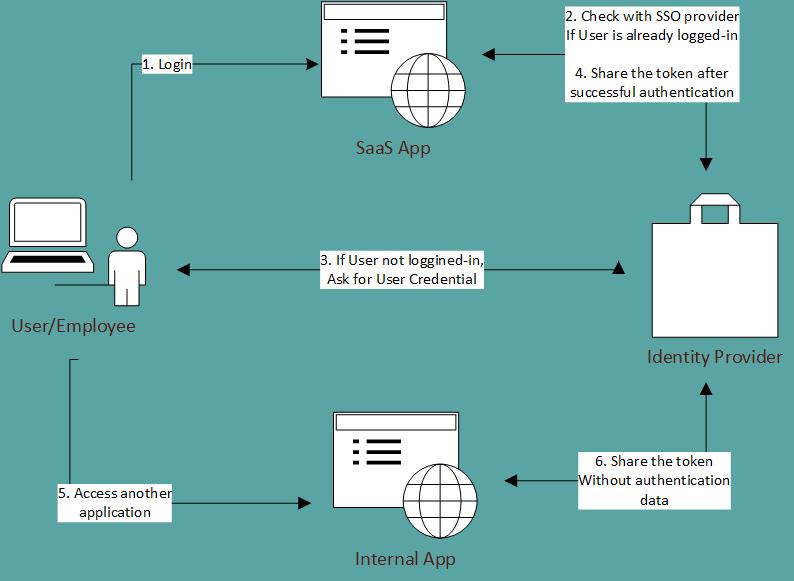
There are various parties involved in the SSO framework.
- User – a user could be an external user or an internal employee of the organization.
- Service Provider (SP) – the application the user wants to access.
- Identity Provider (IdP) – a system that does the job of authentication.
The diagram illustrates the SSO authentication functionality. We might use an IdP system for authorization and identity management as well.
Common Protocols
There are three common types of protocols to support SSO integration.
1. SAML
SAML stands for Security Assertion Markup Language. This is an XML-based protocol, where authentication and authorization data are sent as request and response, in XML format, with no knowledge of the service provider and identity provider. The data is exchanged in the form of SAML Assertion tags, without any technical details of how the authorization and authentication will be performed.
More details about the SAML protocol can be found here.
2. WS-Fed
WS-Fed stands for the Web Services Federation Protocol. This is part of the wider Web Services Security Framework, where trust between services is established using tokens. This protocol is commonly used among Microsoft-based applications at the enterprise level.
More details about the WS-Fed protocol can be found here.
3. OIDC
OIDC stands for OpenID Connect, another protocol based on the OAuth specifications. In this protocol, authentication data is exchanged as JSON Web Tokens (JWTs). This protocol is commonly used for social applications instead of enterprise applications.
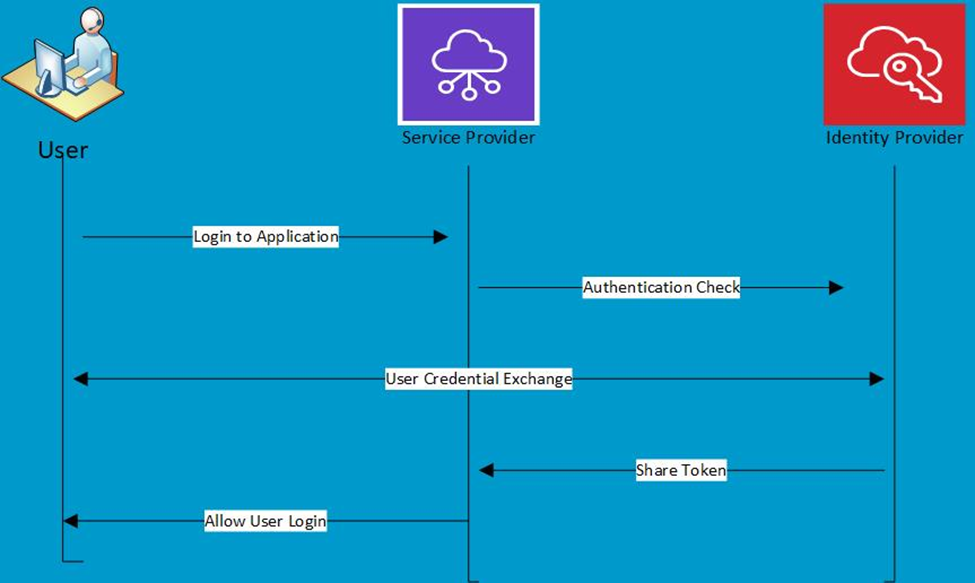
The flow of OIDC-based SSO implementation is as follows. When a user tries to log in to the Service Provider application, it is redirected to the Identity Provider page for authentication information. Once the user is authenticated, the Identity Provider shares a JW token with the application, which includes the user’s identity information as an id token. OIDC protocol can also share authorization details.
OIDC-Based Implementation as a Service Provider
If you are a Service Provider application, you have to deal with an Identity Provider application to implement SSO in your application, so that when a user tries to log in to your application, you can allow them to log in using SSO and maintain the security standard.
For this article, I will assume that you already have a running Angular application with a login page integrated. We will start by taking it as a base and go step by step on how the SSO feature can be added.
1. Import the OIDC library. Import the following entry to package.json. It has all the libraries to implement SSO.
2. Develop AuthGuardService. It intercepts all the navigation in the application and can allow or deny access based on user token authentication.
import { Injectable } from '@angular/core';
import {
  ActivatedRouteSnapshot,
  CanActivate,
  Router,
  RouterStateSnapshot,
} from '@angular/router';
import { Observable } from 'rxjs';
import { AuthService } from './auth.service';
// import { AccessUserInfo } from '../models';

@Injectable({
  providedIn: 'root',
})
export class AuthGuardService implements CanActivate {
  constructor(private authService: AuthService, private router: Router) {}

  canActivate(
    route: ActivatedRouteSnapshot,
    state: RouterStateSnapshot
  ): Observable | Promise | boolean {
    if (this.authService.isLoggedIn()) {
      return true;
    }
    this.authService.startAuthentication();
    return false;
  }
}
3. Develop AuthCallBackComponent. This component allows your Identity Provider to call this API and pass on the user authentication result, with a valid token.
import { Component, OnInit } from '@angular/core';
import { Router } from '@angular/router';
import { User } from 'oidc-client-ts';
import { UserIdleService } from 'angular-user-idle';
import { AuthService } from '../services/auth.service';
import { UserDetail } from '../models/user/UserInfo';
import { LocalStorageService } from '../services/session.service';

@Component({
  selector: 'app-auth-call-back',
  templateUrl: './auth-call-back.component.html',
  styleUrls: ['./auth-call-back.component.css'],
})
export class AuthCallBackComponent implements OnInit {
  currentUser!: User;
  objuserinfo: UserDetail = {} as UserDetail;

  constructor(
    private authService: AuthService,
    private _router: Router,
    private userIdle: UserIdleService,
    private _localService: LocalStorageService
  ) {}

  ngOnInit() {
    setTimeout(() => {
      this.getData();
    }, 0);
  }

  getData() {
    localStorage.removeItem('userInfo');
    this.authService
      .completeAuthentication()
      .then(() => this.authService.getUser())
      .then(async (objUser) => {
        // If user not found, redirect to error page
        if (!objUser) {
          console.error('User not found after authentication.');
          this._router.navigate(['/error'], { replaceUrl: true });
          return;
        }

        this.currentUser = objUser;

        // ---------------------------------------------------
        // Start user idle monitoring
        // ---------------------------------------------------
        this.userIdle.startWatching();
        let isSessionExpired = false;
        this.userIdle.onTimeout().subscribe(() => {
          if (!isSessionExpired) {
            this.authService.signOut();
            isSessionExpired = true;
          }
        });

        // ---------------------------------------------------
        // Populate user info fields upon successful validation
        // ---------------------------------------------------
        this.objuserinfo.userName = this.currentUser.profile.sub ?? '';
        this.objuserinfo.lastName = this.currentUser.profile.family_name ?? '';
        this.objuserinfo.firstName = this.currentUser.profile.given_name ?? '';
        this.objuserinfo.emailAddress = this.currentUser.profile.email ?? '';

        // Save username + token
        localStorage.setItem('userName', this.objuserinfo.userName);
        localStorage.setItem(
          'access_token',
          `${this.currentUser.token_type} ${this.currentUser.access_token}`
        );
      });
  }
}
4. OIDC attribute configuration. In this configuration, you can store all the configuration required to exchange data with your Identity Provider.
{
  "oidcConfig": {
    "issuer": "http://ssoprovider.com",
    "clientId": "This value should be defined by your IdP",
    "redirectURL": "/auth-callback",
    "token_endpoint": "/as/token.oauth2",
    "authorization_endpoint": "/as/authorization.oauth2",
    "revocation_endpoint": "/as/revoke_token.oauth2",
    "userinfo_endpoint": "/idp/userinfo.openid",
    "end_session_endpoint": "https://ssoprovider.com/idp/startSLO.ping?TargetResource=",
    "jwks_uri": "https://ssoprovider.com/pf/JWKS"
  },
  "production": "false",
  "apiRootUrl": "https://serviceprodiver.com /api/query/v1",
  "commandApiRootUrl": "https://serviceprovider.com/api/command/v2",
  "envName": "dev"
}
5. Develop AuthService. This component holds the logic of sign-in, sign-out, and user token management.
import { Injectable } from '@angular/core';
import {
  User,
  UserManager,
  UserManagerSettings,
  WebStorageStateStore,
} from 'oidc-client-ts';

@Injectable({
  providedIn: 'root',
})
export class AuthService {
  private rootUrl: string;
  public manager!: UserManager;
  public user!: User | null;

  isLoggedIn(): boolean {
    return (
      this.user != null &&
      !this.user.expired &&
      this.localService.getItem('userInfo') != null
    );
  }

  isTokenExpired(): boolean {
    try {
      const expireTime = this.getFromSessionStorage('expires_at');
      return expireTime == null || expireTime < Date.now() / 1000;
    } catch {
      return true;
    }
  }

  startAuthentication(): Promise<void> {
    console.log('start');

    localStorage.setItem('currenturl', window.location.href);
    return this.manager.signinRedirect();
  }

  completeAuthentication(): Promise<void> {
    return this.manager
      .signinRedirectCallback()
      .then((user: User) => {
        this.user = user;

        window.history.replaceState(
          {},
          document.title,
          window.location.origin + window.location.pathname
        );
      })
      .catch((err: any) => {
        console.error('Authentication error:', err);
        // this._router.navigate(['/error']);
      });
  }

  getFromSessionStorage(key: string): any {
    const jsonOidc =
      localStorage.getItem(
        `oidc.user:${environment.oidcConfig.issuer}:${environment.oidcConfig.clientId}`
      ) || '{}';

    const sessionOidc = JSON.parse(jsonOidc);
    return sessionOidc[key];
  }

  signOut(): Promise<void> {
    const refreshToken = this.getRefreshToken();
    this.revokeToken(refreshToken);
    return this.manager.signoutRedirect();
  }
}
With the above implementation, your application will be ready to support SSO, and you need to maintain user authentication data.
Best Practices for Implementing SSO
- Choose a reliable Identity Provider, which is accepted at the industry level and supports multiple protocols like SAML, WS-Fed, or OIDC.
- Always choose the second level of authentication, along with user credentials, which is called multi-factor authentication (MFA). It could be by sending an extra token to the user’s cell phone or email address.
- While providing access to application functionality adds role-based access control (RBAC), it aligns with the principle of least privilege.
- Once the token is shared by the Identity Provider, the application should maintain this token securely. If the token is exposed, anyone can use it to gain access to multiple applications for a short time.
- Always use a secure communication protocol, such as HTTPS or SSL, to exchange user credentials or tokens.
Opinions expressed by DZone contributors are their own.
Comments