

Implementing Zero-Downtime Upgrades in an Enterprise Cloud Application
Learn how to achieve zero-downtime upgrades in enterprise SaaS through resilient architecture, CI/CD automation, and multi-region deployment.
 ·
·
Join the DZone community and get the full member experience.
Join For FreeEnsuring your enterprise SaaS application remains always available is more than just a technical objective; it’s a fundamental business requirement. Even short periods of downtime, such as those during routine software updates, can disrupt customers’ operations, erode their trust, and lead to contractual penalties if service-level agreements aren’t met. SaaS applications serve users across multiple time zones. Scheduling downtime that accommodates all users is impractical, making zero-downtime upgrades essential for global businesses. Zero-downtime processes allow for quicker deployment of features, bug fixes, and security patches, supporting agile development and reducing time-to-market.
Mastering zero-downtime upgrade procedures, in tandem with robust multi-cloud and multi-region architectures, is essential in maintaining service availability. Recent high-profile outages on major cloud platforms have underscored the disruptive impact of unexpected downtime, affecting organizations worldwide across industries. By distributing workloads across multiple cloud providers and hosting applications in multiple geographic regions, organizations can reduce single points of failure and improve resilience against large-scale outages. If one cloud provider or region experiences issues, traffic can be quickly rerouted to healthy environments, minimizing the impact on end users.
This article outlines the key architectural patterns, deployment strategies, and operational best practices for achieving zero-downtime upgrades in Enterprise SaaS environments.
Why Zero-Downtime Matters
Enterprise customers often depend on SaaS applications for their core business operations. Zero-downtime upgrades ensure that users can access the application without interruption, enhancing productivity and trust. Scheduled maintenance windows are increasingly impractical due to globalization, and unexpected outages harm both the provider’s reputation and customer satisfaction. Ensuring seamless deployments directly supports business continuity and compliance obligations.
Also, many enterprise agreements and industry regulations require strict service uptime guarantees. Zero-downtime upgrades help providers consistently meet Service Level Agreements (SLAs) and compliance mandates. Seamless upgrades reduce the risk of errors and complications associated with manual interventions, rollback procedures, or customer complaints due to outages.
Foundational Strategies
Decouple Deployment and Release
Deploy changes safely without immediately exposing them to end users. Incorporate feature flags to gradually enable or disable new features in production environments.
One of the most effective ways to deploy new functionality safely is by decoupling deployment from release. This approach ensures that code changes can be pushed to production without instantly impacting end users. The key enabler here is feature flags (also known as feature toggles).
Feature flags allow teams to control the visibility and activation of specific features in real time. Instead of waiting for a big-bang release, you can deploy code continuously and then gradually enable features for selected user groups, environments, or regions. This provides several advantages:
- Progressive delivery: Roll out new functionality to a small percentage of users first, monitor system behavior and user feedback, and expand the rollout only after confirming stability.
- Instant rollbacks: If a new feature introduces performance regressions or unexpected bugs, it can be disabled instantly — no need to redeploy or revert code.
- A/B testing and experimentation: Teams can run experiments by enabling or disabling certain features for different cohorts, collecting data, and making data-driven decisions about what to promote to all users.
- Operational safety: When deploying infrastructure or backend changes, feature flags help teams control risk by activating changes only after confirming all dependent systems are ready.
In practice, modern teams often integrate feature flag management directly into their CI/CD pipelines. Tools such as LaunchDarkly, Unleash, or Flagsmith provide dashboards and APIs to manage flag states dynamically. This allows DevOps or SRE teams to toggle features on or off safely without code changes.
Ensure Backward Compatibility
Design service interfaces and database schemas so that both old and new application versions can operate simultaneously during deployments and rollbacks. Backward compatibility is essential for maintaining system stability during rolling deployments, blue-green releases, and emergency rollbacks. The goal is to ensure that both old and new versions of your application can coexist seamlessly — whether it’s for a few minutes or several days.
When designing APIs, service interfaces, or database schemas, follow patterns that allow incremental change rather than breaking change. For example:
- Version your APIs: Introduce new API versions (/v2/) instead of modifying existing endpoints. This allows older clients to continue operating without disruption while new clients can adopt enhanced functionality at their own pace.
- Use additive changes: Whenever possible, make schema changes additive. Add new columns or tables instead of renaming or dropping existing ones. Deprecated fields can remain in use until all dependent services are updated.
- Graceful data migrations: Perform schema migrations in multiple stages—first deploy a backward-compatible change, then update the application logic, and finally remove deprecated elements in a later release cycle.
- Schema evolution for event streams: For event-driven architectures, ensure your message schemas (e.g., Avro, Protobuf, JSON) can tolerate unknown fields. This allows producers and consumers to evolve independently without breaking the message flow.
- Contract testing: Implement automated contract tests between services to verify that new versions respect existing integration expectations. Tools like Pact or Spring Cloud Contract help detect breaking changes early in the CI/CD pipeline.
Backward compatibility not only supports zero-downtime deployments but also dramatically reduces the risk during rollbacks. If a new release fails, you can revert to the previous version without corrupting data or breaking API consumers.
Automate and Orchestrate
Leverage CI/CD pipelines and automated testing to coordinate builds, deployments, validations, and rollbacks. Eliminate manual steps that risk human error. By leveraging CI/CD pipelines and intelligent orchestration, teams can deliver code to production faster, with fewer errors and greater confidence. The goal is to build a system where every deployment—from code commit to rollback — is repeatable, traceable, and low-risk.
A well-designed CI/CD pipeline doesn’t just build and deploy code — it coordinates every stage of the release process:
- Build automation: Start with automated build processes that compile, package, and version your application consistently across environments. This ensures reproducibility and eliminates “works on my machine” issues.
- Automated testing: Integrate comprehensive testing into the pipeline — unit, integration, end-to-end, and performance tests — to validate changes early. Include smoke tests or canary validations post-deployment to catch environment-specific issues.
- Environment orchestration: Use infrastructure-as-code (IaC) tools like Terraform, Pulumi to manage environments and configurations declaratively. Combine them with container orchestration tools such as Kubernetes for consistent, scalable deployment workflows.
- Progressive deployment strategies: Incorporate deployment strategies such as blue-green, canary, or rolling updates directly into your CI/CD pipeline. These enable partial rollouts, automatic monitoring, and fast rollback triggers.
- Rollback automation: Treat rollback as a first-class citizen in your pipeline. Automate reversion steps, ensuring that a single command — or even an automated alert — can trigger a safe recovery if validation checks fail.
- Continuous verification: Pair your orchestration with real-time monitoring and observability platforms (like Prometheus) to continuously assess system health during and after deployments.
Eliminating manual deployment steps not only reduces human error but also enforces consistency and compliance across teams. Every deployment follows the same tested, version-controlled process, which leads to higher confidence and faster recovery when things go wrong.
Invest in Observability
Instrument systems to capture application metrics, user activity, error rates, and system health. Enable real-time monitoring and alerting to rapidly detect regressions. Monitoring isn’t optional: it’s your early warning system. In addition to standard metrics, invest in:
- Log analytics: Aggregate and analyze logs in near-real time to spot anomalies.
- Logging alerts: Configure alerts based on error patterns or service degradations, not just simple thresholds.
- Dashboards: Build unified dashboards using tools like Grafana to visualize both infrastructure and application performance.
- Comprehensive metrics: Collect infrastructure, application, and business KPIs to track deployment health and user impact.
Deployment Patterns for Zero-Downtime
Blue-Green Deployments
Maintain parallel production environments (blue and green). Deploy updates to the idle environment, validate stability, and redirect live traffic upon success. Roll back by switching traffic to the previous stable environment if issues arise.
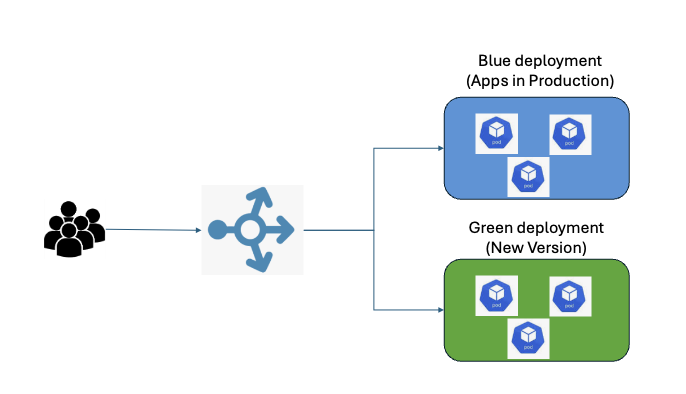
Blue-green deployment is a release process that maintains two parallel production environments: typically referred to as “blue” and “green.” At any moment, one environment (say, blue) serves live traffic, while the other (green) remains idle and ready for updates. When it’s time for a new release—whether it’s a bug fix, a major upgrade, or a new feature—the update is deployed to the idle environment. Once validated, the live traffic is switched over, allowing seamless transitions with minimal risk and downtime.
This pattern is also called Red-Black Deployment, and naming conventions can vary (“blue” or “green” may represent active or idle environments). The key remains: two identical environments, one live and one ready for change.
How Blue-Green Deployment Works
The blue-green deployment process consists of four key phases:
1. Setting Up Parallel Environments
Start by creating two identical production environments: blue (current live) and green (idle, ready for updates). Having two matched environments ensures that the update can be thoroughly tested without interfering with users.
2. Routing With Load Balancer
A load balancer (or router) manages which environment receives user traffic. When it’s time to roll out a new release, the latest code is deployed to the idle environment (green), and all necessary tests and validations are performed. The load balancer then quickly redirects traffic from blue to green, ensuring no DNS propagation issues and a seamless user experience. If issues arise, the load balancer can route traffic back to blue almost instantly.
3. Monitoring the New Release
Once the green environment is live and serving production traffic, DevOps engineers monitor its behavior closely. Automated smoke tests and manual health checks ensure the new release’s stability. Any issues or regressions observed can be addressed before they reach a wider audience.
4. Deployment or Rollback
If the green environment performs as expected, it officially becomes the primary production environment. The previous blue environment can either be decommissioned or kept as a backup for a short period. If significant issues are identified, a rollback is as simple as switching traffic back to the blue environment, dramatically reducing downtime and user impact.
After successful validation and monitoring, the cycle repeats: the now-stable green instance is relabeled as blue, and a fresh environment is prepared for the next release.
- Recommended for: Complex releases and infrastructure-wide changes.
- Tradeoff: Increased resource usage during deployment.
Canary Releases
A canary release, sometimes called a canary deployment, is a proven approach for introducing new changes to production environments with minimal risk. Named after the practice of using canaries in coal mines as early indicators of danger, this technique enables teams to expose new functionality to a limited segment of users or tenants before scaling the update to the entire population.
With a canary release, only a small subset — perhaps just 5-10% — of users or servers receive the new code initially. This group acts as the "early warning system." By carefully monitoring error rates, performance metrics, and user experience with this segment, teams can identify any critical issues before they propagate to the broader user base. If metrics remain healthy and no significant errors are detected, the release can be gradually ramped to an increasing percentage of users—eventually encompassing everyone. Conversely, if problems arise, the deployment can be quickly halted or rolled back, preventing the wider user community from being impacted.
Crucially, canary releases are built around the following best practices:
- Segmentation: Release the new version to a clearly defined user or server segment.
- Automated monitoring: Instrument deployments with monitoring for critical metrics, such as error rates, latency, and resource consumption.
- Incremental rollout: Gradually increase exposure based on confidence and metric health, rather than releasing to all users at once.
- Quick rollback: Maintain the ability to rapidly revert to the stable version if anomalies or regressions are detected.
This pattern fosters a culture of safety and learning, helping teams mitigate risk and validate real-world impact on a limited scale before committing to a full rollout. By being proactive in tracking stability and user experience, organizations can build confidence in their releases and maintain high availability, even as they innovate and evolve their products.
- Recommended for: Gradual adoption and risk mitigation in large-scale SaaS environments.
Rolling Updates
Incrementally apply changes to subsets of servers or containers to maintain continuous service availability. Utilize health checks to verify each batch before progressing. Rolling update, as practiced in orchestrators like Kubernetes, applies changes incrementally to subsets of running pods or containers. For each batch, built-in health checks and readiness probes automatically verify that the new instances are operating as expected before the update proceeds to the next set. If an error or degradation is detected, the update can be paused or reverted to safeguard overall system stability.
For example, with Kubernetes, you might start by updating a single pod out of ten. Kubernetes’s controllers monitor this new pod’s health via designated probes — such as HTTP checks or command executions. If the pod becomes "ready," the system updates the next pod, continuing in sequence. This process enables seamless, continuous availability throughout the update, even as new code is introduced.
Key Benefits of Incremental Updates
- Continuous service availability: Only a fraction of servers/containers are unavailable at any moment, reducing the risk of full outages.
- Automated health verification: Built-in health checks ensure each batch is stable before proceeding.
- Controlled rollback: If an issue is detected, updates can be halted or reverted, protecting users from widespread impact.
- Efficiency and speed: Rolling updates balance risk and speed, often allowing frequent, safe updates in fast-moving production environments.
By adopting incremental deployment strategies — with robust health checking at each step — you can confidently deliver updates, knowing that issues are contained and service reliability remains uncompromised.
- Recommended for: Microservice and stateless architectures.
Feature Toggles
Utilize runtime flags to enable or disable new features dynamically. Leverage runtime feature flags to enable or disable new capabilities instantly, independent of code deployments. This approach offers greater control and flexibility for development teams, allowing them to manage feature exposure dynamically without extensive engineering effort during rollout or testing.
Feature flags are invaluable for frequent, incremental product releases and experimentation, as they facilitate A/B testing, rapid rollback of problematic features, and seamless integration of user feedback. Particularly in blue/green deployment strategies, feature flags empower teams to validate new features in a live environment without disrupting existing services — enabling organizations to safely test hypotheses and swiftly disable features that do not meet user expectations.
- Recommended for: Frequent, incremental product releases and experiments.
Schema Changes: Safeguarding Data Availability
Managing data migrations without disruption is critical. Use the "expand and contract" pattern:
- Expand: Introduce new fields or tables in a backwards-compatible manner.
- Migrate: Update application logic, synchronize, and verify data.
- Contract: Remove deprecated schema components once the system is fully upgraded.
Leverage migration tools (e.g., Liquibase, Flyway) and consider dual-read/write strategies to ensure data consistency. By combining expand and contract principles with robust CI/CD pipelines and observability tooling, teams can make schema changes with zero downtime and minimal user impact.
Conclusion
Zero-downtime upgrades are an operational standard for modern enterprise SaaS offerings. Success relies on disciplined engineering: resilient architecture, robust automation, comprehensive monitoring, and a customer-centric culture. By applying these patterns and practices, engineering teams can deliver upgrades that delight users — without ever taking the platform offline.
Opinions expressed by DZone contributors are their own.
Comments