

Engineering an AI Agent Skill for Enterprise UI Generation
How we built ZUL-writer: an agent skill that turns textual requirements and UI mockups into production-ready front-end code (ZUL) and Java controller templates.
 CORE
·
CORE
·
Large language models have recently made it possible to generate UI code from natural language descriptions or design mockups. However, applying this idea in real development environments often requires more than simply prompting a model. Generated code must conform to framework conventions, use the correct components, and pass basic structural validation.
In this article, we describe how we built an Agent Skill called zul-writer that generates UI pages and controller templates for applications built with the ZK framework.
For readers unfamiliar with it, ZK is a Java-based web UI framework, and ZUL is its XML-based language used to define user interfaces. A typical page is written in ZUL and connected to a Java controller that handles the application logic.
The goal of this agent skill is to transform textual descriptions or UI mockups into ZUL pages and a Java controller scaffold, while validating the output to ensure it conforms to ZK’s syntax and component model.
This article focuses on the technical design of the agent, including prompt design, validation steps, and how we guide the model to generate framework-specific UI code.
Architecting the Agent: Guiding the LLM Toward Valid UI Code
When building tools for enterprise developers, free-form LLM generation is a liability. LLMs often invent non-existent tags, use unsupported properties, and mix architectural patterns. The solution is strictly architecting the agent's constraints.
The prompt constraints (SKILL.md): Instead of writing a prompt that "teaches" the LLM how to write ZUL, we use Markdown frontmatter and structured sections inside SKILL.md to establish ironclad constraints. These constraints bind the LLM to a strict 4-step process, effectively removing its freedom to improvise outside of our defined architecture.
Structuring the context (RAG in practice): To prevent the LLM from guessing components, we feed it an exact UI-to-component mapping (references/ui-to-component-mapping.md) and base XML templates (assets/). By providing these reference assets directly within the skill, it minimizes the LLM's chance of making up invalid UI tags or layout structures. It doesn't need to guess how an MVVM ViewModel should look; it just follows mvvm-pattern-structure.zul.
Designing a Deterministic Workflow for LLMs (The 4-Step Process)
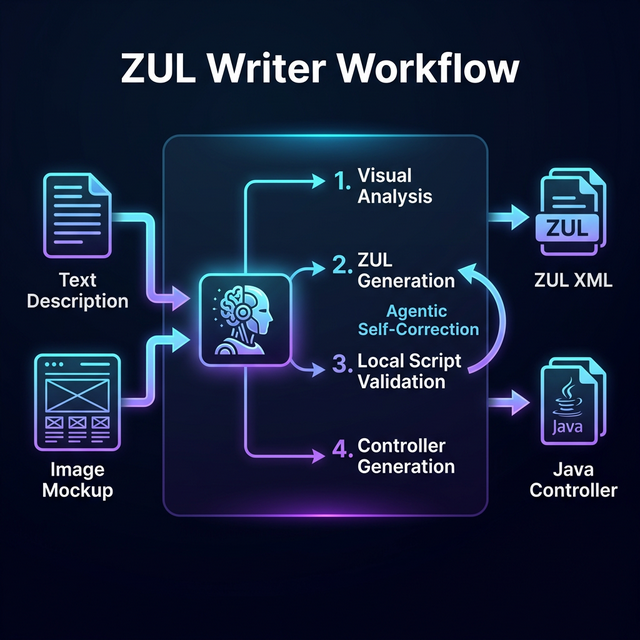
Why does free-form prompting fail for complex UI generation? Because generating a full UI requires multiple context switches: understanding the layout, mapping the components, writing the XML, validating the schema, and finally wiring the backend controller.
To handle this, zul-writer uses Dual Input Modes (text vs. image), natively supporting both descriptive text requirements and direct image inputs (like mockups or screenshots). Here is the deterministic workflow the skill enforces:
- Requirement gathering and visual analysis: If an image is provided, the agent performs a visual analysis to identify layouts, tables, and buttons. It then asks necessary clarifying questions: Target ZK version (9 or 10)? MVC or MVVM? Layout preferences?
- Context-aware generation: The agent generates the ZUL using the exact component mappings and base XML templates provided in the
assets/directory. - Local validation: (Covered in the next section).
- Controller generation: Ensuring the Java code (Composer or ViewModel) is generated to match the IDs and bindings of the generated ZUL perfectly.
Trust, But Verify: Validating AI Output
In a professional engineering workflow, you cannot blindly trust AI-generated code. XML-based languages are particularly prone to LLMs inventing invalid attributes or placing valid attributes on the wrong tags, e.g., putting an iconSclass on a textbox.
Why local script validation? (cost and efficiency): You might think: "Why not just ask the LLM to validate its own code against the XSD?" Validating against massive XSD schemas via LLM prompts consumes huge amounts of tokens, takes too long, and might be prone to "sycophancy" (the LLM telling you it looks fine when it doesn't). Offloading this to a local Python script is deterministic, vastly cheaper, and significantly faster.
The zul-writer skill employs a local Python validation script (validate-zul.py) featuring a 4-layer validation strategy:
- Layer 1: XML well-formedness.
- Layer 2: XSD schema validation.
- Layer 3: Attribute placement checks (catching context-specific errors).
- Layer 4: ZK version-specific compatibility checks.
The agentic loop: If the local script throws an error, the agent intercepts the stack trace, understands what went wrong, and self-corrects the ZUL file before presenting the final code to the developers.
Test-Driven AI Development
Building an AI workflow requires applying traditional software engineering practices — specifically, testing.
Testing the agent with Google Stitch and human-in-the-loop: To test zul-writer, I used Google Stitch to rapidly generate diverse UI screenshots to serve as test inputs. The iteration loop looks like this:
- Feed the Stitch-generated image into
zul-writer. - Manually review the generated ZUL output for layout accuracy and component misuse.
- Identify the AI's "bad habits" and write explicit rules/constraints into
SKILL.mdto prevent future recurrences. (This is Prompt Optimization in action).
Codebase testing: The repository includes a test/ directory with known good and bad ZUL files to independently verify the Python validation script. Furthermore, a zulwriter-showcase/ gallery serves as a runnable integration test to prove that the AI-generated UIs (like enterprise Kanban boards and Feedback dashboards) actually render perfectly.
Developer pro-tip: During the development of the zul-writer skill, managing file changes can be tedious. Instead of repeatedly copy-pasting the skill directory into Claude Code's skill folder every time you make a change, use a Mac Symbolic Link to point ~/.claude/skills/zul-writer directly to your actual local project directory. This single trick saves endless context switching and allows for instant testing during development!
The ZUL-Writer Showcase
The screenshot generated by Stitch:

The ZUL page generated by ZUL-writer:
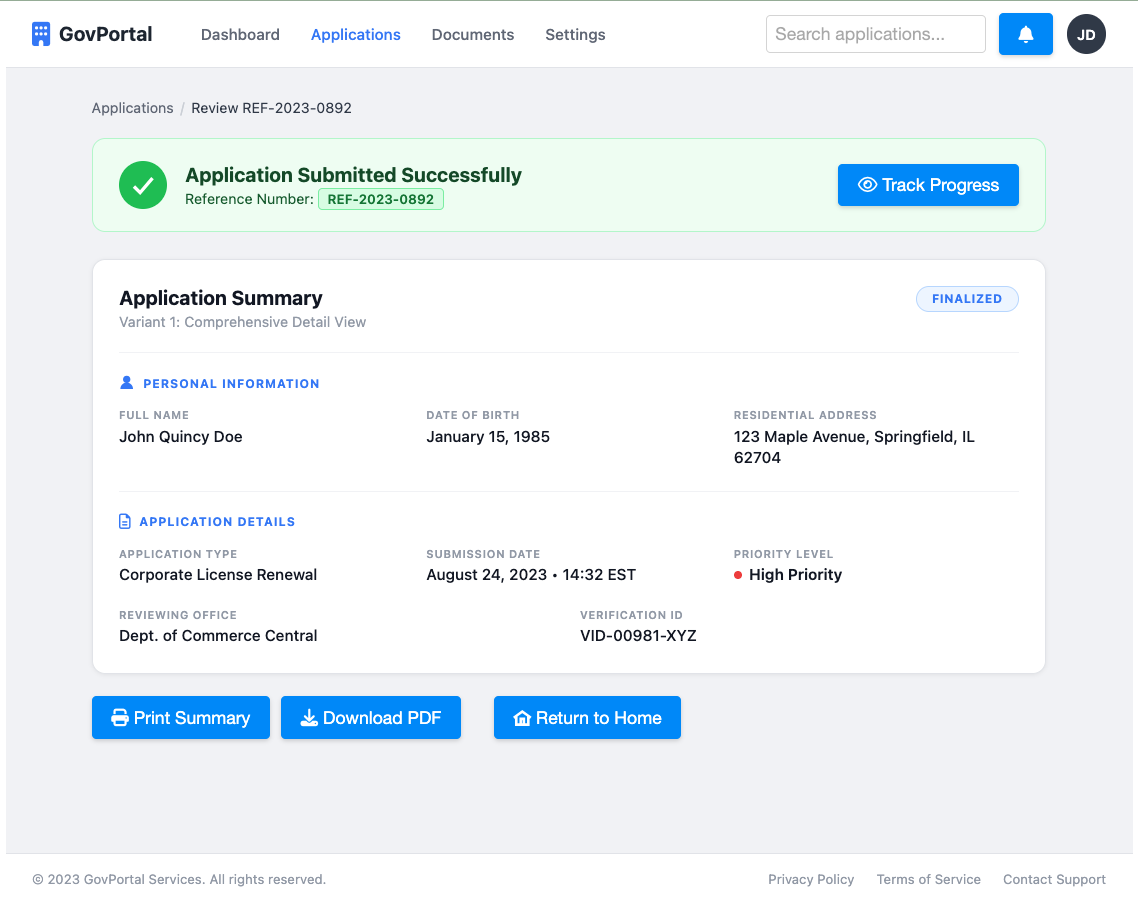
As you can see, the generated result is very similar to the mockup. But what makes the result particularly useful is that the generated page is not just a generic HTML layout. The agent understands the ZK component ecosystem and generates the interface using ZK components and icon libraries.
As a result, the generated page is usually very close to what a developer would write manually. Layouts, components, and event hooks are already structured correctly for a typical ZK application. Developers typically only need to:
- Adjust minor UI details
- Refine component properties
- Implement the actual business logic inside the generated composer
In practice, this reduces a large portion of repetitive scaffolding work and allows developers to focus on application logic rather than UI boilerplate.
Conclusion and Key Takeaways
Large language models are becoming increasingly capable of generating code, but producing reliable results in real development environments usually requires additional structure. In this article, we explored how an agent skill can guide the model to generate framework-specific UI code and validate the output through simple checks such as XML and XSD validation.
While this example focuses on generating ZUL pages and Java controller templates, the same approach can be applied to many other libraries and technologies. By combining LLM prompts, domain knowledge, and lightweight validation, developers can build agent skills that automate repetitive scaffolding tasks.
Hopefully, this article provides some ideas and inspiration for building similar agent skills for the frameworks and tools you use in your own projects. Also, if you are interested in trying out the ZUL-writer, it is available on GitHub.
Opinions expressed by DZone contributors are their own.