

DZone
Thanks for visiting DZone today,
Edit Profile
  • Manage Email Subscriptions
  • How to Post to DZone
  • Article Submission Guidelines
Sign Out View Profile
  • Post an Article
  • Manage My Drafts
Newsletter
Log In / Join
Refcards Trend Reports
Events Video Library
Refcards
Trend Reports

Events

View Events Video Library

Related

  • Enabling Business Transaction Monitoring for App Connect Enterprise
  • MuleSoft Integration With RabbitMQ
  • How to Use IBM App Connect's ‘Mapping Assist’ to Automatically Map Your Integration Flows
  • When RabbitMQ Accepts a Message but Does Not Route It to a Queue

Trending

  • AI Agents and Frontier Models: Insights From The Neuron
  • After the AI Commit: What Eight Retrospectives Taught Me About Working With Coding Agents
  • Building a Real Pipeline With senro: Monorepos, Caching, and Triggers
  • Kill the Worker, Keep the Research: Build a Recoverable LangGraph Agent on Temporal

Draft This article hasn't been published, so readers can't see it.

In moderation This article is waiting for review, so readers can't see it yet.

Deleted This article has been deleted, so readers can't see it.

  1. DZone
  2. Testing, Deployment, and Maintenance
  3. Deployment
  4. Exception/Error Flow in IIB (IBM Integration Bus)

Exception/Error Flow in IIB (IBM Integration Bus)

Take a look at error handling for quality delivery.

By 
Karthik Venkata Thotapalli
·
Aug. 20, 19 · Tutorial
Post on X (opens in a new tab) Share on LinkedIn (opens in a new tab)
20.8K Views

Join the DZone community Save articles, join the discussion, and download Refcards and Trend Reports with a free account.

Join for free Already a member? Log in

Any developer or designer should give the highest priority to error handling for quality delivery.

Let's understand how the error flow happens in IIB with reference to the below flow.
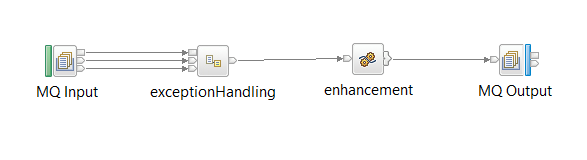
Image title

Say the failure occurred at the compute node in the above flow.
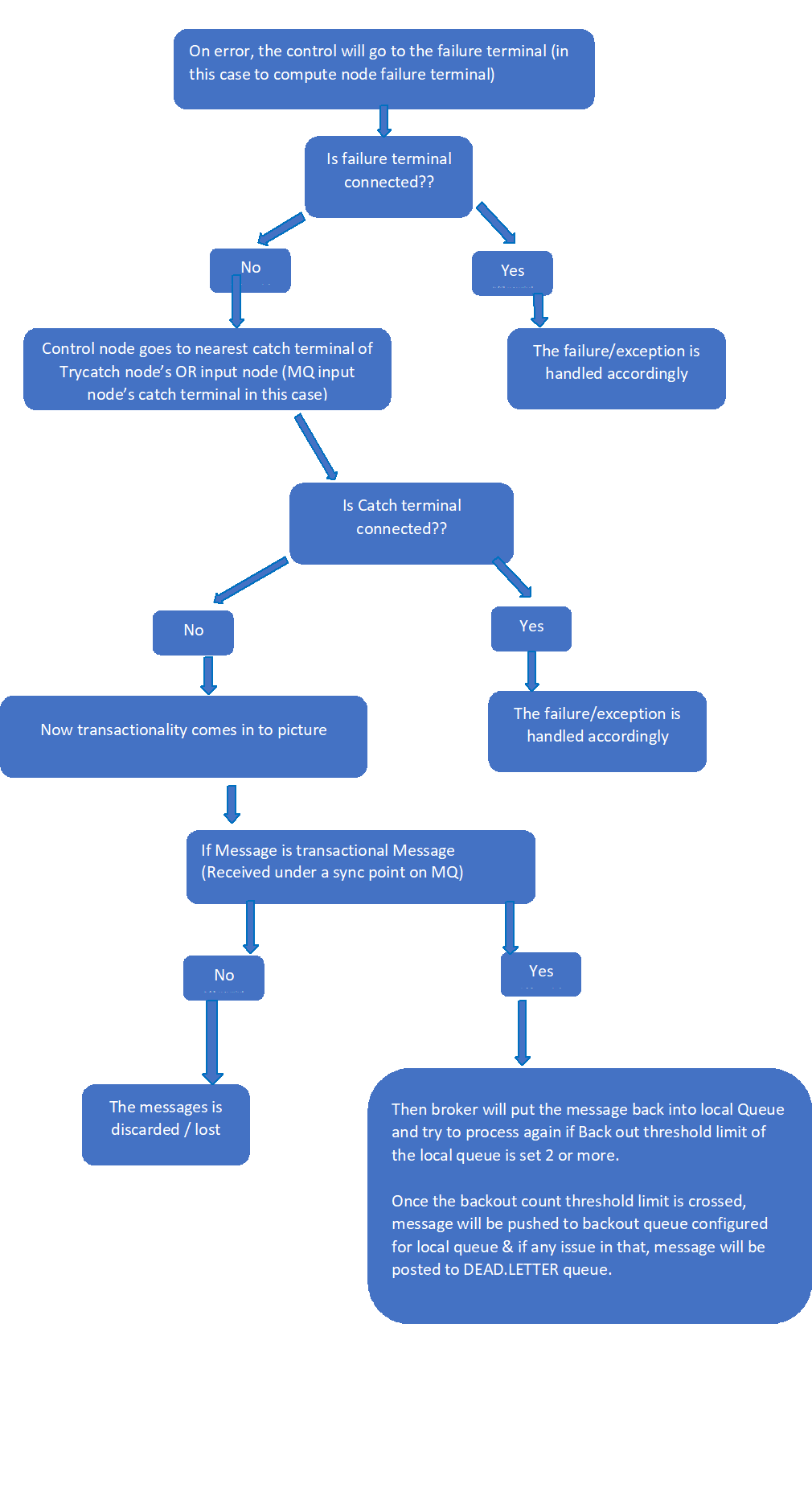
Image title

How Transactionality of Message Is Affected by Transaction Property of Input Node

If transaction property is set to “automatic/yes” and the input message is persistence, the message broker receives the message under the sync point and treats this as a transactional message. If transaction property is set to No and the message is persistence, this creates no effect (treated as non-transactional message).

A Few Things to Consider for Effective Error Handling

Always connect the Failure terminal and the Catch terminal of the input node to the exception handling process.

Ensure that all messages that are received by an MQInput node are either transactional or non-transactional for the length of entire flow, and avoid ambiguous configurations.

It's good practice to have a try-catch node in the middle of complex flows, thus the exception is handled with less time and CPU usage because if only the input node has to handle exception of big flows (having too many nodes and complexity), the failed message control has to travel all the way back to the input node, causing heavy usage of memory, CPU, and time.

Flow (web browser) Integration

Opinions expressed by DZone contributors are their own.

Related

  • Enabling Business Transaction Monitoring for App Connect Enterprise
  • MuleSoft Integration With RabbitMQ
  • How to Use IBM App Connect's ‘Mapping Assist’ to Automatically Map Your Integration Flows
  • When RabbitMQ Accepts a Message but Does Not Route It to a Queue

Partner Resources

×

Comments

Loading comments

The comments didn't load

Please try again in a moment.

Likes

Loading

The next likes didn't load. Please try again.

The likes didn't load

Please try again in a moment.

See who liked this

Log in or join DZone for free to see who liked this article.

Log in Join for free
  • RSS
  • X
  • Facebook

ABOUT US

  • About DZone
  • Support and feedback
  • Community research

ADVERTISE

  • Advertise with DZone

CONTRIBUTE ON DZONE

  • Article Submission Guidelines
  • Become a Contributor
  • Core Program
  • Visit the Writers' Zone

LEGAL

  • Terms of Service
  • Privacy Policy

CONTACT US

  • 3343 Perimeter Hill Drive
  • Suite 215
  • Nashville, TN 37211
  • [email protected]

Let's be friends:

  • RSS
  • X
  • Facebook