

SHAP-Based Explainable AI (XAI) Integration With .Net Application
Explainable AI (XAI) reveals how ML models make decisions. Learn about SHAP, LIME, model-specific and agnostic methods, and how to deploy SHAP as a REST API.
 ·
·
Join the DZone community and get the full member experience.
Join For FreeThink of Explainable AI (XAI) as your friendly guide to a complex machine’s secret thoughts. Instead of leaving you guessing why an algorithm made a certain call, XAI opens the door, points out the important clues, and speaks plainly about what drove its decision. Explainable AI builds trust on the ML decision since it speaks how the decision made, makes the human to believe and to catch and fix the mistakes.
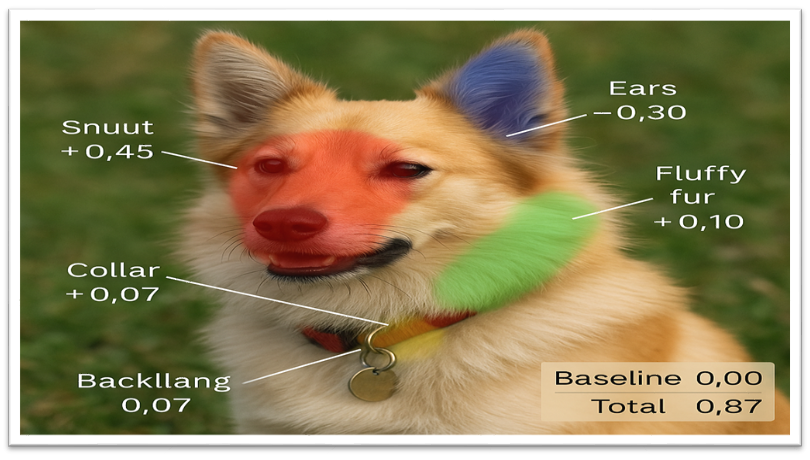
Explanation from Explainable AI:
“I have started at 0%—yet to know the prediction. Spotting that dog’s snout boosted my confidence by 45%, seeing its upright ears added 30%, the fluffy fur another 10%, and the collar a small 7%. A hint of grass slightly pulled me down by 5%. This is a dog and I'm 87% sure about this.”
XAI Methods Categorization
Agnosticity: Whether the Explainable AI (XAI) depend on the type of Machine Learning (ML) model. If the XAI specific to the model then XAI will use the TreeExplainer, Grad-CAM, Integrated Gradients methods based on the model used in the ML model. If it is model agnostic, then LIME, SHAP, Permutation Importance, Counterfactuals methods will be used.
Scope: Whether the XAI method explains the model locally or globally. If it explains locally then it uses LIME, SHAP, Counterfactuals methods. If it explains the model globally it will use Feature-importance, Surrogate Trees, PDP methods.
- Data Type: What data type this XAI works like text, image, structured/tabular data for example.
- Explanation type: What kind of explanation the XAI gives you. Graph, text or image for example.
SHAP XAI Overview
SHAP (SHapley Additive exPlanations) is a technique that each of parameter in dataset will contribute some value and then taking average out of it.
Example : Based on the Dog image.
“My baseline guess was 20%. Seeing the snout in your dog photo bumped me up by 45%, the ears added 30%, fluffy fur another 10%, and collar details gave a small 7%. A bit of busy background took away 5%, leaving me at 87% confidence that it’s a dog.”
SHAP Libraries (.NET framework and Platform Integrations)
- Microsoft InterpretML (Python)
Part of the Azure ML ecosystem; offers a unified API for SHAP (via TreeShap), LIME, and other explainers. - ML.NET OnnxTransformer (.NET)
Use an ONNX-exported model and obtain SHAP values at inference time. - SparkSHAP (Scala / PySpark)
Scales SHAP value computation across Apache Spark clusters for exceptionally large datasets.
Integrate SHAP in .Net Core Application as Rest API
Implementing SHAP Explanations in Python:
- Load data
- Train a model
- Initialize SHAP explainer for the model
- Compute SHAP values for given dataset
- Output the SHAP values for the sample
import xgboost as xgb
import shap
from sklearn.datasets import load_breast_cancer
from sklearn.model_selection import train_test_split

# 1. Load data
p, q = load_breast_cancer(return_p_q=True)
p_train, p_test, q_train, q_test = train_test_split(p, q, random_state=0)

# 2. Train a model (XGBoost classifier in this case)
model = xgb.XGBClassifier(use_label_encoder=False, eval_metric='logloss')
model.fit(p_train, q_train)

# 3. Initialize SHAP explainer for the model
explainer = shap.TreeExplainer(model)  # Efficient for tree models like XGBoost:contentReference[oaicite:6]{index=6}

# 4. Compute SHAP values for provided dataset
sample = p_test[0:1]  # take one instance to explain
shap_values = explainer.shap_values(sample)  # shap_values will be array of contributions per feature:contentReference[oaicite:7]{index=7}

# 5.  SHAP values output for the given sample
print("Model prediction:", model.predict(sample)[0])
print("Base value (expected output):", explainer.expected_value)
print("SHAP values for features:", shap_values[0])Exposing SHAP Explanations as a RESTful API
Once we have a Python model and the ability to compute SHAP values, the next step is to expose this functionality via a REST API so that a .NET application can consume it. We can create a lightweight web service in Python that listens for requests (containing input features) and returns the model’s prediction and SHAP explanation. You can use either Flask (a minimal WSGI framework) or FastAPI (a modern ASGI framework) to build the API – both are suitable.
from flask import Flask, request, jsonify
import joblib, numpy as np

app = Flask(__name__)

# Load the trained model and initialize SHAP explainer at startup
model = joblib.load("model.pkl")  # our pre-trained ML model
explainer = shap.TreeExplainer(model)  # explainer for the loaded model

@app.route('/explain', methods=['POST'])
def explain():
    # Parse input JSON into a feature array
    data = request.get_json()  # Expecting a JSON object of feature values

    # Convert to 2D array or DataFrame as needed by the model:
    features = np.array([[data[f] for f in data]])  # 2D array with one row

    # Get model prediction
    pred = model.predict(features)
    # you may get predict_proba for probability

    # Compute SHAP values for this input
    shap_vals = explainer.shap_values(features)

    # Prepare response
    result = {
        "prediction": int(pred[0]) if pred.shape else float(pred),
        "shap_values": {name: float(val)
                        for name, val in zip(data.keys(), shap_vals[0])},
        "expected_value": float(explainer.expected_value)
    }
    return jsonify(result)
Consuming the SHAP API from a .NET Backend
With the Python service running (e.g. at http://localhost:5001/explain), the .NET application can request explanations by calling this REST API. In an ASP.NET Core environment, you could create a service or controller method that uses HttpClient to POST the feature data and retrieve the explanation results. Below is an example in C# using HttpClient and the System.Net.Http.Json extensions (available in .NET 5+ for convenient JSON serialization):
using System.Net.Http;
using System.Net.Http.Json;
using System.Threading.Tasks;

// Define a C# record or class to represent the response structure
public record ShapResponse(double ExpectedValue, Dictionary<string, double> ShapValues, int Prediction);

...
// 1. Create an HttpClient (in a real app, reuse a single HttpClient instance)
HttpClient httpClient = new HttpClient { BaseAddress = new Uri("http://localhost:5001/") };

// 2. Prepare input feature data as an anonymous object or defined class
var inputData = new { age = 45, income = 50000, gender = 0, balance = 10000 };
// (Feature names must match what the API expects. )

// 3. Send POST request with JSON body
HttpResponseMessage response = await httpClient.PostAsJsonAsync("explain", inputData);
// Ensure success status
response.EnsureSuccessStatusCode();

// 4. Read and parse the JSON response into our ShapResponse record
ShapResponse result = await response.Content.ReadFromJsonAsync<ShapResponse>();

// 5. Use the result in .NET (for example, log or process the explanation)
Console.WriteLine($"Model prediction: {result.Prediction}");
Console.WriteLine($"Base expected value: {result.ExpectedValue}");
foreach (var kv in result.ShapValues)
{
    Console.WriteLine($"Feature '{kv.Key}' contributes {kv.Value}");
}
Conclusion
Understanding how AI models make decisions is no longer optional. Whether you're developing models or using them in real-world applications, being able to explain their behavior helps you catch problems early, build trust with users, and stay accountable. Tools like SHAP give you a clearer view of what’s happening behind the scenes, making complex predictions easier to interpret. In the end, it’s not just about what the model predicts, but why it made that prediction.
Opinions expressed by DZone contributors are their own.
Comments