

DZone
Thanks for visiting DZone today,
Edit Profile
  • Manage Email Subscriptions
  • How to Post to DZone
  • Article Submission Guidelines
Sign Out View Profile
  • Post an Article
  • Manage My Drafts
Over 2 million developers have joined DZone.
Log In / Join
Refcards Trend Reports
Events Video Library
Refcards
Trend Reports

Events

View Events Video Library

Related

  • The Bill You Didn't See Coming
  • Respecting robots.txt in Web Scraping
  • Where Stale Data Hides Inside Your Architecture (and How to Spot It)
  • Providing Enum Consistency Between Application and Data

Trending

  • From ETL to Lakeflow: Shifting to a Declarative Data Paradigm
  • AI Agents in Java: Architecting Intelligent Health Data Systems
  • What Is Plagiarism? How to Avoid It and Cite Sources
  • The Documentation Crisis Nobody Sees: Why AI Agents Are Breaking Faster Than Humans Can Document Them
  1. DZone
  2. Data Engineering
  3. Data
  4. Failed to Invoke Lifecycle Phase ''start''

Failed to Invoke Lifecycle Phase ''start''

See how to fix the error on the object: com.mulesoft.mule.runtime.module.batch.internal.engine.DefaultBatchJobInstanceStore@72155666 in mule 4

By 
Sipra Nayak user avatar
Sipra Nayak
·
Updated Jun. 13, 19 · Code Snippet
Likes (2)
Comment
Save
Tweet
Share
12.8K Views

Join the DZone community and get the full member experience.

Join For Free

Hello everyone, today I want to share a problem I faced and how I came up with the solution.

This error occurs when you have run a large amount of data, and internally, the cache of data occurred.

Since it's internal, it's very difficult to figure out where we have to check. You will get an error that looks something like this:

# java.lang.OutOfMemoryError: Java heap space
# -XX:OnOutOfMemoryError="taskkill /F /PID %p"
# Executing "taskkill /F /PID 5164"...
JVM exited unexpectedly.
Automatic JVM Restarts disabled. Shutting down.
<-- Wrapper Stopped

Whenever you guys get this type of error and it doesn't resolve even after deleting /.mule folder from the workspace, go to Run Configuration down to the runtime version and choose "always" under "Clear Application Data".
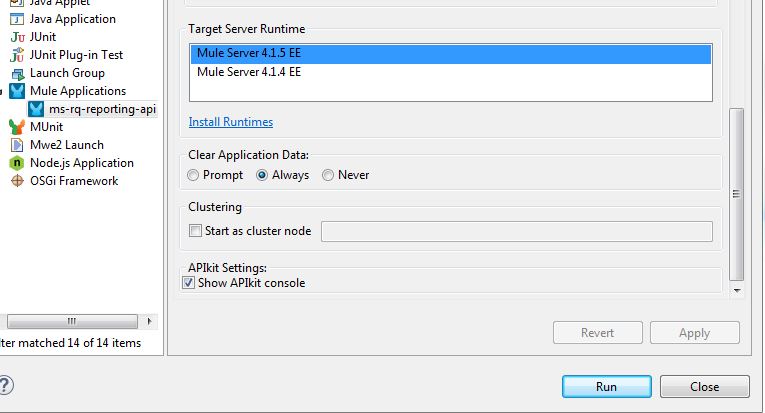
Image title

The moment you run your application with these settings, this error will get resolved.

It will clear all the data that is internally affecting your application and resisting to deploy it locally in your studio.

application Data (computing) IT Moment Cache (computing) Clear (Unix) Workspace

Opinions expressed by DZone contributors are their own.

Related

  • The Bill You Didn't See Coming
  • Respecting robots.txt in Web Scraping
  • Where Stale Data Hides Inside Your Architecture (and How to Spot It)
  • Providing Enum Consistency Between Application and Data

Partner Resources

×

Comments

The likes didn't load as expected. Please refresh the page and try again.

  • RSS
  • X
  • Facebook

ABOUT US

  • About DZone
  • Support and feedback
  • Community research

ADVERTISE

  • Advertise with DZone

CONTRIBUTE ON DZONE

  • Article Submission Guidelines
  • Become a Contributor
  • Core Program
  • Visit the Writers' Zone

LEGAL

  • Terms of Service
  • Privacy Policy

CONTACT US

  • 3343 Perimeter Hill Drive
  • Suite 215
  • Nashville, TN 37211
  • [email protected]

Let's be friends:

  • RSS
  • X
  • Facebook