

Find Invalid Objects in SQL Server Databases
In this article, we are going to take a closer look at the issue of how to find invalid objects in SQL Server databases.
Join the DZone community and get the full member experience.
Join For FreeIn the course of time, we can experience situations when some certain database objects have not been distributed on one or several databases or database instances. This can happen for a number of reasons. An example of that would be a case when a stored procedure refers to a nonexistent table. In this article, we are going to take a closer look at the issue of how to find invalid objects in SQL Server databases with the help of dbForge SQL Complete.
To have a much more complete insight into the functionality of this tool, you will first need to consider the previous series of our articles. This piece is going to be the final thought closing the series of Deleting Lost Transactions in MS SQL Server articles. So let’s go over the topics we have discussed and review what we have accomplished previously:
- Analyzing the algorithm of deleting lost transactions.
- Creating a stored procedure using CRUD.
- Testing the stored procedure and turning it into a script.
- Reviewing a number of useful settings that vastly help in the workflow.
Finding Invalid Objects
Apart from its other functions, with the help of the SQL Complete tool, we can find invalid objects in SQL Server. To do that, first, select the SQL Complete\Find Invalid objects command in the main menu:
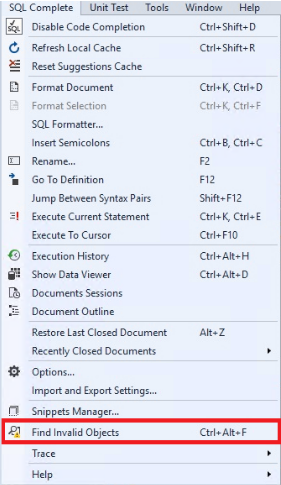
Once it’s done, in the window that opens, we select the required databases from MS SQL Server instances and press “Analyze” at the upper right corner or at the middle of the screen:

Now, the process of searching for references to invalid objects starts:

After the process is completed, you will see a table containing all objects that refer to invalid objects:
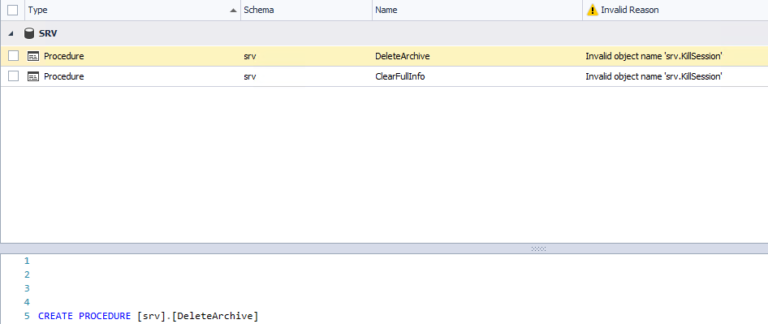
As you can see here, the table displays the type, schema, and name of the object that refers to the invalid object, the name of which is also displayed. At the bottom, you can see the code of the object that refers to the invalid object. In this case, the DeleteArchive stored procedure refers to the nonexistent srv.KillSession table, which is an unresolved reference to the object.
After that, you can proceed to the location of the stored procedure, by right-clicking on it and selecting “Find in Object Explorer” in the context menu:

Finally, it will be enough to analyze the code of the stored procedure, which refers to the nonexistent table, and decide whether you need to create the srv.KillSession table:
Summary
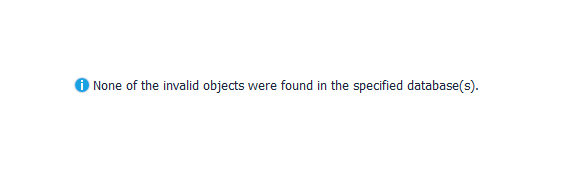
In this final part of articles, we walked through the whole process of finding invalid database objects, providing a step-by-step guide of how to accomplish that using the dbForge SQL Complete tool. The result leaves the user with a decision whether to create the nonexistent object or change the reference to the existing one.
Published at DZone with permission of Evgeniy Gribkov. See the original article here.
Opinions expressed by DZone contributors are their own.
Comments