

From Command Lines to Intent Interfaces: Reframing Git Workflows Using Model Context Protocol
Model Context Protocol enables intent-driven GitHub workflows in the IDE, replacing command sequences with safe, structured natural language interactions.
 ·
·
Join the DZone community and get the full member experience.
Join For FreeMy recent journey into agentic developer systems has been driven by a desire to understand how AI moves from passive assistance to active participation in software workflows. In an earlier article, AI Co-creation in Developer Debugging Workflows, I explored how developers and AI systems collaboratively reason about code. As I went deeper into this space, I came across the Model Context Protocol (MCP) and became keen to understand what this component is and why it is important. I noticed that MCP was frequently referenced in discussions about agentic systems, yet rarely explained in a concrete, developer-centric way. This article is a direct outcome of that learning process, using a practical Git workflow example to clarify the role and value of MCP in intent-driven developer tooling.
What Is an MCP Server?
At a conceptual level, an MCP server acts as a control plane between an AI assistant and external systems. Rather than allowing an LLM to issue arbitrary API calls, the MCP server implements the Model Context Protocol and exposes a constrained, well-defined set of capabilities that the model can invoke.
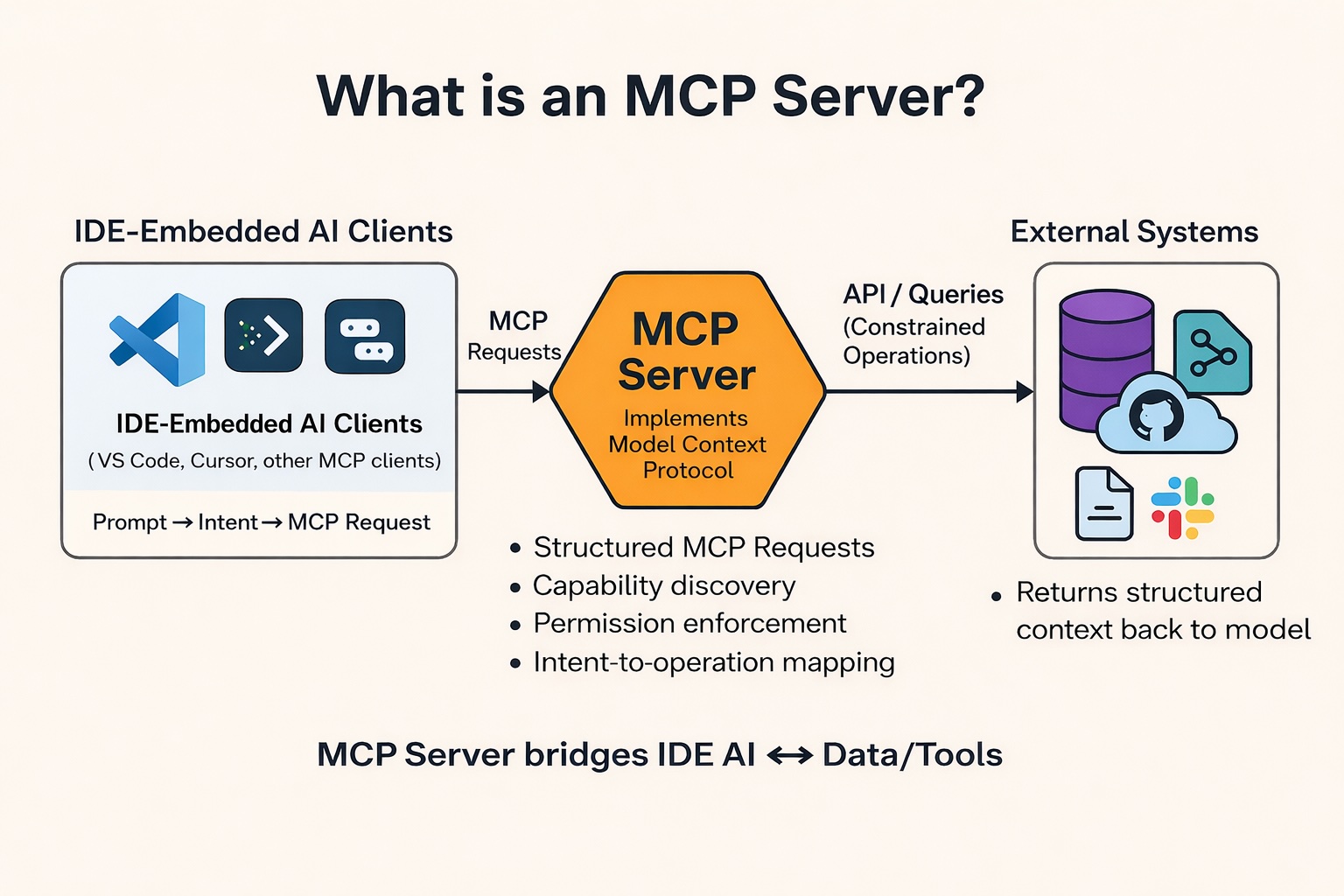
As illustrated in the diagram, the AI assistant functions as an MCP client, issuing structured MCP requests that represent user intent. The MCP server receives these requests, validates them against exposed capabilities and permissions, and translates them into concrete API calls or queries against external systems such as databases, version control platforms, or document stores. The results are then returned to the model as structured context, enabling subsequent reasoning or follow-up actions.
This intermediary role is critical. The MCP server is not merely a proxy; it enforces permission boundaries, operation granularity, and deterministic execution. By separating intent expression from execution logic, MCP reduces the risk of unsafe or unintended actions while enabling AI systems to operate on real developer tools in a controlled manner. In effect, the MCP server bridges conversational AI and operational systems, making intent-driven workflows both practical and governable.
Case Study: Intent-Driven Git Workflows Using GitHub MCP in VS Code
To ground the discussion, this section presents a concrete case study using the open-source github-mcp-server, integrated into Visual Studio Code via GitHub Copilot Chat. The goal of this case study is not to demonstrate feature completeness, but to illustrate how MCP enables intent-first interaction for common GitHub workflows.
MCP Server Registration in VS Code
MCP servers are configured at the workspace or user level using a dedicated configuration file. In this setup, the GitHub MCP server is registered by adding an MCP configuration file under the VS Code workspace:
.vscode/mcp.json
{
  "servers": {
    "github": {
      "url": "https://api.githubcopilot.com/mcp/"
    }
  }
}
This configuration declares GitHub as an MCP server and points the IDE’s MCP client to a remote endpoint. Once registered, the IDE can discover the capabilities exposed by the GitHub MCP server and make them available to the chat interface as structured tools.
Authentication via OAuth Approval
When the MCP server is first invoked, VS Code initiates an OAuth flow with GitHub. In this case, authentication was completed by approving access through a browser-based login using GitHub credentials (username and password, followed by any configured multi-factor authentication).
This OAuth-based flow has several important properties:
- Credentials are not stored directly in the MCP configuration.
- Permissions are scoped to the approved application.
- Token issuance and rotation are handled by the GitHub authorization system.
Once authorization is complete, the MCP server can securely execute GitHub operations on behalf of the user, subject to the granted scopes (these are listed as tools when configuring the MCP server).
Alternative Authentication: Personal Access Tokens
In addition to browser-based OAuth authorization, the GitHub MCP server can also be configured using a GitHub Personal Access Token (PAT). This approach is useful when explicit credential control is required or when OAuth approval is not feasible in a given environment. In this setup, the MCP configuration declares an Authorization header and prompts the user to supply the token securely at runtime, rather than hardcoding it in the file.
.vscode/mcp.json (PAT-based authentication)
{
  "servers": {
    "github": {
      "type": "http",
      "url": "https://api.githubcopilot.com/mcp/",
      "headers": {
        "Authorization": "Bearer ${input:github_mcp_pat}"
      }
    }
  },
  "inputs": [
    {
      "type": "promptString",
      "id": "github_mcp_pat",
      "description": "GitHub Personal Access Token",
      "password": true
    }
  ]
}
This configuration has two practical advantages. First, the token is not committed to source control because it is collected via an interactive prompt. Second, it makes the authentication mechanism explicit and portable across environments while keeping the MCP server endpoint unchanged. After the token is provided, the IDE can invoke GitHub MCP capabilities through the same intent-driven prompts used in the OAuth-based setup.
Verifying MCP Server Initialization in VS Code
After adding the MCP configuration, it is important to verify that the GitHub MCP server is correctly initialized and running. Visual Studio Code exposes MCP server lifecycle events directly in the Output panel, which serves both as a validation mechanism and a primary debugging surface.
Once the .vscode/mcp.json file is detected, VS Code attempts to start the configured MCP server automatically.
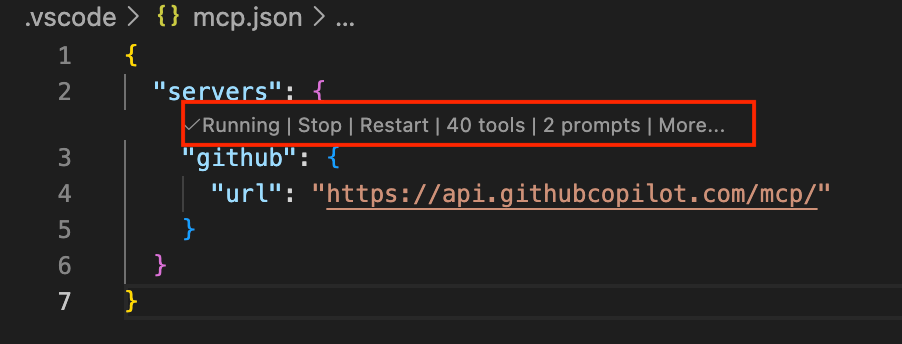
In the Output tab, selecting the “MCP: github” channel shows detailed startup logs, including server initialization, connection state, authentication discovery, and tool registration.
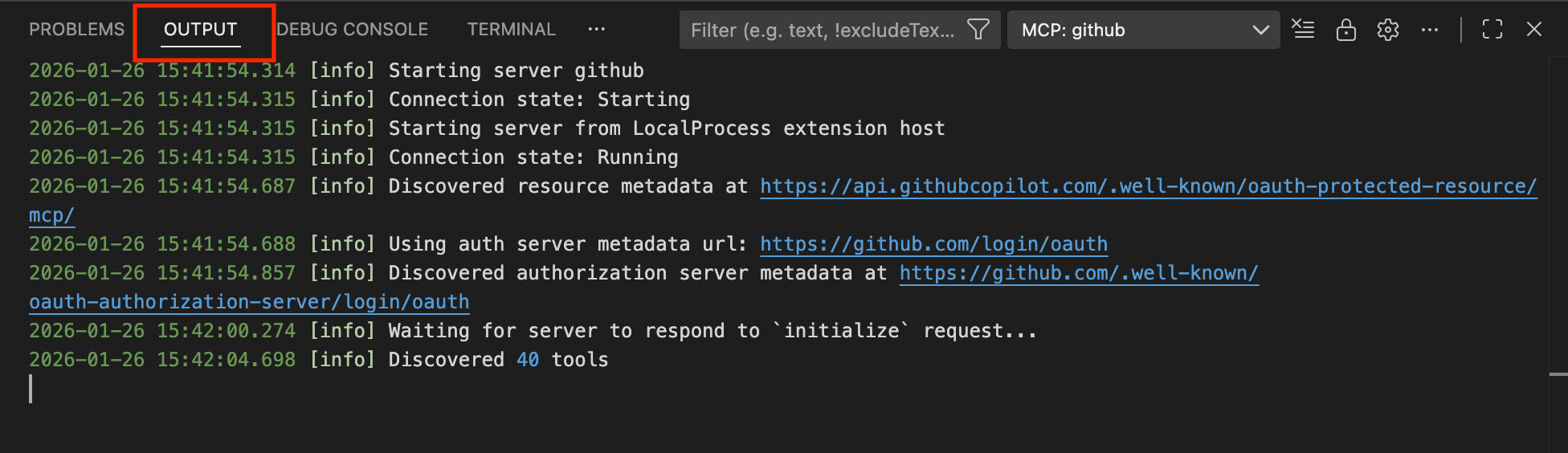
The logs confirm several important stages:
- The GitHub MCP server transitions from Starting to Running
- OAuth-protected resource metadata is discovered
- The GitHub authorization server endpoint is identified
- The server responds successfully to the initialization handshake
- A total of 40 tools are discovered and registered
These log entries provide concrete evidence that the MCP server is active and that its capabilities are available to the IDE. They also offer visibility into the OAuth flow, making it clear when authentication is required and when it has been successfully completed.
From a practical standpoint, the Output panel becomes essential when troubleshooting MCP integrations. Configuration errors, authentication failures, or capability discovery issues surface immediately in these logs, allowing developers to debug MCP setup issues without leaving the IDE or guessing at silent failures.
Executing GitHub Operations Through Intent
Once the GitHub MCP server is configured and running, GitHub operations become available inside the IDE as structured capabilities. Using Visual Studio Code with GitHub Copilot Chat, prompts expressed in natural language are translated into constrained GitHub operations via the github-mcp-server.
Repository Discovery
Prompt:
“List all repos in my GitHub account.”
The assistant invokes the repository-listing capability and returns the results directly in the IDE, validating authentication and MCP capability discovery.
Pull Request Creation
Prompt:
“Create a PR.”
Because the request is underspecified, the assistant asks for required parameters, including repository, change source, title, description, and base branch. After responding with:
“react-storybook-starter, staged changes, PR title – Add a dummy commit, PR description none, merge to master”
the assistant creates a branch, commits the staged changes, and opens a pull request. The PR is confirmed with its repository identifier.
Repository Creation
Prompt:
“Create a new repo in mvmaishwarya. Repo name: problems-and-prep. Repo is public.”
The MCP server executes the repository creation operation and returns confirmation that the public repository has been successfully provisioned.
Observations from Intent-Driven Execution
Across these examples, several consistent behaviors emerge. First, the assistant requests clarification only when required by the operation’s schema, avoiding unnecessary dialogue. Second, all actions are executed through explicitly exposed MCP capabilities rather than inferred or free-form API calls. Finally, the IDE remains the primary workspace, reducing context switching between terminals, browsers, and documentation.
Together, these interactions demonstrate how MCP enables GitHub workflows to shift from command-driven procedures to intent-driven execution while maintaining safety, transparency, and developer control.
Opinions expressed by DZone contributors are their own.
Comments