

Fun (Scary?) Webcam Demo
Using the Windy API to find local public webcams.
Join the DZone community and get the full member experience.
Join For FreeWindy is a fascinating site/app that gives real-time visualizations of wind speed and direction in your area. As a static picture wouldn't do it justice, here's my local area right now.
Back during the last hurricane, I took this lovely snapshot. Not terrifying at all...
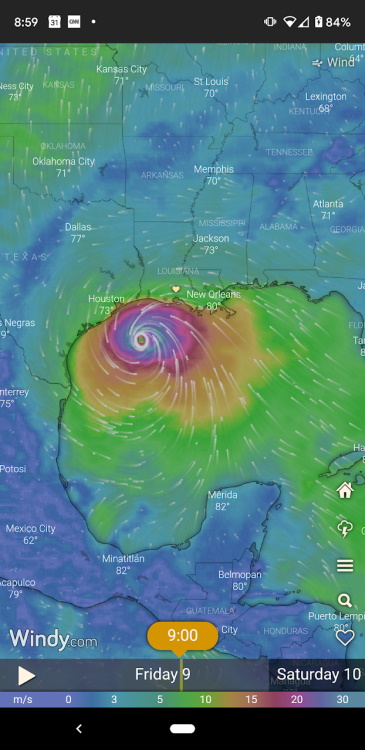
Anyway, it's a great little app, and like a few other people I know, I've got a bit of an addiction to weather apps. That being said, a while ago I discovered Windy had an API, and not only that, but a Webcams API. A literal API that returns information about publicly known webcams around the world. This information contains a wealth of information, including screenshots and information about the location. As an example, here's information about a webcam near me:
{
	"id": "1604839522",
	"status": "active",
	"title": "Lafayette: I- at Ambassador Caffery",
	"image": {
		"current": {
			"icon": "https://images-webcams.windy.com/22/1604839522/current/icon/1604839522.jpg",
			"thumbnail": "https://images-webcams.windy.com/22/1604839522/current/thumbnail/1604839522.jpg",
			"preview": "https://images-webcams.windy.com/22/1604839522/current/preview/1604839522.jpg",
			"toenail": "https://images-webcams.windy.com/22/1604839522/current/thumbnail/1604839522.jpg"
		},
		"sizes": {
			"icon": {
				"width": 48,
				"height": 48
			},
			"thumbnail": {
				"width": 200,
				"height": 112
			},
			"preview": {
				"width": 400,
				"height": 224
			},
			"toenail": {
				"width": 200,
				"height": 112
			}
		},
		"daylight": {
			"icon": "https://images-webcams.windy.com/22/1604839522/daylight/icon/1604839522.jpg",
			"thumbnail": "https://images-webcams.windy.com/22/1604839522/daylight/thumbnail/1604839522.jpg",
			"preview": "https://images-webcams.windy.com/22/1604839522/daylight/preview/1604839522.jpg",
			"toenail": "https://images-webcams.windy.com/22/1604839522/daylight/thumbnail/1604839522.jpg"
		},
		"update": 1638998721
	},
	"location": {
		"city": "Lafayette",
		"region": "Louisiana",
		"region_code": "US.LA",
		"country": "United States",
		"country_code": "US",
		"continent": "North America",
		"continent_code": "NA",
		"latitude": 30.246819,
		"longitude": -92.065978,
		"timezone": "America/Chicago",
		"wikipedia": "https://en.wikipedia.org/wiki/Lafayette, Louisiana"
	},
	"url": {
		"current": {
			"desktop": "https://www.windy.com/webcams/1604839522",
			"mobile": "https://www.windy.com/webcams/1604839522"
		},
		"edit": "https://www.windy.com/webcams/1604839522",
		"daylight": {
			"desktop": "https://www.windy.com/webcams/1604839522",
			"mobile": "https://www.windy.com/webcams/1604839522"
		}
	}
},
And this is only a subset of the data they can return. For my demo (more on that in a sec) I tried to limit the call to only returning what I needed. All in all, it's a cool API, it's got a free tier, and I thought it would be fun to build something with it. I got even more excited when I noticed they had a "nearby" API. This lets you make a request for webcams in a certain circular region:
/api/webcams/v2/list/nearby={lat},{lng},{radius}
I thought it would be cool (and honestly, a bit scary), to see how many public webcams are around you. Obviously, this wouldn't be all of them, just the ones Windy has in their database, but I was still rather curious as to what it would turn up. I whipped up an incredibly simple Vue.js application. Here's the JavaScript:
Vue.config.productionTip = false;
Vue.config.devtools = false;

const KEY = '1D5i0YvpyVtNQM66raOhUPaJf7tKRpbx';
const DIST = 50;

const app = new Vue({
  el:'#app',
  data: {
     location:null,
     cams:null,
     loading:false,
     dist:DIST
  },
  async mounted() {
    this.loading = true;
    this.location = await getLocation();
    this.cams = await getCams(this.location.latitude, this.location.longitude, this.dist, KEY);
    this.loading = false;
  }
})

async function getLocation() {
    return new Promise((resolve, reject) => {
        navigator.geolocation.getCurrentPosition(pos => resolve(pos.coords), e => reject(e));
    });
}

async function getCams(lat,lng,dist,key) {
  const url = `https://api.windy.com/api/webcams/v2/list/limit=50/nearby=${lat},${lng},${dist}?key=${key}&show=webcams:location,image,url`;
  let resp = await fetch(url);
  let data = await resp.json();
  return data.result.webcams;
}
All it really does is get your location via the browser's geolocation API. It then passes to this the Windy API. I display the images in a simple grid:
<div id="app" v-cloak>
  <h2>Nearby Cams (within {{ dist }} km)</h2>
  <div v-if="loading">
    <p><i>Loading nearby cams...</i></p>
  </div>
  <div id="camList">
    <div v-for="cam in cams">
      <h3>{{ cam.title }}</h3>
      <a :href="cam.url.current.desktop" target="_new">
      <img :src="cam.image.current.preview">
      </a>
    </div>
  </div>
  <p>
  Webcams provided by <a href="https://www.windy.com/" target="_blank">windy.com</a> — <a href="https://www.windy.com/webcams/add" target="_blank">add a webcam</a>
  </p>
</div>
The result is pretty cool I think. Here's my area:

As you can see they're all traffic-based. Also note that Windy's API supports embed and live views, but for my app, I thought the pictures alone were ok. You can click for a more dynamic version.
Microsoft Edge's devtools makes it easy to fake your location too. Here's Moscow:

All in all, this took me like five minutes to code, but it was kinda fun. It's on CodePen, and normally I'd just embed it, but geolocation doesn't work inside CodePen embeds, so if you want to play with it yourself, just head over here: https://codepen.io/cfjedimaster/pen/yLzOpPZ
Published at DZone with permission of Raymond Camden. See the original article here.
Opinions expressed by DZone contributors are their own.
Comments