

Scholcast: Generating Academic Paper Summaries With AI-Driven Audio
Scholcast is a Python package that converts academic papers into detailed summaries in A/V format using AI, making it easier to stay updated with the research.
Keeping up with the latest research is a critical part of the job for most data scientists. Faced with this challenge myself, I often struggled to maintain a consistent habit of reading academic papers and wondered if I could design a system that would lower the barrier to exploring new research making it easier to engage with developments in my field without the need for extensive time commitments. Given my long commute to work and an innate lack of motivation to perform weekend chores, an audio playlist that I could listen to while doing both sounded like the obvious option.
This led me to build Scholcast, a simple Python package that creates detailed audio summaries of academic papers. While I had previously built versions using language models, the recent advancements in expanded context lengths for Transformers and improved vocalization finally aligned with all my requirements.
To build Scholcast, I primarily used OpenAI's GPT GPT-4o-mini. However, since I am using the Langchain API to interact with the models, the system is flexible enough to accommodate other models like Claude (through AWS Bedrock) or locally hosted LLMs (such as Ollama).
The key components of this package were the following.
Converting PDF to LaTeX
The first step was to convert academic papers back to their original LaTeX format. I initially experimented with open-source packages like PyPDF2, but these tools struggled with complex academic content, particularly papers containing mathematical notation and special symbols. To overcome these limitations, I opted for the Mathpix API, which offers superior PDF to LaTeX conversion capabilities. Instructions for getting the Mathpix API key can be found in their documentation here.
As of the date of writing this article (Nov 29, 2024), I was unable to use OpenAI's API to convert PDF to Latex with high fidelity. I will create a Push Request if that changes.
Summary Generation and Understanding
This is the core component of the tool, responsible for producing comprehensive paper summaries. The key challenge was determining the appropriate depth of understanding. While ideally, we would want an understanding equivalent to a detailed reading of the paper, generating such extensive coverage in audio format, especially for mathematical concepts, proved challenging.
Initial experiments used standard prompts like:
"Provide a clear and concise explanation of the research paper {academic_paper}.
Include the main research question, the methodology used, key findings, and
the implications of the study"
These prompts generated superficial summaries. For instance, when applied to the seminal paper "Attention Is All You Need," it produced the following explanation:
As you can observe, while the explanation mentions concepts like Self-Attention and Multi-Head Attention, it fails to cover these topics in any amount of depth. The concept of Positional Encodings is also not mentioned in this version. It’s clear that the LLM is either glossing over or skipping entire concepts in this explanation.
To address this limitation, I developed a multi-step approach. First, I prompted the LLM to create a knowledge graph of the paper's key concepts, with edges representing their relationships.
- Prompt to generate a knowledge graph:
Analyze the following {academic paper} and create a knowledge graph.
List the main concepts as nodes and their relationships as edges.
Format your response as a list of nodes followed by a list of edges:

Nodes:
1. Concept1
2. Concept2
...

Edges:
1. Concept1 -> Concept2: Relationship
2. Concept2 -> Concept3: Relationship
...
It generated the following graph for the paper.
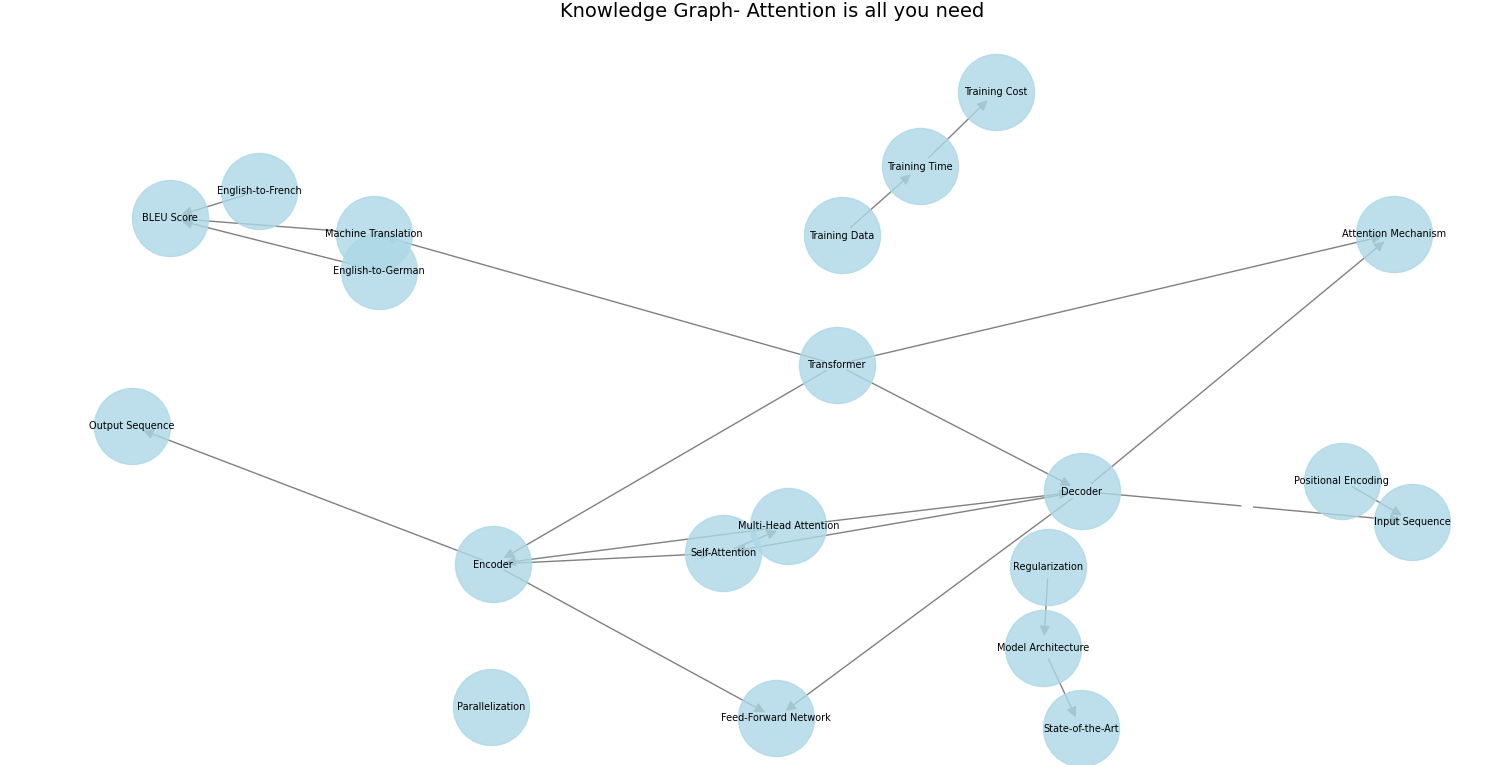
This graph then served as a roadmap for the Teacher LLM to explain the paper, resulting in a notably improved depth.
To further enhance the summaries, I introduced a Student LLM that reads the paper along with the first set of explanations from the Teacher and asks clarifying questions to the Teacher LLM.
This interaction led to more detailed explanations of complex concepts.
As you can see, concepts were covered in much more detail along with fairly interesting follow-up questions from the Student LLM.
Converting That Paper Into Audio/Video Format
This component transforms the generated summary into an audio or video format. For audio conversion, I utilized OpenAI's text-to-speech tts-1-hd model, employing “nova” and “echo” voices to distinguish between the Teacher and Student roles, respectively. This approach adds variety and structure to the audio presentation.
For video creation, I opted for a simple yet effective method of combining a single static image with the audio track using the pydub and moviepy package. This technique results in a basic but functional video format that complements the audio content.
Below is the schematic for the end-to-end workflow:
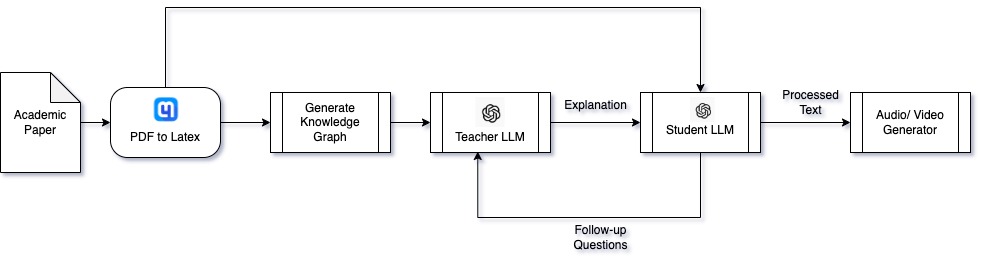
While not equivalent to an in-depth study, the final output provides comprehensive coverage that effectively serves as a substitute for an initial read-through.
Conclusion
You can find the source code for Scholcast here and refer to this README for instructions on how to install and use Scholcast. Also, you can check out the Scholcast YouTube channel for summaries of a bunch of interesting papers on topics ranging from LLMs to optimization and ML algorithms.
Opinions expressed by DZone contributors are their own.