

How to Build and Scale Generative AI Infrastructure
Managing generative AI at scale requires strategies to reduce costs and latency, improve observability, and build reliable infrastructure.
Join the DZone community and get the full member experience.
Join For FreeWhen teams first integrate large language models (LLMs) into their software platforms, the initial experience often feels surprisingly simple. A developer writes a few lines of code, sends a prompt to a model API, and receives a response that looks intelligent, contextual, and almost magical. A prototype can be built in days, sometimes hours, and the business quickly starts imagining how AI will transform customer support, automation, analytics, and decision-making.
This early success creates a dangerous assumption: that moving from a working AI prototype to a production-grade AI system is simply a matter of increasing traffic and adding more users.
In reality, the difficult engineering problems appear after adoption.
The moment thousands of users start interacting with an AI-powered application, the hidden costs begin to surface. The model that worked perfectly during testing suddenly becomes expensive. Response times increase. Infrastructure bills grow unpredictably. A model chosen because it produced impressive answers becomes inefficient when handling millions of requests. Teams discover that AI applications are not just software applications with an intelligent component added on top. They are a completely different class of systems where cost, performance, and reliability must be designed from the beginning.
I experienced this transition while working on an enterprise AI assistant project designed to help internal teams search knowledge bases, generate reports, and automate operational workflows. During the prototype phase, everything looked straightforward. I connected an application to an LLM provider, built a retrieval pipeline, and added some prompts, and the results were impressive.
The first few demonstrations created excitement because the system could answer questions that previously required employees to manually search through thousands of documents.
However, when adoption increased, the engineering reality changed. The system was no longer just answering questions. It was processing thousands of conversations, generating large responses, retrieving documents, calling multiple services, and consuming significant compute resources. The biggest lesson from that project was that building an AI capability is easy. Operating it efficiently at scale is where the real engineering begins.
The First Hidden Cost: Tokens Become Your New Infrastructure Bill
Traditional software systems usually think about infrastructure in terms of servers, databases, memory, and network usage. With generative AI applications, there is another resource that becomes equally important: tokens.
Every interaction with a language model is measured through tokens. Input prompts, retrieved documents, conversation history, and generated responses all contribute to token usage.
During my early development stage, I focused mainly on improving response quality. I added more context, included more documents, and expanded conversation memory because the model produced better answers when it had more information.
The problem was that better answers also meant larger prompts. A simple user question that originally consumed a few hundred tokens could grow into thousands of tokens after adding document retrieval, user history, system instructions, and additional context.
The system worked. The answers were good. But the cost model was becoming unsustainable. One of the first changes I made was measuring token consumption at every stage of the pipeline.
Instead of treating the model call as a single operation, I started monitoring:
- Prompt tokens
- Retrieved context tokens
- Generated response tokens
- Total tokens per user session
- Cost per request
A simple monitoring wrapper helped me understand where the money was going.
response = client.chat.completions.create(
    model="gpt-model",
	messages=messages
)

usage = response.usage

print(
	f"Input: {usage.prompt_tokens}, "
	f"Output: {usage.completion_tokens}"
)
After implementing token tracking, I also created a cost-monitoring utility to identify expensive requests.
TOKEN_PRICE = 0.00001

total_tokens = (
    usage.prompt_tokens +
    usage.completion_tokens
)

request_cost = total_tokens * TOKEN_PRICE

logger.info(
	f"Cost per request: ${request_cost:.4f}"
)
This small change completely surprised me and changed my approach. I discovered that many expensive requests were not caused by the model itself but by inefficient context management.
For example, sending an entire document collection to the model was unnecessary. The model did not need every possible piece of information. It needed the most relevant information.
To solve this, I reduced the number of retrieved documents before constructing the prompt.
retrieved_docs = vector_store.similarity_search(
	query,
	k=5
)

context = "\n".join(
	doc.page_content
	for doc in retrieved_docs
)
This pushed me towards better retrieval strategies, smaller prompts, and smarter context selection. The lesson was simple: In generative AI systems, information is not free. Every additional word sent to the model has a cost.
Latency: The User Experience Problem Nobody Notices Early
Cost was only one side of the problem. The second challenge was latency.
During development, a response time of five or six seconds felt acceptable. I understood that AI models required processing time, and internal users were also patient because they were testing a new capability.
Production users are different. A customer waiting for a chatbot response does not think about neural networks, GPUs, or inference pipelines. They simply think the application is slow. As usage increased, I started breaking down latency into individual components.
A typical AI request looked like this:
User request → Authentication → Retrieval → Database search → Prompt construction → Model inference → Response processing
The model was only one part of the delay.
In some cases, the retrieval process was adding unnecessary seconds because the system was searching too many documents. In other cases, the application was waiting for large model responses that users did not actually need.
I introduced several improvements.
First, I reduced unnecessary model calls. A common mistake in AI applications is using an LLM for every decision. Not every task requires intelligence. For example, if a user asks: "Show me my previous reports," there is no reason to call a large language model. A normal database query is faster and cheaper.
I implemented a lightweight routing layer.
def handle_request(query):

	if "previous reports" in query.lower():
    	return fetch_reports()

	return generate_llm_response(query)
The model should be used where reasoning is required, not as a replacement for every application function.
Second, I streamed responses. Instead of waiting for the entire answer to be generated, users started receiving partial output immediately.
for chunk in client.responses.stream(
    model="gpt-model",
	input=prompt
):
	print(chunk.delta, end="")
Streaming does not reduce the actual processing time, but it improves perceived performance because users see progress immediately.
I also introduced latency monitoring.
import time

start = time.time()

response = generate_answer(prompt)

latency = time.time() - start

logger.info(
	f"Latency: {latency:.2f}s"
)
This was an important lesson from my project: AI engineering is not only about making systems faster. It is also about designing experiences where users feel the system is responsive.
Model Selection: Bigger Does Not Always Mean Better
One of the most expensive mistakes teams make is choosing the largest available model for every task.
During my initial implementation, I used a powerful general-purpose model because it produced excellent responses. It was accurate, creative, and handled complex questions well. The problem was that most user requests were not complex.
A significant percentage of requests involved simple classification, summary, formatting, or extracting information. Using a premium model for these tasks was like using a heavy database cluster to store a small configuration file.
I introduced model routing. The idea was simple: Use smaller, cheaper models for simple tasks. Use larger models only when advanced reasoning is required. My architecture started looking like this:
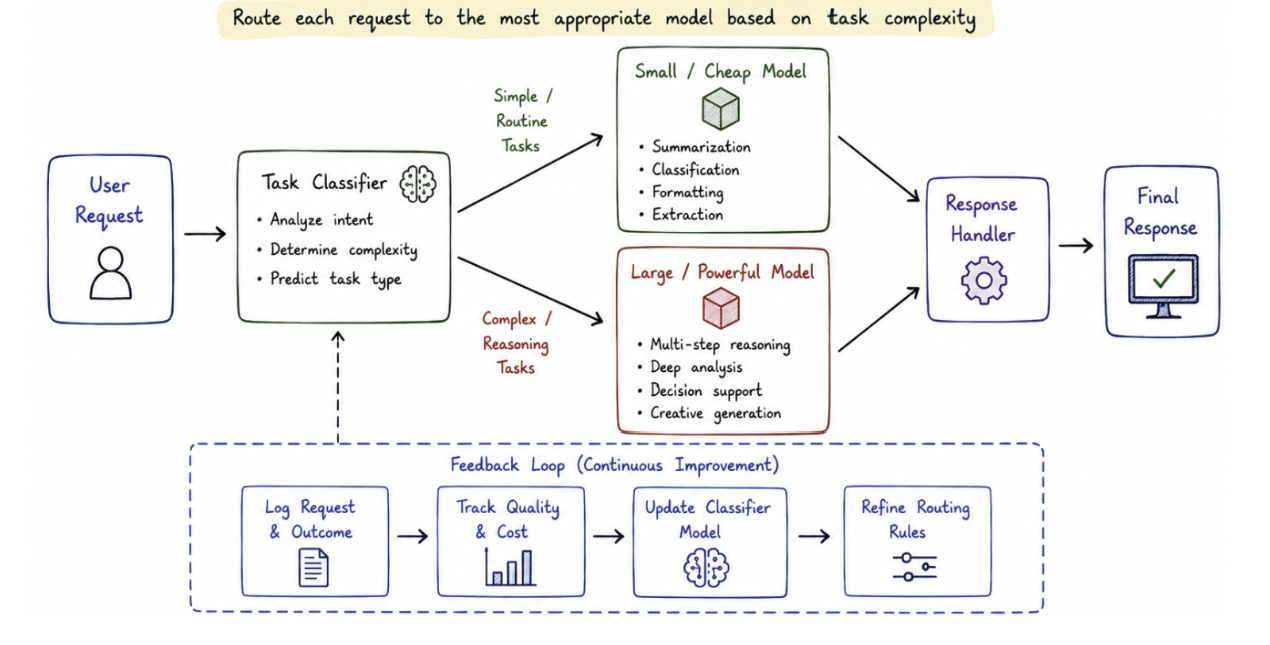
A simplified routing example:
if request_type == "summary":
	model = "small-model"
else:
	model = "large-model"

response = call_model(
	model,
	prompt
)
I later automated this process.
def select_model(query):

	if len(query.split()) < 20:
    	return "small-model"

	return "large-model"
This approach reduced cost significantly without affecting user experience.
The important mindset shift was understanding that AI systems are not powered by one model. They are powered by a collection of models working together.
The future of enterprise AI will not be about finding the single best model. It will be about building intelligent systems that know which model to use and when.
Caching: The Forgotten Performance Strategy in AI Systems
Caching has existed in software engineering for decades. Databases cache queries. Websites cache pages. Applications cache frequently used data.
However, many teams forget that caching is equally important in AI applications.
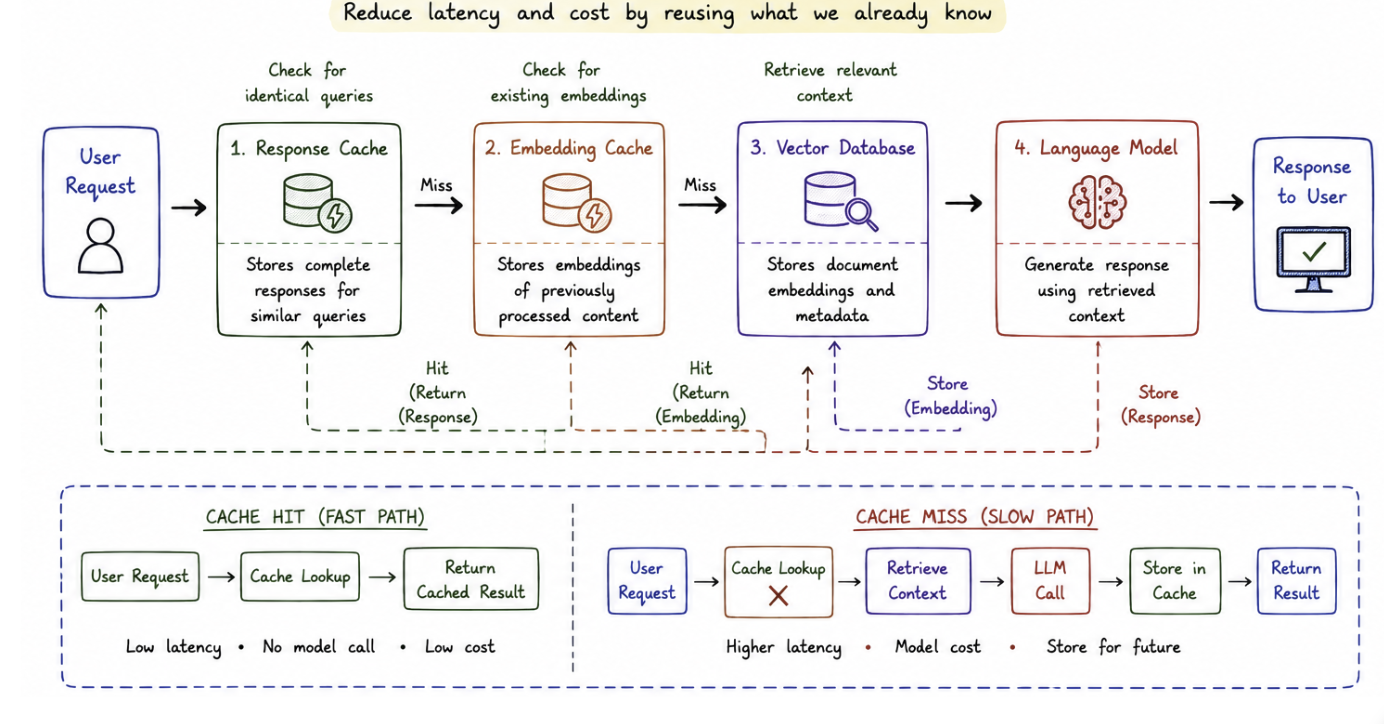
During my project, I discovered that many users were asking similar questions repeatedly.
Some of the questions were: "What is the company leave policy?" "What are the security requirements?" "How do I request access?"
These questions produced almost identical responses every time, and calling an expensive model repeatedly for the same answer made no sense.
I introduced multiple caching layers. The first was response caching. If the same question appeared with similar context, I reused the previous response.
cache_key = hash(user_prompt)

if cache_key in cache:
	return cache[cache_key]

response = generate_answer(
	user_prompt
)

cache[cache_key] = response
The second was embedding caching.
Instead of recalculating document embeddings repeatedly, I stored them and reused them.
if doc_id not in embedding_cache:
    embedding_cache[doc_id] = (
        embedding_model.embed(
            document_text
    	)
	)

 embedding = embedding_cache[doc_id]
Caching requires careful design because AI responses are not always identical. User context, permissions, and updated information must be considered.
A cached response that ignores security rules can create serious problems.
The important lesson is that caching in AI is not just about speed. It is about designing intelligent reuse while maintaining correctness.
Infrastructure Optimization: Treat AI Like a Production System
As usage increased, I realized that AI systems require the same operational discipline as any production platform. I introduced monitoring across the entire stack.
metrics = {
    "latency": latency,
    "tokens": total_tokens,
	"model": model_name
}

send_to_monitoring(metrics)
I also implemented rate limiting to prevent traffic spikes from overwhelming the system.
from flask_limiter import Limiter

limiter = Limiter(
    key_func=get_remote_address
)

@limiter.limit("20/minute")
def ask_ai():
	pass
For longer-running workloads such as report generation, I moved requests into asynchronous queues.
task_queue.enqueue(
    generate_monthly_report,
	report_id
)
This prevented expensive background jobs from affecting real-time user requests.
The Bigger Lesson: AI Infrastructure Is Becoming a New Engineering Discipline
The biggest mistake organizations make is thinking of generative AI as just another API integration, which it is not. Traditional applications are predictable. A database query usually behaves the same way every time. A function returns the same result for the same input.
AI systems are different. They introduce uncertainty, variable workloads, expensive computation, and continuously changing behavior.
Conclusion
Managing generative AI infrastructure at scale requires far more than simply integrating a language model into an application. As usage grows, organizations must carefully balance cost, performance, reliability, and user experience while maintaining operational efficiency. Token consumption, latency optimization, intelligent model routing, caching, monitoring, and infrastructure governance become critical components of a successful AI platform. The organizations that achieve long-term success with generative AI will be those that treat it as a production-grade engineering discipline, designing systems that are scalable, observable, cost-effective, and resilient from the outset rather than attempting to solve these challenges after deployment.
Opinions expressed by DZone contributors are their own.
Comments