

Getting Started With JAVA (for .NET Developers)
This article will walk you through how to get started with Java using your .NET/C# knowledge—whether you're a new programmer or have some experience.
 CORE
·
CORE
·
Join the DZone community and get the full member experience.
Join For FreeIntroduction
Every platform has its own weaknesses and strength and when selecting a platform you should off course also take into account the context of your organization and the goal that you want to achieve.
Please remember, there is no best language or platform. They are only fit for purpose.
The intention of this post is help you get started learning JAVA if you are a new programmer or if you used .NET/C# mostly in your carrier and are curious about trying java as well.
.NET v/s JAVA
C#/.NET are very similar to java. Like Java, C# & .NET are also open source.
.NET platform came 7 years after java but setup in similar way as java. Following are the main building blocks of .NET platform:
- Programming Language (C#)
- Standard Library
- Runtime Environment (CLR , .NET equivalent of JVM).
Now if we look at building blocks of JAVA Platform:
- Java Programming Language.
- Java Standard Edition (Java SE) APIs (aka Standard library).
- Java runtime environment (aka Java Virtual Machine).
- JVM knows how to run byte-code that’s compiled from java source files and executed on the underlying hardware.
Three parts of Java platform are bundled together in what’s called Java Development Kit (JDK).
JDK is always starting point when you start developing java applications and it contains all the tools you need to create and run java applications. In next section, we will learn how to install JAVA.
Install JDK
When developing .NET applications, we install .NET SDK(s). On java side, we have JDK. Here are the steps to install it:
- Download and install JDK
- https://www.oracle.com/java/technologies/javase-downloads.html
- Setup Environment Variables (System)
- Create an environment variable JAVA_Home and set Variable value.
- Update Path for bin directory of Java.
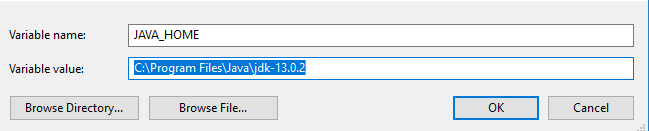
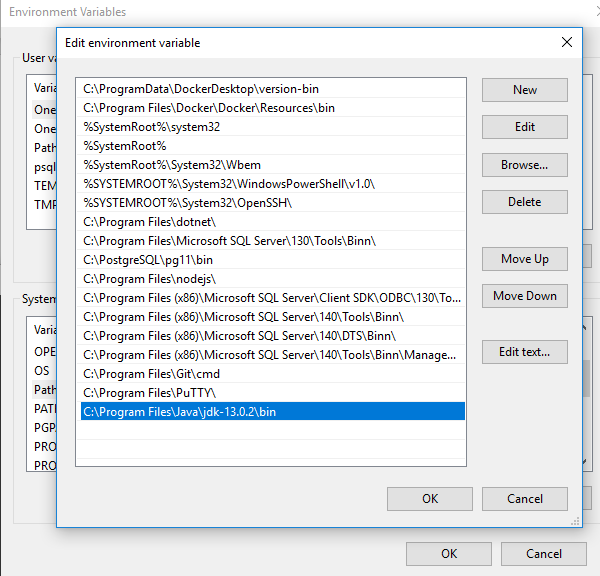
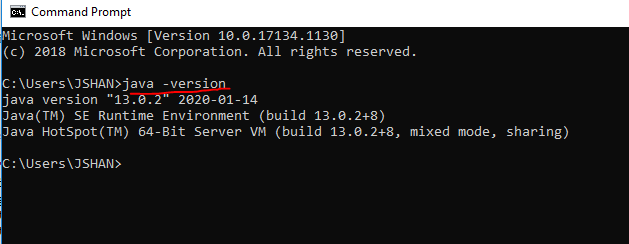
With Environment variable setup and Path updated, open command prompt and execution the >>java -version command to confirm that JDK installation is successful:
Adapting JAVA
Lets see the scalable development model offered by JAVA.
- Hierarchical and structural code bases.
- At the fundamental level, java starts with classes.
- Related classes can grouped in packages.
- Related packages yet again can be grouped into modules.
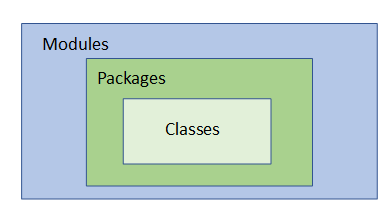
In .NET, we have classes, namespaces, libraries etc. which offers similar capabilities.
Productivity
JAVA offers following capabilities out of the box:
- Automatic memory management
- Garbage collection
- Multi threading
C# is also managed language so offers same benefits like java:
- Automatic memory management.
- Garbage collection
- Multi-threading.
Performance
Following are few points towards performance characthersitics of JAVA:
- Just-in-time compilation.
- JVM specialized for underlying hardware.
- With java, we have the platform-independent byte-code and a platform-specific JVM, giving both the benefit of portability and the benefit of performing highly specific optimization towards the actual CPU that the JVM is running on with just-in-time compilation.
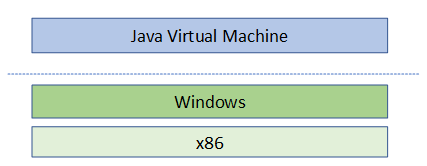
C# compiles to intermediate language (IL), which is similar to java byte-code. And .NET has CLR equivalent of JVM.
Difference
- C# moves much faster than java in terms of new features.
- .NET stack recently move to cross-platform stack.
Generally if a company have already invested in .NET eco-system then it will be logical to make a choice for C# and .NET. But if you want large eco-system of libraries and diversity then java is more logical choice.
Demo: Compiling and Running Java Code
In this very simple example, I used notepad to write a java program:
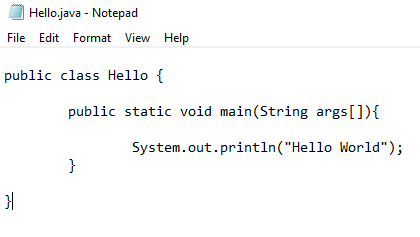
We can use java compiler javac to compile this program. This will output byte-code (Hello.class) file.
Now to run byte-code, we will use this generated class >> java Hello(.class is default).
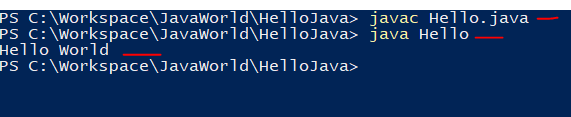
Congratulation, you just wrote your first java program, compile it and then execute it. You can download the code on this git repo.
Typically, you will use an IDE for development purposes and an IDE will simplify this process greatly. You can use IntelliJ IDEA which has a free community version available or you can use Visual Studio Code or any other IDE which you like more. Eclipse, NetBeans are also popular for java development.
JAVA in Visual Studio Code
You can setup visual studio code for java development very easily. You can install Coding Pack for Java from this link:

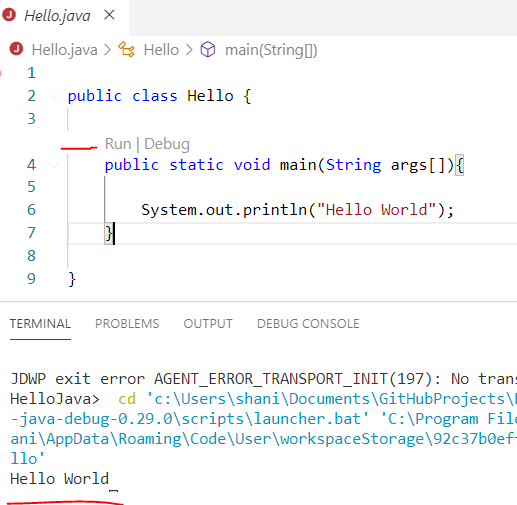
Once, this is installed, open the project folder in VS-Code and Run the application to see the results:
Summary
In this post, we saw a very simple comparison b/w java and .NET and focus was mostly towards similarities. I think if you try to map your existing C# skills to java then it will make it easier to learn and program JAVA. As both platforms are very similar and their syntax is also not very different, this makes it easier even more. If you have some questions or comments, feel free to reach out to me. Till next time, Happy Coding.
Published at DZone with permission of Jawad Hasan Shani. See the original article here.
Opinions expressed by DZone contributors are their own.
Comments