

How to Break Up Swift Concurrency
A technical deep dive into how blocking GCD calls and hidden deadlocks exhaust the Swift cooperative pool. Learn how to write safe, deadlock-free async code.
Join the DZone community and get the full member experience.
Join For FreeNeed to perform asynchronous operations and support multitasking in your app? Async/await is at your service — simple and elegant. The cooperative thread pool efficiently switches threads between tasks, while the compiler ensures thread safety at the type level. You can even seamlessly bridge older parts of your codebase written in GCD!
But then, for some reason, your app starts hanging in production…
Below, we will explore specific examples (complete with diagrams) of how not to mix async/await code with DispatchQueue (the same rules apply to other blocking primitives).
The Root of the Problem
The system doesn’t allocate a dedicated thread for every Task. Instead, tasks are executed on a cooperative thread pool, where the number of available threads never exceeds the number of active CPU cores.
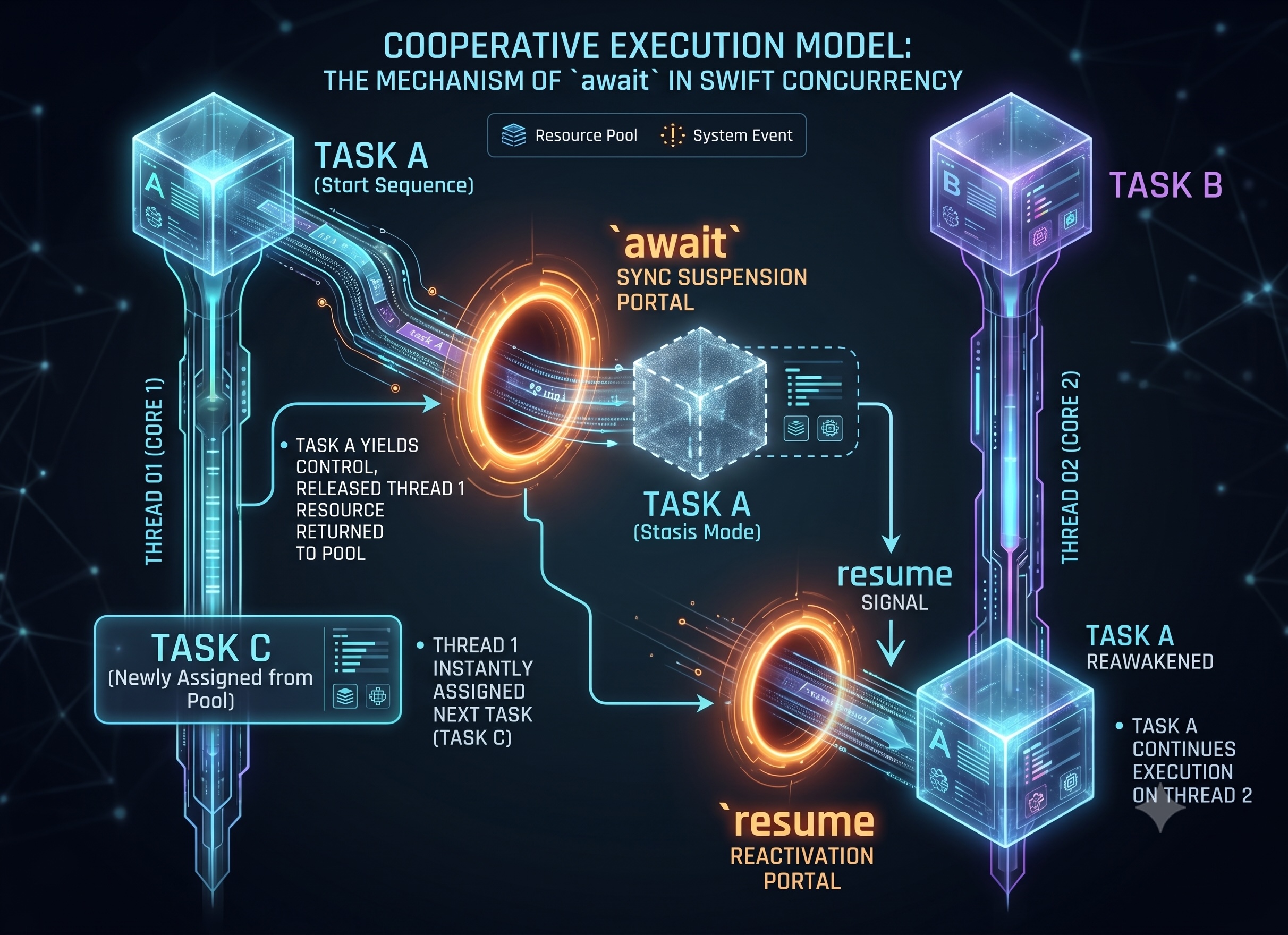
Therefore, you can cheaply spawn thousands of tasks — they are merely small allocations on the heap, not separate threads.
However, a blocking GCD call or an infinite task (a loop) is not a suspension point; they occupy the thread and do not return it to the pool. The more of these tasks there are, the higher the chance of depleting the pool. Each of the methods below leads to this situation in its own way.
Method #1. Saturating the Pool With Blocking Tasks
The simplest way is to occupy every thread in the pool with a task that blocks it until its execution is complete. An example using DispatchQueue.sync:
// The pool size is 2. We launch 2 blocking tasks, each on its own queue.
for i in 0..<2 {
    Task {
        DispatchQueue(label: "blocking-\(i)").sync {  // blocks the thread
            // some heavy work
        }
        print("done")
    }
}

Task { print("See you later...") }  // stuck in the queue, won't execute anytime soon
The task inside sync does not suspend. The thread from the pool waits until the block finishes executing on the queue. If you do this simultaneously on every thread in the pool, its throughput will drop to zero.
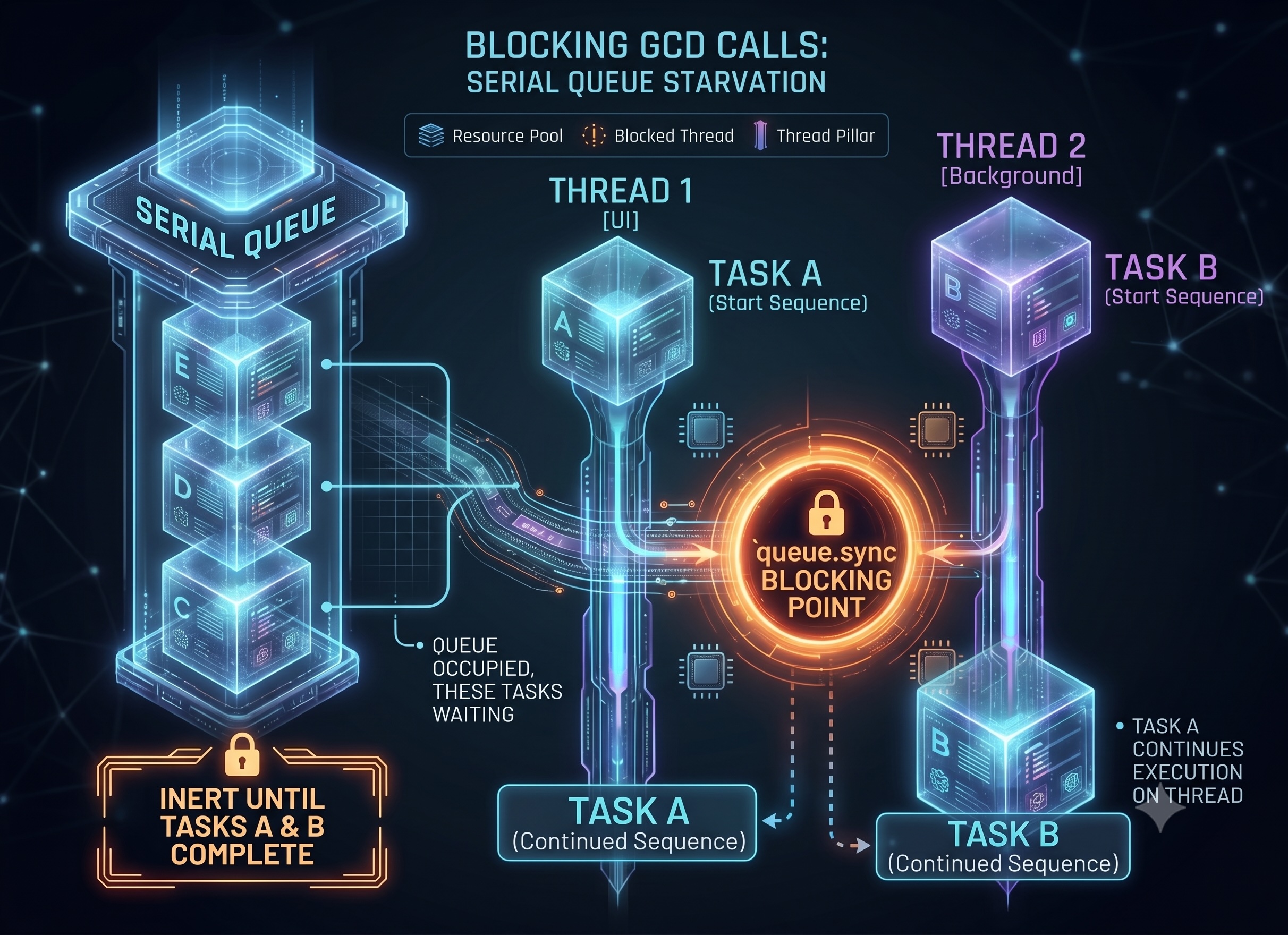
The pool recovers after the blocks complete. But while they are executing, nothing that lives on it makes progress: non-isolated async functions, regular actors, TaskGroup (@MainActor and GCD queues continue to work in the meantime — the main actor has its own executor on the main thread, and GCD has its own pool). The heavier the task — a synchronous network request, heavy computation, file I/O — the longer the stall.
How can this slip through tests? If you only test on powerful devices. If, say, 4 blocking tasks occur simultaneously at runtime, the code might run normally on 8 cores, but then fail on a 2-core CI runner or a low-end device.
Additionally
Pool exhaustion due to blocking calls is discussed in the Swift Forums thread Deadlock When Using DispatchQueue from Swift Task, where a reader-writer subsystem managed by a TaskGroup deadlocks as soon as a sufficient number of tasks simultaneously block their threads in the pool.
The Problem With the Vision Framework
A blocking call can be inside third-party code, and you won’t see it in your own. The Swift Forums thread Cooperative pool deadlock when calling into an opaque subsystem describes such a case: a seemingly synchronous Apple API (VNImageRequestHandler.perform from Vision) internally drops down into GCD and blocks the calling thread. Just a few concurrent tasks calling it are enough to exhaust the cooperative pool and hang the entire application.
Method #2. Creating a Deadlock Between Queues
Thread starvation is temporary if the blocking call eventually finishes. To make it permanent, you need to arrange it so that two blocked threads wait for each other.
let queueA = DispatchQueue(label: "A")
let queueB = DispatchQueue(label: "B")

Task {
    queueA.sync {            // holds the pool thread on A...
        queueB.sync { }      // ...then waits for B
    }
}

Task {
    queueB.sync {            // holds the pool thread on B...
        queueA.sync { }      // ...then waits for A → circular wait
    }
}
The queueA block won't complete until queueB is freed, and the queueB block won't complete until queueA is freed.
Important: This is not a guaranteed deadlock. It only happens if both outer sync calls manage to capture their queues before the inner sync calls execute. If the first task completely finishes before the second one starts, nothing will happen. This can lead to intermittent (flaky) bugs.
Method #3. Creating a Deadlock on a Single Queue
Variant 1. Two Nested sync Calls
A familiar situation:
let queue = DispatchQueue(label: "serial")

Task {
    queue.sync {                 // blocks the cooperative thread
        // ...work...
        queue.sync { }           // sync on the same serial queue
    }
}
In practice, this will more likely result in a crash rather than a hang. libdispatch recognizes the simple case — the thread already owns the queue and calls sync on it again — and intentionally crashes the application with EXC_BAD_INSTRUCTION and the message BUG IN CLIENT OF LIBDISPATCH: dispatch_sync called on queue already owned by current thread.
This applies to a serial queue. A nested sync on a concurrent queue will not cause a deadlock, but it will still hold the pool thread.
sync deadlocks between queues and on a single queue are well-known GCD "pitfalls"; it is easy to fall into them in a cooperative pool of limited size.
Variant 2. A Hidden Reentrant sync and a Single Queue for Everything
The blocking call can be hidden behind an innocent helper function. For example, in a seemingly safe synchronous accessor like this:
let queue = DispatchQueue(label: "store")

func currentUser() -> User {          // used throughout the code
    queue.sync { _user }              // fine — as long as you are not on `queue`
}
And now someone somewhere starts work on the same queue and calls this helper from within:
Task {
    queue.sync {                      // now executing ON `queue`
        let user = currentUser()      // currentUser() calls queue.sync again
        apply(user)                   // the same serial queue → crash
    }
}
Each call looks normal on its own. The problem only arises when they are combined, and its two halves might reside at opposite ends of the codebase. As a result, the application crashes with the same libdispatch message as in Variant 1, but the stack trace doesn't immediately reveal that two "normal" halves of code from different files are to blame.
Method #4. Not Keeping Track of @MainActor
The main thread is not part of the cooperative pool; @MainActor has its own executor on the main thread. But the scheduling model is the same — cooperative — and a blocking sync breaks it in exactly the same way:
@MainActor
func onTap() {
    let worker = DispatchQueue(label: "load")
    worker.sync {  // blocks the main thread, the UI freezes
        let data = loadDataSync()
        DispatchQueue.main.sync {  // worker is now waiting for main...
            render(data)  // ...but main is blocked above → deadlock
        }
    }
}
Blocking the main thread stops rendering, gesture processing, and run loop events. The user sees a frozen screen, and the watchdog might kill the application.
Method #5. Not Suspending Heavy Synchronous Tasks
Without GCD or any primitives. A task performing long synchronous work between await points also does not yield its thread back:
Task {
    while true {
        heavySynchronousWork()   // never reaches an await
    }                            // holds its thread forever
}
In a cooperative pool, the runtime can only reassign a thread at a suspension point. No await means no yielding. From the pool's perspective, a tight CPU loop without an await is indistinguishable from a blocking call; it just does useful work while 'starving' everyone else.
A possible solution is to break the long-running work into chunks with await Task.yield() between them:
Task {
    while !Task.isCancelled {
        heavySynchronousWork()
        await Task.yield()
    }
}
Apple’s documentation for Task.yield() describes it as suspending the current task to allow other tasks to execute. But this is not an ideal solution, because between yield points, the work still occupies a pool thread.
There is another option: moving the heavy work out of the pool entirely, for example, via GCD + continuation or a separate executor.
How Not to Break Swift Concurrency
- Do not call long-running tasks under blocking primitives or
queue.syncinside aTask. Short critical sections under a fast lock (os_unfair_lock,NSLock, an instantaneousqueue.syncaround a field read) are acceptable: the thread holding the lock will perform the work itself and release it immediately. - Call callback APIs using continuations. To turn a GCD API with a completion handler into an
asyncfunction, wrap it inwithCheckedContinuation(orwithCheckedThrowingContinuationwhen an error is possible). The continuation suspends the task and resumes it from the callback without blocking the thread. - Keep blocking
synccalls from the same queue in one place. If a public function blocks the thread, indicate this explicitly (via its signature or a comment) or useasync. - Watch out for calls within
@MainActormethods. Do not call heavy tasks undersyncon the main thread, with the exception of a shortsyncfor the sake of an atomic read. Launch heavy work in a separateTaskor queue and update the UI asynchronously. - Use suspension in heavy loops. Insert
await Task.yield()so that a long (or infinite) task does not hijack a pool thread for itself, or move the work out of the cooperative pool. - Test on low-end devices and under load. In an environment with 1–2 cores or on a pool saturated with concurrent tasks.
Opinions expressed by DZone contributors are their own.
Comments