

Google Cloud KMS vs. AWS KMS: Java Encryption Guide
Compare Google Cloud KMS vs. AWS KMS in Java, including envelope encryption, key rotation, IAM, data keys, and audit logging.
Join the DZone community and get the full member experience.
Join For FreeEvery system that stores sensitive data needs keys that never leave a hardened boundary, an audit trail of every use, and rotation that doesn't mean re-encrypting petabytes. On Google Cloud, that's Cloud KMS; on AWS, it's AWS KMS. Both store symmetric and asymmetric keys, both use HSMs, and both are built for envelope encryption.
But AWS KMS vs. Google Cloud KMS comes down to the choices that show up in your code: how keys are named, what rotation means, where authorization lives, and whether the service hands you data keys. This article walks through Cloud KMS in Java and then maps it onto AWS KMS.
Cloud KMS organizes keys in a four-level hierarchy under a project:
- Location. Where the key material lives: a region such as
us-east1, a multi-region such asus, orglobal. Key material stays in the location you pick for its whole lifecycle. - Key ring. A named group of keys in one location. It exists for organization and IAM inheritance.
- CryptoKey. The key you reference in code. It has a purpose (
ENCRYPT_DECRYPT,ASYMMETRIC_SIGN,ASYMMETRIC_DECRYPT,MAC, and a few more) and a rotation schedule. - CryptoKeyVersion. The actual key material. A key has one or more versions, and for symmetric keys one of them is the primary, the version that new encryptions use.
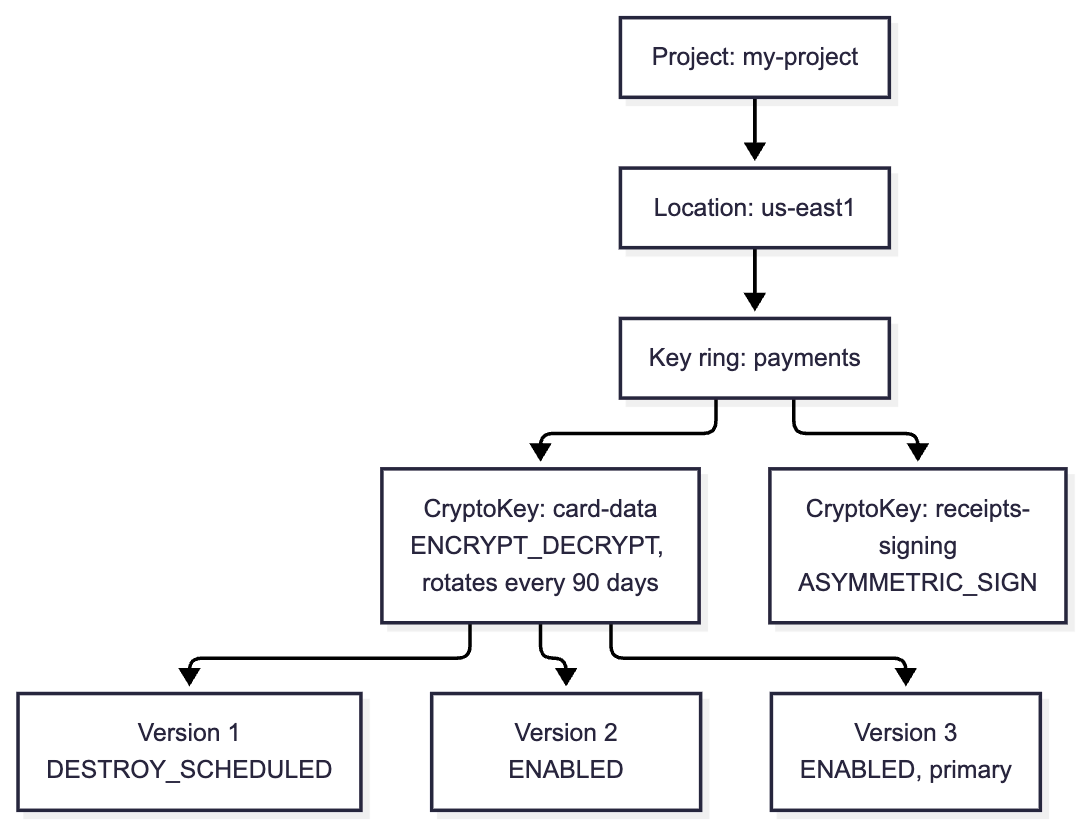
A key is identified only by its full resource name, projects/my-project/locations/us-east1/keyRings/payments/cryptoKeys/card-data, optionally followed by /cryptoKeyVersions/2. There are no aliases. Nothing can move after it's created: the location is fixed when you create the key ring, and key rings themselves can't be deleted.
Each key version also has a protection level:
SOFTWARE: keys are protected by Google's software crypto (BoringCrypto, FIPS 140-3 Level 1).HSM: keys live in Cloud HSM, which is FIPS 140-2 Level 3 validated.HSM_SINGLE_TENANTgives you a dedicated HSM.EXTERNALandEXTERNAL_VPC: Cloud EKM keeps the key material in a supported external key manager that you operate, reached over the internet or a VPC. Google never holds the key.
The Java client is KeyManagementServiceClient. It uses Application Default Credentials, so on GKE, Cloud Run, or GCE, the workload's service account authenticates with no keys in the code. This creates a key ring and an HSM-backed symmetric key that rotates every 90 days:
try (KeyManagementServiceClient kms = KeyManagementServiceClient.create()) {
    KeyRing ring = kms.createKeyRing(
        LocationName.of("my-project", "us-east1"), "payments", KeyRing.getDefaultInstance());

    CryptoKey key = CryptoKey.newBuilder()
        .setPurpose(CryptoKeyPurpose.ENCRYPT_DECRYPT)
        .setVersionTemplate(CryptoKeyVersionTemplate.newBuilder()
            .setAlgorithm(CryptoKeyVersionAlgorithm.GOOGLE_SYMMETRIC_ENCRYPTION)
            .setProtectionLevel(ProtectionLevel.HSM))
        .setRotationPeriod(Duration.newBuilder().setSeconds(90L * 24 * 3600))   // every 90 days
        .setNextRotationTime(Timestamp.newBuilder()
            .setSeconds(Instant.now().plusSeconds(90L * 24 * 3600).getEpochSecond()))
        .build();

    kms.createCryptoKey(KeyRingName.parse(ring.getName()), "card-data", key);
}
The rotation period can be anywhere from one day to 100 years. When it fires, Cloud KMS creates a new version and makes it primary. Earlier versions stay enabled, so old ciphertext still decrypts, and nothing is re-encrypted. To rotate by hand, create a version with CreateCryptoKeyVersion and promote it with UpdateCryptoKeyPrimaryVersion. Automatic rotation applies only to symmetric keys; asymmetric keys are rotated manually.
The AWS KMS key rotation process differs in how key material is managed, as described below.
KMS keys aren't meant to encrypt your data directly. A single Encrypt call accepts at most 64 KiB of plaintext (8 KiB of plaintext plus AAD for HSM keys), and every call is a network round trip. The standard pattern is envelope encryption, also used with AWS KMS envelope encryption: encrypt the data locally with a data encryption key (DEK), then have KMS encrypt (wrap) the DEK with a key encryption key (KEK) that never leaves the service. You store the wrapped DEK next to the ciphertext.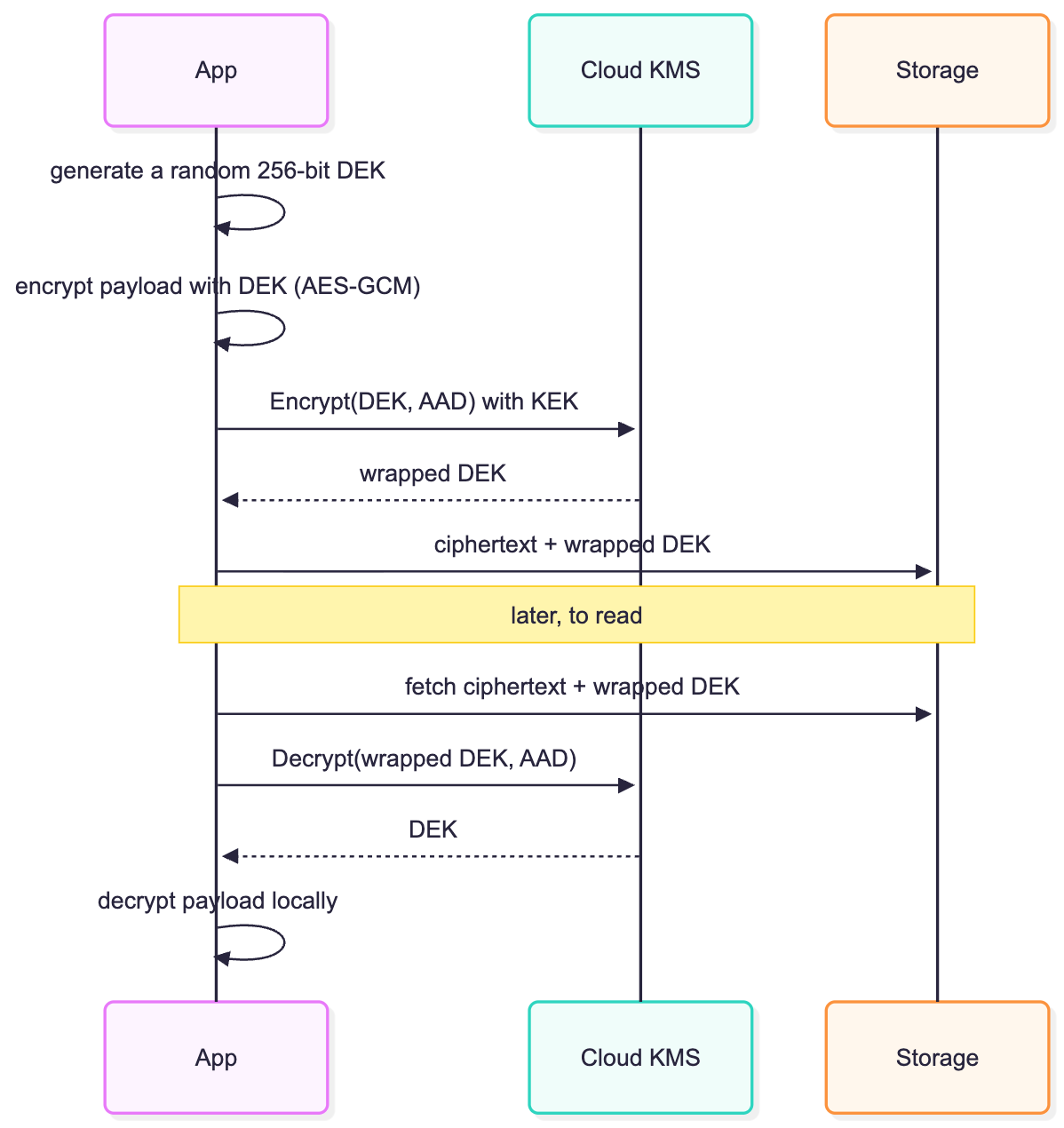
Cloud KMS has no data-key API, so you generate the DEK yourself. Google's guidance is to generate a new DEK every time you write data, never share one across users, and prefer Tink, which packages this whole flow. Doing it by hand shows what's happening:
CryptoKeyName kek = CryptoKeyName.of("my-project", "us-east1", "payments", "card-data");
ByteString aad = ByteString.copyFromUtf8("tenant=acme");   // must be supplied again to decrypt

try (KeyManagementServiceClient kms = KeyManagementServiceClient.create()) {
    // 1. Generate a fresh DEK locally. Cloud KMS has no GenerateDataKey call.
    KeyGenerator gen = KeyGenerator.getInstance("AES");
    gen.init(256);
    SecretKey dek = gen.generateKey();
    // ... encrypt the payload locally with dek (AES-GCM), then discard dek ...

    // 2. Wrap the DEK with the KEK, with CRC32C checks against corruption in transit.
    ByteString dekBytes = ByteString.copyFrom(dek.getEncoded());
    EncryptResponse wrapped = kms.encrypt(EncryptRequest.newBuilder()
        .setName(kek.toString())
        .setPlaintext(dekBytes)
        .setPlaintextCrc32C(crc32c(dekBytes))
        .setAdditionalAuthenticatedData(aad)
        .setAdditionalAuthenticatedDataCrc32C(crc32c(aad))
        .build());
    if (!wrapped.getVerifiedPlaintextCrc32C()
        || wrapped.getCiphertextCrc32C().getValue() != crc32c(wrapped.getCiphertext()).getValue()) {
        throw new IllegalStateException("integrity check failed");
    }
    ByteString wrappedDek = wrapped.getCiphertext();   // store next to the encrypted payload
    String usedVersion = wrapped.getName();            // the primary version that wrapped it

    // 3. Later: unwrap. Pass the key, not the version; Cloud KMS picks the version.
    ByteString unwrapped = kms.decrypt(DecryptRequest.newBuilder()
            .setName(kek.toString())
            .setCiphertext(wrappedDek)
            .setAdditionalAuthenticatedData(aad)
            .build())
        .getPlaintext();
    SecretKey restored = new SecretKeySpec(unwrapped.toByteArray(), "AES");
}

static Int64Value crc32c(ByteString data) {
    return Int64Value.of(Hashing.crc32c().hashBytes(data.toByteArray()).padToLong());
}
Encrypt uses the key's current primary version. Decrypt also takes the key, not a version: the ciphertext records which version produced it, so rotation is invisible to readers. The optional CRC32C fields let the server confirm it received your plaintext intact, and let you confirm the ciphertext you got back.
The AAD (tenant=acme) is bound to the ciphertext, so one tenant's wrapped DEK can't be swapped into another tenant's record.
Lifecycle operations act on versions, not keys. You disable a version (ENABLED to DISABLED) to stop it from being used, and re-enable it later. There's no switch that disables a whole key; you disable each version.
Destroying a version is deliberately slow. DestroyCryptoKeyVersion moves it to DESTROY_SCHEDULED for 30 days by default. The duration is set when the key is created, and an organization policy can enforce a minimum. During that window, RestoreCryptoKeyVersion brings it back in the DISABLED state. After the window, the material is gone and data encrypted by that version can't be recovered. Destroyed versions are no longer billed. Cloud KMS has also added permanent deletion: you can delete key versions and then the key itself, though a deleted key's name can't be reused.
Cloud KMS has no policy language of its own. Access is ordinary IAM, granted at the organization, folder, project, key ring, or key level and inherited downward. The predefined roles split duties cleanly:
roles/cloudkms.adminmanages keys but can't encrypt or decrypt.roles/cloudkms.cryptoKeyEncrypterDecrypter,cryptoKeyEncrypter, andcryptoKeyDecryptercan use keys but not manage them.roles/cloudkms.signerVerifierandpublicKeyViewercover asymmetric keys.
The operator who rotates keys never sees plaintext, and the service that decrypts can't destroy its key. Grant usage roles on the specific key, not the project.
Two more controls round this out. Cloud Audit Logs record admin operations (create, rotate, destroy) automatically, but Encrypt and Decrypt are Data Access logs, which are off by default. If you want a record of every key use, enable them for Cloud KMS. Key Access Justifications, used with Cloud EKM keys, attaches a reason code to every Google request for your key, and your external key manager can refuse it.
To import key material, you create an import job with a wrapping method, such as RSA_OAEP_3072_SHA256_AES_256 or one of the newer post-quantum HPKE methods. The job gives you a public key, and it expires after three days. You wrap your key material with that public key and import it as a new version of a key. For a key that must only ever hold imported material, set importOnly, which means rotation is manual: import new material and make it primary. If you destroy an imported version, you can re-import the same material later.
AWS KMS covers the same ground with a flatter, version-less model:
- Keys, not versions. A KMS key has a key ID (a UUID), an ARN, and optional aliases such as
alias/card-data. There's no hierarchy above it beyond the account and Region. - Rotation is hidden. Automatic rotation is off by default for customer managed keys. When enabled, it runs every 365 days by default, configurable from 90 to 2,560 days, and
RotateKeyOnDemandallows up to 25 extra rotations per key. The key ID never changes; AWS keeps old material internally and picks it on decrypt. - All keys in HSMs. Keys in the default key store live in HSMs validated at FIPS 140-3 Level 3. There's no software tier. CloudHSM key stores and external key stores (XKS) cover the dedicated and hold-your-own-key cases.
- A data-key API.
GenerateDataKeyreturns a fresh DEK in plaintext along with a copy wrapped under your key, so step 1 and step 2 above are one call. - Encryption context. The AWS equivalent of AAD is a map of key-value pairs. Unlike Cloud KMS AAD, it's recorded in CloudTrail and can be used in policy conditions such as
kms:EncryptionContext:tenant. - Three authorization layers. Every key has exactly one key policy, a resource policy that supports
Denyand conditions. IAM policies work only if the key policy enables them, and grants add temporary, programmatic permissions on top. - Whole-key lifecycle.
DisableKeyandScheduleKeyDeletionact on the whole key. The deletion window is 7 to 30 days, andCancelKeyDeletionbacks it out. - Replication. Multi-Region keys share the same key ID and material across Regions, and
ReplicateKeycopies one to a new Region. You choose this at creation; a single-Region key can't be converted.
Here's the same envelope flow on AWS:
Map<String, String> context = Map.of("tenant", "acme");   // logged in CloudTrail, usable in policy

try (KmsClient kms = KmsClient.create()) {
    GenerateDataKeyResponse dataKey = kms.generateDataKey(GenerateDataKeyRequest.builder()
        .keyId("alias/card-data")
        .keySpec(DataKeySpec.AES_256)
        .encryptionContext(context)
        .build());
    byte[] dek = dataKey.plaintext().asByteArray();         // encrypt locally, then discard
    SdkBytes wrappedDek = dataKey.ciphertextBlob();         // store next to the payload

    byte[] unwrapped = kms.decrypt(DecryptRequest.builder()
            .keyId("alias/card-data")                       // optional for symmetric keys
            .ciphertextBlob(wrappedDek)
            .encryptionContext(context)
            .build())
        .plaintext().asByteArray();
}
KeyId is optional on Decrypt for symmetric keys because the ciphertext blob identifies the key, but AWS recommends passing it so you don't decrypt with a key you didn't expect. Cloud KMS requires the key name on every Decrypt.
| Concept | Google Cloud KMS | AWS KMS |
|---|---|---|
| Key identifier | Resource name projects/…/cryptoKeys/k, no aliases |
Key ID, ARN, aliases |
| Versions | First-class CryptoKeyVersion with its own state |
Hidden behind the key ID |
| Protection | SOFTWARE, HSM (FIPS 140-2 L3), single-tenant HSM, EXTERNAL, EXTERNAL_VPC |
All HSM-backed (FIPS 140-3 L3), plus CloudHSM and external key stores |
| Max plaintext per call | 64 KiB (8 KiB with AAD for HSM keys) | 4,096 bytes |
| Data keys | Generate locally (or with Tink) | GenerateDataKey |
| Authenticated data | AAD bytes, not logged | Encryption context map, logged and usable in policies |
| Auto-rotation | 1 day to 100 years | 90 to 2,560 days, off by default, plus 25 on-demand |
| Disable | Per version | Whole key |
| Destroy | Per version, 30 days scheduled by default, restorable | Whole key, 7–30 days, cancellable |
| Access control | IAM roles on the hierarchy, admin and usage split | Key policy (with Deny) + IAM + grants |
| Usage logging | Data Access audit logs, off by default | CloudTrail management events |
| Multi-region | Choose a multi-region location for the key ring | Multi-Region keys, ReplicateKey |
| BYOK | Import job, expires in 3 days | GetParametersForImport, token valid 24 hours |
| Throughput quota (default) | Token-based per region; about 60,000 software operations a minute | 10,000 to 100,000 symmetric operations a second, by Region |
What the AWS KMS vs. Google Cloud KMS encryption comparison means in practice:
- Cloud KMS is simpler to reason about for access. It's one IAM model with roles that separate managing keys from using them. AWS is more expressive: a key policy can
Deny, and conditions on encryption context can tie a key's use to a tenant. That power comes with the risk of a key policy that locks out its own administrators. - Versions are explicit on Google Cloud. You can disable or destroy just the key material that was compromised and leave the rest working. On AWS you disable or delete the whole key, or rotate and keep the old material.
- AWS logs every use by default. On Google Cloud, enable Data Access logs for Cloud KMS on day one, or you won't have a record of who decrypted what.
- Plan for quotas. AWS gives each account and Region a large shared pool of cryptographic operations. Cloud KMS's default is far smaller per project and region, so cache unwrapped DEKs for hot reads where your threat model allows, and request a quota increase before launch. Both quotas are adjustable.
- Both want envelope encryption. Neither service is built to encrypt bulk data directly. On Google Cloud, Tink makes the local half trivial. On AWS, the AWS Encryption SDK plays the same role.
Google Cloud KMS treats keys as resources in your project hierarchy: versions are visible, protection level is chosen per key, and IAM is the whole authorization story. That's easy to audit and gives fine-grained control over key material, as long as you turn on Data Access logs and size your quotas. AWS KMS hides versions and puts authorization in a per-key policy language that's more expressive, especially with encryption context, and its data-key API saves a step.
These differences are worth considering when reviewing AWS KMS best practices alongside Google Cloud KMS key management. On both clouds, the envelope pattern is the common ground: generate a DEK, wrap it, store it next to the data, and let KMS guard only the key that guards everything else.
Opinions expressed by DZone contributors are their own.
Comments