

Getting started with Java Serverless Functions using Quarkus and AWS Lambda
Java serverless functions with Quarkus
 CORE
·
CORE
·
The serverless journey started with functions - small snippets of code running on-demand and a short period in Figure 1. AWS Lambda in the “1.0” phase made this paradigm very popular, but it had its limitations around execution time, protocols, and poor local development experience.
Since then, developers realized that the same serverless traits and benefits could be applied to microservices and Linux containers. This leads us into what we're calling the “1.5” phase in Figure 1. Some serverless containers here completely abstract Kubernetes, delivering the serverless experience through an abstraction layer that sits on top of it, like Knative.
When we achieve this "2.0" phase in Figure 1, the serverless becomes to handle more complex orchestration and integration patterns, combined with some level of state management. More importantly, developers desire to keep using a familiar application runtime, Java, to run a combination of serverless and non-serverless workloads in legacy systems.

Figure 1. Serverless Journey
So what is the first task for Java developers before they get started with developing new serverless functions along with this journey? That should be to choose a new cloud-native Java framework that allows developers to run Java functions quicker and smaller memory footprint than traditional monolithic applications. This capability can also be applied to various infrastructure environments from physical servers to virtual machines, and containers in multi and hybrid cloud.
Developers might think of an opinionated Spring framework that uses java.util.function package in Spring Cloud Function to support imperative and reactive functions development. Spring also enables the developers to deploy Java functions to common Function as a Service (FaaS) services such as Amazon Lambda, Apache OpenWhisk, Microsoft Azure, and Project Riff using cloud adaptors. However, the developers still have concerns about slow startup and response time, and heavy memory consuming processes with Spring characteristics. This problem can be worse for running Java functions on scalable container environments like Kubernetes.
To solve this problem, I’d like to bring up a new open source cloud-native Java framework, Quarkus that aims to design serverless applications and write cloud-native microservices to run on cloud infrastructures Kubernetes and Red Hat OpenShift Container Platform.
Quarkus rethinks Java and uses a closed world approach to building and running it and has turned Java into a runtime that’s comparable to Go. Quarkus also includes 100+ extensions for developers to integrate enterprise capabilities from database access to serverless integration, messaging, security, observability, and business automation.
Here is a quick example of how developers can scaffold a Java serverless function project with Quarkus.
1. Creating the Quarkus AWS Lambda maven project
This command generates a Quarkus project to use AWS Gateway HTTP API:
$ mvn io.quarkus:quarkus-maven-plugin:1.13.3.Final:create \
       -DprojectGroupId=org.acme \
       -DprojectArtifactId=quarkus-amazon-lambda \
       -Dextensions=quarkus-amazon-lambda \
       -DclassName="org.acme.getting.started.GreetingResource"
2. Building Serverless Functions
This command compiles the code and generates a few extra files such as lambda deployment file and AWS Serverless Application Model (SAM) command-line tool(CLI) scripts for local simulation and AWS deployment:
$ mvn clean install -f quarkus-amazon-lambda
You should find the following files in the target/ directory:
- function.zip - Lambda deployment file
- sam.jvm.yaml - SAM CLI script for local simulation
- sam.native.yaml - SAM CLI script with a native executable for local simulation
- manage.sh - Bash script for wrapping SAM CLIs for AWS production
3. Deploying the Functions to AWS Lambda
This command deploys a local application to AWS Lambda as a serverless function:
$ LAMBDA_ROLE_ARN=<YOUR_ROLE_ARN> sh target/manage.sh create
Note: In case you haven’t created Amazon Resource Names (ARNs), find more information on how to create them here.
4. Testing the Functions on AWS Lambda
Access the AWS console with your credentials then navigate to the AWS Lambda service page. You should see that the Quarkus function is already deployed in Figure 2.

Figure 2. AWS Lambda Service Landing Page
When you click on the function’s name (e.g. QuarkusAmazonLambda), it brings you to the Function Overview page. Now, you can select the “Test” tab then, input the following JSON data:
{

  "Name": "Quarkus Serverless Functions"

}
Click on the “Test” button in Figure 3:
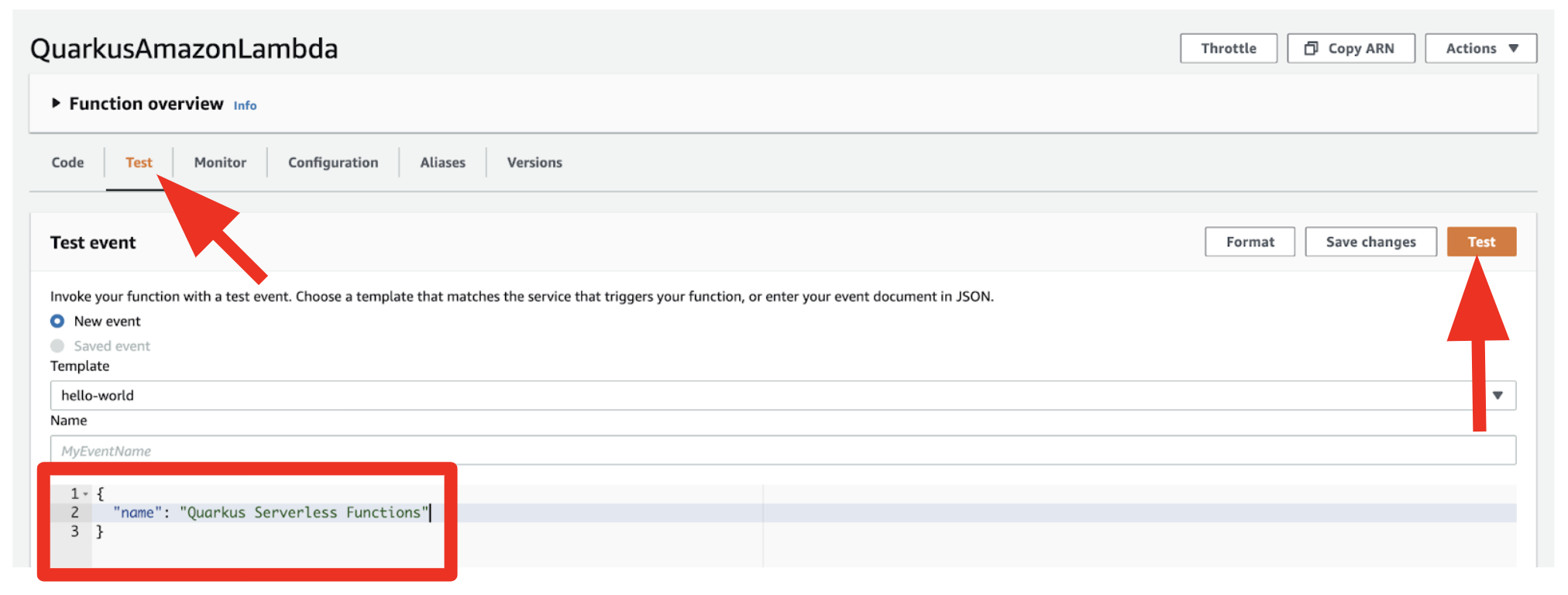
Figure 3. Test the Function
The output should look like this in Figure 4:
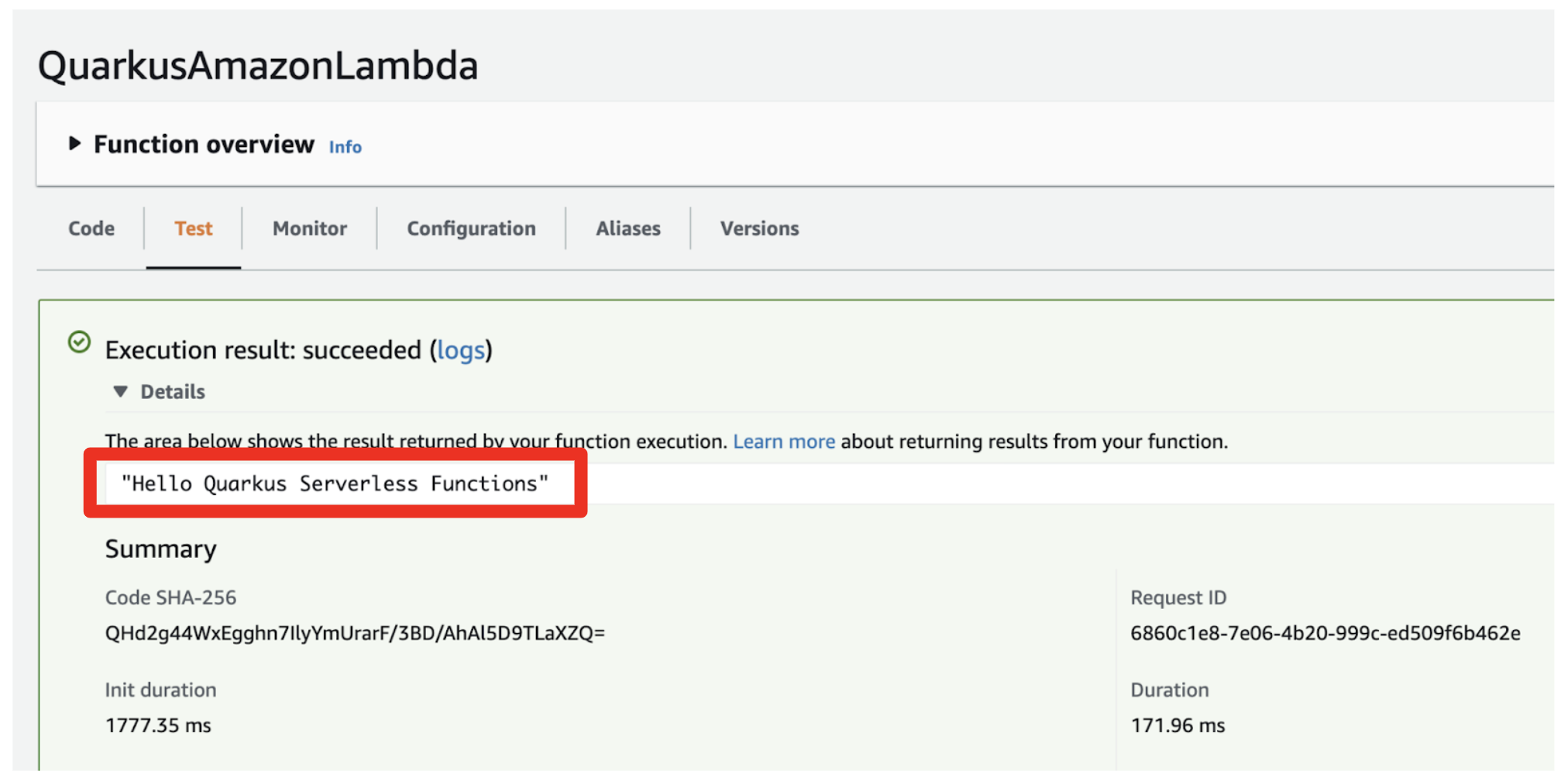
Figure 4. Test Result
Quarkus also enables developers to delete the function from the local machine if the function isn’t required to run any longer on AWS Lambda. Run the following bash script in your local environment:
$ LAMBDA_ROLE_ARN=<YOUR_ROLE_ARN> sh target/manage.sh delete
The function will be deleted after a few seconds in the AWS Lambda with the following output:
Deleting function

++ aws lambda delete-function --function-name QuarkusAmazonLambda
Watch this demo of how you can go through step by step.
Conclusion
You’ve learned today how the serverless journey is evolving from starting with AWS Lambda functions to serverless containers and integration with enterprise legacy systems. Along with this journey, enterprise developers can still use familiar technologies like Java for getting started with serverless functions development using Quarkus in terms of how to create a project then build and deploy it to AWS Lambda with three command lines.
Opinions expressed by DZone contributors are their own.