

Google Cloud Pub/Sub: Messaging With Spring Boot 2.5
In this article, supplement your knowledge of Google Cloud Pub/Sub by learning how to create Spring Boot microservices to publish and subscribe to messages.
Join the DZone community and get the full member experience.
Join For FreeBefore starting to read this article, please check out my previous article about Google Cloud Pub/Sub Setup and Tryout. In the last article, we saw how to set up the Google Cloud Pub/Sub to publish and subscribe to the messages by following the use case. In this article, let's create Spring Boot microservices to publish and subscribe to messages.
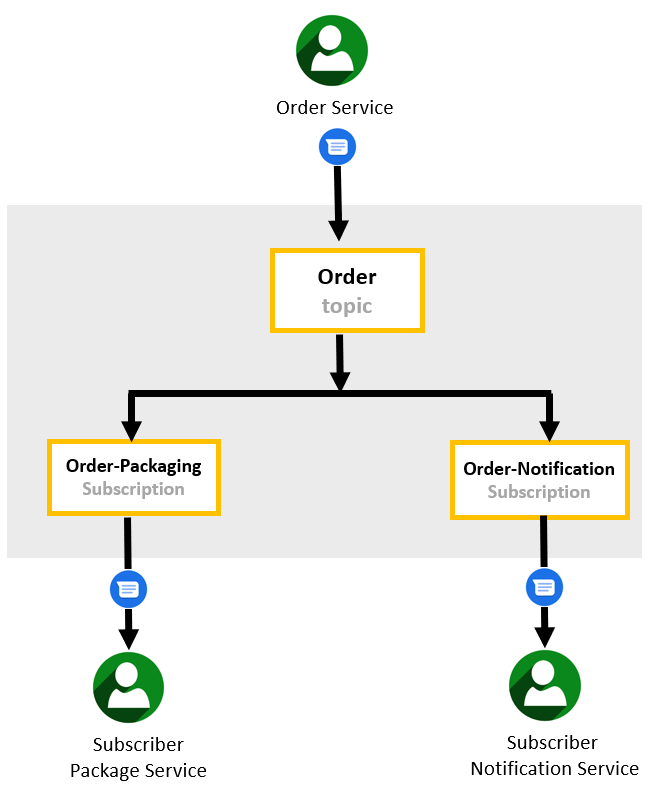
Before developing the microservices to publish and subscribe messages using Google Cloud Pub/Sub, we need to create topics, subscriptions, and service accounts in Spring Boot applications. Please check out my previous article to do the Google Cloud Pub/Sub setup and try it out. Based on the above use case, we are going to build the three microservices using Spring Boot Framework. They are:
- Order Service
- Packaging Service
- Notification Service
Prerequisites
- Open Java Development Kit 1.8
- Spring Boot 2.5.3
- Gradle 7.0
Order Service: The Publisher
Order Service is a Spring Boot framework microservice to publish messages into the Google Cloud Pub/Sub topic. Let us build the Order Service step by step to publish a message. The following dependencies are required to publish a message and integrate it with the GCP:
implementation 'com.google.cloud:spring-cloud-gcp-starter-pubsub'
implementation 'org.springframework.boot:spring-boot-starter-integration'
The entire build.gradle file is given below.
plugins {
	id 'org.springframework.boot' version '2.5.3'
	id 'io.spring.dependency-management' version '1.0.11.RELEASE'
	id 'java'
}

group = 'com.talk2amareswaran.projects.gcp'
version = '0.0.1-SNAPSHOT'
sourceCompatibility = '1.8'

repositories {
	mavenCentral()
}

ext {
	set('springCloudGcpVersion', "2.0.3")
	set('springCloudVersion', "2020.0.3")
}

dependencies {
	implementation 'org.springframework.boot:spring-boot-starter-integration'
	implementation 'org.springframework.boot:spring-boot-starter-web'
	implementation 'com.google.cloud:spring-cloud-gcp-starter-pubsub'
	implementation 'org.springframework.integration:spring-integration-http'
}

dependencyManagement {
	imports {
		mavenBom "com.google.cloud:spring-cloud-gcp-dependencies:${springCloudGcpVersion}"
		mavenBom "org.springframework.cloud:spring-cloud-dependencies:${springCloudVersion}"
	}
}

test {
	useJUnitPlatform()
}
Authenticate the Order Service application with GCP by adding the following properties in the application.properties file.
spring.cloud.gcp.project-id=<GCP-PROJECT-ID>
spring.cloud.gcp.credentials.location=file:<PUB/SUB-PUBLISHER-SERVICE-FILE-PATH>
The entire application properties file is given below.
spring.cloud.gcp.project-id=<GCP-PROJECT-ID>
spring.cloud.gcp.credentials.location=file:<PUB/SUB-PUBLISHER-SERVICE-FILE-PATH>
server.port=8081
Write a code to create an outbound channel adapter, messaging gateway, and REST controller to publish a message in the OrderserviceApplication.java file.
Create an outbound channel adapter that listens to new messages from a Spring channel and publishes them to a Google Cloud Pub/Sub topic.
@Bean
@ServiceActivator(inputChannel = "pubsubOutputChannel")
 public MessageHandler messageSender(PubSubTemplate pubsubTemplate) {
   return new PubSubMessageHandler(pubsubTemplate, "TOPIC-NAME");
}
Use a "MessageGateway" to write messages to a channel and publish them to Google Cloud Pub/Sub.
@MessagingGateway(defaultRequestChannel = "pubsubOutputChannel")
public interface PubsubOutboundGateway {
  void sendToPubsub(String text);
}
Spring auto-generates an object that can then be "autowired" into a private field in the application.
@Autowired
private PubsubOutboundGateway messagingGateway;
Add logic to the REST controller that lets us write to a Spring channel and publish a message into the Cloud Pub/Sub topic.
 @PostMapping("/publishMessage")
public String publishMessage() {
  messagingGateway.sendToPubsub("Hello! This is a publisher message!");
  return "Message published successfully";
}
The entire OrderserviceApplication.java file is given below.
import org.springframework.beans.factory.annotation.Autowired;
import org.springframework.boot.SpringApplication;
import org.springframework.boot.autoconfigure.SpringBootApplication;
import org.springframework.context.annotation.Bean;
import org.springframework.integration.annotation.MessagingGateway;
import org.springframework.integration.annotation.ServiceActivator;
import org.springframework.messaging.MessageHandler;
import org.springframework.web.bind.annotation.PostMapping;
import org.springframework.web.bind.annotation.RestController;

import com.google.cloud.spring.pubsub.core.PubSubTemplate;
import com.google.cloud.spring.pubsub.integration.outbound.PubSubMessageHandler;

@SpringBootApplication
@RestController
public class OrderserviceApplication {

	public static void main(String[] args) {
		SpringApplication.run(OrderserviceApplication.class, args);
	}

	private static final String TOPIC = "order";

	@Bean
	@ServiceActivator(inputChannel = "pubsubOutputChannel")
	public MessageHandler messageSender(PubSubTemplate pubsubTemplate) {
		return new PubSubMessageHandler(pubsubTemplate, TOPIC);
	}

	@MessagingGateway(defaultRequestChannel = "pubsubOutputChannel")
	public interface PubsubOutboundGateway {
		void sendToPubsub(String text);
	}

	@Autowired
	private PubsubOutboundGateway messagingGateway;


	 @PostMapping("/publishMessage")
	 public String publishMessage() {
		 messagingGateway.sendToPubsub("Hello! This is a publisher message!");
		 return "Message published successfully";
	 }

}
Build the OrderService application by executing the below Gradle command.
gradle clean buildStarting a Gradle Daemon, 1 incompatible and 1 stopped Daemons could not be reused, use --status for details
BUILD SUCCESSFUL in 27s
6 actionable tasks: 6 executedRun the OrderService application by executing the below command.
java -jar build\libs\orderservice-0.0.1-SNAPSHOT.jarThe following output you can see on the console to confirm the order service started and running on port 8081.
2021-08-13 19:29:20.331  INFO 4244 --- [           main] o.s.b.w.embedded.tomcat.TomcatWebServer  : Tomcat started on port(s): 8081 (http) with context path ''
2021-08-13 19:29:20.378  INFO 4244 --- [           main] c.t.p.g.o.OrderserviceApplication        : Started OrderserviceApplication in 18.645 seconds (JVM running for 21.081)
Package Service: The Subscriber
Package Service is a Spring Boot framework microservice to subscribe messages from Google Cloud Pub/Sub subscriptions. Let us build the Package Service step by step to subscribe and receive a message. The following dependencies are required to subscribe/receive a message and integrate it with the GCP.
implementation 'org.springframework.boot:spring-boot-starter-integration'
implementation 'com.google.cloud:spring-cloud-gcp-starter-pubsub'
The entire build.gradle file is given below.
plugins {
	id 'org.springframework.boot' version '2.5.3'
	id 'io.spring.dependency-management' version '1.0.11.RELEASE'
	id 'java'
}

group = 'com.talk2amareswaran.projects.gcp'
version = '0.0.1-SNAPSHOT'
sourceCompatibility = '1.8'

repositories {
	mavenCentral()
}

ext {
	set('springCloudGcpVersion', "2.0.3")
	set('springCloudVersion', "2020.0.3")
}

dependencies {
	implementation 'org.springframework.boot:spring-boot-starter-integration'
	implementation 'com.google.cloud:spring-cloud-gcp-starter-pubsub'
	implementation 'org.springframework.boot:spring-boot-starter-web'
}

dependencyManagement {
	imports {
		mavenBom "com.google.cloud:spring-cloud-gcp-dependencies:${springCloudGcpVersion}"
		mavenBom "org.springframework.cloud:spring-cloud-dependencies:${springCloudVersion}"
	}
}

test {
	useJUnitPlatform()
}
Authenticate the Package Service application with GCP by adding the following properties in the application.properties file.
spring.cloud.gcp.project-id=<GCP-PROJECT-ID>
spring.cloud.gcp.credentials.location=file:<PUB/SUB-SUBSCRIBER-SERVICE-ACCOUNT-FILE-PATH>
The entire application.properties file is given below.
spring.cloud.gcp.project-id=<GCP-PROJECT-ID>
spring.cloud.gcp.credentials.location=file:<PUB/SUB-SUBSCRIBER-SERVICE-ACCOUNT-FILE-PATH>
server.port=8082
Write a code to create an inbound channel adapter and service activator to process messages received from Cloud Pub/Sub through subscriptions in the PackagingserviceApplication.java file.
Create an inbound channel adapter that listens to messages from a Google Cloud Pub/Sub subscription and sends them to a Spring channel in an application.
@Bean
public PubSubInboundChannelAdapter messageChannelAdapter(@Qualifier("pubsubInputChannel") MessageChannel inputChannel, PubSubTemplate pubSubTemplate) {
  PubSubInboundChannelAdapter adapter = new PubSubInboundChannelAdapter(pubSubTemplate, "SUBSCRIPTION-NAME");
  adapter.setOutputChannel(inputChannel);
  adapter.setAckMode(AckMode.MANUAL);
  return adapter;
}
An inbound channel where the adapter sends the received messages must be configured.
@Bean
public MessageChannel pubsubInputChannel() {
  return new DirectChannel();
}
Attach to an inbound channel is a service activator that is used to process incoming messages.
@Bean
@ServiceActivator(inputChannel = "pubsubInputChannel")
public MessageHandler messageReceiver() {
	return message -> {
	System.out.println("Message Arrived! The message is: " + new String((byte[]) message.getPayload()));
	BasicAcknowledgeablePubsubMessage originalMessage = message.getHeaders().get(GcpPubSubHeaders.ORIGINAL_MESSAGE, BasicAcknowledgeablePubsubMessage.class);
	originalMessage.ack();
  };
}
The entire PackagingserviceApplication.java file is given below.
import org.springframework.beans.factory.annotation.Qualifier;
import org.springframework.boot.SpringApplication;
import org.springframework.boot.autoconfigure.SpringBootApplication;
import org.springframework.context.annotation.Bean;
import org.springframework.integration.annotation.ServiceActivator;
import org.springframework.integration.channel.DirectChannel;
import org.springframework.messaging.MessageChannel;
import org.springframework.messaging.MessageHandler;

import com.google.cloud.spring.pubsub.core.PubSubTemplate;
import com.google.cloud.spring.pubsub.integration.AckMode;
import com.google.cloud.spring.pubsub.integration.inbound.PubSubInboundChannelAdapter;
import com.google.cloud.spring.pubsub.support.BasicAcknowledgeablePubsubMessage;
import com.google.cloud.spring.pubsub.support.GcpPubSubHeaders;

@SpringBootApplication
public class PackagingserviceApplication {

	private static final String ORDER_PACKAGING_SUBSCRIPTION = "order-packaging";

	public static void main(String[] args) {
		SpringApplication.run(PackagingserviceApplication.class, args);
	}

	@Bean
	public PubSubInboundChannelAdapter messageChannelAdapter(
			@Qualifier("pubsubInputChannel") MessageChannel inputChannel, PubSubTemplate pubSubTemplate) {
		PubSubInboundChannelAdapter adapter = new PubSubInboundChannelAdapter(pubSubTemplate,
				ORDER_PACKAGING_SUBSCRIPTION);
		adapter.setOutputChannel(inputChannel);
		adapter.setAckMode(AckMode.MANUAL);

		return adapter;
	}

	@Bean
	public MessageChannel pubsubInputChannel() {
		return new DirectChannel();
	}

	@Bean
	@ServiceActivator(inputChannel = "pubsubInputChannel")
	public MessageHandler messageReceiver() {
		return message -> {
			System.out.println("Message Arrived! The message is: " + new String((byte[]) message.getPayload()));
			BasicAcknowledgeablePubsubMessage originalMessage = message.getHeaders()
					.get(GcpPubSubHeaders.ORIGINAL_MESSAGE, BasicAcknowledgeablePubsubMessage.class);
			originalMessage.ack();
		};
	}
}
Build the PackageService application by executing the below Gradle command.
gradle clean buildgradle clean build
BUILD SUCCESSFUL in 3s
6 actionable tasks: 6 executedRun the PackageService application by executing the below command.
java -jar build\libs\packagingservice-0.0.1-SNAPSHOT.jarThe following output you can see on the console to confirm the package service started and running on port 8082.
2021-08-13 20:02:26.996  INFO 12968 --- [           main] o.s.b.w.embedded.tomcat.TomcatWebServer  : Tomcat started on port(s): 8082 (http) with context path ''
2021-08-13 20:02:27.024  INFO 12968 --- [           main] c.t.p.g.p.PackagingserviceApplication    : Started PackagingserviceApplication in 6.562 seconds (JVM running for 7.372)
Notification Service: The Subscriber
Notification Service is a Spring Boot framework microservice to subscribe messages from Google Cloud Pub/Sub subscriptions. Let us build the Notification Service step by step to subscribe and receive a message. The following dependencies are required to subscribe/receive a message and integrate it with the GCP.
implementation 'org.springframework.boot:spring-boot-starter-integration'
implementation 'com.google.cloud:spring-cloud-gcp-starter-pubsub'
The entire build.gradle file is given below.
plugins {
	id 'org.springframework.boot' version '2.5.3'
	id 'io.spring.dependency-management' version '1.0.11.RELEASE'
	id 'java'
}

group = 'com.talk2amareswaran.projects.gcp'
version = '0.0.1-SNAPSHOT'
sourceCompatibility = '1.8'

repositories {
	mavenCentral()
}

ext {
	set('springCloudGcpVersion', "2.0.3")
	set('springCloudVersion', "2020.0.3")
}

dependencies {
	implementation 'org.springframework.boot:spring-boot-starter-integration'
	implementation 'com.google.cloud:spring-cloud-gcp-starter-pubsub'
	implementation 'org.springframework.boot:spring-boot-starter-web'
}

dependencyManagement {
	imports {
		mavenBom "com.google.cloud:spring-cloud-gcp-dependencies:${springCloudGcpVersion}"
		mavenBom "org.springframework.cloud:spring-cloud-dependencies:${springCloudVersion}"
	}
}

test {
	useJUnitPlatform()
}
Authenticate the Notification Service application with GCP by adding the following properties in the application.properties file.
spring.cloud.gcp.project-id=<GCP-PROJECT-ID>
spring.cloud.gcp.credentials.location=file:<PUB/SUB-SUBSCRIBER-SERVICE-ACCOUNT-FILE-PATH>
The entire application.properties file is given below.
spring.cloud.gcp.project-id=<GCP-PROJECT-ID>
spring.cloud.gcp.credentials.location=file:<PUB/SUB-SUBSCRIBER-SERVICE-ACCOUNT-FILE-PATH>
server.port=8083
Write a code to create an inbound channel adapter and service activator to process messages received from Cloud Pub/Sub through subscriptions in the NotificationserviceApplication.java file.
Create an inbound channel adapter that listens to messages from a Google Cloud Pub/Sub subscription and sends them to a Spring channel in an application.
@Bean
public PubSubInboundChannelAdapter messageChannelAdapter(@Qualifier("pubsubInputChannel") MessageChannel inputChannel, PubSubTemplate pubSubTemplate) {
  PubSubInboundChannelAdapter adapter = new PubSubInboundChannelAdapter(pubSubTemplate, "SUBSCRIPTION-NAME");
  adapter.setOutputChannel(inputChannel);
  adapter.setAckMode(AckMode.MANUAL);
  return adapter;
}
An inbound channel where the adapter sends the received messages must be configured.
@Bean
public MessageChannel pubsubInputChannel() {
  return new DirectChannel();
}
Attach to an inbound channel is a service activator that is used to process incoming messages.
@Bean
@ServiceActivator(inputChannel = "pubsubInputChannel")
public MessageHandler messageReceiver() {
	return message -> {
	System.out.println("Message Arrived! The message is: " + new String((byte[]) message.getPayload()));
	BasicAcknowledgeablePubsubMessage originalMessage = message.getHeaders().get(GcpPubSubHeaders.ORIGINAL_MESSAGE, BasicAcknowledgeablePubsubMessage.class);
	originalMessage.ack();
  };
}
The entire NotificationserviceApplication.java file is given below.
import org.springframework.beans.factory.annotation.Qualifier;
import org.springframework.boot.SpringApplication;
import org.springframework.boot.autoconfigure.SpringBootApplication;
import org.springframework.context.annotation.Bean;
import org.springframework.integration.annotation.ServiceActivator;
import org.springframework.integration.channel.DirectChannel;
import org.springframework.messaging.MessageChannel;
import org.springframework.messaging.MessageHandler;

import com.google.cloud.spring.pubsub.core.PubSubTemplate;
import com.google.cloud.spring.pubsub.integration.AckMode;
import com.google.cloud.spring.pubsub.integration.inbound.PubSubInboundChannelAdapter;
import com.google.cloud.spring.pubsub.support.BasicAcknowledgeablePubsubMessage;
import com.google.cloud.spring.pubsub.support.GcpPubSubHeaders;

@SpringBootApplication
public class NotificationserviceApplication {

	private static final String ORDER_NOTIFICATION_SUBSCRIPTION = "order-notification";

	public static void main(String[] args) {
		SpringApplication.run(NotificationserviceApplication.class, args);
	}

	@Bean
	public PubSubInboundChannelAdapter messageChannelAdapter(
			@Qualifier("pubsubInputChannel") MessageChannel inputChannel, PubSubTemplate pubSubTemplate) {
		PubSubInboundChannelAdapter adapter = new PubSubInboundChannelAdapter(pubSubTemplate,
				ORDER_NOTIFICATION_SUBSCRIPTION);
		adapter.setOutputChannel(inputChannel);
		adapter.setAckMode(AckMode.MANUAL);

		return adapter;
	}

	@Bean
	public MessageChannel pubsubInputChannel() {
		return new DirectChannel();
	}

	@Bean
	@ServiceActivator(inputChannel = "pubsubInputChannel")
	public MessageHandler messageReceiver() {
		return message -> {
			System.out.println("Message Arrived! The message is: " + new String((byte[]) message.getPayload()));
			BasicAcknowledgeablePubsubMessage originalMessage = message.getHeaders()
					.get(GcpPubSubHeaders.ORIGINAL_MESSAGE, BasicAcknowledgeablePubsubMessage.class);
			originalMessage.ack();
		};
	}
}
Build the NotificationService application by executing the below Gradle command.
gradle clean buildgradle clean build
BUILD SUCCESSFUL in 3s
6 actionable tasks: 6 executedRun the NotificationService application by executing the below command.
java -jar build\libs\notificationservice-0.0.1-SNAPSHOT.jarThe following output you can see on the console to confirm the notification service started and running on port 8083.
2021-08-13 20:11:17.656  INFO 12668 --- [           main] o.s.b.w.embedded.tomcat.TomcatWebServer  : Tomcat started on port(s): 8083 (http) with context path ''
2021-08-13 20:11:17.700  INFO 12668 --- [           main] c.t.p.g.n.NotificationserviceApplication : Started NotificationserviceApplication in 6.191 seconds (JVM running for 7.001)
Now it is time to publish a message. Execute the below CURL command to publish a message in order service. Then, the package service and notification service will receive a message through subscriptions.
curl --location --request POST 'http://localhost:8081/publishMessage'The CURL command response is given below.
Message published successfullyThe following message will receive on the package service and notification service console.
Message Arrived! The message is: Hello! This is a publisher message!The source code is available in the GIT repository:
https://github.com/talk2amareswaran/gcp.git
(google-cloud-pub-sub-springboot-2.5)
Please watch the below demo video to create a Google Cloud Pub/Sub topic, subscriptions, create service accounts, and developing the order, packaging, and notification microservices.
Happy Architecture! Happy Coding!
Opinions expressed by DZone contributors are their own.
Comments