

Spring Boot Microservices + Apache Camel: A Hello World Example
A tutorial on to use Spring Boot in tandem with Apache Camel to unlock the power of routes in your mircoservice-based applications.
 ·
·
Join the DZone community and get the full member experience.
Join For FreeOverview
In this tutorial, we will be implementing a Spring Boot + Apache Camel Hello World Example to copy files from one location to another. In a previous tutorial, we had looked at enterprise application integration and how Apache Camel helps achieve it. In this tutorial, we will have a brief look at why we need to use Apache Camel in microservices architecture. What benefits it provides.
Video Tutorial
Need for Apache Camel With Spring Boot Microservices
Usually for systems developed using a microservices architecture, there are many microservices involved. These enterprise services need to be integrated with each other.
These microservices communicate with each other using a variety of transport protocols like HTTP, JMS, etc. Gregor Hohpe and Bobby Woolf wrote a book, Enterprise Integration Patterns, which list all the good practices that should be followed when implementing Enterprise Integration Frameworks. Camel supports most of the Enterprise Integration Patterns mentioned in this book.
Implementation
Go to the Spring Initializr website and select the following dependencies:
- Web
- Camel
- Actuator
- Dev Tools
Download the Maven project. The Maven project we will be developing is as follows.
pom.xml:
<project xmlns="http://maven.apache.org/POM/4.0.0" xmlns:xsi="http://www.w3.org/2001/XMLSchema-instance"
xsi:schemaLocation="http://maven.apache.org/POM/4.0.0 https://maven.apache.org/xsd/maven-4.0.0.xsd">
<modelVersion>4.0.0</modelVersion>
<parent>
<groupId>org.springframework.boot</groupId>
<artifactId>spring-boot-starter-parent</artifactId>
<version>2.4.3</version>
<relativePath ></relativePath> <!-- lookup parent from repository -->
</parent>
<groupId>com.codusingjava</groupId>
<artifactId>spring-boot-camel</artifactId>
<version>0.0.1-SNAPSHOT</version>
<name>spring-boot-camel</name>
<description>Demo project for Spring Boot</description>
<properties>
<java.version>1.8</java.version>
</properties>
<dependencies>
<dependency>
<groupId>org.springframework.boot</groupId>
<artifactId>spring-boot-starter-actuator</artifactId>
</dependency>
<dependency>
<groupId>org.springframework.boot</groupId>
<artifactId>spring-boot-starter-web</artifactId>
</dependency>
<dependency>
<groupId>org.apache.camel.springboot</groupId>
<artifactId>camel-spring-boot-starter</artifactId>
<version>3.8.0</version>
</dependency>
<dependency>
<groupId>org.springframework.boot</groupId>
<artifactId>spring-boot-devtools</artifactId>
<scope>runtime</scope>
<optional>true</optional>
</dependency>
<dependency>
<groupId>org.springframework.boot</groupId>
<artifactId>spring-boot-starter-test</artifactId>
<scope>test</scope>
</dependency>
</dependencies>
<build>
<plugins>
<plugin>
<groupId>org.springframework.boot</groupId>
<artifactId>spring-boot-maven-plugin</artifactId>
</plugin>
</plugins>
</build>
</project>
What Are Routes?
Routes are the most important units of Apache Camel. Using routes, we define the message flow and integration logic for our application.
Apache Camel Routes can be written in various Domain Specific Languages (DSL). The most popular of these languages are:
- Java DSL - a Java-based DSL
- Spring XML - an XML-based DSL in Spring XML files.
For this example, we make use of Java DSL for writing routes. A route consists of a message channel, using which allows applications to communicate via messages. The end points of these message channels either consume or produce messages.
What Are Components?
A component acts as an endpoint factory, using which we can interact with external systems. Camel provides a large number of components that we can use to interact with externals systems.
For example, here we have to transfer files from one folder to another, so we make use of the file component at both ends of the message channel.
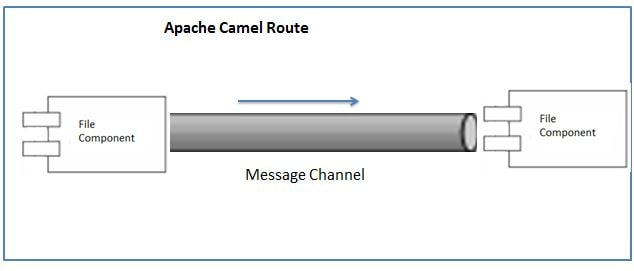
Suppose we have to transfer a file to a JMS queue. We would make use of the file component at one end and the JMS component at the other end.
So let us create an Apache Camel route in our Spring Boot project. To create a route Apache Camel, we need to extend the RouteBuilder class and override the configure method. Then, in the configure method, we define our route. So our route using Java DSL will be as follows:
xxxxxxxxxx
package com.codeusingjava.springbootcamel.route;
import org.apache.camel.builder.RouteBuilder;
import org.springframework.stereotype.Component;
public class SimpleRouteBuilder extends RouteBuilder {
public void configure() throws Exception {
from("file:C://folder1").to("file:C://folder2");
}
}
Spring IO has already created the Spring Boot main class for us. Start the Spring Boot application by running it as a Java application.
xxxxxxxxxx
package com.codeusingjava.springbootcamel;
import org.springframework.boot.SpringApplication;
import org.springframework.boot.autoconfigure.SpringBootApplication;
public class SpringBootCamelApplication {
public static void main(String[] args) {
SpringApplication.run(SpringBootCamelApplication.class, args);
}
}
The route will copy all content from the input folder to the output folder. After the route execution is complete, the file is deleted from the source folder. If you do not want this, then noop=true should be specified. This will copy the files from one location to another without deleting it from the source folder.
xxxxxxxxxx
package com.codeusingjava.springbootcamel.route;
import org.apache.camel.builder.RouteBuilder;
import org.springframework.stereotype.Component;
public class SimpleRouteBuilder extends RouteBuilder {
public void configure() throws Exception {
from("file:C://folder1?noop=true").to("file:C://folder2");
}
}
And we're done! Happy coding!
Opinions expressed by DZone contributors are their own.
Comments