

Part 1: Building Governed MCP Tool Services With Quarkus LangChain4j and Goose
Build governed, cloud-native Java MCP tool services for Goose agents using Quarkus LangChain4j, Java 25, and Jakarta Bean Validation.
 CORE
·
CORE
·
Join the DZone community and get the full member experience.
Join For FreeGoose — the open-source, Rust-based AI developer agent from Block (donated to the Linux Foundation’s Agentic AI Foundation) — interacts natively with your local development environment via the Model Context Protocol (MCP). In this tutorial, you will learn how to build stateless, cloud-native Java microservices using Quarkus LangChain4j and expose them as governed MCP extensions that Goose can discover and run seamlessly.
Autonomous AI coding agents like Goose go far beyond simple code autocompletion. Built in Rust for speed and portability, Goose runs on your local machine, inspects files, runs terminal commands, and uses tools over MCP to automate complex engineering tasks.
However, when developers want an AI agent to query enterprise microservices, trigger database migrations, or fetch internal API metrics, writing custom local scripts or ad-hoc wrappers is brittle and dangerous.
The solution is to build a stateless MCP Tool Server in Java using Quarkus LangChain4j. Quarkus provides near-zero startup time and low memory footprint, while LangChain4j makes exposing @Tool methods via standard MCP HTTP/JSON-RPC trivial.
Architecture: How Goose Integrates With Quarkus MCP
┌────────────────────────────────────────────────────────┐
│             Goose AI Agent (Rust Runtime)              │
│       (Local CLI / Desktop App / ACP Server)           │
└───────────────────────────┬────────────────────────────┘
                            │ Model Context Protocol (MCP)
                            │ JSON-RPC over Stateless HTTP
                            ▼
┌────────────────────────────────────────────────────────┐
│            Quarkus LangChain4j MCP Server              │
│     - @Tool Annotations & Bean Validation              │
│     - Reactive SmallRye Mutiny Execution               │
│     - GraalVM Native Image Ready                       │
└───────────────────────────┬────────────────────────────┘
                            │ Reactive Clients
                            ▼
Enterprise APIs / Databases / Dev UI- Goose Agent (Client): Executes on the developer machine, orchestrating LLM tool loops via MCP.
- MCP HTTP Transport: Goose sends structured tool calls to the Quarkus backend as stateless HTTP POST requests using standardized MCP methods (tools/list, tools/call).
- Quarkus Microservice: Validates parameters with Jakarta Bean Validation, executes reactive business logic, and returns structured data to Goose.
Step 1: Configuring Dependencies in Quarkus
Create a new Quarkus project or update your pom.xml to include quarkus-langchain4j-mcp and Reactive:
Note: Find the completed demo application here: https://github.com/danieloh30/governed-mcp-tools.git.
<dependencyManagement>
    <dependencies>
      <dependency>
        <groupId>${quarkus.platform.group-id}</groupId>
        <artifactId>${quarkus.platform.artifact-id}</artifactId>
        <version>${quarkus.platform.version}</version>
        <type>pom</type>
        <scope>import</scope>
      </dependency>
    </dependencies>
</dependencyManagement>

<dependencies>
    <dependency>
      <groupId>io.quarkus</groupId>
      <artifactId>quarkus-arc</artifactId>
    </dependency>
    <dependency>
      <groupId>io.quarkus</groupId>
      <artifactId>quarkus-rest-jackson</artifactId>
    </dependency>
    <dependency>
      <groupId>io.quarkiverse.mcp</groupId>
      <artifactId>quarkus-mcp-server-http</artifactId>
      <version>2.0.0.CR2</version>
    </dependency>
    <dependency>
      <groupId>io.quarkus</groupId>
      <artifactId>quarkus-hibernate-validator</artifactId>
    </dependency>
    <dependency>
      <groupId>io.quarkus</groupId>
      <artifactId>quarkus-junit</artifactId>
      <scope>test</scope>
    </dependency>
  </dependencies>
Step 2: Implementing Hardened MCP Tools
We will create a Customer Services MCP Tool that Goose can call when an engineer asks: "Goose, check the database status for customer CUST-4091 and fetch their recent telemetry."
By placing @Tool annotations on CDI beans, Quarkus LangChain4j automatically registers the class as an MCP server endpoint:
@ApplicationScoped
public class CustomerServiceTools {

    @Tool(description = "Retrieve the current account status, service tier, and primary deployment region for a given customer.")
    public Uni<CustomerStatusResponse> getCustomerStatus(
            @ToolArg(description = "Customer ID formatted as CUST-XXXX")
            @NotNull
            @Pattern(regexp = "^CUST-[0-9]{4,8}$")
            String customerId) {
        CustomerStatusResponse response = switch (customerId) {
            case "CUST-4091" -> new CustomerStatusResponse("CUST-4091", "ACTIVE", "ENTERPRISE_TIER", "US-EAST-1");
            case "CUST-2187" -> new CustomerStatusResponse("CUST-2187", "ACTIVE", "BUSINESS_TIER", "EU-WEST-1");
            case "CUST-7734" -> new CustomerStatusResponse("CUST-7734", "SUSPENDED", "STARTER_TIER", "AP-SOUTH-1");
            default -> new CustomerStatusResponse(customerId, "NOT_FOUND", "UNKNOWN", "UNKNOWN");
        };
        return Uni.createFrom().item(response);
    }

    @Tool(description = "Retrieve recent health-check logs and diagnostic metrics for a specified availability zone.")
    public Uni<List<String>> getZoneHealthLogs(
            @ToolArg(description = "Zone identifier, e.g., US-EAST-1")
            @Size(max = 20)
            String zoneId) {
        return Uni.createFrom().item(List.of(
                "[" + zoneId + "] CPU utilization: 42% (healthy)",
                "[" + zoneId + "] Memory pressure: 31% (normal)",
                "[" + zoneId + "] Network I/O: 1.2 Gbps ingress / 0.8 Gbps egress",
                "[" + zoneId + "] Disk IOPS: 12,400 read / 8,300 write (within SLA)",
                "[" + zoneId + "] Active connections: 18,230 (capacity: 50,000)",
                "[" + zoneId + "] Last incident: none in past 72 hours"
        ));
    }

    @Tool(description = "Track the current status, item count, and estimated delivery for an enterprise order.")
    public Uni<OrderStatusResponse> getOrderStatus(
            @ToolArg(description = "Order ID formatted as ORD-XXXXXXXX")
            @NotNull
            @Pattern(regexp = "^ORD-[0-9]{8}$")
            String orderId) {
        OrderStatusResponse response = switch (orderId) {
            case "ORD-20240815" -> new OrderStatusResponse("ORD-20240815", "SHIPPED", 12, "$48,750.00", "2024-08-22", "US-EAST-1");
            case "ORD-20240901" -> new OrderStatusResponse("ORD-20240901", "PROCESSING", 5, "$12,300.00", "2024-09-10", "EU-WEST-1");
            case "ORD-20241003" -> new OrderStatusResponse("ORD-20241003", "DELIVERED", 28, "$134,500.00", "2024-10-08", "AP-SOUTH-1");
            default -> new OrderStatusResponse(orderId, "NOT_FOUND", 0, "$0.00", "N/A", "UNKNOWN");
        };
        return Uni.createFrom().item(response);
    }

    @Tool(description = "Retrieve SLA compliance metrics including uptime, latency, and violation count for a service.")
    public Uni<SLAComplianceResponse> getSLACompliance(
            @ToolArg(description = "Service identifier, e.g., api-gateway, auth-service")
            @NotNull
            @Size(max = 40)
            String serviceId) {
        SLAComplianceResponse response = switch (serviceId) {
            case "api-gateway" -> new SLAComplianceResponse("api-gateway", 99.97, "45ms", 99.99, 0, "2024-Q3");
            case "auth-service" -> new SLAComplianceResponse("auth-service", 99.82, "120ms", 99.95, 3, "2024-Q3");
            case "data-pipeline" -> new SLAComplianceResponse("data-pipeline", 98.50, "340ms", 99.80, 12, "2024-Q3");
            case "notification-hub" -> new SLAComplianceResponse("notification-hub", 99.91, "78ms", 99.97, 1, "2024-Q3");
            default -> new SLAComplianceResponse(serviceId, 0.0, "N/A", 0.0, -1, "N/A");
        };
        return Uni.createFrom().item(response);
    }
...
}
Step 3: Enabling the MCP Extension in application.properties
Configure your Quarkus MCP server settings:
quarkus.mcp-server.server-info.name=customer-tools
quarkus.mcp-server.server-info.version=1.0.0
quarkus.mcp-server.http.root-path=/mcp

quarkus.log.category."io.quarkiverse.mcp".level=DEBUG
Launch Quarkus in dev mode:
./mvnw quarkus:devStep 4: Connecting Goose to Your Quarkus MCP Server
Goose can be extended with any MCP server over stdio or HTTP. Configure Goose by editing its YAML configuration file or using the Goose CLI.
Option A: Using the Goose CLI
Register the Quarkus MCP server directly in your terminal:
goose extension add customer-tools \
  --type http \
  --uri http://localhost:8080/mcp
Option B: Editing ~/.config/goose/config.yaml
Add the Quarkus backend to your Goose extensions configuration:
extensions:
  customer-tools:
    enabled: true
    type: http
    uri: http://localhost:8080/mcp
    headers:
      Content-Type: "application/json"
Step 5: Testing the Developer Workflow
Launch Goose via CLI or the Desktop App:
goose sessionPrompt Goose:
Developer: "I'm debugging customer CUST-4091. Use customer-tools to fetch their account tier, and then check the health logs for their primary region."
Frontend UI:
Developer: Choose one of the Tool explorers. Select the “Run tool” button on the right panel. Verify the audit events.
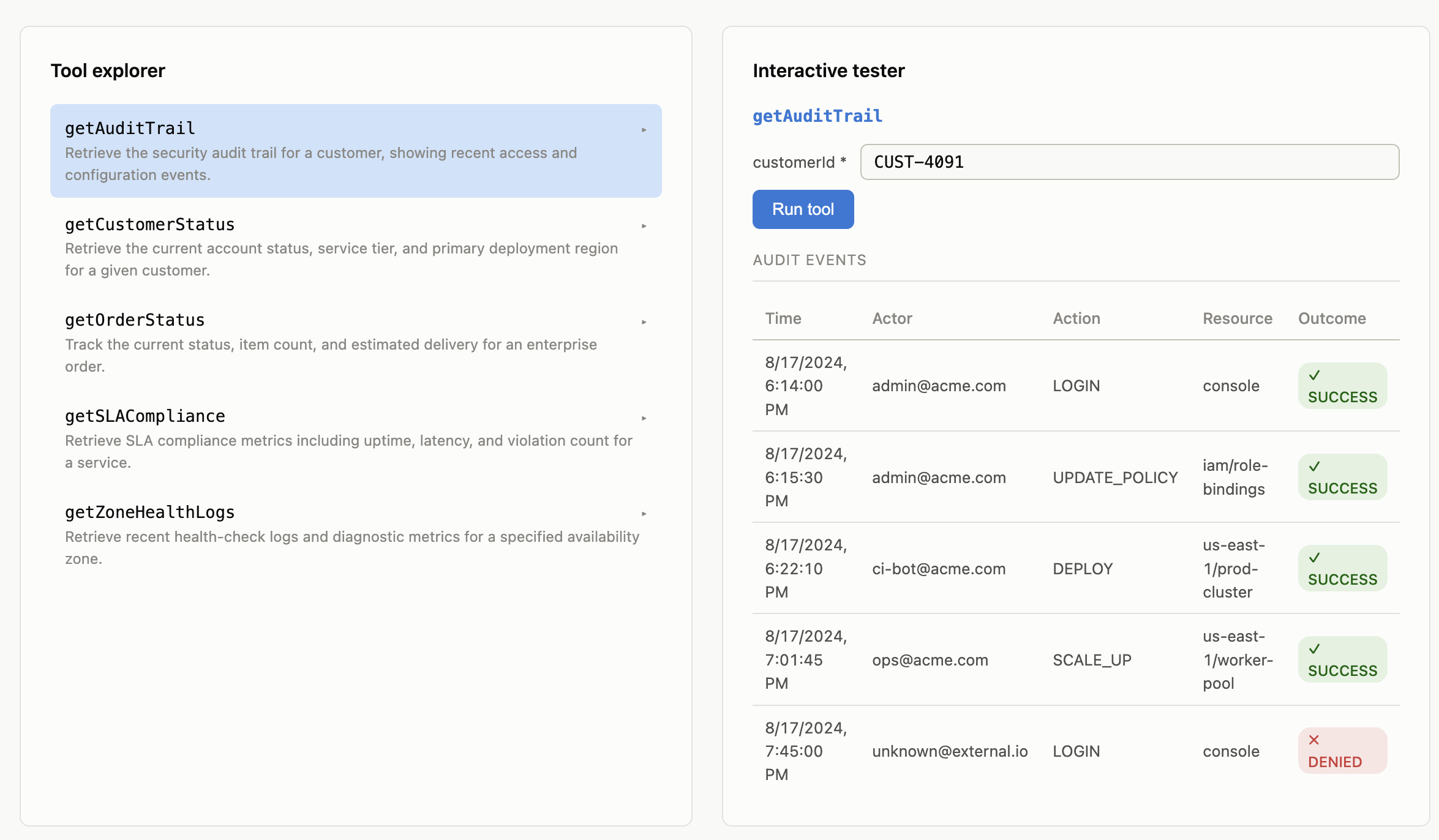
What Happens Under the Hood
- Discovery: Goose sends an HTTP POST /mcp JSON-RPC tools/list request. Quarkus responds with JSON schema definitions derived from getCustomerStatus and getZoneHealthLogs.
- Tool Invocation 1: Goose parses the prompt, formats a tools/call JSON payload with {"customerId": "CUST-4091"}, and posts it to Quarkus.
- Execution and validation: Quarkus executes Hibernate Bean Validation. Since CUST-4091 matches ^CUST-[0-9]{4,8}$, it runs getCustomerStatus and returns primaryRegion: US-EAST-1.
- Tool Invocation 2: Goose sees US-EAST-1, triggers getZoneHealthLogs("US-EAST-1"), receives the green health metrics, and summarizes the complete diagnostic report back to you in the CLI.
Summary and Next Steps
By wrapping Java business logic in Quarkus LangChain4j @Tool beans, you give local AI developer agents like Goose secure, validated access to enterprise backend systems.
However, when hundreds of developers run local Goose agents against shared backend microservices in production, connecting them directly creates security and governance risks.
Coming up in Part 2: We will introduce agentgateway — the Linux Foundation data plane proxy —to sit between Goose and Quarkus. We will configure OAuth2/OIDC authentication, fine-grained tool-level RBAC, and rate limiting to harden our enterprise AI infrastructure.
Opinions expressed by DZone contributors are their own.
Comments