

GraphQL With Spring Boot
In this article, learn more about GraphQL, see whether GraphQL is better than REST, and go through an example schema.
 ·
·
Join the DZone community and get the full member experience.
Join For Free
GraphQL – A Query Language for APIs
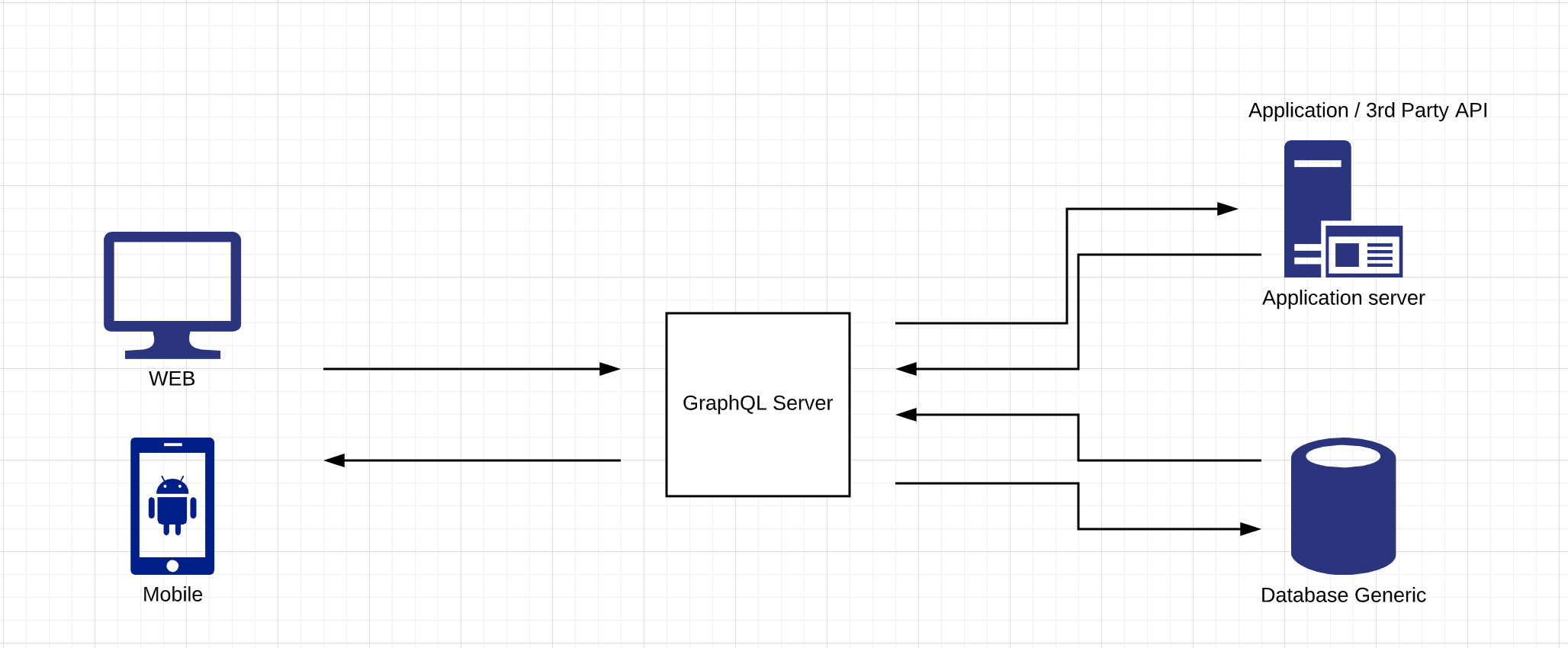
The basic need of most applications is to fetch data from the backend, which could be a database, a third-party application, NFS, etc. API interface is written to facilitate this.
REST web services are one of the most popular architectures to expose data from the backend. Previously, this was the best fit because the development pace wasn’t as fast as it is today. We are all so comfortable with REST, so the question is, "Is GraphQL better than REST?"
REST vs GraphQL
- Network Performance: When UI invokes a REST API, it will not have any control over the response data, whereas GraphQL provides a mechanism to specify the fields of interest in response. This reduces network overload by fetching the smallest data possible.
- Endpoint: In REST, each resource is identified by a URI. This makes the client obliged to know each endpoint. In GraphQL, all resources are identified by a single endpoint. There is no hassle of maintaining multiple URI’s.
- Data Fetching Strategy: In GraphQL, we have only one endpoint. The client sends a single query with the required fields. This helps with improved network performance and avoids the over-fetching/under-fetching data problem.
You might also like: GraphQL Java Example for Beginners [Spring Boot]
What Is GraphQL?
GraphQL is a query language. It gives control to the user to query what he needs, thus reducing the payload on the network.
The main terms used most commonly in GraphQL are:
- Schema — The contract between the GraphQL client and the GraphQL server
- Query — Similar to GET call in REST and used by the client to query the fields
- Mutations — It is similar to a POST/PUT call in REST and is used by the client for any insert/update operation
GraphQL Architecture:
Schema and Type System
GraphQL uses Schema Definition Language (SDL) to write the schema, which is a contract between client and server. In the schema, we define all the fields and functionalities exposed by APIs.
Once we have this schema in place, both the client and the server can continue their development independently. The client can mock the data until the server is ready.
Here is an example schema for Student and his Address. This schema contains a type definition for Student and Address. Each type may have one or more fields. In our example, Student and Address has 5 and 3 fields respectively. The non-nullable fields are represented with ! at the end of the field definition.
The relationship between types can also be seen in the below example. The Address type is referred to in the Student type definition.
xxxxxxxxxx
type student {
Id: ID!,
name: String,
age: Int!,
phone: String
address: Address!
}
type Address {
street: String!,
city: String!,
zipcode: Int!
}
type Query {
students(name:String);
}
type Mutation {
createStudent(name:String!, age:String, phone:String!);
}
GraphQL Query
In the below example, the GraphQL query contains the root field i.e. Students and query’s payload i.e. name and age. This query also takes an argument student name. This query returns the student’s name and their age whose name matches to Smith.
xxxxxxxxxx
query{
students(name:”Smith”) {
name
age
}
}
Mutations
This is similar to a REST POST method. If we need an API to create/modify data, then we can go for mutations. Possible mutations are:
- Creating new data
- Modifying existing data
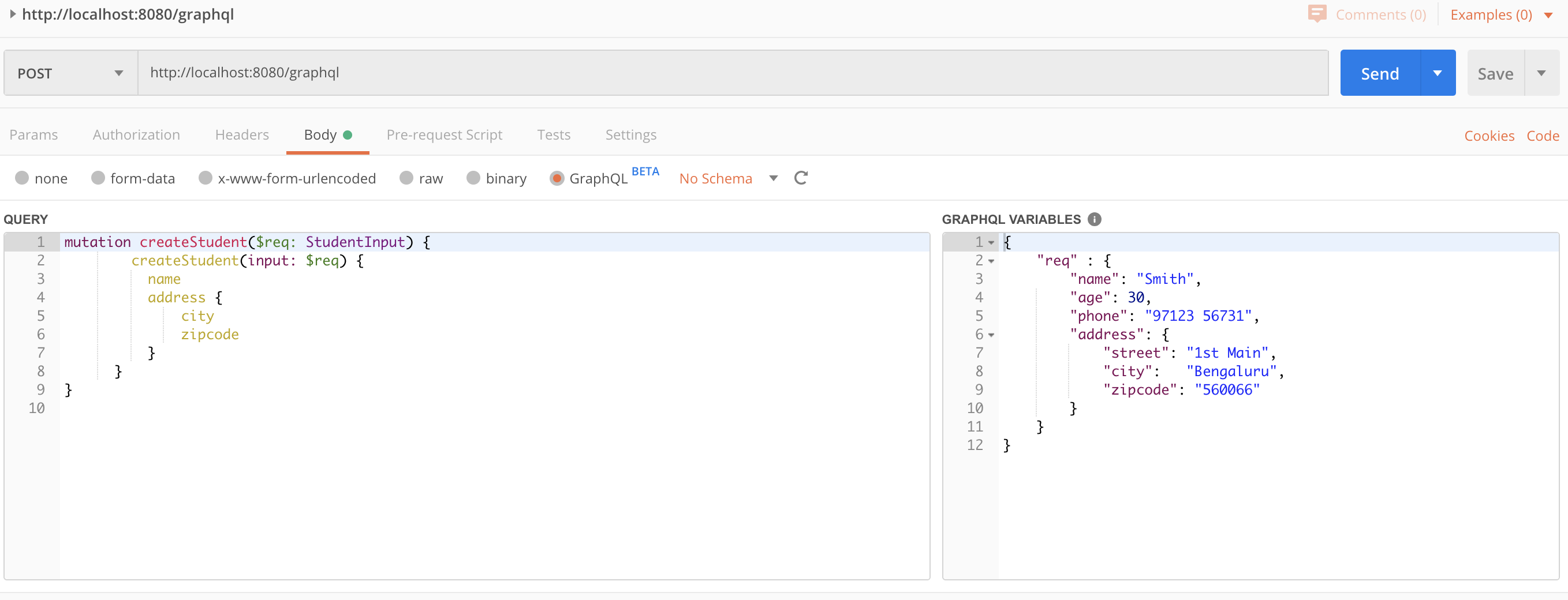
Mutation syntax starts with the keyword mutation. The below mutation creates a student, and the server returns the unique ID of the inserted record.
Example:
xxxxxxxxxx
mutation createStudent($req: StudentInput) {
createStudent(input: $req)
name
address {
city
zipcode
}
}
}
Query Variable:
{
"req" : {
"name": "Smith",
"age": 30,
"phone": "97123 56731",
"address": {
"street": "1st Main",
"city": "Bengaluru",
"zipcode": "560066"
}
}
}
Resolvers
Resolvers are functions written in the GraphQL server corresponding to each field in GraphQL query/mutations. When a request comes to the server, it will invoke resolvers’ functions corresponding to fields mentioned in the query.
GraphQL With Spring Boot
The complete source code is available at https://github.com/sunithan09/SampleGraphQLApp.
Now that we know the main features of GraphQL, let’s go over the details on implementing GraphQL with Spring Boot.
To build a GraphQL server with Spring Boot, all you need are the below dependencies in your pom:
xxxxxxxxxx
<dependency>
<groupId>com.graphql-java-kickstart</groupId>
<artifactId>graphql-spring-boot-starter</artifactId>
<version>5.11.1</version>
</dependency>
<dependency>
<groupId>com.graphql-java-kickstart</groupId>
<artifactId>graphql-java-tools</artifactId>
<version>5.7.1</version>
</dependency>
Once you have these dependencies, Spring Boot downloads the necessary GraphQL handlers to parse the schema, and GraphQL API’s are exposed at the endpoint /graphql. This also can be customized in application.properties.
Schema and Resolvers
Schemas must be written in classpath with the extension “.graphqls”. We can have as many schema files as we require. Each type defined in the schema must have field resolvers. FieldResolverError results if the GraphQL server cannot find the resolver for any given field.
Along with field resolvers, it is required to have Query resolvers and Mutation resolvers.
Spring bean must implement GraphQL Query Resolver.
Query resolver for Students may look like:
xxxxxxxxxx
import com.coxautodev.graphql.tools.GraphQLQueryResolver;
import com.sample.graphql.modal.Student;
import com.sample.graphql.service.StudentService;
import org.springframework.beans.factory.annotation.Autowired;
import org.springframework.stereotype.Component;
public class StudentQueryResolver implements GraphQLQueryResolver
{
private StudentService studentService;
public Student student (String name)
{
return studentService.getStudentDetailsByName(name);
}
}
And mutation resolver to create Student would be:
xxxxxxxxxx
import com.coxautodev.graphql.tools.GraphQLMutationResolver;
import com.sample.graphql.modal.Student;
import com.sample.graphql.service.StudentService;
import org.springframework.beans.factory.annotation.Autowired;
import org.springframework.stereotype.Component;
public class StudentMutationResolver implements GraphQLMutationResolver
{
private StudentService studentService;
public Student createStudent (Student student) {
return studentService.createStudentRecord(student);
}
}
Testing
Now your GraphQL server is ready. You can test your API’s using Postman or the GraphiQL UI tool.
GraphiQL
To use the GraphiQL UI tool, you need to have the below dependency:
xxxxxxxxxx
<dependency>
<groupId>com.graphql-java-kickstart</groupId>
<artifactId>graphiql-spring-boot-starter</artifactId>
<version>5.11.1</version>
</dependency>
GraphiQL is a web tool and is accessible at the root /graphiql.
Postman
We can use Postman to post queries to the GraphQL server. These are POST calls, and the query is passed as body with content type set to application/graphql.
Latest Postman versions (V7 onwards) support GraphQL queries where you can pass your GraphQL queries directly or build and store schema in Postman itself.
Example Postman request for mutation call:
Limitations
GraphQL is indeed a great way to build and query APIs, but it does have certain limitations. A few of them are:
- The nested queries having multiple fields could lead to performance issues. GraphQL queries has to be carefully designed as the control is with client and it could ask anything.
- Web caching is easier with REST compared to GraphQL, as the latter has a single endpoint.
- Retrieving objects recursively (to infinite length) is not supported in GraphQL. One has to specify to what depth it needs the data to get the recursive data.
Conclusion
Though GraphQL is becoming popular, it is not always the best choice, and it is not the alternative for REST web services. REST has its own advantages over GraphQL in terms of web cache, performance, etc.
Keeping the above limitations in mind will help you choose the right tool for your needs.
Further Reading
Opinions expressed by DZone contributors are their own.
Comments