

Grounding AI Agents in Governed Data
Stop trusting prompts alone to protect PII. Put AI agents behind the same governed semantic layer as your human analysts.
Join the DZone community and get the full member experience.
Join For FreeToday, every vendor offering BI solutions has incorporated a chat box. Whether you use Copilot or some other natural-language interface that connects you to a data warehouse, just ask a question in simple words, and it will generate SQL automatically. While this is conducive to productivity in other industries, in banking it presents an opportunity for a new attack.
It is not enough to simply say that wrong SQL can be produced. It’s that an ungoverned text-to-SQL layer may join tables it shouldn’t, return columns that should have been masked. As a result of a lack of oversight, a marketing analyst could receive a query containing raw account numbers, since none of the components of the stack told the system to do otherwise. Prompt-level guardrails (“please don’t show PII”) are not a security control. They’re just a suggestion, and a model under adversarial pressure ot just a confusing prompt will ignore a suggestion.
The issue isn't just about providing a more intelligent prompt; rather, it's about placing the artificial intelligence assistant on the same layer of information as human analysts, meaning an environment where the database manages the relevant security details as per row and column criteria instead of relying on technology. Consequently, if the analyst does not have access to the specific column, there is no justification for the AI assistant to have access to it as well.
The diagram below (Figure 1) shows the steps taken to build that layer in BigQuery: a validated semantic layer that allows human dashboards and AI-generated queries to be connected to the same quality definitions. This would allow the assistant to leverage existing security rather than creating it.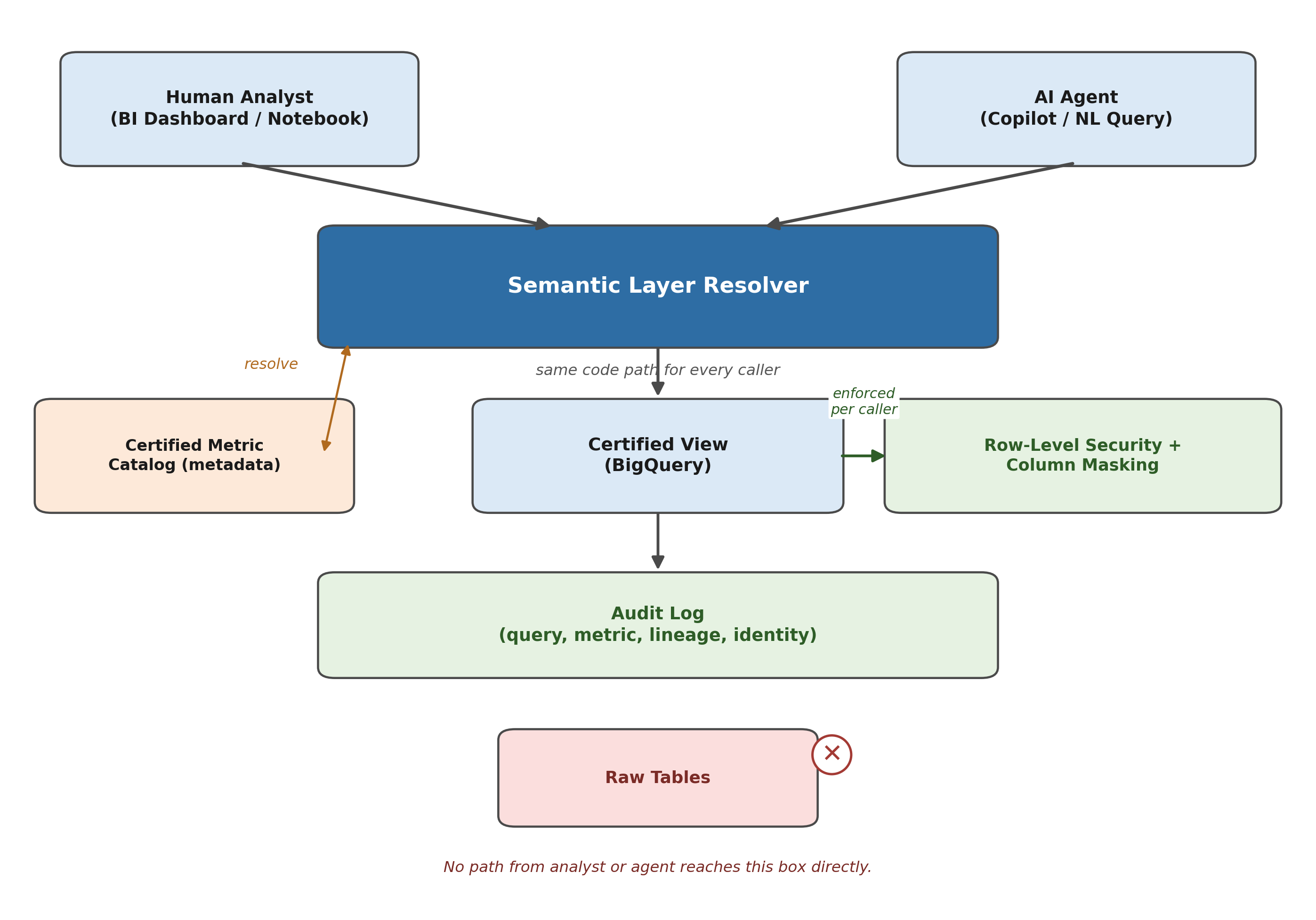
Step 1: Stop Letting Anyone (Human or AI) Query Raw Tables
The initial phase is architectural, not related to AI: there is no query made by a person or a system involving the base tables. Instead, each of the metrics that are accessible to consumers is defined at least once in a BigQuery view, and its calculation logic is embedded in that view.
-- Certified metric: Risk-Weighted Assets, defined once, queried everywhere
CREATE VIEW analytics.risk_weighted_assets AS
SELECT
  exposure.customer_id,
  exposure.region,
  exposure.exposure_class,
  exposure.outstanding_balance,
  risk_weights.weight_pct,
  ROUND(exposure.outstanding_balance * risk_weights.weight_pct / 100, 2)
    AS rwa_amount,
  CURRENT_TIMESTAMP() AS calculated_at
FROM finance.exposures AS exposure
JOIN reference.basel_risk_weights AS risk_weights
  ON exposure.exposure_class = risk_weights.exposure_class
WHERE exposure.status = 'ACTIVE';
The view of "risk-weighted assets" created through a dashboard, a notebook, and an LLM agent is identical. There is no alternative version in a researcher’s spreadsheet, nor can an AI agent "helpfully" recreate the calculation based on exposure tables but use incorrect risk weightings.
Step 2: Enforce Security at the Data Layer, Not the Application Layer
It is important to ensure that BigQuery includes row-level and column-level security and associates it with the table. This means the principle will work irrespective of the entity making the query.
-- Row-level security: a regional analyst only ever sees their region's rows
CREATE ROW ACCESS POLICY regional_filter
ON analytics.risk_weighted_assets
GRANT TO ('group:[email protected]')
FILTER USING (region = 'EMEA');
Column masking works the same way, through policy tags rather than per-report logic:
# Dataplex policy tag: applied once, enforced everywhere the column is queried
taxonomy: financial-pii
policyTags:
  - displayName: "customer-account-number"
    description: "Masked for all roles except fraud-investigation"
  - displayName: "customer-ssn"
    description: "Masked for all roles except compliance-audit"
Once a policy tag is applied to a column, a user, or any AI agent acting under that user's identity, who doesn’t have the appropriate fine-grained reader role, will receive either a null value or a hashed value. There is no mistake that the model has to circumvent; it’s simply a different result. This is what makes querying with AI safe, since whatever the query for the AI is, it cannot reveal anything that the column policy prohibits.
Step 3: Give the Grounding Layer Metadata to Query Against
It is impossible for an LLM to adhere to rules of governance it knows nothing about. Accordingly, a metadata directory is necessary for the semantic layer that contains a description of each certified metric with enough detail for the agent to turn an inquiry posed in natural language into the correct interpretation and filtering process, not simply provide it with a raw schema dump.
{
  "metric_id": "risk_weighted_assets",
  "display_name": "Risk-Weighted Assets",
  "view": "analytics.risk_weighted_assets",
  "owner": "[email protected]",
  "sensitivity": "internal",
  "allowed_dimensions": ["region", "exposure_class", "customer_id"],
  "definition": "Balance times Basel risk weight, summed by class.",
  "lineage": ["finance.exposures", "reference.basel_risk_weights"],
  "last_certified": "2026-06-01"
}
This record is the thing the AI agent actually reads. The document specifies which view will be interrogated, lists the dimensions available for filtering results, and identifies who to contact if something goes wrong. It is worth mentioning that in this record there is no schema given for the finance exposes table, which leaves the model nothing to "discover" about.
Step 4: Route Natural-Language Requests Through the Semantic Layer, Not the Warehouse
When the certified metrics with their metadata have been obtained, the resolution process consists of transforming the user's natural-language question into a query that uses an allowed view rather than directly referring to the underlying schema.
class SemanticLayerResolver:
    def __init__(self, metric_catalog, bq_client):
        self.catalog = metric_catalog  # metric_id -> metadata, from Step 3
        self.bq_client = bq_client

    def resolve(self, nl_request: str, user_identity: str) -> QueryResult:
        # 1. Map the request to a certified metric, never to a raw table.
        #    A constrained classifier over self.catalog.keys() works better
        #    here than open-ended text-to-SQL against the full warehouse.
        metric = self.match_metric(nl_request)
        if metric is None:
            return QueryResult.refuse("No certified metric found.")

        # 2. Extract filters, restricted to the metric's allowed_dimensions.
        filters = self.extract_filters(
            nl_request, metric["allowed_dimensions"]
        )

        # 3. Build SQL against the certified view only.
        sql = self.build_query(metric["view"], filters)

        # 4. Execute as the requesting user, so BigQuery's row/column
        #    security applies exactly as it would for a human query.
        result = self.bq_client.query(sql, user=user_identity)
        # 5. Attach lineage and certification metadata to the answer,
        #    so "what the AI said" is auditable like any report.
        return QueryResult(
            data=result,
            metric_id=metric["metric_id"],
            lineage=metric["lineage"],
            certified_at=metric["last_certified"],
        )
The important line is step 4: the query is executed under the requesting user instead of using a shared service account. Hence, all the downstream access control mechanisms are automatically applied. There is no need for a separate permission system for the resolver because it has no access rights that exceed the rights of the requesting user.
Step 5: Audit Every AI-Generated Query Like You Would a Human's
The governance teams will not agree on a system based on the suggestion of " having faith in the model." What they approve is proof in every case where a resolver has provided information, just as is done when an individual writes a report.
def log_ai_query(user_identity, nl_request, result: QueryResult):
    audit_log.write({
        "user": user_identity,
        "request": nl_request,
        "metric_id": result.metric_id,
        "lineage": result.lineage,
        "policy_version": result.certified_at,
        "row_count": result.row_count,
        "timestamp": now(),
    })
One financial institution successfully applied this approach. What used to be a lengthy project in which one would have to analyze whether an AI assistant could access customer information has been transformed into something evaluated right away: the assistant can perform the same functions as a human worker. The financial institution was also measuring the new trend of using a certified semantic layer, not only in regard to the AI being discussed. Conflicts over defining metrics across different business lines practically vanished when the organization no longer had to create a separate “AI-compliant” data model.
The Real Insight: Governance Is What Makes AI Fast, Not What Slows It Down
It’s easy to assume that the best approach to deal with the LLM and sensitive data combination is to include a review step in which a human sits in on every step of the process, or another model is deployed to analyze the first model’s outputs before they are used. This is not only unscalable, but it also misses the point.
Another way is to make sure that the insecure path cannot be taken, rather than simply being shunned. If the data layer implements row-level security, column masking, and certified metric definitions, you can confirm that an AI agent querying the data cannot generate queries that reveal any data previously available to someone with the same role. As a result, there is no need to verify output against constraints, since they were already included in the model.
This shift is suggested by this pattern. Governed self-service, the architecture that permits a business analyst to carry out data initiatives safely in the absence of ticket submission, also creates a secure basis for AI-enhanced analysis. But it wasn't the main purpose. It is just a coincidence that it has worked out this way.
Opinions expressed by DZone contributors are their own.
Comments